tech blog

What we’ve learned from Microsoft’s own AI transformation

AI is reshaping work faster than any organization has fully mastered. Across industries, the conversation has shifted from what AI can do to how companies can use AI to create business value and expand what people are able to achieve. At Microsoft, we believe the organizations that succeed will be what we call Frontier Firms: human-led, but increasingly AI-enabled. That responsibility begins with how AI is built and continues through how it is put to work: AI should expand human capability while people retain meaningful control, judgment and accountability. We committed to being Customer Zero, learning through our own transformation so we could help others navigate their own. Our employees have experimented with AI, while leaders have set ambitious goals and challenged teams to reimagine how we work to achieve more than was possible before. We created cross-company councils spanning corporate functions, go-to-market and engineering to share best practices and learn together. We asked everyone to challenge their fixed mindsets and embrace the growth mindset we have cultivated for more than a decade. That work is producing measurable results: for a sales team deal close rates increased by 20%1; selected supply-chain workflows cut cycle time by up to 75%2; and a nine-person engineering team shipped an initial product release in 35 days.3 As proven approaches emerged, we codified them into case studies so we could accelerate transformation, scale what worked and learn from what did not. Just as importantly, we knew that if we wanted to help customers realize the full value of AI, we had to do the work to transform ourselves first. Our own first-hand experience needed to be a source of learning we could share with others. We have been sharing Microsoft’s Frontier Playbook with customers as a practical guide to our AI transformation journey, including what we’ve learned, what has worked so far and where we’ve grown from failures. Drawing on hundreds of AI transformation efforts across the company, the playbook captures what we are learning as we redesign work, build new capabilities, measure impact and help people grow alongside AI. The playbook also reflects important truths: transformation is hard, and learning is the durable superpower. Among the many insights gained from our successes and our failures, five lessons consistently stand out. 1. Start with the business outcome, not the technology We initially treated AI like a traditional technology rollout: deploy the tools, provide training, drive adoption. We learned that access and usage do not equal transformation: a tool licensed to over 200,000 people does not change how the work gets done. Early sales usage made this clear. Despite broad deployment, usage plateaued and impact did not materialize. Rather than push adoption harder, the team started from the business goals — deliver more value to customers, win deals and improve employee experience. They mapped how account managers spent their week and identified the best tools for the moments that mattered most: an Analyst agent for pipeline, a Deal agent for deal packages and Researcher for deep customer understanding. Weekly peer-led huddles turned experimentation into habit and scaled best practices to everyone on the team. Within the group, adoption of priority use cases tripled, revenue per account manager rose 9.4% and close rates were 20% higher.4 Success still required investment in helping people build new skills, experiment with new ways of working and learn from one another. But when leaders focused on a clear business outcome and what mattered most to the person doing the job, rather than AI adoption itself, conversations shifted from using AI to creating value. 2. Redesign the entire workflow, not just individual tasks One of our biggest lessons came from reimagining workflows end to end, not applying AI to existing steps. Early efforts helped people complete familiar tasks faster but rarely transformed outcomes. Adding agents to a broken process still leaves a broken process — speeding up one step just creates a longer queue at the next. Our cloud supply chain team simplified its processes before reimagining them with agents. Supply chain experts and engineers worked side by side, first mapping and simplifying end-to-end workflows, then created a single source of truth so every agent reasoned from the same data. With that foundation in place, they deployed more than 100 purpose-built agents across planning, sourcing, fulfillment and logistics. Those agents investigate shifts in demand and model capacity while comparing transportation options across air, land and sea on cost, timing and carbon impact — complexity few teams could manage alone. Cycle time fell by up to 75% in selected workflows. The shift isn’t only about speed, it’s about adding new value by improving what the team can see, anticipate and act on. Within defined permissions and approval thresholds, agents have progressed from answering questions to helping planners update or cancel purchase orders directly. Planners who once spent five to seven days tracing why a demand plan changed can now get an answer in hours, and sometimes in less than 20 minutes. That makes it possible to analyze changes as planning cycles unfold, model more scenarios, build better contingency plans and identify risks earlier — helping the team make better decisions and improve the performance of the supply chain.5 We are seeing the same shift in software engineering, where the opportunity extends beyond generating code faster to redesigning how teams plan, build, test and evaluate products with agents across the workflow. We’ve found the largest gains come when teams step back and redesign how work should flow across people, process and technology from start to finish — including what agents can access and do, how their actions are monitored and where people must review, approve or intervene. AI is most powerful when all three advance together. 3. Put employees at the center of transformation The people who do the work know where processes break down, where judgment matters and where AI could help — insights that no process map can fully capture. Their expertise needs to shape transformation from the start. Leaders are
tech blog

Microsoft’s commitment for AI in education; protecting students, strengthening learning

Microsoft has been in the business of education for five decades. Since the earliest days of this company, we have worked alongside educators, students, families and educational leaders through each new wave of technology — and we have learned what helps learning and what gets in the way. That commitment continues today, in a technological moment unlike any we have seen. AI can personalize learning, reduce administrative burden, accelerate research and expand access to high-quality instruction. It also brings real risk. Educators and parents are asking whether students are still doing the thinking, and whether the tools their children use are safe. Those are the right questions. At its core, teaching and inspiring students to become their best selves is a deeply human endeavor. Education is built on a meaningful partnership among educators, students and families that helps unlock human potential and shape brighter futures. No one company understands entirely how AI will reshape education. But uncertainty calls for more care, not less. That is why Microsoft is taking a holistic approach, grounded in five principles. Safety, privacy, security and transparency by design Educators remain in control and at the center of AI use in the classroom AI designed to support students’ learning, not replace their thinking AI strengthens education systems, from learning to discovery Every student prepared for an AI powered future 1. Safety, privacy, security and transparency by design Every AI system used in education should be designed with robust safeguards that protect student privacy, enhance safety, reduce risk – including safeguards that address bias – and provide the transparency that students, educators and parents deserve. We believe institutions should never have to choose between innovation and trust. Security, privacy and transparency are foundational to Microsoft’s approach in education. That is why last week, we signed a landmark agreement with the American Federation of Teachers (AFT) and introduced a new Privacy & Safety Standard for Schools covering Microsoft Education products. The agreement represents the first time a major technology company and one of America’s largest teachers’ unions have come together to define what trusted AI should look like within these products. The Standard limits how Microsoft Education products can use student and educator data, requires human oversight for consequential decisions, provides meaningful transparency for families and holds Microsoft accountable when we fall short. It also affirms that schools retain ownership of the knowledge and ideas they create. We did not build this Standard to keep it to ourselves. Students and institutions deserve these protections, whichever technology their school chooses. We invite others across our industry to meet this bar with us. 2. Educators remain in control and at the center of AI use in the classroom Educators should remain at the center of teaching and learning. AI should augment educator expertise, not replace professional judgment. Educators should help shape the design of AI systems and be equipped with the skills and support needed to use AI in ways that support student outcomes. Technology alone does not transform education. Educators do. At a school in the Bronx, special education teacher Ashley Hernandez is using Copilot to develop differentiated, sensory-aware materials for students with complex communication and medical needs. Technology helps her adapt learning experiences more efficiently and creates more time to work directly with students. Just as importantly, her experience has helped shape the future of the technology itself. Educators know best what works in the classroom, and their voices are reflected in the products we create. Through our Education Insiders Program, educators and school leaders participate in private product previews and feedback sessions to help us improve tools before they’re released. That is why we build products like Teach in Microsoft 365 Copilot. Teach is our education-first AI experience for educators. Designed around real instructional workflows, it helps educators adapt materials for different learners, build lessons that match their standards and spend less time planning. Our goal is not to automate teaching; it is to lift the administrative burden that gets in the way. Customers tell us this works. Brisbane Catholic Education achieved a 275% increase in learner agency among at-risk cohorts. Since deploying Microsoft 365 Copilot, Miami Dade College has seen a 15% increase in student pass rates and a 12% drop in course dropout rates. Educators need practical training, communities of practice and in-demand credentials. Through Microsoft Elevate for Educators, we are connecting educators with those resources and pathways. Over the last year, more than 17 million people have completed an in-demand AI skills credential. Through the Elevate for Educators program, we help educators build the understanding and confidence they need to teach about AI effectively and responsibly. We also offer practical materials that help educators introduce generative AI safely and responsibly to students.  3. AI designed to support students’ learning, not replace their thinking AI systems in education should be grounded in learning science and designed to promote healthy student engagement, critical thinking, student well-being and improved learning outcomes. According to our recent research on learning science, a significant risk of AI in education is cognitive offloading that creates the appearance of learning without the cognitive work that makes learning durable. This is a real problem. Students think they are learning when they are not. Many commonly used tools were not designed for education. They prioritize speed over understanding, and many institutions have responded by limiting or blocking access entirely, even as students continue to use AI on their own. Without a purpose-built learning experience, trust becomes the barrier to enabling AI for students at all. Education needs AI designed to support the purposes of education: helping people build knowledge, critical thinking, judgement and confidence. Some of the most important learning happens when students are stuck. Difficulty builds understanding that lasts. AI that removes that struggle can quietly move the thinking from the learner to the machine. We must protect the work that helps learners grow. Microsoft’s AI experiences in education are age-appropriate by design — including default-off access to Copilot Chat for K-12 students with administrator controls for

tech blog

GitHub Copilot app for Beginners: Automate Dependabot pull request triage

I might be biased, but I think Dependabot is pretty amazing. It helps keep my projects up to date, ensuring I’m always using secure libraries. But because there’re frequently new vulnerabilities, there’re frequently new pull requests from Dependabot. Sometimes it’s a minor version bump. Sometimes it’s a major version upgrade. Sometimes everything will work just fine. And sometimes… well, every single developer has been caught by a breaking change. How can we best triage these pull requests? The work isn’t particularly difficult per se, but it certainly is repetitive. It’s the perfect task to offload to Copilot! With GitHub Copilot app automations, you can hand off that first round of review. Instead of manually inspecting every Dependabot pull request, you can create an automation that reviews open pull requests, groups them by risk, verifies CI status, and delivers a summary before your day begins. Follow the steps below to build a daily Dependabot triage automation. Step 1: Create a new automation From the GitHub Copilot app, create a new automation. You’ll configure two things first: Name: Give the automation a descriptive name, such as Daily Dependabot Triage. Trigger: Decide when it should run. Available trigger options include: Manual Hourly Daily Weekly When an issue is created For recurring maintenance tasks like Dependabot reviews, a daily schedule is often a good choice. For example, you might schedule it to run before your workday begins so the results are waiting when you log in. You can also choose whether the automation runs in the cloud or on your local machine. Step 2: Describe the task in natural language Next, tell Copilot what you want it to do. For example: Review the open Dependabot pull requests, group them by risk, identify the safe patch and minor version updates, verify that CI is passing for each pull request, and provide a short summary of the recommended next steps. Because the prompt uses natural language, you can customize it to match your team’s workflow. Step 3: Select the repository Choose the repository or project the automation should analyze. Once you’ve selected the repository, create the automation. If you want to test it immediately instead of waiting for the scheduled run, choose Create and Run. Step 4: Review the results When the automation finishes, Copilot returns a summary instead of a list of individual pull requests. For example, it might: Group safe patch updates together Separate minor and major version upgrades Identify which pull requests have passing CI Highlight dependencies that require additional investigation Rather than interrupting your morning with dozens of small decisions, you can quickly identify which updates are ready to merge and which deserve closer attention. Step 5: Continue the work in a Copilot session If one of the updates requires additional work, you can continue directly from the automation results. For example, if the summary identifies a major framework upgrade, you can start a new Copilot session from the results and ask Copilot to help complete the migration. Because the session starts with the automation’s context, you don’t have to gather the information again. Review previous automation runs Every automation run is saved, making it easy to see: When it ran What actions it performed What results it produced Having a history of each run makes automations transparent. You can always review what happened instead of treating them as a black box. Turn repetitive work into background work Dependabot triage is a good example of the kind of recurring task that’s well suited for automation. You describe the workflow once, choose when it should run, and let Copilot perform the repetitive steps automatically. If you’re just getting started with automations, begin with a task you already perform on autopilot. Let Copilot handle the routine work so you can spend your time on the decisions that require your expertise. Ready to automate your next recurring task? Create your first automation in the GitHub Copilot app > The post GitHub Copilot app for Beginners: Automate Dependabot pull request triage appeared first on The GitHub Blog. ​ AI & ML, GitHub Copilot, GitHub Copilot app, GitHub Copilot app for Beginners The GitHub Blog

tech blog

OpenClaw went viral. Meet the maintainers building and securing it.

What began as a personal experiment quickly became a global open source project with extraordinary momentum. OpenClaw is a personal AI assistant that runs on users’ devices and connects with the messaging channels they already use. Started by Peter Steinberger as a weekend project in November 2025, its GitHub repository has grown to approximately 388,000 stars, 81,000 forks, and more than 80,000 commits by August 26, 2026. In this video interview, filmed just six months into the project, creator Peter Steinberger and several OpenClaw maintainers discuss managing a surge of pull requests, rethinking contributor trust and code review, addressing software supply chain risks, and balancing powerful agent capabilities with security. They also share security lessons from the GitHub Secure Open Source Fund and the value of connecting with maintainers facing similar challenges. Watch the full video above, then explore the key lessons below. People in this video The following maintainers shared their experiences maintaining and securing OpenClaw. Peter Steinberger, Creator of OpenClaw Brad Groux, CEO, Digital Meld Josh Avant, Member of technical staff, OpenClaw Foundation Josh Lehman, Martian Engineering Sally O’Malley, Principal software engineer at Red Hat Val Alexander, OpenCoven Vincent Koc, Chief architect, OpenClaw Foundation Here are the top 10 lessons that we took away from the conversation. Lessons 1–3: How AI changed contributions and community 1. Pull requests became prompt requests OpenClaw’s maintainers found themselves managing thousands of pull requests and issues, with some contributors opening hundreds of pull requests at once. I don’t even call them pull requests. I call them prompt requests. Peter Steinberger There were some contributors that had multiple hundreds of pull requests running these sort of automated software factories that were just mining everything for issues. Josh Lehman The challenge shifted from attracting participation to finding valuable contributions amid a flood of activity that could overwhelm human review. 2. Keep the door open for new contributors OpenClaw’s maintainers wanted the project to be welcoming to new participants, whether they were first-time open source contributors, non-developers solving a specific problem, or people using AI agents to help. Rather than dismissing imperfect contributions, they looked for promising ideas and worked with contributors to refine, rewrite, or complete the final changes themselves. I know how it felt when, many years ago, my first pull request was accepted on a project. Peter Steinberger Some of the first-time contributions that were merged came from people without a development background. They used an agent to create a pull request, and worked with maintainers to finish the change. A good proportion of those first-time pull requests that got merged are from non-developers. They’re just people that have a specific problem and a need. Vincent Koc 3. Agents save time but make it harder to sign off The maintainers described two very different outcomes from the same technology: agents can help people reclaim time, but they can also make it harder to stop working. I’ve seen the other side of it, where people are just so in love with it and they realize, wow, if I don’t sleep tonight, I can do what used to take a week for me to do. Val Alexander I have three kids. They’re very small. OpenClaw lets me manage agents that go and work for me so I can get back to playing with my kids. Josh Lehman Sometimes the maintainers will go on the channel and say, ‘I’m going to touch grass now. I’m taking a few hours off.’ Sally O’Malley Agents are neither good nor bad for work-life balance. But they amplify both the opportunity to do more and the importance of knowing when to step away. Lessons 4-6: How maintainers adapted 4. Earn trust by finding where you can add value There was no single path to becoming an OpenClaw maintainer. Some contributors arrived through security work, others through integrations or community participation, but the common thread was finding a way to add value and taking ownership. Peter ignored me, so I was like, how else can I get his attention? Security. Vincent Koc I’m a Microsoft guy, so I thought, is there a plugin for Microsoft Teams? Brad Groux I looked into the community and I was in voice chat, and people were asking a lot of questions, and I was like, well, how can I add value in these conversations? Val Alexander 5. The new trust signal is showing your work As contribution counts became less informative, the team identified evidence that could help a pull request stand out: agent transcripts, screenshots, testing, and an explanation of the contributor’s thinking. If you provide us with the transcripts, we actually see how you came to the pull request and your discussion with the agent. Incredibly valuable. If you add screenshots, you can prove that you tested this. Peter Steinberger The important question was not simply whether a human or an agent wrote the code. It was whether the contributor understood the feature and had considered how it interacted with the rest of the project. Nobody cares if you wrote the code or not, but we care if you actually thought about this feature. Peter Steinberger 6. Maintainers are reviewing agent code with agents Maintainers increasingly relied on AI tools to help review AI-generated contributions, while also taking a more hands-on approach to improving submitted code. Whenever I get a pull request from an AI, one thing I love to do now is use GitHub Copilot for all the reviews. I just press a button right there. It does a review and generates clarity on all the files that are attached, what the files mean, and how they changed. Val Alexander This is the first project where I saw it become normalized that when someone submits a pull request, as a maintainer, you just edit it. You just make it right. Josh Lehman Lessons 7–9: Security challenges 7. Reputation became an attack surface Contribution history itself could be manipulated. OpenClaw’s maintainers saw people duplicate existing pull requests, and Vincent Koc explains why. People would basically duplicate other people’s

tech blog

GitHub Copilot app for Beginners: Run several agents at once

Running multiple AI agents on the same project seems like pure chaos, with too many cooks in your development kitchen. But with the GitHub Copilot app, these agents work separately and don’t interfere with each other, allowing you to get more done in less time. Think of parallel agent sessions like a trip to the laundromat. You can start multiple loads of laundry at the same time, in their own machines. You can set each washer with its own settings, and it won’t impact the other loads. Most importantly, you don’t have to wait for one to finish before you can start another one. Let’s look at how it works. Agent sessions, Git worktrees, and context An agent session is a task you’ve given Copilot, start to finish. In the GitHub Copilot app, you can manage several sessions through the sessions view. Each card shows its title and how far along the agent is in completing its task. Each session runs independently of the others. That means you can start a new session whenever you want, and the ones already running won’t be disturbed. But here’s where the real magic happens. Each agent session in the GitHub Copilot app can run on its own Git worktree. Since each session is isolated, they can run in parallel, all at the same time. That means you spend your time reviewing and making decisions rather than watching your agents at work. Plus, each session keeps its own context, so you can switch between them freely. Each picks up exactly where you left it, and you never have to re-explain what you were doing. Less context switching means you feel less scattered. What this looks like Let’s look at an example repository, tailspin-toys. There are three things I want to do to this project today: add funded sort, perform an accessibility review, and run some tests on this project. The first step is to ask Copilot to build the funded sort feature. Just as it gets started, open a new session and ask Copilot to perform an accessibility review. As that gets under way, start prompting Copilot to run some tests in a third session. In the session view, you can keep track of all of these as they progress and review the results as they finish. Or you can step away entirely, grab a cup of coffee, and know your work is happening without you babysitting it. Get started Ready to feel the power of parallel agent sessions? Try starting two small tasks at the same time in the GitHub Copilot app. It’s a low-stakes way to watch your tasks progress independently. Start using the GitHub Copilot app > The post GitHub Copilot app for Beginners: Run several agents at once appeared first on The GitHub Blog. ​ AI & ML, GitHub Copilot, GitHub Copilot app, GitHub Copilot app for Beginners The GitHub Blog

tech blog

Decoding the new AI lingo: Loops, harnesses, squads, hill climbing… oh my!

It might be overwhelming to see all of the new vocabulary popping up in software development these days thanks to AI tools introducing them… all the time. Some of this new vocab describes useful patterns that people are newly pursuing, others are just fancy names on top of things that already exist, and some are still actively being defined as we speak. In our latest episode of the GitHub Podcast, Marlene Mhangami, GPS, and I talked through some of the AI terms developers are learning right now: loop engineering, Ralph loops, squads, harness engineering, hill climbing, forward deployed engineers, closed models, open weights, and open source models. If you’re a reader instead of a listener, here’s a guide to what those terms mean, why they matter, and how to think about them. Listen to the full episode below! 👇 Loop engineering: Moving beyond one-shot prompts Loop engineering is the practice of designing repeatable systems around agents, instead of manually prompting them for one task at a time. A simple example: instead of asking an agent every morning to review new issues, summarize them, and propose fixes, you create a loop that runs on a schedule. That loop might fetch issues, pass them to an agent, validate the output, and escalate anything that gets stuck. It’s a glorified AI-native cron job. Ralph loops: The brute-force cousin of loop engineering A Ralph loop is one implementation of this “loop” concept: you give an agent a detailed task, often from a product requirements document or spec, and have it keep working until the job is done. That can be useful, especially for breaking down large tasks into repeated plan-act-check cycles. But, on the other hand, it can also be expensive and inefficient because every iteration uses more tokens, more context, and more compute. Loop engineering aims to make this pattern more structured, so you’re not caught asking an agent to “try again” all the time. A well-designed loop adds primitives like skills, observability, validation, routing, and checkpoints. Squads, fleets, and multi-agent workflows If loops define a workflow, “squads” and “fleets” describe how multiple agents can participate in that workflow. A squad is a group of agents with different roles. They often reflect a real-world team. One agent might plan, another agent might vet that plan, another agent might implement it, another might test it, and another might review it. A fleet refers to parallel agents working on tasks at the same time. You can have a squad working in a fleet in parallel, or in a sequence. Operating this way lets different agents handle different parts of a process, and you can fine-tune and specialize each one with specific skills to be more efficient. The core idea is parallelization and specialization. Instead of one agent trying to do everything, different agents can handle different parts of a development process. Harnesses: The system around the model Outside of what a model generates, a harness is everything surrounding it that makes it useful in your workflows. That could be the tools, permissions, memory, context, orchestration (and so on) that guides how the model behaves. If it helps you remember: harnesses are aptly named after the harnesses for horses. Horses are like models that can run wild, and a harness helps direct the horse’s weight safely as it completes tasks. Get it? Anyway, a good example of a software harness is GitHub Copilot. It connects models to codebases, editors, pull requests, terminals, and so on. When you hear the term “harness engineering” tossed around, that’s the work of designing and improving that system that surrounds the models. Hill climbing: Improving agents with feedback The term “hill climbing” is used to describe the process of improving agents and harnesses over time. That could mean, for example, using evals to measure whether an agent is producing the right kind of output (and then adjusting the harnesses until the results improve). Or, another example, if your agent is supposed to review pull requests, hill climbing might be checking if it indeed finds meaningful bugs and produces useful recommendations, and adjusting tooling to improve that. Forward deployed engineer: A familiar role with an AI focus A forward-deployed engineer job has already existed, but AI branding makes it sound edgy and new. Now, it’s a customer-facing software engineer, or sales engineer, or solutions engineer, often with an AI focus. If you haven’t seen those job titles before, this person generally works closely with customers to implement or adapt technical solutions into their environments. With the AI focus, that means helping teams integrate AI tools, workflows, agents, etc. into their existing systems. Closed models, open weights, and open source models Not all models are shared in the same way. Closed models are accessed through an API or hosted product. Developers can use the model, but they don’t get access to the underlying weights, training data, or training process. The big, famous frontier models you hear about are often all closed models. Open weight models make the model weights (which are like dials that decide how important certain inputs are) available. Developers can download and run these models, often locally or in their own infrastructure. But, to be clear, the dataset and training method may not be fully available. Open source models go a step further, in that the model, code, data, and training process are all available for inspection, reuse, and modification. The more open the model, the more you can run, customize, audit, and trust it. The terms are ever-evolving This is just a sampler of some of the terms we’re hearing a lot today. Some will stick around, and others will fade into our memories, and others will be replaced by better language as the industry matures. Don’t worry about falling behind on buzzwords. They’re just words, and more important are the practices under them! Ask yourself if workflows can repeat reliably, how you validate tasks, how humans should (or shouldn’t) interfere, how much you can rely on a

tech blog

How we make AI coding more cost efficient without sacrificing task quality

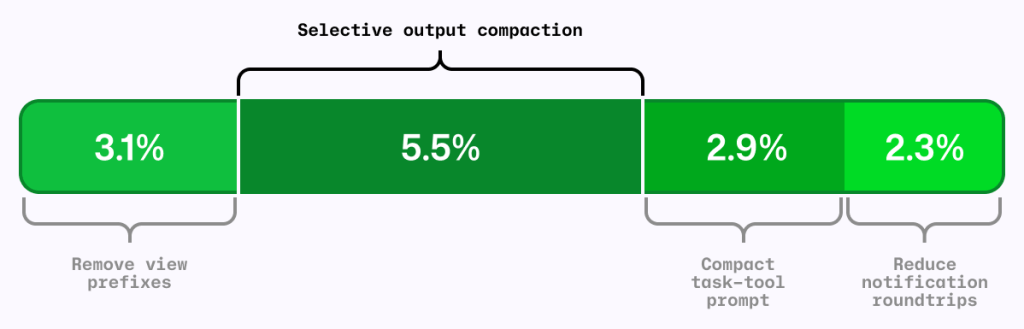
Output quality is important when working with AI coding agents, but true efficiency comes from getting work done quickly, efficiently, and with the right context. That’s why token count of individual interactions alone isn’t a meaningful measure of efficiency. The goal shouldn’t be to use fewer tokens, but to tap into the right amount of context to move a task forward. A concise tool response can sometimes require additional calls or work if it leaves out information the agent needs, ultimately making the task slower and more expensive. That’s why we want to optimize for the outcome rather than the tool call. This post examines four changes in GitHub Copilot that put that principle into practice: Preserve useful context while reducing repetitive output. Remove formatting that adds no value to the task. Shorten instructions without changing useful behavior. Deliver completed background work without an extra retrieval step. Possible changes were evaluated offline using agentic coding benchmarks. The most promising changes were then validated through controlled online experiments before shipping. The examples in this post come from GitHub Copilot CLI. Multiple other Copilot products, such as the GitHub Copilot app and Copilot code review, use the same underlying harness and also become more efficient through these improvements. Figure 1: Four independent A/B experiments using the same AI-credit metric. The segments are shown together for comparison; their effects are not necessarily strictly additive.  The local metric trap It’s common to shorten the output from each tool call as a way to reduce agent costs. RTK (Rust Token Killer) is a utility that shortens shell output before an agent reads it. We evaluated its effect on GitHub Copilot using our agentic coding benchmarks. In our harness and benchmark configuration, RTK shortened some responses, but when the omitted text mattered, the model sometimes reopened the original output or reran the command to recover what it needed. Those recovery steps added turns and carried more context forward. The individual tool response was shorter, but on average, the task used more tokens and took longer. We saved tokens locally and spent more globally. Figure 2: A shorter tool response can make the completed task more expensive when missing details force the agent to reread output, rerun commands, and carry more context forward.  This result applies to the integration and workloads we tested, not to every RTK configuration or to output compression in general. This meant that tokens per tool call is the wrong objective. An efficiency change has to be evaluated across the complete task, from the user’s request through the final result. More useful was to look at what can we remove without making the model repeat work. Compress noise, preserve useful information The goal was to shorten repetitive output while preserving the context an agent needs to complete its task without retracing steps. Analysis of benchmark runs showed that install, build, test, and lint output often contains repetitive noise, while source-like output and arbitrary command results are more likely to contain the information an agent needs. That analysis informed a selective output compressor, informed in part by RTK and similar approaches. The prototype was evaluated on agentic coding benchmarks and a range of open source repositories, exercising their build, test, and lint systems. Early versions were too aggressive. They made the model repeat work or read the full saved output, increasing end-to-end cost and reducing task success. For example, we initially compressed git diff but removed that filter after benchmark tasks showed agents reopening the original output to recover missing information. Those early failures led to a three-part policy: Preserve source-like and arbitrary output. Commands such as cat, git diff, git show, and arbitrary scripts are returned unchanged. Reorganize search results without dropping content. Matches and file lists from tools such as grep can be grouped more efficiently while retaining every result. Compress repetitive noise selectively. Install, build, test, and progress output is compressed only when the savings are substantial. The shipped version emerged through repeated evaluation and refinement. It is conservative not because the goal was to build a conservative compressor, but because that is what the evaluations supported. When output is compressed, the agent can still retrieve the complete original through a direct recovery path. Figure 3: The shipped compressor preserves source-like output, reorganizes search results without loss, and compresses only predictable repetitive noise while retaining the full original. That recovery path is both a safety mechanism and an evaluation signal. We tracked whether the agent opened the saved original, reran commands, repeated exploration, narrowed its searches, or took additional turns. Frequent recovery would indicate that the compressor had removed something valuable. On offline tasks where output compression triggered, no statistically significant task-success regression was detected, and agents extremely rarely opened the saved originals. In the online experiment, average cost decreased slightly with no material regression detected in the tracked quality metrics. Remove formatting before removing information One clean token optimization came from the view tool, which agents use to read file contents into context. Previously, view prefixed every line with a number before showing the contents to the model. Earlier file-editing tools used those numbers to target changes, but current tools instead match surrounding code and do not use line numbers. The line-number prefixes remained even though the normal workflow no longer used them. Each prefix was small. Repeated across every line and every file read, however, that unused formatting accumulated throughout a session. So, we removed it. Figure 4: Removing line-number prefixes preserves the source exactly while eliminating formatting that was repeated across every file read. Line numbers remain useful in diffs and short snippets. They were wasteful here because they were attached to every file read without serving the current editing workflow. Removing them caused model-inference cost to fall by roughly 5% in offline agentic coding benchmarks. Success rates stayed within the expected run-to-run variance, and edit failures did not increase. We then tested the change with Copilot CLI users. The online experiment reduced average daily model-inference cost per user by about

tech blog

The yield imperative: Turning AI infrastructure into useful intelligence

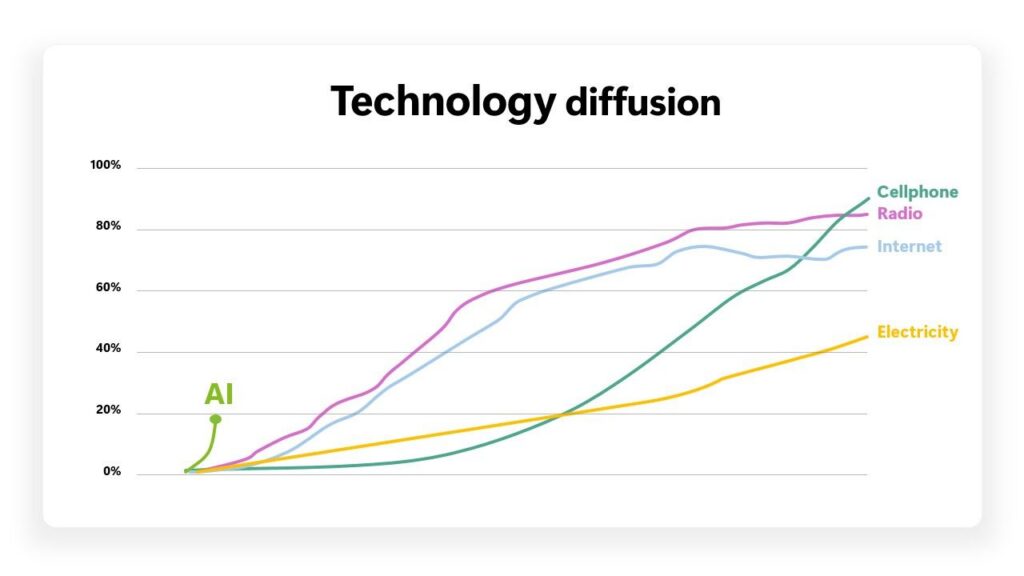
As we enter the next era, what will be the defining measure of our progress? Every industry has a word that shapes how it thinks. For pilots, it’s safety. For insurers, it’s risk. For the semiconductor industry, it’s yield. Yield does not ask how elegant the solution is, how many years it took or what the roadmap promised. Rather, it asks one simple question: What useful output did we produce? For more than 60 years, the semiconductor industry has asked that question, relentlessly maximizing the number of usable chips produced from every wafer. Generation after generation, wafer after wafer, it is precisely that discipline that turned the transistor from a laboratory curiosity into the foundation of modern life. Today, we need to apply the same principle to the unprecedented resources that the world is pouring into AI: capital on a scale once reserved for nations, gigawatts of power and record-breaking fabs and datacenters. The question that will define this decade is the same one this industry has always asked: What actually comes out? Not just chips and tokens, but as affordable intelligence, as work that matters and as outcomes that improve lives.‌ That is the yield imperative. YouTube Video Click here to load media The limit of more  AI has proliferated with remarkable speed, at a rate of adoption faster than the internet, the PC or even the smartphone. Yet, global penetration still stands at just 18% of the working population, and the vast majority of that usage is chat-based. As systems move from answering individual prompts to reasoning, planning, using tools and executing longer agentic workflows, the infrastructure equation changes dramatically. A single agentic task can use more than 3,400 times as many tokens as a typical chat interaction. Source: Microsoft AI Diffusion Report We are only in the early innings of agentic adoption, and the infrastructure is already strained. Power is setting the limits on what we can build and when. Packages and racks are growing larger and denser. Memory is becoming an even tighter constraint. For years, the industry’s rational answer to each new requirement resulted in more: more silicon in the package, more memory beside it, more power to feed it and more fiber to connect it. Each generation delivered meaningful progress. But when each new gain requires more input than the one before it, we are on a treadmill. It moves only as long as we keep adding to it. I believe we need to pursue two paths forward. The first is evolutionary: we continue improving the architectures we have today, driving incremental efficiency, utilization and economics within each generation. The second is transformational: changing the curve itself with innovation in new architectures, new materials and new approaches to system and model design. The history of our industry is defined by transformations like these. When increasing CPU clock speeds ran into the power wall, we moved to multicore processors. When planar NAND reached its limits, memory went vertical. And now, once again, we have an opportunity to challenge our assumptions and rethink the fundamentals. Because the next chapter of AI won’t be defined simply by how much infrastructure we build, it will be defined by how much intelligence we can create from it. Engineering useful yield  For decades, the computing industry has optimized yield in the context of manufacturing. Today, that discipline has to extend across layers, from datacenters and silicon through models and the agentic harnesses that orchestrate them. And the work does not stop once the technology is built. We must then deploy and scale it faster, while developing new tools and systems to maximize utilization across our fleet. From development through execution, each layer has a yield of its own, and losses and gains compound across them. Capacity at any one layer is only a starting point. The real measure is how effectively those layers work together to produce useful output from the system as a whole. Our experience at Microsoft building and operating AI infrastructure at scale has reinforced two key lessons. First, the biggest constraints are rarely solved in the layer where they appear. Second, when we attack a constraint across the whole stack, tradeoffs that seemed inherent to the problem often turn out to be artifacts of the architecture. The greatest advances often come when we apply these learnings through co-design, working across layers to turn apparent limits into solvable system constraints. Innovations in memory, networking and power show what this approach looks like in practice. Memory: More intelligence from every byte  Today, memory is viewed as a supply problem or a component problem. In reality, it is a system problem. In AI inference, memory is now setting the limits on system performance. It must hold larger models, preserve longer contexts and deliver data fast enough to keep the compute fed. And agents raise the bar even further. Generation, retrieval, tool use and persistent memory run together in loops that can last minutes or hours. The result is a much longer memory horizon, with far more information kept close to the compute and available across an expanding sequence of turns. Doing that efficiently at scale will define the next generation of AI infrastructure. Our experience building the Azure Maia platform demonstrates that memory bottlenecks are not resolved by a single layer. Model architecture, data science and compression can reduce the amount of KV cache, which stores the model’s working context during generation. Software can manage memory hierarchies more effectively, silicon can be optimized for data movement efficiency and compilers can place data closer to compute. No one change removes the constraint. Together, they increase the useful intelligence the system can deliver from the same memory resources. That is useful yield: not simply adding bytes but getting more useful intelligence from every byte we already have. Networking: Designing across layers As we zoom out to the cluster level, we see that intelligence does not come from one chip. It comes from thousands of chips operating as one system. Faster links

tech blog

Activate More Data. Spend Less.

Introducing the new ultra-dense storage engine of the Dell AI Data Platform: Dell ObjectScale X7700 with release 4.4.   ​  ​Introducing the new ultra-dense storage engine of the Dell AI Data Platform: Dell ObjectScale X7700 with release 4.4. Launch Blog | Dell

tech blog

A guide to slash commands in the GitHub Copilot app

If you’ve used slash commands in the GitHub Copilot CLI, you already know how powerful a quick / can be. In the GitHub Copilot app, slash commands take that idea further, giving you shortcuts for managing sessions, navigating projects, and customizing your Copilot workflow. What are slash commands? Slash commands are text shortcuts you type directly into the GitHub Copilot app’s chat composer. Start by typing / and an autocomplete menu appears, showing the commands available in your current context. It’s a small character with a lot of potential, opening the door to shortcuts that help you work with Copilot in new ways. If you’re coming from the CLI, here’s the key difference: CLI slash commands are designed around a terminal-first workflow. Things like adding directories, setting your working directory, and managing terminal access happen through commands. This makes sense, because the CLI lives inside your terminal where there’s no visual interface. 💡 Tip: If you’ve used slash commands in the Copilot CLI, you’ll notice some familiar faces. Commands like /clear and /model work in both places. But the GitHub Copilot app-specific commands are tailored for the multi-session workflow that the desktop app provides. The app, on the other hand, provides a visual interface for managing context. File access commands like /add-dir or /cwd aren’t needed since the app manages project context automatically. App slash commands are more about workflows. You can navigate between sessions, manage projects, and control how the agent works. Why use slash commands? Slash commands may look like simple shortcuts, but they can change how you interact with Copilot. They help you move faster, stay focused, and quickly access the workflows you need. Instead of digging through options or breaking your focus to find the right tool, you can type a command and keep moving. A single / opens up the list of slash commands that can help you move faster, explore new ideas, and get the most out of the app. Let’s take a look at some of the slash commands available in the GitHub Copilot app and how they can fit into your everyday workflows. Before you write code, make a /plan Good code starts with a good plan. /plan helps you break down a task before you start writing code, think through your approach, identify potential challenges, and decide what needs to happen next. It also switches your session into Plan mode, which you can also select from the Mode dropdown in the chat composer. Plan a new feature. Break down new feature ideas before jumping into implementation. Have Copilot identify files, components, and dependencies so you have a clearer path forward. /plan I need to add two-factor authentication to our application. Help me break down the work involved, identify what files need to change, and outline an implementation approach. Prepare for a large refactor. Map out complex changes before touching your code. Uncover potential risks and develop an incremental approach for making large changes safely. /plan We want to refactor our notification system code to make it easier to support new channels like push notifications. Help me understand the changes needed and create an incremental migration plan. Triage and fix bugs. If you know something is wrong but aren’t sure where to start, /plan can help you explore possible causes and outline the steps needed to diagnose and resolve the problem. /plan Users are reporting that our checkout flow randomly fails after payment processing. Help me investigate possible causes and create a plan to diagnose and fix the issue. Let Copilot play devil’s advocate with /spar Sometimes the best way to validate an idea is to challenge it. /spar is like that one teammate who raises their hand and asks, “Have we thought about what happens when this goes wrong?” It helps you pressure-test your approach by having Copilot question your assumptions and point out potential risks or tradeoffs before you commit to a solution. Here are a few ways you can use it: Validate an architecture choice. Pitch your plan to use Redis for caching and have Copilot question your invalidation strategy, scalability, or whether another approach better fits your workload. /spar I’m planning to use Redis as a caching layer for our product API. Challenge my approach and point out any scalability or consistency concerns I may have missed. Compare implementation options. Ask Copilot to debate the pros and cons of REST versus GraphQL, or synchronous versus asynchronous processing, based on your application’s requirements. /spar Help me decide between REST and GraphQL for a customer-facing API. Ask questions, challenge my assumptions, and recommend which approach fits best for an app with mobile clients. Review a migration plan. Walk through a database migration or infrastructure change and have Copilot identify edge cases, risks, or rollout concerns before you begin. /spar I’m migrating our database to a new managed service with minimal downtime. Poke holes in my migration plan and identify any risks or edge cases I should account for. Challenge a performance optimization. Share an optimization you’re considering and ask Copilot to point out hidden bottlenecks, unintended side effects, or simpler alternatives. /spar I’m planning to lazy load most of the components on my site to improve initial load time. Critique my approach and tell me where it could hurt user experience or introduce unnecessary complexity. /autopilot take the wheel Once you have a /plan, the next step is turning that idea into working code. /autopilot helps you work through implementation, make changes, and iterate as needed. Instead of managing each individual step, give Copilot a goal and let it work through the steps needed to complete the task. It also switches your session into Autopilot mode, which you can also select from the Mode dropdown in the chat composer. Implement a new feature. Hand off a task and let Copilot work through the implementation steps. /autopilot Add support for exporting user reports as CSV files. Identify the files that need changes, implement the feature, and update any relevant tests.

tech blog

Using the GitHub Copilot SDK for Java

Java developers no longer have to rely on Java framework-specific approaches to drive AI from their enterprise apps. While it is true that Langchain4j empowered developers by disintermediating specific AI vendors, you still had a dependency on Langchain4j. And with Spring AI, well, of course you had a dependency on design choices made by Spring, if not on Spring itself. Now, GitHub Copilot SDK for Java is the first truly framework agnostic way to drive AI from Java. And with its BYOK support, GitHub Copilot SDK for Java is also AI vendor neutral. 💡 Even though it’s called GitHub Copilot SDK, you can use it with any direct model provider, such as OpenAI, Azure, Anthropic, or OpenAI-compatible endpoints, by passing a provider/ProviderConfig with your own baseUrl + apiKey (or bearer token). No Copilot subscription required. The GitHub Copilot SDK for Java is a client library that empowers your server-side Java code to create Copilot agent sessions, register tools, send prompts, and receive structured responses—all programmatically. It works in server environments, including Jakarta EE and Spring. If you’ve been building enterprise Java for any length of time, this SDK will feel like home: CompletableFuture, annotations, lambdas, virtual threads, it’s all here. This post shows you how to use the SDK, walks through a complete Jakarta EE 11 sample application, and leaves you with concrete next steps to try it yourself. I chose Jakarta EE 11 for my demo because I was the lead release coordinator for that release. I believe in open standards as the best way to empower developers. For more on Jakarta EE 11 see this InfoQ article. This sample app is an agent harness using Jakarta EE 11. But, of course, developers can build their own agent harness using the well-known Java frameworks and libraries of their choice. Clone the sample app and try it yourself > Where to get it The SDK is available as a Maven dependency: <dependency> <groupId>com.github</groupId> <artifactId>copilot-sdk-java</artifactId> <version>1.0.7-preview.1</version> </dependency> Prerequisites: JDK 17 or 25 (25 recommended — unlocks virtual threads and other modern features) Maven 3.9+ A GitHub account with an active Copilot subscription The Copilot CLI installed locally at version 1.0.71 or later. Walk through the sample app The best way to see the SDK in action is to run this sample application. Get the code git clone https://github.com/microsoft/Build26-BRK206-your-agent-anywhere-multiclient-multidevice-with-github-copilot-sdk.git cd Build26-BRK206-your-agent-anywhere-multiclient-multidevice-with-github-copilot-sdk/src/java-agent-orchestrator mvn clean package liberty:run # Open http://localhost:9080/index.xhtml The Java demo is built on: Concern Technology Runtime Open Liberty 26.0.0.5 Platform Jakarta EE 11 (Faces 4.1, CDI 4.1, WebSocket 2.2, Data 1.0, Persistence 3.2) UI PrimeFaces 15.0.16 AI orchestration Copilot SDK for Java 1.0.7-preview.1 Database H2 in-memory (10 seed property listings) What the app does The application is a real-estate lead-management agent pipeline. A customer submits an enquiry (“I’m looking for a 3-bedroom house in London under £800,000”), and the system spins up an isolated Copilot Agent on a virtual thread to process it through a pipeline: The architecture uses Jakarta WebSocket to push real-time status updates from the server to the browser, so you can watch agents progress through phases as the model calls tools: Submit multiple inquiries simultaneously to see concurrent virtual-thread agents in action. Each one processes independently with its own Copilot session. SDK features in action Let’s walk through the key SDK features as they appear in the sample code. Defining tools with @CopilotTool This is the headline API. If you’ve ever written a @GET endpoint in JAX-RS or an @MessageDriven bean, this will feel instantly familiar: @CopilotTool(value = “Sets the current phase of the agent. Use this to report progress.”, name = “set_current_phase”) public String setCurrentPhase( @CopilotToolParam(“The phase to transition to (VALIDATING, SEARCHING, ” + “WRITING_REPORT, REJECTED_GARBAGE, REJECTED_NO_MATCHES, or DONE)”) String phaseName) { phase = Phase.valueOf(phaseName.trim().toUpperCase(Locale.ROOT)); notifyUi(); return “Phase set to ” + phase.getLabel(); } The @CopilotTool annotation declares the method as a tool the model can call. The @CopilotToolParam annotation describes each parameter so the model knows what to pass. The SDK handles all the JSON Schema generation, argument parsing, and dispatch. You just write a normal Java method. Two build prerequisites for @CopilotTool. The annotation-based tool API is currently an experimental feature of the SDK, so you need to configure two things in your Maven build: Enable experimental APIs: pass -Acopilot.experimental.allowed=true to the compiler. Without this flag, the annotation processor will refuse to generate the tool metadata. For more details on the experimental APIs see Copilot SDK documentation. Register the annotation processor: add the SDK as an annotationProcessorPath so the compiler can find the @CopilotTool processor and generate the $$CopilotToolMeta classes at compile time. Both are configured in the maven-compiler-plugin: <plugin> <groupId>org.apache.maven.plugins</groupId> <artifactId>maven-compiler-plugin</artifactId> <version>3.15.0</version> <configuration> <compilerArgs> <arg>-Acopilot.experimental.allowed=true</arg> </compilerArgs> <annotationProcessorPaths> <path> <groupId>com.github</groupId> <artifactId>copilot-sdk-java</artifactId> <version>1.0.7-preview.1</version> </path> </annotationProcessorPaths> </configuration> </plugin> To register all annotated tools from an object: List<ToolDefinition> annotatedTools = ToolDefinition.fromObject(this); Inline lambda tools with ToolDefinition.from(…) When you want a tool defined at the call site without a dedicated method, use the lambda style: ToolDefinition reportIntentTool = ToolDefinition .from(“report_intent”, “Reports the current intent of the agent”, Param.of(String.class, “intent”, “Intent in max 4 words”), (String intent) -> { currentIntent = intent; addEvent(Instant.now(), “intent”, “Intent updated”, intent); notifyUi(); return “ok”; }) .overridesBuiltInTool(true); Notice .overridesBuiltInTool(true). This tells the SDK that our report_intent tool deliberately replaces a built-in tool of the same name. This is useful when you need custom behaviour for a tool the model already knows about. Cross-class tool scanning Tools don’t have to live in the same class as your agent logic. Here’s searchProperties defined in a separate CDI bean: @ApplicationScoped public class PropertyDatabase { @CopilotTool(value = “Searches the real estate listings database. ” + “Returns up to 10 matching properties.”, name = “search_properties”) public List<Property> searchProperties( @CopilotToolParam(“Property type substring (e.g. ‘flat’, ‘house’)”) String type, @CopilotToolParam(“City substring (e.g. ‘London’, ‘Bristol’)”) String city, @CopilotToolParam(“Minimum number of bedrooms (0 for no minimum)”) int minBedrooms, @CopilotToolParam(“Maximum price in GBP (0 for no maximum)”) double maxPriceGbp) { // … filter and return matching properties … } } You would normally register these with ToolDefinition.fromObject(propertyDatabase). In the sample app, we use a

tech blog

Your contributors are AI-first now. Is your project?

The same question keeps coming up in maintainer conversations: what do you do when the pull request queue fills with work written by agents? It’s something Nicholas Tindle, founding AI engineer at AutoGPT, also deals with every day. I spoke with him in May for Maintainer Month. At the time of the interview, AutoGPT had over 180,000 stars and around 150 open pull requests. A big chunk of those pull requests were written by agents, including Copilot, OpenClaw, and AutoGPT’s own internal tooling, among others. Most maintainers I talk to have the same reaction: close the door. Turn off pull requests. Don’t tax the team with reviewing slop. Nicholas saw an upside: It’s basically somebody else paying for your compute. Nicholas Tindle, founding AI engineer at AutoGPT The way he sees it, if a contributor wants to spend their tokens improving your project, let them. Just make it so the only way through the door is the way that works for you. Your docs aren’t the problem. Discovery is. AutoGPT tried the obvious thing first. Better contributor guidelines. Better docs. A whole wiki dedicated to working with the repo. None of it moved the needle. It turns out the tools aren’t going to go read your docs unless they’re told to. That’s the part a lot of us get wrong. We treat documentation like the agent will go find it. It won’t. Agents read what’s in front of them, at the level of the directory they’re working in. So AutoGPT started putting instructions where agents look. First CLAUDE.md files, because Claude was generating pull requests without enough repository-specific context. The commit trailer made each one easy to spot, because they announced themselves in the commit trailer. Then they hit the next wall: Copilot and Codex ignore Claude files, because they’re not Claude. So they centralized the standard AGENTS.md and pointed Claude files at it. Here’s the nuance I found most useful. AGENTS.md is scoped to a directory. A skill can be discovered outside that directory. (If you haven’t shipped one: a skill is an instruction file with a description that tells the agent when to load it. The agent scans descriptions up front and pulls in the full instructions when the task matches.) AutoGPT’s AGENTS.md sits beside the code it governs. That placement matters as much as the instructions themselves. If you’re writing backend tests and you think about doing front-end stuff, a skill may load dynamically. It’s not going to know what directory to go look in for an AGENTS.md file, but the skill can tell it that. Their front-end engineer got tired of the same class of broken pull request, so they wrote a guide, and shipped it as a skill in the repo. The description contained trigger phrasing: write a Storybook test if your component lives in these folders. Now every harness that touches the repo discovers it automatically. The backend enforces its own version of the rule the same way: hit 80% coverage or don’t open the pull request. Gates that actually work These are the gates you can adapt for your project. Enforce the pull request template, loudly. AutoGPT tells agents that pull requests not matching the template get closed automatically with zero hesitation. They built the tooling to actually do it, then found they didn’t need to run it. At AutoGPT, the rule changed agent behavior before the automation ever ran. The agents followed the template. Human contributors sometimes needed more room, which Nicholas treats as a feature: If you don’t follow the template, I know you’re probably a person, and I’m going to be kinder. The test plan trick. The template requires a test plan, and its wording casually mentions testing the pull request. That phrase triggers a skill called test PR, which installs agent browser (with permission), spins up the app, and executes the change. The agent set out to fill in a checkbox and ended up running the code. They almost never get pull requests that don’t work anymore. What they get now is pull requests that work but don’t fit the roadmap, which is a much better problem to have. Make CI a wall, not a suggestion. Codecov coverage thresholds are required checks. The agent opens the pull request, checks back a few minutes later, sees it can’t merge, loads the testing skill, and writes the tests. Nobody had to ask. Use the CLA as a human detector. AutoGPT is dual licensed, but Nicholas argues every project should do this, MIT included. Signing requires a browser and a GitHub OAuth flow on a separate domain. Agents are bad at that today, and for good reason: most maintainers do not want an agent logged into GitHub in a browser with broad account access. If your CLA is not signed after a week, we close the pull request with a comment that says sign the CLA, reopen when you’re done. That gate works because it puts a human back in the loop. A CLA is one option. A code-of-conduct checkbox can do the same job. Require a commit SHA before resolving a review thread. Some agents mark every review thread as resolved without touching the code. AutoGPT’s fix is a pr-address skill in the repo that declares the only valid sequence: fix, commit, push, reply, then resolve. The reply has to link the fixing commit, with the full SHA pulled from git rev-parse HEAD after committing, so the agent can’t recycle an old one. The skill even names the anti-patterns: “Acknowledged” is not a fix, and neither is citing a commit that doesn’t touch the flagged line. The gate they turned off When a check fails, AutoGPT had an agent read the run and comment on what broke. Their first version wired Claude Code into GitHub Actions and authenticated it inside the workflow, which meant one more broad credential living in CI. Running Copilot in the workflow gets the same result without that. Nicholas is a fan: It’s unbelievable. I’m so

tech blog

From coder to orchestrator: How agents shift the role of a developer

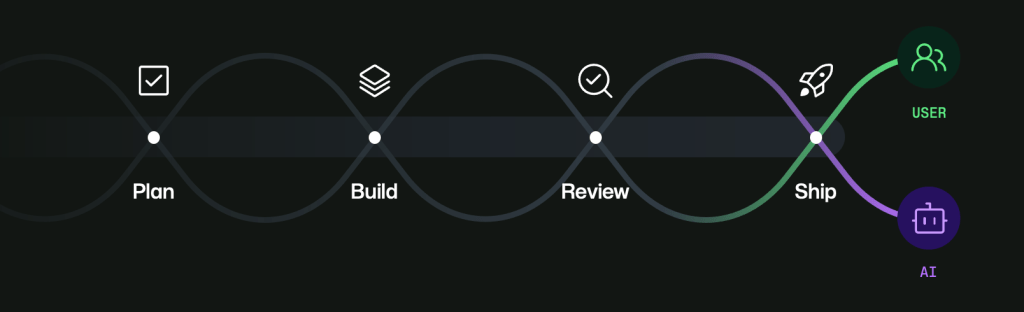
Stop me if you’ve heard this one before: I’ve created an exciting new demo with just a single prompt. Everyone claps! One-prompt demos are quick and easy to create. But setting up a system that lets you generate code reliably and safely… that’s a completely different story. With a prompt, you receive a one-off output, but what you need is a wired workflow to produce repeatable delivery, with the right checks, context, and controls in place. That changes the developer role. You still write code, sure, but you also design the system: how code is proposed, validated, reviewed, and shipped.  Doing it all in one place makes it easier to track and execute. GitHub Copilot is your control plane for building software that gets wired up. And it helps you better orchestrate your agents. The agentic flow that works To create a workflow that fits the way you work, you want to start with familiar repository events and triggers. Add a label to an issue or run a scheduled workflow overnight. Those events can trigger a GitHub Actions workflow that invokes an agent to perform a task that you scoped. The agent’s output is captured in a pull request, where deterministic checks take over: linting, tests, security scanning, and build verification. From there, CODEOWNERS, required reviews, and branch protections govern what can merge. Agents are flexible, but within a deterministic boundary that is rule-based and predictable. The deterministic side is what makes teams trust the system. CI checks produce repeatable signals. Branch rules prevent accidental bypass. Review requirements make it so your judgement is needed to make higher-risk changes. Meanwhile, agents handle the ambiguous, context-heavy tasks. Developers are the system orchestrators who define triggers, scope agent permissions, and design handoffs. Ultimately, they also decide where human judgment must remain in the loop. GitHub is where you can create this ecosystem. Configure event-driven automations with Copilot cloud agent workflows. Run Copilot CLI in GitHub Actions to blend AI-powered steps into your pipeline. Extend agent capabilities with MCP when you need more tools or external context. Those aren’t separate philosophies—they’re implementation options along the same maturity path. Get started If you’re adopting this approach, start small. Pick one bounded workflow, something like issue triage, docs-and-tests sync, or low-risk maintenance updates. Bring GitHub Copilot into your existing software development infrastructure, and let it help you build what you want to see next. From coder to orchestrator As the developer role continues to shift, you are owning more of the delivery system around code. Ready to expand into this role and learn more about working with agents? Explore GitHub Universe, where builders become orchestrators. Join us on October 28–29 to see what’s new and what’s next. Time is running out for Early Bird pricing—buy your ticket by August 19 to get $300 off! Throughout the event, you’ll be able to develop your skills and learn something new during workshops. You can connect with developers, open source maintainers, and leaders. Learn about technology that is developing fast so you can keep doing what you love—and build the next big thing. Register now to attend GitHub Universe 2026 > Additional resources Need help convincing your manager? Use our customizable email template. Want to stay updated? Sign up. Curious what the experience is like? Explore last year’s highlights. The post From coder to orchestrator: How agents shift the role of a developer appeared first on The GitHub Blog. ​ Career growth, Developer skills, GitHub Universe The GitHub Blog

tech blog

GitHub availability report: July 2026

The GitHub Actions incident on Thursday, August 6, was unacceptable in both its impact and particularity of its duration. Availability continues to be our top priority across all of GitHub. However, with this incident, we have fallen short of our commitments to you. We know how heavily customers rely on actions, and a prolonged outage like this one has a real impact on your productivity and on your trust in us. We continue to work through a deeper root cause analysis (RCA) on the incident, as there were many aspects in play that we want to fully understand before calling the investigation complete. We’ll update the public summary when our investigation is complete, and we will include the complete details in our August availability post to be published in September. Aside from immediate repair items discovered through our investigation, we are accelerating our architectural roadmap in GitHub Actions, aligned to our ongoing efforts around isolation, resiliency, and scale. It’s worth noting that the GitHub Actions service at the core of the aforementioned incident is still fully running in our data centers, a contributing factor to the lack of capacity we experienced. While the majority of actions runs on Azure, we hadn’t yet prioritized migrating launch service, the component that bridges the monolith to actions, due to its generally asynchronous nature and ability to queue work in response to issues. Unfortunately, as outlined in the public summary, cascading failures led to an unacceptable delay in recovery. This is why we are accelerating our move of GitHub Actions to Azure, where we will have more headroom and capabilities to absorb spikes. On our broader efforts, last month, we shared how a deliberate pause and stronger stability controls changed the way we move production traffic into Azure. In July, those controls allowed us to resume that work with greater confidence while continuing to reduce shared dependencies across GitHub. The short version of July: GitHub is becoming less dependent on shared infrastructure and individual datacenter locations, giving us more capacity to absorb growth and making failures easier to isolate. This month, more than half of monolith read traffic ran in Azure Central US, authentication data began leaving our oldest shared database, and dedicated services removed substantial load from that shared path. GitHub can now serve a larger share of customer requests from independent Azure capacity, reducing reliance on any single datacenter while preserving performance. Monolith read traffic served from Azure Central US peaked at 52.75% on July 28—the first time we consistently remained above the halfway line. Git traffic in Azure reached 47%, up from 43% in June, and 29% of all repositories now have a second replica in Central US, making failover less disruptive when a region degrades. Just as important, the stability validation process introduced after May’s incident is now part of every major traffic expansion, helping us increase capacity without increasing customer risk. We also reduced shared failure points behind critical customer workflows. The first authentication tables moved from our oldest shared database to dedicated infrastructure, proving the migration pattern for the remaining work. Authentication and permission checks now place substantially less pressure on that shared path: at peak, the dedicated user service offloads more than one million queries per second, while 80% of a major authorization lookup has moved to the isolated service path. Repository content traffic now runs fully from Central US on dedicated infrastructure, and the dedicated pull request service, which already serves anonymous traffic, reached 99.87% parity with the monolith for authenticated reads as we progressively roll all traffic to it. Together, these changes make it less likely that pressure or failures in one part of GitHub will affect unrelated customer activity. GitHub can now absorb more workload growth before shared infrastructure becomes a source of degradation that affects customers. One production change cut total query time on the artifacts table in half, while caching in the Git authorization path reduced authorization service load by 18.2%, even as request volume grew. Search is also less exposed to the capacity constraints that contributed to earlier incidents: all production search workloads now serve from Central US with additional headroom during demand or infrastructure stress. We are also changing how we measure and operate reliability. In addition to infrastructure health, we are increasingly measuring the health of important customer workflows such as pull requests so teams can identify degradation earlier. We are continuing to replace high-risk manual production activity with automation, review controls, and operational safeguards, so customer experience is less dependent on perfect human execution. Crossing 50% is the midpoint, not the finish. The next phase is about building enough independent Azure capacity to serve all production traffic and, ultimately, withstand the loss of a region without failure. This quarter, we are targeting 70% of read traffic and 30% of write traffic in Central US while bringing every production service online there. Moving database primaries will unlock write traffic; a second Azure region will provide the foundation for regional resilience. We now have a line of sight to get dotcom production traffic out of our datacenters by the end of CY2026. The eight incident write-ups that follow are the other half of this picture—what the system did well, what it did not, and what we have already changed as a result. The principle continues to guide us: availability, then capacity, then features. July 8, 2026 (lasting 7 hours and 4 minutes) On July 8, 2026, between 15:07 and 22:13 UTC, multiple GitHub services—including the Web UI, REST API, GraphQL API, Actions, Packages, Copilot, and Git operations—were unavailable across data-resident Enterprise Cloud environments and returned 5xx errors. Affected users experienced page-load and login failures, failed API requests, queued or rejected Actions workflow runs, and unavailable package registry endpoints. During the peak hour, approximately 84% of active tenants across the affected production environments had a majority of their requests fail, and the peak 5xx error rate reached approximately 96% in the most affected environment. Our automated monitoring detected elevated 5xx

tech blog

GitHub Copilot app for Beginners: Write your first prompt

Opening a new AI tool can feel a little like staring at a blank page. You know you want help with something, but figuring out exactly what to ask can be its own task. The good news is that you don’t need to write the perfect prompt to get started. A prompt is simply a description of what you want to accomplish. Start with what you know, give Copilot some context, and refine the request as you go. Let’s walk through what it looks like to start your first task in the GitHub Copilot app. Start with the right context Before you can ask Copilot to make a change, it needs something to work on. Agent sessions can be connected to a GitHub repository or a folder on your local machine, giving Copilot access to the code and files it needs for the task. From the GitHub Copilot app home screen, you can select a project you’ve worked with before or add a new one. If you’re working on code that’s only on your computer, you can add a local folder instead. Either way, connecting a project gives the session the context it needs to work with your codebase. Once your project is selected, you’re ready to write your first prompt. Describe what you want in plain English You don’t need to learn a special syntax or figure out the perfect way to phrase your request. Start by describing the change you want to make. For example: Add a most-funded sort option to the games list. That’s enough to get started. Copilot can examine the project, find the relevant parts of the codebase, and work on the requested change. If the first attempt isn’t quite what you had in mind, you can provide additional details or ask for changes. Prompting is an iterative process, so you don’t have to anticipate every detail before you begin. The best prompt is often the one that gets you moving. Choose the right model when you need it The GitHub Copilot app also lets you choose which AI model handles your task. Different models have different strengths, and some are better suited to complex reasoning while others can handle simpler tasks more quickly. If you’re just getting started, the default model is a good place to begin. You don’t need to understand every difference between the available models before you can use the app. As you work, you can switch models when a task requires more complex reasoning or when the first approach isn’t giving you the results you need. Think of the model selector as another tool you can reach for when the task calls for it, rather than something you need to configure before every session. Use whatever input feels natural Typing isn’t the only way to write a prompt. The GitHub Copilot app includes built-in voice input, which can be useful when you’re thinking through a problem out loud or have a longer request to describe. Your speech is converted into text in the prompt box, where you can review and edit it before sending it. That means you can think out loud without immediately committing to the first version of your request. Sometimes it’s easier to explain what you want than to type it out. Voice input gives you another way to get that idea into the session. Customize how the work runs You can also change how your session handles the work. From the session title, you can select a different agent or enable remote control for the session. Different agents can be configured for different types of work, so you can choose the one that best fits the task you’re working on. Remote sessions give you another kind of flexibility. Instead of running the work only on your local machine, you can access the same session from the web. You can start a task, close your laptop, and return to the session later from another device without losing your place. These options aren’t things you need to configure before your first prompt. They’re there when you need more control over how a task is handled. Start small and iterate Your first prompt doesn’t need to be perfect. Start with a small change you’d like to make in a project you already know, describe what you want in plain language, and see what happens. From there, you can refine the request, try a different model, or adjust how the session runs. The more you use the app, the more natural these choices become. The important part is getting started. Pick a project, give Copilot a task, and see where it takes you. Get started with the GitHub Copilot app > The post GitHub Copilot app for Beginners: Write your first prompt appeared first on The GitHub Blog. ​ AI & ML, GitHub Copilot, GitHub Copilot app, GitHub Copilot app for Beginners The GitHub Blog

tech blog

What 50 open source projects taught us about security in the AI era

AI is changing the pace of open source development and the security challenges that come with it. Maintainers are reviewing unfamiliar contributions, managing new attack surfaces, and responding to vulnerabilities with limited time and resources. Session 4 of the GitHub Secure Open Source Fund tested a practical response. The Secure Fund invested more than $500,000 across 50 projects, pairing maintainers with GitHub Security Lab experts, GitHub security tools, AI-assisted workflows, and a peer community. One lesson emerged consistently: AI can help maintainers investigate, prioritize, and respond faster. Maintainers still provide the context, judgement, and accountability required to decide what ships. OpenClaw was invited to participate in Session 4 because it is GitHub’s fastest-growing open source project, and its maintainers wanted to strengthen its security posture. By the end of Session 4, OpenClaw developed an incident response plan, expanded its use of GitHub security tooling, audited its GitHub Actions workflows, and strengthened its processes for identifying and responding to security issues. The maintainers shared: OpenClaw’s experience reflects the broader story of Session 4. While the specific risks varied across the cohort, maintainers shared a consistent need: the knowledge, tools, and expert support to secure software as AI changed how they built it. Across the program, maintainers turned that support into concrete security improvements. Projects strengthened established practices, prepared for emerging AI-related risks, and explored how tools like GitHub Copilot could support vulnerability triage, threat modeling, code review, and remediation. The benefits extend beyond individual projects. When maintainers strengthen the security of widely used open source software, they help build a more resilient ecosystem for everyone who depends on it.  Session 4, by the numbers 50 projects 71 maintainers 22 Countries $500,000+ in non-dilutive funding powered by GitHub Sponsors 92% of projects completed the program with core GitHub security features enabled–secret scanning, code scanning, protected branches, private vulnerability reporting, Dependabot Learn more or enable these security features for your own project. Security results across all sessions: Across all GitHub Secure Open Source Fund Sessions and follow-up periods through August 2026: 188 projects and 290 maintainers have participated across 42 countries GitHub, Microsoft, and external funding partners have contributed $1.88 million, distributed through GitHub Sponsors. Participating projects have identified and disclosed 533 new CVEs, performed more than 1,500 Dependabot security updates, and resolved more than 650 exposed secrets. During the last six months ending in July 2026, participating and Alumni projects fixed 4,210 CodeQL alerts and blocked 119 secrets from being exposed. How the GitHub Secure Open Source Fund works The GitHub Secure Open Source Fund links funding directly to measurable security outcomes. The program combines hands-on security education, direct engagement with GitHub Security Lab experts, and a trusted community where maintainers can work through security challenges with their peers. Each session is a three-week sprint and engagement for a total of 12 months. Funding and participation are tied directly to outcome‑driven goals and verified security improvements. The sprint is designed and curated by the GitHub Security Lab, and delivered by security experts from GitHub and our partners. The training is structured into different focus areas per week. These include: Foundations of open source security Threat modeling and secure coding AI security and vulnerability management Throughout this program, each project receives $10,000 USD via GitHub Sponsors (which breaks down to $6,000 USD during the sprint and $2,000 USD at six- and 12-month security check-ins). Projects are invited to a new security-focused community and office hours with the GitHub Security Lab, which they can take advantage of during the full 12 months. They also receive security resources to immediately implement in their project and Azure credits for cloud infrastructure. Learn more about the Secure Open Source Fund. Apply for Session 5 of the GitHub Secure Open Source Fund before August 24. Become a Funding or Ecosystem Partner of the GitHub Secure Open Source Fund. Where security work happened in Session 4 Session 4 focused on improving security across the systems developers rely on every day. The projects below are grouped by the role they play in the software ecosystem. AI, machine learning, and intelligent systems 🤖 Caracal • Deep Agents • DocsGPT • LadybugDB • LangChain • n8n-MCP • Nasiko • ONNX • OpenClaw • PageIndex • Scenic • Serena These projects sit at the intersection of AI, automation, data infrastructure, and machine learning. They increasingly serve as foundational components for modern AI workflows and production deployments. As AI adoption accelerates, security improvements in these projects help establish stronger foundations for emerging AI ecosystems. Build systems, supply chain, and release tooling 🧰 browserslist • CycloneDX Python Library • Cucumber • golangci-lint • JReleaser • postcss • Task These projects help developers test, validate, package, release, and maintain software across diverse environments. Tools in this group influence everything from software bills of materials and release pipelines to code quality and testing automation. Core programming languages, runtimes, and foundational libraries 📚 Byte Buddy • core-js • FS2 • Gleam • htmx • Pkl • Pyodide • termcolor These projects help define how software is written, configured, executed, and extended. Improvements at this layer flow downstream to thousands of applications and developer ecosystems. Security improvements in foundational runtimes and libraries can extend downstream to the many tools and applications that depend on them. Developer tools and productivity platforms ⚒️ cheerio • Ciphey • CodeRunner • Hoppscotch • MapStruct • Python Pillow • Proyecto Respira • Readest • ToolJet • Vuetify • Yjs These projects shape the everyday experience of building, testing, collaborating on, and using software. Many serve as widely adopted utilities, applications, and platforms that appear throughout developer environments and application stacks. Together, this group supports API development, low-code platforms, collaborative applications, content processing, and software delivery workflows. When infrastructure projects become more resilient, the benefits extend far beyond a single application and strengthen entire technology ecosystems. Web, networking, APIs, and infrastructure services 📊 actix-web • aiohttp • Apache Solr • Apache ZooKeeper • etcd • FastAPI • Haraka • Hummingbird • mimetype • Sniffnet

tech blog

How to bring your software delivery workflow into GitHub with agent apps

How many tabs do you have open alongside your pull request? Imagine picking up a new issue in your product’s free-trial onboarding flow: make the “invite your teammates” step optional. Support keeps flagging the step as a friction point as signups increase. Quick win, right? From scoping to deployment, you need answers to these four questions: Is this even the right change? Are the dependencies I’m touching clean? How do I roll it out safely? Is it safe to deploy right now? Each answer lives in a different tool, so working through the pull request means carrying the same context across four places. GitHub agent apps bring the tools you need to answer those questions to where you’re already working, powered by the same platform and harness as our own Copilot cloud agent. The illustrative walkthrough below shows how you can use services you already depend on, such as Amplitude, Endor Labs, LaunchDarkly, and PagerDuty to answer these questions and complete this request, without ever leaving GitHub. 1. Before you build it Support says the “invite your teammates” step is annoying for customers who are onboarding with your product, but they haven’t given an indication of who has complained or whether those complaints lead to churn. You’d be right to be skeptical. So instead of opening Amplitude and building a query to confirm your hunch, you ask the Amplitude agent right from the Agents tab: @amplitude[agent] is completing the team invite step correlated with success later in the funnel? Break it down by segments we’re measuring. The split comes back clear: team users who finish the step are more likely to retain later, while solo users don’t have that correlation. A rescope is now justified: defer the step for solo signups and keep it for teams. Access to product insights is now within GitHub, enabling course correction before any code is written. 2. As you build it Copilot opens a draft pull request for the change. The implementation also updates dependencies used by the onboarding flow. Instead of waiting for a CI scan to fail later, you ask the Endor Labs agent in a comment: @endor-labs-github-agenthq[agent] is there anything I need to watch out for in the dependencies being touched by this pull request? The agent identifies the changed dependencies, checks them for known vulnerabilities and broader package risk, then reports back in the pull request. This time, everything looks clean. Nothing to remediate. Dependency review becomes a proactive check while the change is still in front of you. Much better than remediating a CI scan after it fails. 3. Rolling it out The previous finding now gets carried through to implementation: solo signups get the optional path, while teams keep the existing one. Because these segments are set at signup, a feature flag can target them directly. Ask the LaunchDarkly agent to set it up for you, the same way you’d ask a team member: @launchdarkly-agent[agent] please create a feature flag for this pull request and wire it into the code. – key: defer-team-invite – type: boolean – default: false – target: solo-intent signups – rollout: internal > 5% > 25% > 100% The agent creates the flag in LaunchDarkly and adds the code implementation as a commit you review. If the target environment requires approval, it creates an approval request instead of applying the targeting change directly. A human still decides whether the rollout moves forward. Flag setup goes from a second tool, a manual code handoff, and Slack coordination to one pull request comment and a commit you review. 4. Before you ship Review tells you the code is correct, but whether the service is in a good state for a deployment is a different question. Before merging, you ask the PagerDuty agent: @pagerduty-agent-app[agent] assess the deployment risk for this pull request against the onboarding service. Check active incidents and recent incident history, then recommend whether to proceed. The agent maps the repository to its PagerDuty service, checks for active incidents, reviews the previous 90 days, and compares the files in the pull request with areas involved in past incidents. This time, the risk is low. There are no active incidents and no meaningful correlation with the current changes. The recommendation is to proceed. Nothing dramatic happens, but that’s the point. Checking deploy risk becomes a routine step for your pull requests instead of something you do only when a release already feels dangerous. What changes You still use Amplitude, LaunchDarkly, Endor Labs, and PagerDuty. But now, you no longer need to carry the context between them, and they’ll all work directly in your GitHub workflows. As work moves from idea to production, developers can bring each service into GitHub when its context or capabilities matter. With agent apps, GitHub becomes the place where developers and agents coordinate what happens next, without developers switching contexts. Try it Agent apps are available from the GitHub Marketplace. Install one, enable it for your organization, and take it for a spin: Assign it to an issue to kick off a task. @mention it in a pull request comment for analysis or action. Select it from the Agents tab in your repository. Your tools are still your tools. Now, they show up where you are already working: on GitHub. Explore the other inaugural agent apps and start bringing your stack directly into your workflow: Packfiles’s agent reads your backlog and builds a migration strategy. reads your backlog and builds a migration strategy. Miro‘s agent connects visual collaboration with code workflows. Bright Security‘s agent autonomously handles end-to-end dynamic security testing inside GitHub. SonarQube‘s agent brings analysis, quality gates, and remediation into GitHub agent sessions. Octopus Deploy‘s agent can identify, diagnose, and resolve deployment failures. Discover agent apps in the GitHub Marketplace > The post How to bring your software delivery workflow into GitHub with agent apps appeared first on The GitHub Blog. ​ AI & ML, GitHub Copilot, Agent Apps, GitHub Marketplace The GitHub Blog

tech blog

Your guide to GitHub Universe 2026 is here: The schedule just launched!

The GitHub Universe 2026 schedule just dropped, and it’s full of exciting sessions, demos, and panels covering the potential of AI-powered development. If you haven’t registered yet, here’s what you need to know. This two-day event brings together some of the greatest minds in tech, with experts from companies like AMD, Figma, NVIDIA, Coinbase, Anthropic, and OpenAI leading our sessions. They’re covering everything from delegating real work to Copilot and measuring AI at enterprise scale to fine-grained security for MCP servers. You’ll also have the chance to chat with the GitHub team one-on-one, get your questions answered, and even pick up some career advice. Did we mention the Ship & Tell sessions where teams show what they’ve built, and partner booths where you can demo the latest tech? When: October 28-29 Where: Fort Mason Center, San Francisco, CA One thing first: register before August 19 and save $300 with Early Bird passes. Prices go up after that, so if Universe is already on your list, now’s the moment. The best part? You can stack savings with our group discounts. Register now Here’s a sneak peek of some of the sessions we have planned. You can jump to the full agenda right here. Be sure to mark your favorites to build your own personal calendar. Find your flow Some of the best moments at Universe happen heads-down: working through a real problem, configuring something on your own machine, and walking out with a project you can actually use. This year’s catalog leans into that with learnings you can take straight back to your repositories. A few sessions to start with: Stop prompting, start delegating: Configure Copilot to own the workKen Muse, GitHub; Mickey Gousset, GitHubLearn how the right Copilot configuration turns AI into something you can trust with complex tasks. Layer Copilot’s full stack onto a TypeScript app, and you’ll leave with a working project and a clear sense of which capability fits which task, so you can delegate more and prompt less. Inside GitHub Copilot’s coding harness: Optimizing across every modelJulia Kasper, MicrosoftShipping a coding agent that works across OpenAI, Claude, Gemini, and whatever drops next week takes a harness. See the evaluation framework the GitHub Copilot team uses to test and optimize its agent across every model: reproducible benchmarks, thousands of autonomous coding tasks, and LLM-graded assertions that catch regressions before users do. Stop waiting on your own pull requests: GitHub stacked pull requests in practiceSameen Karim, GitHubStacked pull requests let you split changes into smaller, dependent pull requests that move through review efficiently while preserving the full picture. This demo builds a stack with the GitHub CLI, reviews it on github.com, and merges each pull request as it’s ready—so you leave with a workflow you can use tomorrow. Find your people Hallway conversations, a question that reframes your whole approach, the engineer who already solved the thing you’re stuck on. This year’s agenda is filled with sessions for exactly that. Plus, hallway tracks, partner booths, and Ship & Tell sessions where teams show what they’ve actually built. A few sessions worth your time: Building AI fluency at UPSJared Hatfield, UPSGetting developers to try GitHub Copilot is simple; getting them fluent with it—using agents to plan, write, and ship real work—is the harder challenge. See how UPS moves developers from awareness to fluency, why motivation and measurement matter as much as the tooling, and where to focus first at enterprise scale. Code is the easy part: Building Home Assistant in the openFranck Nijhof, Open Home Foundation“Building in the open” usually means one thing: code on GitHub. But the hard work starts long before code—ideas, UX, design, architecture, the roadmap itself. At Home Assistant, every step happens in the open across 20,000 contributors and a dozen GitHub organizations. See how the Open Home Foundation runs its whole roadmap with issues, projects, and discussions, including the harder parts, like being wrong in public, fixing it in public, and proving you don’t have to be technical to contribute. I made my Octolamp think with GitHub Copilot CLI hooksBeatris Mendez Gandica, Nuevo FoundationWhat if your desk lamp could show when GitHub Copilot CLI is thinking? Using the native hooks system, Beatris Mendez Gandica made hers breathe green when the agent works, go white when idle, and blink red on errors. No prompting tricks, just system-level lifecycle events driving a physical light via the WLED API. In this session, you’ll see how Copilot CLI hooks work under the hood, and leave knowing how to write your own for any use case. Build what’s next Want to know what’s on the horizon? These are the talks that pull back the curtain on where AI-assisted development is heading. The view from the labs: What’s next for AI-assisted developmentCara Phillips, Anthropic; Rohan Varma, OpenAI; Kate Catlin, GitHubThe people building frontier AI models see where capabilities are heading before anyone else. This interactive panel brings leaders from Anthropic, OpenAI, and other labs that power GitHub Copilot together for a candid look at the next two years of AI-assisted development, and what it means for you. Open pull requests, don’t merge them: Fine-grained authorization for hosted MCP serversNick Taylor, PomeriumHosted MCP servers hand every agent everything its human can do: OAuth in, broad scope out, one global toggle. But what if an agent should open a pull request and leave the merge to a reviewer? See a pattern that works today: an identity-aware proxy that adds per-identity authorization in front of any hosted MCP server with no changes upstream, demonstrated live with Copilot doing exactly that. From writing code to managing agents: Scaling 50+ services at GitHubAnjuan Simmons, GitHubGitHub’s Lifecycle team traded hand-coding fixes across 50+ services for an agentic pipeline where AI agents classify issues, research codebases, write implementation plans, and open draft pull requests automatically. Get the real lessons and numbers from running it at GitHub’s own scale: how it was built with GitHub Actions and Copilot, where automation pays off most, and why engineers still

tech blog

How canvases make agentic workflows visible, steerable, and cost-efficient

When I was in college, I joined the beta for one of the first versions of AI inline completions in VS Code. It felt like a game changer. Since then, GenAI has fundamentally changed software development: hybrid teams where agents and humans work in tandem, with the developer at the center as visionary and orchestrator. We are living in that transition right now. As a natural byproduct of how fast innovation in GenAI has moved, we now have tools to help us plan, build, review, and ship code. But in the current state, many workflows still feel disjointed. Context gets lost across threads and surfaces, and too much time gets spent reviewing agent-generated work. Agents can produce changes faster than any human can review them, and most developer tools were not originally designed for multi-agent orchestration. It becomes easy to lose track of what ran, what changed, what was validated, and what still needs human judgment. The GitHub Copilot app is a major step toward addressing this. One feature in particular that I’ve learned to love and use almost every day is canvases. Canvases let developers and agents interact on a durable, shared surface. Instead of treating chat as the only place where work happens, canvases make work visible, steerable, and approvable as it unfolds. Chat is great for intent, but weak for durable execution I still believe chat is one of the best interfaces we have for intent. It’s where you can think, refine, and direct. It’s fast and flexible, especially when the problem is still ambiguous. But once an agent starts doing real work, chat becomes a long scroll of instructions, logs, pivots, and corrections. The important parts are technically there, but buried: the plan, decision points, validations, and approval moments. If you have to reconstruct all of that from history, you’re already paying a coordination tax. Canvases solve that by giving workflows a home. They make state explicit and persistent. Humans can inspect and guide. Agents can update and progress. Both can stay aligned without constantly replaying context. The first build: Java Modernization Studio One of the first canvases I built was Java Modernization Studio. Java modernization is exactly the kind of workflow where visibility and governance matter: assessment, planning, migration tasks, validation gates, and readiness to ship. In a chat-only experience, those steps blur together. You can still move forward, but it gets harder to audit and harder to trust at scale, especially with multiple contributors. Teams keep asking the same expensive questions: What stage are we in? What decisions were made? What is blocked? What still needs human approval? The studio made each phase explicit and inspectable. Instead of parsing narrative history, teams could see operational state directly. Instead of guessing what happened, they could verify it. Human reviewers could focus on high-signal judgments while agents kept execution moving between checkpoints. Explore the Java Modernization Studio canvas > The second build: Site Studio After that, I built Site Studio for a very different workflow: creating and managing personal site content. It’s content-heavy rather than migration-heavy, but the orchestration challenge is similar: section progress, iterative edits, review loops, and status transitions. In a chat-only flow, content can drift quickly. A section gets revised, then revised again, and confidence drops in what is current. Feedback gets scattered, drafts repeat, and momentum slows because each iteration starts by rebuilding context. Site Studio keeps that state durable. Section status is visible. Draft values are persisted as work happens. Human review points are explicit. The agent can keep moving while the human can steer, approve, or redirect without losing the thread. Explore the Site Studio canvas > The repeatable pattern Across both canvases, I found the same repeatable blueprint: Define workflow states clearly. Surface the decisions that matter. Persist progress and drafts immediately. Keep explicit human approval points. This shifts the model from prompt-by-prompt interaction to durable collaborative workflows. You stop treating each turn like a fresh start and start treating each workflow like a system with memory, structure, and control. Cost and efficiency: yes, canvases are an investment I also want to be explicit about cost: canvases can be an investment. For instance, Site Studio cost me about 2,000 AI credits, and the modernization canvas cost me about 3,000 AI credits. They take effort to design and shape well. But in the long run, especially for repeated workflows, that investment pays back. Durable surfaces reduce repeated prompting, reduce context loss, reduce unnecessary back-and-forth, and reduce rework. Over time, that can save both time and money while improving trust and throughput. So for me, this is not “spend more tokens for nicer UX.” It’s “invest in better workflow architecture so recurring work becomes more efficient, predictable, and governable.” Available now in awesome-copilot The canvases I built—Java Modernization Studio and Site Studio—are available in awesome-copilot for anyone who wants to use them, adapt them, or learn from them. If you are already using Copilot agents, a practical next step is to pick one repeated workflow and build a minimal canvas around it with /create-canvas. Start small, run real work, and iterate from actual usage. If it helps your team, contribute it back to awesome-copilot so others can benefit too. We’re still early in this transition, but the direction is clear. Agents can accelerate execution. Humans provide vision, judgment, and accountability. Canvases are one way to make that partnership real, durable, and scalable. Build your own canvas with /create-canvas and contribute it back to awesome-copilot > The post How canvases make agentic workflows visible, steerable, and cost-efficient appeared first on The GitHub Blog. ​ AI & ML, GitHub Copilot, awesome-copilot, canvases, developer productivity, GitHub Copilot app The GitHub Blog

tech blog

ITMAITY – Delivering Quality. Keeping Promises. Putting Clients First

In today’s competitive business environment, success depends on more than simply delivering a product or service. Businesses need quality, reliability, timely delivery, and a trusted technology partner who understands their goals. At ITMAITY, we believe in delivering excellence at every stage — from understanding client requirements to developing solutions and providing reliable support. Quality Is Our Commitment Quality is not just a promise at ITMAITY — it is our habit. We maintain high standards across our products and services through rigorous quality checks, reliable technology, and a commitment to consistent performance. Our goal is to provide solutions that businesses can depend on for the long term. High Standards • Tested & Trusted • Built to Perform On-Time Delivery, Every Time We understand that time is valuable in business. Delays can affect productivity, operations, and growth. That’s why ITMAITY focuses on punctual project delivery while maintaining the quality our clients expect. Your Deadline, Our Commitment. We strive to deliver projects and solutions on schedule, helping businesses move forward without unnecessary delays. Client-Centric Approach At ITMAITY, our clients are at the center of everything we do. We listen carefully, understand business requirements, and focus on creating solutions that deliver real value. From the initial discussion to final delivery and ongoing support, we work toward building long-term relationships based on trust. Our approach is simple: Why Choose ITMAITY? Whether you need technology solutions, digital services, software development, IT support, or business automation, ITMAITY combines quality, innovation, timely execution, and customer-focused service to help your business grow. Innovate • Develop • Deliver We don’t just deliver products or services — we deliver excellence. Get in Touch with ITMAITY Looking for a reliable technology partner for your business? 📧 Email: info@itmaity.com📞 Contact: +9187590 27112🌐 Website: www.itmaity.com ITMAITY — Quality in Every Solution. Timely in Every Delivery. Client-Centric in Everything We Do.

Scroll to Top