INITIALIZING

Author name: ITMAITY

tech blog

GitHub Availability Report: March 2025

In March, we experienced one incident that resulted in degraded performance across GitHub services. March 29 7:00 UTC (lasting 58 hours) Between March 29 7:00 UTC and March 31 17:00 UTC, GitHub experienced service degradation due to two separate, but related incidents. On March 29, users were unable to unsubscribe from GitHub marketing email subscriptions due to a service outage. Additionally, on March 31, 2025 from 7:00 UTC to 16:40 UTC users were unable to submit ebook and event registration forms on resources.github.com, also due to a service outage. The March 29 incident occurred due to expired credentials used for an internal service, preventing customers from being able to unsubscribe directly from marketing/sales topics through github.com/settings/emails UI and from performing the double opt-in step required by some countries. A similar credential expiry on March 31 resulted in users experiencing degradation accessing resources.github.com. The cause of the incident was traced to an issue in the automated alerting for monitoring upcoming credential expirations. The bug in alerting resulted in the invalid credentials being discovered after they had expired. This resulted in two incidents before we could deploy a durable fix. We mitigated it by renewing the credentials and redeploying the affected services. To improve future response times and prevent similar issues, we have enhanced our credential expiry detection, alerting, and rotation processes, and are working on improving on-call observability. Please follow our status page for real-time updates on status changes and post-incident recaps. To learn more about what we’re working on, check out the GitHub Engineering Blog. The post GitHub Availability Report: March 2025 appeared first on The GitHub Blog. ​ Company news, News & insights, GitHub Availability Report The GitHub Blog

tech blog

Staying Ahead of Cyber Threats with Cyber Resilience

Cyber resilience goes beyond defense; it’s about strategies to safeguard operations and thrive amid advanced cyber threats.   ​  ​Cyber resilience goes beyond defense; it’s about strategies to safeguard operations and thrive amid advanced cyber threats. Cyber Resiliency Blog | Dell

tech blog

Exploring Hybrid Classical-Quantum Compute

*This is a re-publication of a blog that originally ran September 21, 2021* Dell Technologies’ Platform to Model Quantum Applications …   ​  ​*This is a re-publication of a blog that originally ran September 21, 2021* Dell Technologies’ Platform to Model Quantum Applications … PowerEdge Blog | Dell

tech blog

What the heck is MCP and why is everyone talking about it?

It feels like everyone’s talking about MCP (Model Context Protocol) these days when it comes to large language models (LLMs), but hardly anyone is actually defining it. TL;DR: It’s an open standard for connecting LLMs to data and tools. Let’s dive in deeper! The context problem for LLMs LLMs often struggle when they are asked for information outside of their training data. They’ll sometimes either hallucinate and say something incorrect, or simply say, “I don’t know.” Giving them the right amount of context when you prompt them (whether it’s your codebase, your repository data, your documentation, etc.) is necessary for AI agents built on top of LLMs to be useful. Usually, you have to really refine your prompting to give LLMs that context, or use some sort of external tool. For example, GitHub Copilot has tools like @workspace to give relevant information from your codebase to your prompts. This type of “extra tooling” is cool, but can get fairly complex fairly quickly as you implement things across different APIs and services. A solution: Model Context Protocol, or MCP In November, Anthropic open sourced the Model Context Protocol as a standard for connecting LLMs and AI assistants to data and tools! MCP grew the way you sleep… slowly and then all at once. As tools and organizations have adopted the MCP standard, it has only become more and more valuable. And because MCP is model agnostic, anyone can use and create MCP integrations. As with all open standards, a rising tide lifts all boats: the more people that use it, the better it becomes. I think that MCP has “won” the hearts of so many AI developers and tools because of this openness, and also because it’s a very “AI-first” version of existing ideas. This isn’t the first time we’ve seen a protocol like this become a standard, either. Back in 2016, Microsoft released the Language Server Protocol (LSP), which provided standards for code editors to support programming languages. Fast forward to today: because of LSP, programming language support across editors is better than ever, to the point where developers don’t even need to think about it anymore! MCP takes a lot of its inspiration from LSP, and could be absolutely transformative for AI tooling. It allows for everyone, from the largest tech giants to the smallest indie developer shops, to enable robust AI solutions in any AI client with minimal setup. That’s why this is a huge deal! An open standard that is backed more and more by the tech community means better tools, better developer experiences, and better user experiences for everyone. GitHub and MCP We’re not just talking about MCP: we’re contributing, too! We’re SO excited to have recently released our new open source, official, local GitHub MCP Server! It provides seamless integration with GitHub APIs, allowing for advanced automation and integration capabilities for developers to build with! You can chat more with us about it in the GitHub Community or you can check out the official announcement. How do I contribute and learn more? Hoorah, I thought you’d never ask! Here’s some resources to get you on your way: MCP documentation Repository of reference implementations for MCP MCP specification for protocol requirements More documentation on LSP Also, if you don’t mind the shameless plug, you can also use it with agent mode now. Go forth and code! The post What the heck is MCP and why is everyone talking about it? appeared first on The GitHub Blog. ​ AI & ML, LLMs, Open Source, GitHub Copilot, LLM, Model Context Protocol, open source, Open Standards The GitHub Blog

tech blog

How we’re making security easier for the average developer

Let’s be honest—most security tools can be pretty painful to use. These tools usually aren’t designed with you, the developer, in mind—even if it’s you, not the security team, who is often responsible for remediating issues. The worst part? You frequently need to switch back and forth between your tool and your dev environment, or add a clunky integration. And oftentimes the alerts aren’t very actionable. You may need to spend time researching on your own. Or worse, false positives can pull you away from building the next thing. Alert fatigue creeps in, and you find yourself paying less and less attention as the vulnerabilities stack up. We’re trying to make this better at GitHub by building security into your workflows so you can commit better code. From Secret Protection to Code Security to Dependabot and Copilot Autofix, we’re working to go beyond detection to help you prioritize and remediate problems—with a little help from AI. We’re going to show you how to write more secure code on GitHub, all in less than 10 minutes. At commit and before the pull request: Secret Protection You’ve done some work and you’re ready to commit your code to GitHub. But there’s a problem: You’ve accidentally left an API key in your code. Even if you’ve never left a secret in your code before, there’s a good chance you will someday. Leaked secrets are one of the most common, and most damaging, forms of software vulnerability. In 2024, developers across GitHub simplified the process by using Secret Protection, detecting more than 39 million secret leaks. Let’s start with some context. Traditionally, it could take months to uncover the forgotten API key because security reviews would take place only after a new feature is finished. It might not even be discovered until someone exploited it in the wild. In that case, you’d have to return to the code, long after you’d moved on to working on other features, and rewrite it. But GitHub Secret Protection, formerly known as Secret Scanning, can catch many types of secrets before they can cause you real pain. Secret Protection runs when you push code to your repository and will warn you if it finds something suspicious. You will know right away that something is wrong and can fix it while the code is fresh in your mind. Push protection—which blocks contributors from pushing secrets to a repository and generates an alert whenever a contributor bypasses the block—shows you exactly where the secret is so you can fix it before there’s any chance of it falling into the wrong hands. If the secret is part of a test environment or the alert is a false positive, you can easily bypass the alert, so it will never slow you down unnecessarily. What you don’t have to do is jump to another application or three to read about a vulnerability alert or issue assignment. Want to get started? Check out our documentation on Secret Protection on GitHub > After commit: Dependabot OK, so now you’ve committed some code. Chances are it contains one or more open source dependencies. Open source is crucial for your day-to-day development work, but a single vulnerability in a transient dependency—that is to say, your dependencies’ dependencies—could put your organization at risk (which isn’t something you want coming up in a performance review). Dependabot, our free tool for automated software supply chain security, helps surface vulnerabilities in your dependencies in code you’ve committed. And once again, it finds problems right away—not when the security team has a chance to review a completed feature. If a fix already exists, Dependabot will create a pull request for you, enabling you to fix issues without interrupting your workflow. Dependabot now features data to help you prioritize fixes. Specifically, alerts now include Exploit Prediction Scoring System (EPSS) data from the global Forum of Incident Response and Security Teams to help you prioritize alerts based on exploit likelihood. Only 10% of vulnerability alerts have an EPSS score above 0.95%, so you can focus on fixing this smaller subset of more urgent vulnerabilities. It can really make your backlog easier to manage and keep you from spending time on low-risk issues. Want to get started? Check out our documentation on Dependabot > At the pull request: Code Security You’ve committed some code, you’re confident you haven’t leaked any secrets, and you’re not relying on dependencies with known vulnerabilities. So, naturally, you create a pull request. Traditionally, you might be expected to run some linters and security scanning tools yourself, probably switching between a number of disparate tools. Thanks to our automation platform GitHub Actions, all of this happens as soon as you file your pull request. You can run a variety of different security tools using Actions or our security scanning service GitHub Code Security (formerly known as Code Scanning). Our semantic static analysis engine CodeQL transforms your code into a database that you can query to surface known vulnerabilities and their unknown variations, potentially unsafe coding practices, and other code quality issues. You can write your own CodeQL queries, but GitHub provides thousands of queries that cover the most critical types of vulnerabilities. These queries have been selected for their high level of accuracy, ensuring a low false positive rate for the user. But we don’t just flag problems. We now recommend solutions for 90% of alert types in JavaScript, Typescript, Java, and Python thanks to GitHub Copilot Autofix, a new feature available for free on public repositories or as part of GitHub Code Security for private repositories. Let’s say you’ve got a pesky SQL injection vulnerability (it happens all the time). Copilot Autofix will create a pull request for you with a suggested fix, so you can quickly patch a vulnerability. You no longer need to be a security expert to find a fix. We’ve found that teams using Autofix remediate vulnerabilities up to 60% faster, significantly reducing Mean Time to Remediation (MTTR). This is what we mean when we

tech blog

Boosting Multicloud Storage Automation with OpenStack

Discover how OpenStack and Dell are driving smarter automation & future-ready cloud storage options with enterprise-grade performance.   ​  ​Discover how OpenStack and Dell are driving smarter automation & future-ready cloud storage options with enterprise-grade performance. DevOps Blog | Dell

tech blog

How to request a change to a CVE record

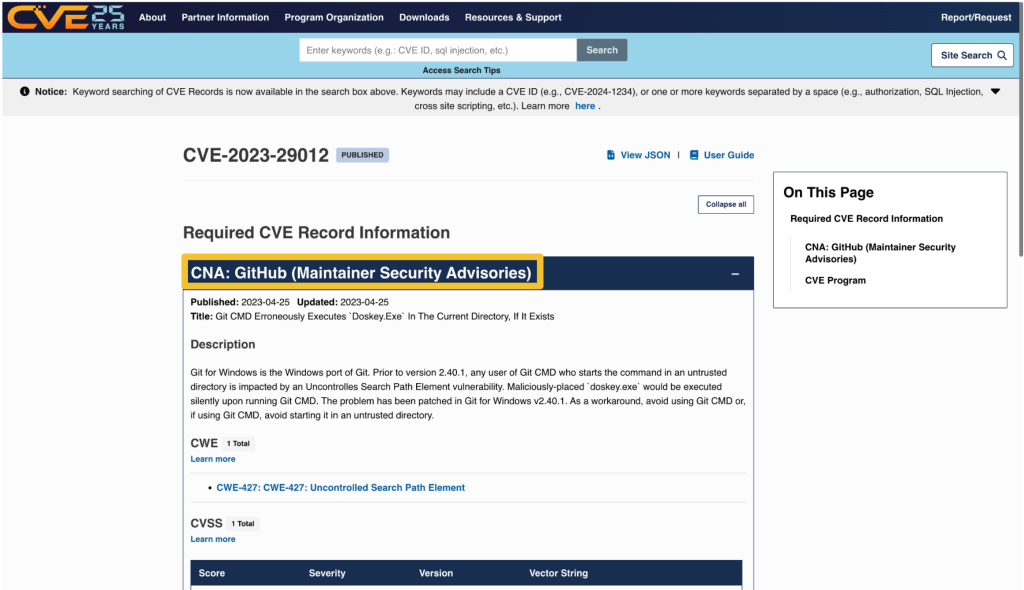
Ever come across a Common Vulnerabilities and Exposures (CVE) ID affecting software you use or maintain and thought the information could be better? CVE IDs are a widely-used system for tracking software vulnerabilities. When a vulnerable dependency affects your software, you can create a repository security advisory to alert others. But if you want your insight to reach the most upstream data source possible, you’ll need to contact the CVE Numbering Authority (CNA) that issued the vulnerability’s CVE ID. GitHub, as part of a community of over 400 CNAs, can help in cases when GitHub issued the CVE (such as with this community contribution). And with just a few key details, you can identify the right CNA and reach out with the necessary context. This guide shows you how. Step 1: Find the CNA that issued the CVE Every CVE record contains an entry that includes the name of the CNA that issued the CVE ID. The CNA is responsible for updating the CVE record after its initial publication, so any requests should be directed to them. On cve.org, the CNA is listed as the first piece of information under the “Required CVE Record Information” header. The information is also available on the right side of the page. On nvd.nist.gov, information about the issuing CNA is available in the “QUICK INFO” box. The issuing CNA is called “Source”. Step 2: Find the contact information for the CNA After identifying the CNA from the CVE record, locate their official contact information to request updates or changes. That information is available on the CNA partners website at https://www.cve.org/PartnerInformation/ListofPartners. Search for the CNA’s name in the search bar. Some organizations may have more than one CNA, so make sure that the CVE you want corresponds to the correct CNA. The left column, under “Partner,” has the name of the CNA that links to a profile page with its scope and contact information. Step 3: Contact the CNA Most CNAs have an email address for CVE-related communications. Click the link under “Step 2: Contact” that says Email to find the CNA’s email address. The most notable exception to the general preference for email communication among CNAs is the MITRE Corporation, the world’s most prolific CVE Numbering Authority. MITRE uses a webform at https://cveform.mitre.org/ for submitting requests to create, update, dispute, or reject CVEs. What to include in your communication to the CNA The CVE ID you want to discuss The information you want to add, remove, or change within the CVE record Why you want to change the information Supporting evidence, usually in the form of a reference link Including publicly available reference links is important, as they justify the changes. Examples of reference links include: A publicly available vulnerability report, advisory, or proof-of-concept A fix commit or release notes that describe a patch An issue in the affected repository in which the maintainer discusses the vulnerability in their software with the community A community contribution pull request that suggests a change to the CVE’s corresponding GitHub Security Advisory When submitting changes, keep in mind that the CNA isn’t your only audience. Clear context around disclosure decisions and vulnerability details helps the broader developer and security community understand the risks and make informed decisions about mitigation. The time it takes for a CNA to respond may vary. Rules 3.2.4.1 and 3.2.4.2 of the CVE CNA rules state: “3.2.4.1 Subject to their respective CNA Scope Definitions, CNAs MUST respond in a timely manner to CVE ID assignment requests submitted through the CNA’s public POC. 3.2.4.2 CNAs SHOULD document their expected response times, including those for the public POC.” The CNA rules establish firm timelines for assignment of CVE IDs to vulnerabilities that are already public knowledge. For CVE ID assignment or record publication in particular, section 4.2 and section 4.5 of the CVE CNA rules establish 72 hours as the time limit in which CNAs should issue CVE IDs or publish CVE records for publicly-known vulnerabilities. However, no such guidance exists for changing a CVE record. What if the CNA doesn’t respond or disagrees with me? If the CNA doesn’t respond or you cannot reach an agreement about the content of the CVE record, the next step is to engage in the dispute process. The CVE Program Policy and Procedure for Disputing a CVE Record provides details on how you may go about disputing a CVE record and escalating a dispute. The details of that process are beyond the scope of this post. However, if you end up disputing a CVE record, it’s good to know who the root or top-level root of the CNA is that reviews the dispute. When viewing a CNA’s partner page linked from https://www.cve.org/PartnerInformation/ListofPartners, you can find the CNA’s root under the column “Top-Level Root.” For most CNAs, their root is the Top-Level Root, MITRE. Want to improve a CVE record and a CVE record’s corresponding security advisory? Learn more about editing security advisories in the GitHub Advisory Database. The post How to request a change to a CVE record appeared first on The GitHub Blog. ​ Maintainers, Open Source, Security, Vulnerability research, CNA, Community Contribution, CVE, CVE Numbering Authority, CVE quality, GitHub Security Lab, open source security The GitHub Blog

tech blog

Git turns 20: A Q&A with Linus Torvalds

Exactly twenty years ago, on April 7, 2005, Linus Torvalds made the very first commit to a new version control system called Git. Torvalds famously wrote Git in just 10 days after Linux kernel developers lost access to their proprietary tool, BitKeeper, due to licensing disagreements. In fact, in that first commit, he’d written enough of Git to use Git to make the commit! Git’s unconventional and decentralized design—nowadays ubiquitous and seemingly obvious—was revolutionary at the time, and reshaped how software teams collaborate and develop. (To wit, GitHub!) To celebrate two decades of Git, we sat down with Linus himself to revisit those early days, explore the key design decisions behind Git’s lasting success, and discuss how it forever changed software development. Check out the transcript of our interview below, and check back later this week for the full video of our interview. Want to watch a sneak peek of our video interview with Linus? 👇 https://github.blog/wp-content/uploads/2025/04/LINUS-TORVALDS-INTERVIEW-SOCIAL-CLIP_BLOG.mp4#t=0.001 The following transcript has been lightly edited for clarity. Taylor Blau: It’s been 20 years, almost to the hour, since Git was self-hosted enough to write its initial commit. Did you expect to be sitting here 20 years later, still using it and talking about it? Linus Torvalds: Still using it, yes. Maybe not talking about it. I mean, that has been one of the big surprises—basically how much it took over the whole SCM world. I saw it as a solution to my problems, and I obviously thought it was superior. Even literally 20 years ago to the day, I thought that first version, which was pretty raw—to be honest, even that version was superior to CVS. But at the same time, I’d seen CVS just hold on to the market—I mean, SVN came around, but it’s just CVS in another guise, right?—for many, many decades. So I was like, okay, this market is very sticky. I can’t use CVS because I hate it with a passion, so I’ll do my own thing. I couldn’t use BitKeeper, obviously, anymore. So I was like, okay, I’ll do something that works for me, and I won’t care about anybody else. And really that showed in the first few months and years—people were complaining that it was kind of hard to use, not intuitive enough. And then something happened, like there was a switch that was thrown. “I’ll do something that works for me, and I won’t care about anybody else.” Well, you mentioned BitKeeper. Maybe we can talk about that. Sure. Pretty famously, you wrote the initial version of Git in around 10 or so days as a replacement for the kernel. Yes and no. It was actually fewer than—well, it was about 10 days until I could use it for the kernel, yes. But to be fair, the whole process started like December or November the year before, so 2004. What happened was BitKeeper had always worked fairly well for me. It wasn’t perfect, but it was light years ahead of anything else I’ve tried. But BitKeeper in the kernel community was always very, like, not entirely welcomed by the community because it was commercial. It was free for open source use because Larry McVoy, who I knew, really liked open source. I mean, at the same time, he was making a business around it and he wanted to sell BitKeeper to big companies. [It] not being open source and being used for one of the biggest open source projects around was kind of a sticking point for a lot of people. And it was for me, too. Interested in participating more in the Git community? Join Git Merge 2025 at GitHub HQ in San Francisco on September 29 and 30. I mean, to some degree I really wanted to use open source, but at the same time I’m very pragmatic and there was nothing open source that was even remotely good enough. So I was kind of hoping that something would come up that would be better. But what did come up was that Tridge in Australia basically reverse engineered BitKeeper, which wasn’t that hard because BitKeeper internally was basically a good wrapper around SCCS, which goes back to the 60s. SCCS is almost worse than CVS. But that was explicitly against the license rules for BitKeeper. BitKeeper was like, you can use this for open source, but you can’t reverse engineer it. And you can’t try to clone BitKeeper. And that made for huge issues. And this was all in private, so I was talking to Larry and I was emailing with Tridge and we were trying to come up with a solution, but Tridge and Larry were really on completely opposite ends of the spectrum and there was no solution coming up. So by the time I started writing Git, I had actually been thinking about the issue for four months and thinking about what worked for me and thinking about “How do I do something that does even better than BitKeeper does but doesn’t do it the way BitKeeper does it?” I did not want to be in the situation where Larry would say, “Hey, you did the one thing you were not supposed to do.” “…how do I do something that does even better than BitKeeper does, but doesn’t do it the way BitKeeper does it.” So yes, the writing part was maybe 10 days until I started using Git for the kernel, but there was a lot of mental going over what the ideas should be. I want to talk about maybe both of those things. We can start with that 10-day period. So as I understand it, you had taken that period as a time away from the kernel and had mostly focused on Git in isolation. What was that transition like for you to just be working on Git and not thinking about the kernel? Well, since it was only two weeks, it ended up being that way. It wasn’t actually a huge deal.

tech blog

Found means fixed: Reduce security debt at scale with GitHub security campaigns

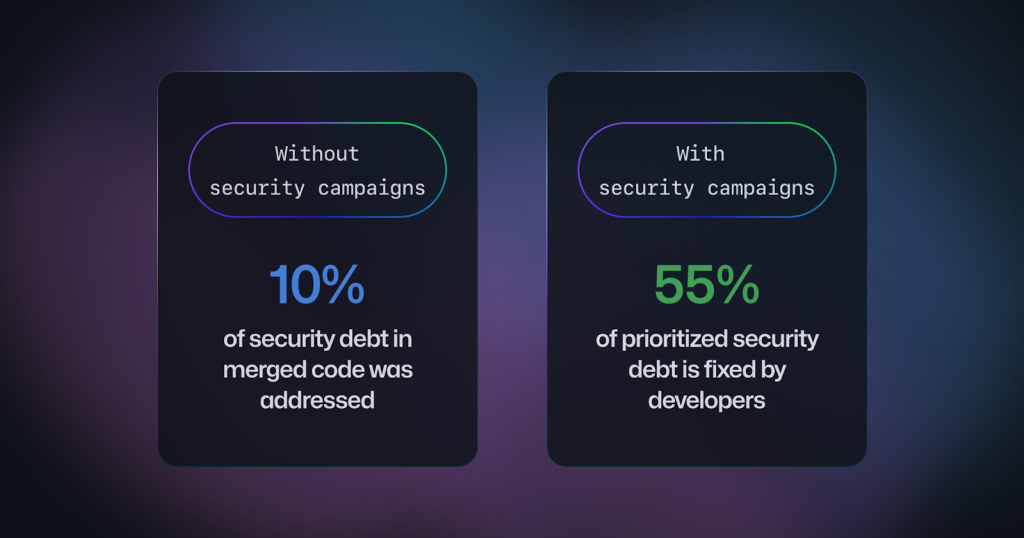
We get it: you’d rather spend your time shipping features than chasing security alerts. That’s why we’ve built tools like Copilot Autofix directly into pull requests, enabling teams to remediate security issues up to 60% faster, significantly reducing Mean Time to Remediation (MTTR) compared to manual fixes. Autofix helps you catch vulnerabilities before they ever make it into production, so you spend less time fixing bugs and more time coding. But what about the vulnerabilities already lurking in your existing code? Every unresolved security finding adds to your security debt—a growing risk you can’t afford to ignore. In fact, our data shows that teams typically address only 10% of their security debt, leaving 90% of vulnerabilities unprioritized and unresolved. Our data shows that security debt is the biggest unaddressed risk that customers face: historically, only 10% of lingering security debt in merged code gets addressed, meaning until today, 90% of risks did not get prioritized. Now, our data shows that 55% of security debt included in security campaigns is fixed. Security campaigns bridge this gap by bringing security experts and developers together, streamlining the vulnerability remediation process right within your workflow, and at scale. Using Copilot Autofix to generate code suggestions for up to 1,000 code scanning alerts at a time, security campaigns help security teams take care of triage and prioritization, while you can quickly resolve issues using Autofix—without breaking your development momentum. Security campaigns in action Since security campaigns were launched in public preview at GitHub Universe last year, we have seen organizations at all different stages of their security journey try them out. Whether they’ve been used to reduce security debt across an entire organization or to target alerts in critical repositories, security campaigns have delivered value for both developers and security teams in their efforts to tackle security debt. Security campaigns simplify life for our developers. They can easily group alerts from multiple repositories, reducing time spent on triage and prioritization while quickly remediating the most critical issues with the help of Copilot Autofix. – Jose Antonio Moreno, DevSecOps engineer, Lumen GitHub security campaigns is a game-changer for our development teams. It’s educated us about existing vulnerabilities, brought our engineers together to collaboratively tackle fixes, and significantly improved our remediation time. – GP, security engineer, Alchemy In a sample of early customers, we found that 55% of alerts included in security campaigns were fixed, compared to around only 10% of security debt outside security campaigns, a 5.5x improvement. This shows that when alerts are included in a campaign, you can spend more time fixing the security debt, since the prioritization of which alerts to work on has already been taken care of by your security team. In fact, our data shows that alerts in campaigns get roughly twice as much developer engagement than those outside of campaigns. Security campaigns: how they work Triaging and prioritizing security problems already present in a codebase has to happen as part of the normal software development lifecycle. Unfortunately, when product teams are under pressure to ship faster, they often don’t have enough time to dig through their security alerts to decide which ones to address first. Luckily, in most software organizations, there is already a group of people who are experts in understanding these risks: the security team. With security campaigns, we play to the different strengths of developers and security teams in a new collaborative approach to addressing security debt. Security teams prioritize which risks need to be addressed across their repositories in a security campaign. Security campaigns come with predefined templates based on commonly used themes (such as the MITRE top 10 known exploited vulnerabilities) to help scope the campaign. GitHub’s security overview also provides statistics and metrics summarizing the overall risk landscape. Once the campaign alerts are selected and a timeline is specified, the campaign is communicated to any developers who are impacted by the campaign. The work defined in a campaign is brought to developers where they work on GitHub, so that it can be planned and managed just like any other feature work. Copilot Autofix immediately starts suggesting automatic remediations for all alerts in a campaign, as well as custom help text to explain the problems. Fixing an alert becomes as easy as reviewing a diff and creating a pull request. Crucially, security campaigns are not just lists of alerts. Alongside the alerts, campaigns are complemented with notifications to ensure that developers are aware of which alert they (or their team) are responsible for. To foster stronger collaboration between developers and the security team, campaigns also have an appointed manager to oversee the campaign progress and be on hand to assist developers. And of course: security managers have an organization-level view on GitHub to track progress and collaborate with developers as needed. Starting today, you can also access several new features to plan and manage campaign-related work more effectively: Draft security campaigns: security managers can now iterate on the scope of campaigns and save them as draft campaigns before making them available to developers. With draft campaigns, security managers can ensure that the highest priority alerts are included before the work goes live. Automated GitHub Issues: security managers can optionally create GitHub Issues in repositories that have alerts included in the campaign. These issues are created and updated automatically as the campaign progresses and can be used by teams to track, manage and discuss campaign-related work. Organization-level security campaign statistics: security managers can now view aggregated statistics showing the progress across all currently-active and past campaigns. For more information about using security campaigns, see About security campaigns in the GitHub documentation. Try security campaigns today If your organization is already using GitHub Advanced Security or GitHub Code Security you can take advantage of security campaigns today. If you want to learn more about how GitHub Code Security can help secure your code at scale, then request a demo. The post Found means fixed: Reduce security debt at scale with GitHub security campaigns appeared first

tech blog

Vibe coding with GitHub Copilot: Agent mode and MCP support rolling out to all VS Code users

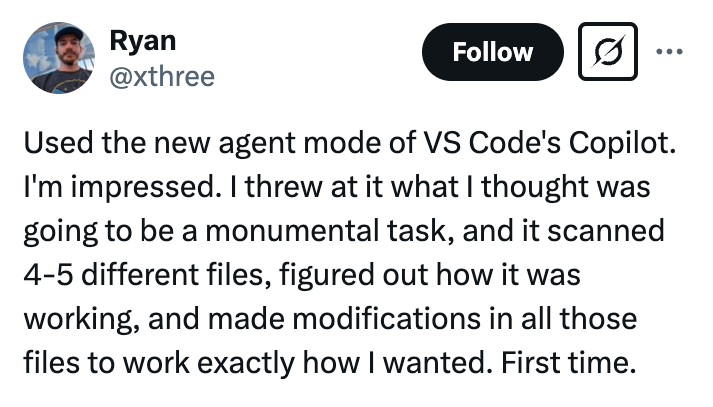
Allow us to reintroduce ourselves: GitHub Copilot is getting a whole lot more agentic with increased context of your tools and services, powered by the world’s leading models, starting today. 👏 We are excited to roll out agent mode in Visual Studio Code to all users, now complete with MCP support that unlocks access to any context or capabilities you want. What’s more, we are thrilled to release a new open source and local GitHub MCP server, giving you the ability to add GitHub functionality to any LLM tool that supports MCP. 🤖 In keeping with our commitment to offer multi-model choice, we’re making Anthropic Claude 3.5, 3.7 Sonnet, 3.7 Sonnet Thinking, Google Gemini 2.0 Flash, and OpenAI o3-mini generally available via premium requests, included in all paid Copilot tiers. These premium requests are in addition to unlimited requests for agent mode, context-driven chat, and code completions that all paid plans have when using our base model (👀 more below). With the new Pro+ tier, individual developers get the most out of the latest models with Copilot. The agent awakening doesn’t stop there. We are also announcing the general availability of the Copilot code review agent, which in just over a month in preview has been used by over 1 million developers on GitHub. Plus, the general availability of next edit suggestions so you can tab tab tab your way to coding glory. 🏆 Agent mode in VS Code Agent mode is progressively rolling out to VS Code users in stable, as we aim for full availability to all users in the coming weeks. You can also manually enable it now. Compared to chat or multi-file edits, which allow you to propose code changes across multiple files in your workspace, agent mode is fundamentally capable of taking action to translate your ideas into code. With simple prompts, agent mode takes Copilot beyond answering a question, instead completing all necessary subtasks across automatically identified or generated files to ensure your primary goal is achieved. Agent mode can suggest terminal commands or tool calls and ask you to execute them. It also analyzes run-time errors with self-healing capabilities. Since the launch to VS Code Insiders in February, developers have been using agent mode for a variety of tasks: from autofixing code gen errors, to building webapps, to yeeting commits – whatever that means. 🙂 https://x.com/xthree/status/1902748372022264142 Agent mode is powered by your choice of Claude 3.5 and 3.7 Sonnet, Google Gemini 2.0 Flash, and OpenAI GPT-4o. Currently, agent mode achieves a pass rate of 56.0% on SWE-bench Verified with Claude 3.7 Sonnet. We anticipate agent mode to grow more capable as chain of thought reasoning models continue to advance. To activate agent mode, upgrade to the latest VS Code and enable in settings. Model Context Protocol (MCP) is now available in public preview Developers spend their days conducting a wide array of tasks to get the job done, from research, to navigating telemetry, to infrastructure management, to coding and debugging. And they use many tools for this, the so-called engineering stack. MCP allows you to equip agent mode with the context and capabilities it needs to help you, like a USB port for intelligence. When you enter a chat prompt in agent mode within VS Code, the model can use different tools to handle tasks like understanding database schema or querying the web. This setup allows for more interactive and context-sensitive coding support. For example, with a prompt to “Update my GitHub profile to include the title of the PR that was assigned to me yesterday,” agent mode would take that request, combined with the list of all available MCP tools, and ask an LLM what to do next. Over time, the agent would continue calling tools iteratively, until the task is complete. Already, GitHub is home to a massive and growing MCP ecosystem that you can discover and use today. Here is a great repository that acts as a community inventory with some of the best MCP servers to use. The GitHub local MCP server equips agent mode with compelling capabilities such as searching across repositories and code, managing issues and creating PRs – turning agent mode into a powerful user of the GitHub platform. Get started by setting up local and remote MCP servers and using tools with agent mode in Visual Studio Code. To get started with the GitHub local MCP server, visit the repository, now supported natively in VS Code. Premium model requests Since GitHub Universe, we introduced a number of new models for chat, multi-file edits, and now agent mode. With the general availability of these models, we are introducing a new premium request type. Premium requests are in addition to the unlimited requests for agent mode, context-driven chat, and code completions in all paid plans for our base model (currently: OpenAI GPT-4o). Customers with Copilot Pro will receive 300 monthly premium requests, beginning on May 5, 2025. Customers with Copilot Business and Copilot Enterprise will receive 300 and 1000 monthly premium requests respectively, starting between May 12 and May 19, 2025. Until then, use of these premium models is unlimited. We are also introducing a new Pro+ plan for individuals with 1500 monthly premium requests and access to the best models, like GPT-4.5, for $39 per month. Copilot paid users1 will also have the ability to pay-as-you-go for additional premium request usage. Individuals and organizations can choose to opt-in to use additional requests beyond their included amount, in addition to setting spending limits on requests to control costs with ease. GitHub Copilot Business and Enterprise administrators can manage requests via their Copilot Admin Billing Settings. Additional premium requests start at $0.04 per request. Each premium model will consume a specific number of premium requests, allowing you to use a more powerful or efficient model when you need it, all while you have continued, unlimited access to Copilot’s base model. You can learn more about how seat-based premium requests will work in our documentation. Happy 50th birthday,

tech blog

Your AI Companion

As I look back on the incredible impact that Microsoft has had over its now 50 years of relentless innovation, I’m inspired by the simplicity and power of Bill Gates’ bold ambition all those years ago: to put a PC on every desk and in every home. At Microsoft AI we’re driven by that same spirit. Today, we’re creating Copilot, an AI companion for everyone. What does this mean? What does it look like? What does it do? Truth is, there’s no single answer that captures it. Because it’s going to look and feel a little different for each of us. An AI companion is completely personal, built around individual needs, values and expectations. That’s why ultimately, there will be as many different Copilots as there are people using them. Today, we are embarking on the journey to take Copilot from an AI companion to your AI companion. With your permission, Copilot will now remember what you talk about, so it learns your likes and dislikes and details about your life: the name of your dog, that tricky project at work, what keeps you motivated to stick to your new workout routine. Copilot will understand you in the context of your life, and show up, on your terms, in the right way at the right time. This is far richer, more dynamic, supportive and emergent than any software we’ve seen before. It’s a new kind of relationship with technology, a new era. Of course, we’re also focusing on the fundamentals: engaging personality, incredible search capability, custom-made answer cards, bespoke podcasts. With Deep Research you have a world-class researcher working alongside you. With Shopping, a trusted, impartial partner, looking out for the best products and deals. With Actions, let Copilot shoulder some of the burden, from scoring the gig tickets to sorting the ride home. Our new Windows app means your computer finally works on your behalf. And now with Copilot Vision on Mobile, Copilot can see what you see, responding in real time to create a shared understanding of your world. But the important point is that throughout Copilot is more than an AI, it’s yours. It remembers not just what you said, but who you are. Copilot helps you stay organized, think clearly, learn more intuitively. It’s there when you need a quick factual answer, a long exploratory debate or when you fancy just downloading after a hard day. Every day we hear the most incredible stories about the many and varied ways people enjoy Copilot. So, as we continue on our journey to create a Copilot for everyone, we’re focusing on one critical goal: to make it truly yours. Each will have its own unique style and blend of attributes that distinctly suit each and every one of us. All the while, we’ll stick to our core promise. You remain in control, you are the pilot and you make the calls and set the boundaries. We can’t wait for you to discover your personal Copilot. Mustafa Suleyman, Executive Vice President and CEO of Microsoft AI __________ Today, we announced a set of new updates that represent the next chapter in our vision to deliver a true AI companion — helping make AI more useful by making it more personal. Table of contents Memory Actions Copilot Vision Pages Podcasts Shopping Deep Research Copilot Search YouTube Video Click here to load media Memory and Personalization Memory is essential for creating a true AI companion. With Memory, Copilot can remember important details: your favorite food, the types of films you enjoy and your nephew’s birthday and his interests. As you interact with Copilot, it notes your preferences, building a richer user profile and offering tailored solutions, proactive suggestions and timely reminders. Copilot prioritizes security and privacy, giving you control through the user dashboard and the option to choose which types of information it remembers about you or to opt out entirely. You remain in control. YouTube Video Click here to load media As we explore the full range of what true personalization means, we are experimenting with new ways for you to interact with your Copilot. For example, what if your Copilot had an appearance and you could shape and form it to be whatever you want? We’re early in this thinking but soon you’ll have the ability to personalize Copilot and interact with your AI companion in a fun way while it offers advice and support when you want it. You can strike up a conversation with Copilot and now have an entertaining appearance that’s unique to you. YouTube Video Click here to load media Actions Another key advancement that makes Copilot a helpful AI companion is its ability to now take action on your behalf. With Actions, Copilot can now partner with you to complete tasks behind the scenes. Use simple chat prompts to ask Copilot to book event tickets, grab dinner reservations or send a thoughtful gift to a friend and it will check that task off your list. Copilot Actions will work with most websites across the web, and we’re particularly excited to highlight our launch partners: 1-800-Flowers.com, Booking.com, Expedia, Kayak, OpenTable, Priceline, Tripadvisor, Skyscanner, Viator and Vrbo. YouTube Video Click here to load media Copilot Vision We introduced Vision in Copilot for the web late last year and now we’re bringing it to mobile and Windows. Copilot and your phone’s camera now enable an interactive experience with the real world, in real time. From the Copilot app on your phone, you can look around at your surroundings and request information, guidance or ideas. It can analyze both real-time video from the camera and photos stored on your camera roll. For example, use Vision to improve plant health by asking it to examine your plants and suggest actions, or to scan your office and provide tips on decoration. Vision on Mobile is available today in the Copilot app for iOS and Android. The new native Windows app will allow you to call upon Copilot while working

tech blog

Celebrating Microsoft’s 50 years

Satya Nadella, Chairman and CEO, shared the following remarks at Microsoft’s 50th anniversary today. It’s so wonderful to be here with all of you celebrating 50 years of Microsoft. And it’s especially exciting to be doing it at a time like this. For me, though, it starts with Bill [Gates] and Steve [Ballmer], who are both here with us today. I want to say a very big thank you to the two of you, and to Paul [Allen], and what you’ve meant to me personally and your vision that you had building this extraordinary company of ours that I’ve had the privilege to be part of. Thank you for your vision, your leadership, your passion, and for building the Microsoft that we know today. A company that has truly changed the world. Fifty years ago, Bill and Paul started Microsoft with a simple but powerful idea: to build technology so people everywhere could build more technology. The very first product Microsoft built was the Basic interpreter for the Altair, giving people the power to create software, jumpstarting the PC revolution, and creating an entirely new sector for our economy. YouTube Video Click here to load media But today, it’s not just about the past 50 years, it’s about the next 50. If there’s one thing that I have learned during my time at Microsoft, it’s not about longevity, but relevance. Our future will not be defined by what we have built, but what we empower others to build. This is why we are leading this new wave of AI innovation and more importantly, democratizing it, just like we did with the PC. From there we’ve gone to chat, to multi file edits, and now to agents. More than 150 million developers in nearly every country around the world are using GitHub. So, I thought to myself, what if I could take that power and rebuild Microsoft’s very first product? And so, I tried it. YouTube Video Click here to load media You really know you’re on to something. Intelligence has been commoditized when CEOs can start vibe coding. But in all seriousness, this is not just a cool party trick, It’s transformational. It’s empowering. It’s unleashing human ambition. And it’s happening now. In fact, I’m excited to share that the capability I just showed with Agent Mode is rolling out to all Visual Studio Code users starting today. We now have autonomous AI agents or peer programmers who can collaborate with us to anticipate our needs and help us think more creatively, and it does not stop there. We are bringing full MCP support to Agent Mode; we’re also launching Code Review Agent today to fix and fine bugs automatically; we’re also making it easier than ever before for developers to build their own agents in Azure AI Foundry. Think of it like an agent factory. It’s a production line for intelligence. Tens and thousands of organizations are using Foundry to build their own agents. And today, we’re going further. We now have a new agent framework for building multi-agent systems. But building agents is just the very beginning. We’re also building tools for all the evals, fine tuning, observability, and feedback. And you’ll also have a red teaming agent and tools to measure code vulnerabilities. All of this in support of building trustworthy AI systems. There’s much, much more to come. What started out as a developer tools company 50 years ago is now a platform company where everyone can be a developer. Our mission has not changed, it’s only expanded. Just as we have done always, we are putting the power in people’s hands so that they can build software that moves their communities, their countries forward. The same ethos is driving Copilot, not just for developers, but for every aspect of working life. Helping people do things that allow them to do more things, whether it’s building apps, doing homework, shopping, planning, and so much more. Ultimately, it all comes down to our mission to empower every person and every organization on the planet to achieve more. I’ve always thought of Microsoft as a platform and partner-first company, and this has only been possible because of our customers, our partners and developers, and our 1.6 million employees, past and present, who have connected their passion with our purpose to get us where we are today. And it’s you who will continue to build this company to have impact around the world well into the future. So, from the bottom of my heart, a big thank you to everyone who has contributed to Microsoft in getting us to this moment. I can’t wait to see what is next with Copilot and everything that we have for you. Remarks have been edited for clarity. Photo: Bill Gates, Microsoft Co-founder and Gates Foundation Chair; Steve Ballmer, former Microsoft CEO and Ballmer Group Co-founder; and Satya Nadella, Chairman and CEO of Microsoft, on stage at the anniversary event. The post Celebrating Microsoft’s 50 years appeared first on The Official Microsoft Blog. ​Satya Nadella, Chairman and CEO, shared the following remarks at Microsoft’s 50th anniversary today. It’s so wonderful to be here with all of you celebrating 50 years of Microsoft. And it’s especially exciting to be doing it at a time like this. For me, though, it starts with Bill [Gates] and Steve [Ballmer], who are… The post Celebrating Microsoft’s 50 years appeared first on The Official Microsoft Blog.  Featured, Recent News, The Official Microsoft Blog, 50th anniversary, Azure AI Foundry, Copilot, GitHub, Visual Studio Code The Official Microsoft Blog

tech blog

Transforming Urban Landscapes Through Technology

Discover how the City of Durham, NC is using AI to revolutionize city planning, safety and sustainability for its residents.   ​  ​Discover how the City of Durham, NC is using AI to revolutionize city planning, safety and sustainability for its residents. AI Solutions Blog | Dell

Scroll to Top