Localhost dangers: CORS and DNS rebinding
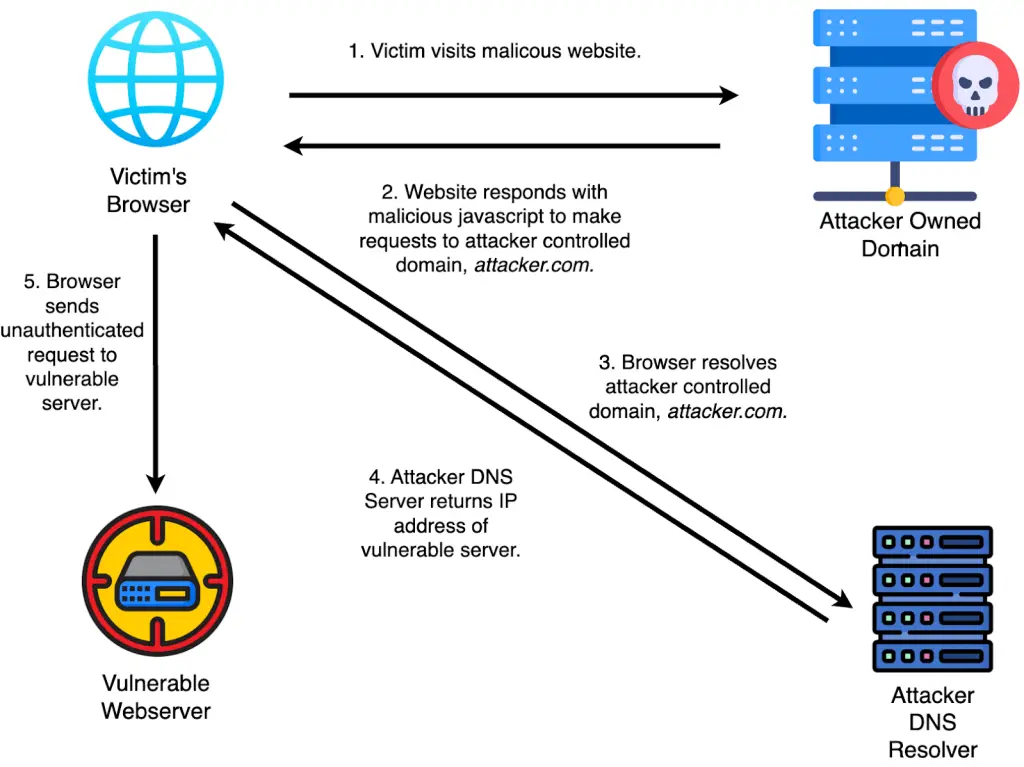
At GitHub Security Lab, one of the most common vulnerability types we find relates to the cross-origin resource sharing (CORS) mechanism. CORS allows a server to instruct a browser to permit loading resources from specified origins other than its own, such as a different domain or port. Many developers change their CORS rules because users want to connect to third party sites, such as payment or social media sites. However, developers often don’t fully understand the dangers of changing the same-origin policy, and they use unnecessarily broad rules or faulty logic to prevent users from filing further issues. In this blog post, we’ll examine some case studies of how a broad or faulty CORS policy led to dangerous vulnerabilities in open source software. We’ll also discuss DNS rebinding, an attack with similar effects to a CORS misconfiguration that’s not as well known among developers. What is CORS and how does it work? CORS is a way to allow websites to communicate with each other directly by bypassing the same-origin policy, a security measure that restricts websites from making requests to a different domain than the one that served the web page. Understanding the Access-Control-Allow-Origin and Access-Control-Allow-Credentials response headers is crucial for correct and secure CORS implementation. Access-Control-Allow-Origin is the list of origins that are allowed to make cross site requests and read the response from the webserver. If the Access-Control-Allow-Credentials header is set, the browser is also allowed to send credentials (cookies, http authentication) if the origin requests it. Some requests are considered simple requests and do not need a CORS header in order to be sent cross-site. This includes the GET, POST, and HEAD requests with content types restricted to application/x-www-form-urlencoded, multipart/form-data, and text/plain. When a third-party website needs access to account data from your website, adding a concise CORS policy is often one of the best ways to facilitate such communication. To implement CORS, developers can either manually set the Access-Control-Allow-Origin header, or they can utilize a CORS framework, such as RSCors, that will do it for them. If you choose to use a framework, make sure to read the documentation—don’t assume the framework is safe by default. For example, if you tell the CORS library you choose to reflect all origins, does it send back the response with a blanket pattern matching star (*) or a response with the actual domain name (e.g., stripe.com)? Alternatively, you can create a custom function or middleware that checks the origin to see whether or not to send the Access-Control-Allow-Origin header. The problem is, you can make some security mistakes when rolling your own code that well-known libraries usually mitigate. Common mistakes when implementing CORS For example, when comparing the origin header with the allowed list of domains, developers may use the string comparison function equivalents of startsWith, exactMatch, and endsWith functions for their language of choice. The safest function is exactMatch where the domain must match the allow list exactly. However, what if payment.stripe.com wants to make a request to our backend instead of stripe.com? To get around this, we’d have to add every subdomain to the allow list. This would inevitably cause users frustration when third-party websites change their APIs. Alternatively, we can use the endsWith function. If we want connections from Stripe, let’s just add stripe.com to the allowlist and use endsWith to validate and call it a day. Not so fast, since the domain attackerstripe.com is now also valid. We can tell the user to only add full urls to the allowlist, such as https://stripe.com, but then we have the same problem as exactMatch. We occasionally see developers using the startsWith function in order to validate domains. This also doesn’t work. If the allowlist includes https://stripe.com then we can just do https://stripe.com.attacker.com. For any origin with subdomains, we must use .stripe.com (notice the extra period) in order to ensure that we are looking at a subdomain. If we combine exactMatch for second level domains and endsWith for subdomains, we can make a secure validator for cross site requests. Lastly, there’s one edge case found in CORS: the null origin should never be added to allowed domains. The null origin can be hardcoded into the code or added by the user to the allowlist, and it’s used when requests come from a file or from a privacy-sensitive context, such as a redirect. However, it can also come from a sandboxed iframe, which an attacker can include in their website. For more practice attacking a website with null origin, check out this CORS vulnerability with trusted null origin exercise in the Portswigger Security Academy. How can attackers exploit a CORS misconfiguration? CORS issues allow an attacker to make actions on behalf of the user when a web application uses cookies (with SameSite None) or HTTP basic authentication, since the browser must send those requests with the required authentication. Fortunately for users, Chrome has defaulted cookies with no Samesite to SameSite Lax, which has made CORS misconfiguration useless in most scenarios. However, Firefox and Safari are still vulnerable to these issues using bypass techniques found by PTSecurity, whose research we highly recommend reading for knowing how someone can exploit CORS issues. What impact can a CORS misconfiguration have? CORS issues can give a user the power of an administrator of a web application, so the usefulness depends on the application. In many cases, administrators have the ability to execute scripts or binaries on the server’s host. These relaxed security restrictions allow attackers to get remote code execution (RCE) capabilities on the server host by convincing administrators to visit an attacker-owned website. CORS issues can also be chained with other vulnerabilities to increase their impact. Since an attacker now has the permissions of an administrator, they are able to access a broader range of services and activities, making it more likely they’ll find something vulnerable. Attackers often focus on vulnerabilities that affect the host system, such as arbitrary file write or RCE. Real-world examples A CORS misconfiguration allows for RCE