tech blog

Video: How to run dependency audits with GitHub Copilot

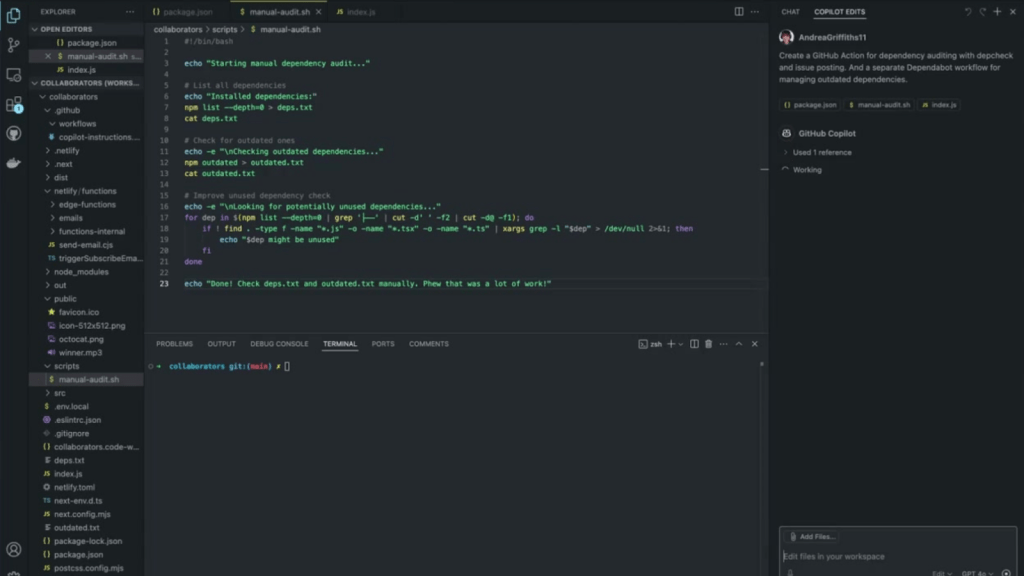
Every software project faces the inevitable challenge of dependency management. Over time, dependencies become outdated, leading to security vulnerabilities. Others go unused, needlessly bloating build times. For many development teams, addressing these issues means running manual scripts, reviewing output files, and hoping nothing falls through the cracks. I recently transformed this error-prone manual process into an automated solution using a few tools on GitHub—GitHub Copilot, GitHub Actions, and Dependabot, to be specific (just in case you’re wondering). Here’s how you can do the same! So, let’s jump in (and make sure to watch the video above, too!). The problem with manual dependency audits Most teams start with a simple approach to dependency management. This often includes a Bash script that runs periodically. Here’s what our manual script looks like: #!/bin/bash echo “Starting manual dependency audit…” # List all dependencies echo “Installed dependencies:” npm list –depth=0 > deps.txt cat deps.txt # Check for outdated ones echo -e “nChecking outdated dependencies…” npm outdated > outdated.txt cat outdated.txt # Guess at unused ones (very crude) echo -e “nLooking for potentially unused dependencies…” for dep in $(npm list –depth=0 | grep ‘├──’ | cut -d’ ‘ -f2 | cut -d@ -f1); do if ! find . -type f -name “*.js” -o -name “*.tsx” -o -name “*.ts” | xargs grep -l “$dep” > /dev/null 2>&1; then echo “$dep might be unused” fi done echo “Done! Check deps.txt and outdated.txt manually. Phew that was a lot of work!” This approach has several limitations, including: It’s manual, so someone has to remember to run it (and let’s be honest, I often forget to run these in my own codebases). The unused dependency check is crude, and often inaccurate. Results are scattered across multiple output files. It’s not integrated with workflows or CI/CD pipelines. There has to be a better way than this—right? How to simplify dependency audits on GitHub Luckily there is, in fact, a better solution than manual Bash script if you’re working on GitHub—and it starts with using a combination of our AI developer tool, GitHub Copilot, our automation and CI/CD tool. GitHub Actions, and Dependabot, our automated dependency tool. Here’s a step-by-step guide you can use to do this. Step 1: Use GitHub Copilot to create the action Agent mode takes GitHub Copilot from suggesting code to owning tasks, like transforming our bash script into a GitHub Actions workflow. Here is our prompt: “Create a GitHub Action for dependency auditing with depcheck and issue posting. And a separate Dependabot workflow for managing outdated dependencies.” Remember our original bash script? With just a prompt, I shared the context (package.json and our manual script) and asked it to create an action that uses the dependency checker tool depcheck for more accurate detection of unused dependencies. Step 2: GitHub Copilot writes the GitHub Action To implement this GitHub Action, GitHub Copilot creates the new workflow file in .github/workflows/dependency-audit.yml. Here’s the workflow file Copilot helped create: name: Dependency Audit on: schedule: – cron: ‘0 0 * * 1′ # Run weekly on Mondays workflow_dispatch: # Allow manual triggering jobs: audit: runs-on: ubuntu-latest steps: – uses: actions/checkout@v4 – name: Set up Node.js uses: actions/setup-node@v4 with: node-version: ’18’ – name: Install dependencies run: npm ci – name: Install depcheck run: npm install -g depcheck – name: Run depcheck for unused dependencies run: depcheck –json > unused-deps.json – name: Run npm audit run: npm audit –json > security-audit.json – name: Generate report run: | echo “# Dependency Audit Report $(date)” > report.md echo “## Unused Dependencies” >> report.md cat unused-deps.json | jq -r ‘.dependencies[]’ >> report.md echo “## Security Issues” >> report.md cat security-audit.json | jq ‘.metadata.vulnerabilities’ >> report.md – name: Create issue if problems found uses: peter-evans/create-issue-from-file@v4 if: ${{ success() }} with: title: Weekly Dependency Audit content-filepath: ./report.md labels: maintenance, dependencies Step 3: Enable Dependabot While our custom action focuses on finding unused dependencies, we can use Dependabot to automatically create pull requests for outdated packages. Dependabot can be configured either via a simple YAML file or automatically by turning it on from your repository settings. Here’s the YAML file that Copilot created: # .github/dependabot.yml version: 2 updates: – package-ecosystem: “npm” directory: “/” schedule: interval: “weekly” open-pull-requests-limit: 10 The result: a fully automated dependency audit With that, our dependency management is now fully automated. Let’s recap how it works: Our custom action uses depcheck to accurately identify unused dependencies. Dependabot creates pull requests for outdated packages, complete with changelogs and risk assessments. Security vulnerabilities are detected and reported weekly. Everything is documented in GitHub Issues for team visibility. This approach not only saves time but also significantly reduces the security risks and performance issues that stem from poorly managed dependencies. By combining the AI capabilities of GitHub Copilot with GitHub Actions and Dependabot, we’ve turned a tedious manual task into an automated, integrated solution that keeps our codebase lean and secure. And I’ll take those time savings to do something more interesting, like unraveling the mystery of those weird goats in the TV show Severance. Or who knows, maybe I’ll finally figure out what macrodata refinement even means in that show (does anyone have any idea yet? Season two is killing me). Try GitHub Copilot free and activate DependabotLearn more about GitHub Copilot for Business or start your free trial of GitHub Enterprise today. The post Video: How to run dependency audits with GitHub Copilot appeared first on The GitHub Blog.
tech blog

GitHub for Beginners: Essential features of GitHub Copilot

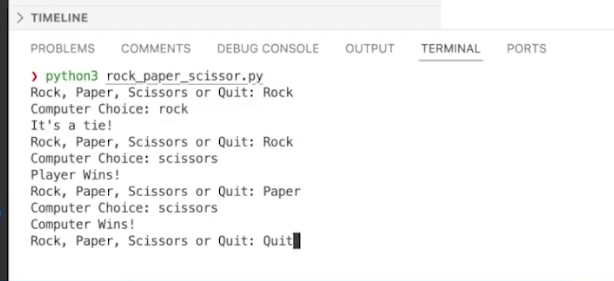
Welcome back to our second GitHub for Beginners series, where we are diving into the world of GitHub Copilot. In our previous episode, we introduced you to GitHub Copilot and gave you some guidance on getting started. Hopefully you’ve had a chance to give it a try! Today we’re going to be looking at some of the essential features of Copilot, and provide you with tips on how to make the most out of your AI coding assistant. For the demos in this series, we’re using GitHub Copilot in Visual Studio Code. Copilot is available in other IDEs, but the available functionality may vary depending on your environment. What is GitHub Copilot? First, let’s go over a quick refresher. GitHub Copilot is an AI pair programmer that helps you write code. It is a generative AI, which means that it is capable of creating new content based on what it has learned. This also means that if you are following along through any demos, Copilot might offer different solutions in response to prompts. This is expected. To use Copilot, you must have a GitHub account and a Copilot license. You can get started with a free license by visiting this link. Once you have access, you need to install the extension in your editor, authenticate it, and you’ll be good to go. For more introductory details, check out our first blog in the series. Now let’s take a look at some of the most essential features. Code completion Let’s say you wanted to create a rock, paper, scissors game in Python. First, create a new file called rock_paper_scissor.py. At the top of the file, add the following comment: Create a Rock Paper Scissors game where the player inputs their choice and plays against a computer that randomly selects its move, with the game showing who won each round. Add a score counter that tracks player and computer wins, and allow the game to continue until the player types ‘quit’. Press the Enter key a couple of times. You will notice some gray, italicized text appearing after your cursor. This is called ghost text, and is the suggestion provided from GitHub Copilot. You can press Tab to accept the suggestion. Continue accepting lines until the suggestion defines a function (that is, starts with the def keyword). https://github.blog/wp-content/uploads/2025/03/01-ghost-text.mp4#t=0.001 When you press the Enter key after the function definition, you’ll see ghost text defining the main function. Hover over the ghost text with your cursor to see different menu options available to you. You can accept a single word, tab through a few completions, or accept the current suggestion. You can also click on the three dots and select “Open Completions Panel.” https://github.blog/wp-content/uploads/2025/03/02-completions-panel.mp4#t=0.001 The Completions panel shows a list of the many ways this code could be implemented. Scroll through the options and choose the suggestion that you want to use. Once you’ve decided on a suggestion, click the associated “Accept suggestion” button. This populates the code into your file. Finally, add a line to invoke the function. Remember that because Copilot is a generative AI, it will not always provide the same suggestions, even with the same prompt! After adding the code, open your terminal and enter python rock_paper_scissor.py to play the game. Try it out as long as you like and enter quit when you’ve decided you’re done. Congratulations! You’ve just made a game with GitHub Copilot! Inline chat Now that we have the base for our game, we want to improve it, and we’re going to use the inline chat feature of GitHub Copilot to accomplish this. In our demo, we had the following line: player_choice = input(‘Rock, Paper, Scissors or Quit: ‘).lower() However, we want players to have a little more flexibility. By highlighting this line of code and pressing either Ctrl + I or Command + I, we open up Copilot Inline Chat where we can enter a prompt. Let’s say we give Copilot this prompt: allow the user to enter r for rock, p for paper, and s for scissors Before sending this prompt to Copilot, notice the dropdown menu at the end of the prompt window. This dropdown enables you to choose which model you’d like to use to respond to the prompt. Copilot Chat uses different models, and new ones are being continuously added. After selecting your model, press enter, and watch as Copilot updates the code. Once the code is updated, you have the option to accept or discard the suggested changes. If you accept the changes, try running the game again in your terminal, and observe that now you can use single letters to make your choice. The inline chat feature is really good at helping you apply quick fixes to your code. If you want to work at a deeper level, you can use the full Copilot Chat experience for that. Copilot Chat GitHub Copilot Chat can help you with code explanations, building out full minimum viable products (MVPs), writing tests, fixing errors in your terminals, and much more. To showcase the capabilities of Copilot Chat, we’re going to use it to create a graphical user interface (GUI) for our rock, paper, scissors game. First, click the chat icon in the left-hand bar of VS Code to open up the chat window. Enter the following prompt into the box provided: Create a simple GUI using a library like Tkinter for the game Note that as long as you keep your rock_paper_scissor.py file open, it will be listed at the bottom of the chat panel as the current file. This is known as the context, and it lets Copilot Chat know which game you are talking about. You could disable this by clicking the Close File icon shown after “Current file”. However, in this case, you want to make sure that Copilot Chat has the context of the correct file. The best practice is to let Copilot have the context of your currently-open file to generate relevant code. Just like with the

tech blog

Highlights from Git 2.49

The open source Git project just released Git 2.49 with features and bug fixes from over 89 contributors, 24 of them new. We last caught up with you on the latest in Git back when 2.48 was released. To celebrate this most recent release, here is GitHub’s look at some of the most interesting features and changes introduced since last time. Faster packing with name-hash v2 Many times over this series of blog posts, we have talked about Git’s object storage model, where objects can be written individually (known as “loose” objects), or grouped together in packfiles. Git uses packfiles in a wide variety of functions, including local storage (when you repack or GC your repository), as well as when sending data to or from another Git repository (like fetching, cloning, or pushing). Storing objects together in packfiles has a couple of benefits over storing them individually as loose. One obvious benefit is that object lookups can be performed much more quickly in pack storage. When looking up a loose object, Git has to make multiple system calls to find the object you’re looking for, open it, read it, and close it. These system calls can be made faster using the operating system’s block cache, but because objects are looked up by a SHA-1 (or SHA-256) of their contents, this pseudo-random access isn’t very cache-efficient. But most interesting to our discussion is that since loose objects are stored individually, we can only compress their contents in isolation, and can’t store objects as deltas of other similar objects that already exist in your repository. For example, say you’re making a series of small changes to a large blob in your repository. When those objects are initially written, they are each stored individually and zlib compressed. But if the majority of the file’s content remains unchanged among edit pairs, Git can further compress these objects by storing successive versions as deltas of earlier ones. Roughly speaking, this allows Git to store the changes made to an object (relative to some other object) instead of multiple copies of nearly identical blobs. But how does Git figure out which pairs of objects are good candidates to store as delta-base pairs? One useful proxy is to compare objects that appear at similar paths. Git does this today by computing what it calls a “name hash”, which is effectively a sortable numeric hash that weights more heavily towards the final 16 non-whitespace characters in a filepath (source). This function comes from Linus all the way back in 2006, and excels at grouping functions with similar extensions (all ending in .c, .h, etc.), or files that were moved from one directory to another (a/foo.txt to b/foo.txt). But the existing name-hash implementation can lead to poor compression when there are many files that have the same basename but very different contents, like having many CHANGELOG.md files for different subsystems stored together in your repository. Git 2.49 introduces a new variant of the hash function that takes more of the directory structure into account when computing its hash. Among other changes, each layer of the directory hierarchy gets its own hash, which is downshifted and then XORed into the overall hash. This creates a hash function which is more sensitive to the whole path, not just the final 16 characters. This can lead to significant improvements both in packing performance, but also in the resulting pack’s overall size. For instance, using the new hash function was able to improve the time it took to repack microsoft/fluentui from ~96 seconds to ~34 seconds, and slimming down the resulting pack’s size from 439 MiB to just 160 MiB (source). While this feature isn’t (yet) compatible with Git’s reachability bitmaps feature, you can try it out for yourself using either git repack’s or git pack-objects’s new –name-hash-version flag via the latest release. [source] Backfill historical blobs in partial clones Have you ever been working in a partial clone and gotten this unfriendly output? $ git blame README.md remote: Enumerating objects: 1, done. remote: Counting objects: 100% (1/1), done. remote: Total 1 (delta 0), reused 0 (delta 0), pack-reused 0 (from 0) Receiving objects: 100% (1/1), 1.64 KiB | 8.10 MiB/s, done. remote: Enumerating objects: 1, done. remote: Counting objects: 100% (1/1), done. remote: Total 1 (delta 0), reused 0 (delta 0), pack-reused 0 (from 0) Receiving objects: 100% (1/1), 1.64 KiB | 7.30 MiB/s, done. […] What happened here? To understand the answer to that question, let’s work through an example scenario: Suppose that you are working in a partial clone that you cloned with –filter=blob:none. In this case, your repository is going to have all of its trees, commit, and annotated tag objects, but only the set of blobs which are immediately reachable from HEAD. Put otherwise, your local clone only has the set of blobs it needs to populate a full checkout at the latest revision, and loading any historical blobs will fault in any missing objects from wherever you cloned your repository. In the above example, we asked for a blame of the file at path README.md. In order to construct that blame, however, we need to see every historical version of the file in order to compute the diff at each layer to figure out whether or not a revision modified a given line. But here we see Git loading in each historical version of the object one by one, leading to bloated storage and poor performance. Git 2.49 introduces a new tool, git backfill, which can fault in any missing historical blobs from a –filter=blob:none clone in a small number of batches. These requests use the new path-walk API (also introduced in Git 2.49) to group together objects that appear at the same path, resulting in much better delta compression in the packfile(s) sent back from the server. Since these requests are sent in batches instead of one-by-one, we can easily backfill all missing blobs in only a few packs instead of one pack per blob.

tech blog

How GitHub engineers learn new codebases

No matter where you are in your coding career, you will likely come across a new codebase or problem domain that is completely unfamiliar to you. Because codebases can be filled with many layers of design patterns, bugfixes, and temporary workarounds, learning a new one can be a time-consuming and frustrating process. Last year, I moved to a new team at GitHub. During my transition, I collected insights from colleagues about how they approach learning new technical spaces. A fascinating collection of strategies emerged, and I’m excited to share them! Below are the most effective methods I gathered, organized by approach. Whether you’re a seasoned engineer switching teams or a newcomer to the field, these strategies can help make your next codebase onboarding a little bit easier. Hands-on code exploration One of the best ways to get started is working directly with the code itself: Start with “Good First Issues”: Begin your journey by tackling smaller, well-defined tasks. These issues are often carefully selected by the team that owns the codebase to help newcomers understand key components without becoming overwhelmed. They provide natural entry points into the system, while delivering immediate value to the team. Learn with GitHub Copilot: Open up your Copilot Chat window next to the codebase as you’re exploring it. You can ask Copilot Chat your questions, and then use the /explain functionality for things that are difficult to understand. Learn more about using Copilot Chat in your development environment here. Here are some example queries that I have used with GitHub Copilot to enhance my understanding of a codebase: What will this function return if I give it X? Summarize what this method is made to do What are some potential gaps in the existing tests for this method? Analyze telemetry and metrics: Modern applications generate vast amounts of performance and usage data. Study these metrics to understand how the system behaves in production, what patterns emerge during peak usage, and which components require the most attention. This data-driven approach provides invaluable context about the application’s real-world behavior. Explore through testing: Make deliberate modifications to the code and observe their effects. Write new tests to verify your understanding, and intentionally break things (in development) to see how the system fails. This helps build an intuitive understanding of the application’s boundaries and failure modes. Collaborative learning Knowledge sharing is often the fastest path to understanding: Pair program: Don’t just observe—actively participate in pairing sessions with experienced team members. Ask questions about their workflow, note which files they frequently access, and get to know their debugging strategies. Even if you’re mainly watching, you’ll absorb valuable context about how different pieces fit together. Understand the “why”: When assigned tasks, dig deep into the motivation behind them. Understanding the business context and technical rationale helps you make better architectural decisions and aids in future problem solving. Don’t be afraid to ask seemingly basic questions. They often lead to important insights. Monitor team communications: Stay active in team chat channels and incident response discussions. Pay special attention to production alerts and how the team responds to them. This exposure helps you understand common failure patterns and builds muscle memory for handling incidents. Documentation and knowledge management Writing and organizing information helps solidify understanding: Create personal documentation: Maintain a living document of your discoveries, questions, and insights. Document important code paths, architectural decisions, and system interfaces as you encounter them. This will become an invaluable reference and help identify gaps in your understanding. Build technical maps: Create diagrams of system architecture, data flows, and entity relationships. Start with high-level “black boxes” and gradually fill in the details as your understanding grows. Visual representations often reveal patterns and relationships that aren’t obvious in the code. One tool that I use for this is Figma. I start with adding the basic blocks that I understand about a system and how they interact, and then continuously zoom in and out on different parts of the system to add to the map as I learn. Maintain a command cheat sheet: Keep track of useful commands, scripts, and workflows you discover. Include context about when and why to use them. This becomes especially valuable when working with complex build systems or deployment pipelines. Here’s an example of a command cheat sheet that I often refer to for markdown syntax. Gather information on the domain: One key to managing your knowledge of a codebase is to have a deep understanding of the domain. This can be gained from product owners, customer insights, or from industry best practices if the domain is generalizable enough. Deeply understanding the domain and what customers in that space find the most critical are key to learning a new codebase. Learn by teaching One great way to verify your understanding of a topic is the ability to accurately explain it to others. If you created personal documentation, as recommended in the previous section, you can formalize it into guides and official documentation for future new members of your team: Write internal guides: Once you learn something new, document it for the next person. This forces you to organize what you’ve learned and often reveals areas where your understanding isn’t as complete as you thought. Contribute to official documentation: When you find gaps in the existing documentation, take the initiative to improve it. This not only helps future team members but also validates your understanding with current experts. Learn more about writing documentation for your GitHub repository from our GitHub-flavored markdown guide. Regularly reflect on your learning by answering these key questions: Can you describe the system in a few concise sentences? How does it interact with adjacent systems? What surprised you most during the learning process? What aspects remain unclear? After all of these recommendations, I’ve found that my favorite way to learn a new codebase is through documenting it, and turning that documentation into something that others can use in the future. Writing things down forces me to structure my thoughts and

tech blog

Sign in as anyone: Bypassing SAML SSO authentication with parser differentials

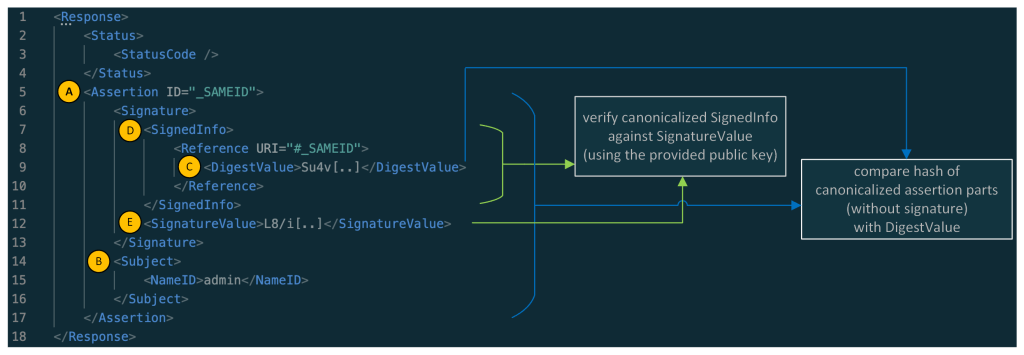
Critical authentication bypass vulnerabilities (CVE-2025-25291 + CVE-2025-25292) were discovered in ruby-saml up to version 1.17.0. Attackers who are in possession of a single valid signature that was created with the key used to validate SAML responses or assertions of the targeted organization can use it to construct SAML assertions themselves and are in turn able to log in as any user. In other words, it could be used for an account takeover attack. Users of ruby-saml should update to version 1.18.0. References to libraries making use of ruby-saml (such as omniauth-saml) need also be updated to a version that reference a fixed version of ruby-saml. In this blog post, we detail newly discovered authentication bypass vulnerabilities in the ruby-saml library used for single sign-on (SSO) via SAML on the service provider (application) side. GitHub doesn’t currently use ruby-saml for authentication, but began evaluating the use of the library with the intention of using an open source library for SAML authentication once more. This library is, however, used in other popular projects and products. We discovered an exploitable instance of this vulnerability in GitLab, and have notified their security team so they can take necessary actions to protect their users against potential attacks. GitHub previously used the ruby-saml library up to 2014, but moved to our own SAML implementation due to missing features in ruby-saml at that time. Following bug bounty reports around vulnerabilities in our own implementation (such as CVE-2024-9487, related to encrypted assertions), GitHub recently decided to explore the use of ruby-saml again. Then in October 2024, a blockbuster vulnerability dropped: an authentication bypass in ruby-saml (CVE-2024-45409) by ahacker1. With tangible evidence of exploitable attack surface, GitHub’s switch to ruby-saml had to be evaluated more thoroughly now. As such, GitHub started a private bug bounty engagement to evaluate the security of the ruby-saml library. We gave selected bug bounty researchers access to GitHub test environments using ruby-saml for SAML authentication. In tandem, the GitHub Security Lab also reviewed the attack surface of the ruby-saml library. As is not uncommon when multiple researchers are looking at the same code, both ahacker1, a participant in the GitHub bug bounty program, and I noticed the same thing during code review: ruby-saml was using two different XML parsers during the code path of signature verification. Namely, REXML and Nokogiri. While REXML is an XML parser implemented in pure Ruby, Nokogiri provides an easy-to-use wrapper API around different libraries like libxml2, libgumbo and Xerces (used for JRuby). Nokogiri supports parsing of XML and HTML. It looks like Nokogiri was added to ruby-saml to support canonicalization and potentially other things REXML didn’t support at that time. We both inspected the same code path in the validate_signature of xml_security.rb and found that the signature element to be verified is first read via REXML, and then also with Nokogiri’s XML parser. So, if REXML and Nokogiri could be tricked into retrieving different signature elements for the same XPath query it might be possible to trick ruby-saml into verifying the wrong signature. It looked like there could be a potential authentication bypass due to a parser differential! The reality was actually more complicated than this. Parser differentials occur when different parsers interpret the same input in different ways. There are other documented samples of parser differentials while parsing XML that led to a security impact: “XMPP Stanza Smuggling or How I Hacked Zoom” by Ivan Fratric “Psychic paper” by Siguza But parser differentials are far more common than that and in no way limited to file formats. Other kinds of vulnerabilities often have a parser differential at their core. For example, how URLs are parsed in certain server-side request forgery (SSRF) vulnerabilities or how HTTP headers are interpreted in request smuggling attacks. The LangSec paper “A Survey of Parser Differential Anti-Patterns” by Ali and Smith categorizes real world parser differentials with regards to their root causes. Roughly speaking, four stages were involved in the discovery of this authentication bypass: Discovering that two different XML parsers are used during code review. Establishing if and how a parser differential could be exploited. Finding an actual parser differential for the parsers in use. Leveraging the parser differential to create a full-blown exploit. To prove the security impact of this vulnerability, it was necessary to complete all four stages and create a full-blown authentication bypass exploit. Quick recap: how SAML responses are validated Security assertion markup language (SAML) responses are used to transport information about a signed-in user from the identity provider (IdP) to the service provider (SP) in XML format. Often the only important information transported is a username or an email address. When the HTTP POST binding is used, the SAML response travels from the IdP to the SP via the browser of the end user. This makes it obvious why there has to be some sort of signature verification in play to prevent the user from tampering with the message. Let’s have a quick look at what a simplified SAML response looks like: Note: in the response above the XML namespaces were removed for better readability. As you might have noticed: the main part of a simple SAML response is its assertion element (A), whereas the main information contained in the assertion is the information contained in the Subject element (B) (here the NameID containing the username: admin). A real assertion typically contains more information (e.g. NotBefore and NotOnOrAfter dates as part of a Conditions element.) Normally, the Assertion (A) (without the whole Signature part) is canonicalized and then compared against the DigestValue (C) and the SignedInfo (D) is canonicalized and verified against the SignatureValue (E). In this sample, the assertion of the SAML response is signed, and in other cases the whole SAML response is signed. Searching for parser differentials We learned that ruby-saml used two different XML parsers (REXML and Nokogiri) for validating the SAML response. Now let’s have a look at the verification of the signature and the digest comparison. The focus of the following

Uncategorized

Microsoft introduces new adapted AI models for industry

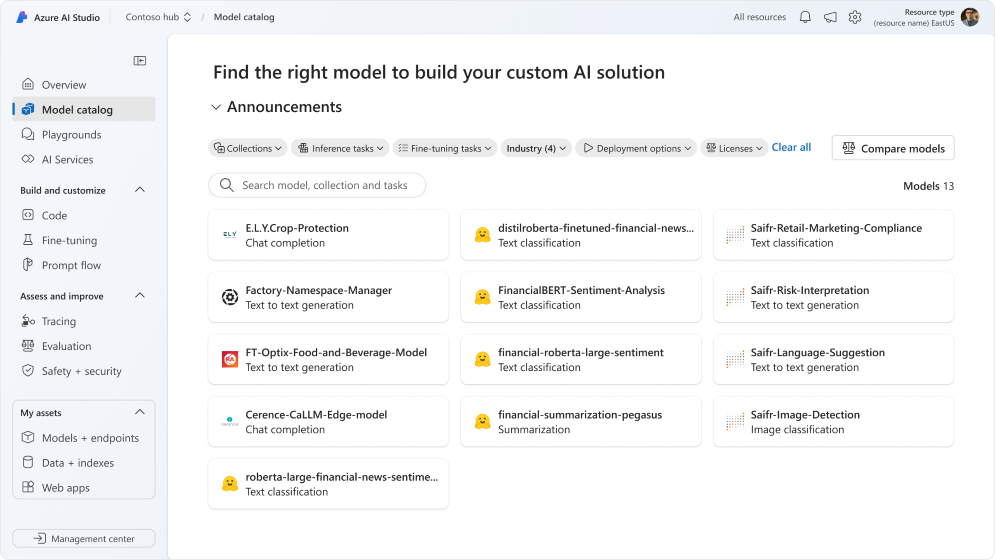
Across every industry, AI is creating a fundamental shift in what’s possible, enabling new use cases and driving business outcomes. While organizations around the world recognize the value and potential of AI, for AI to be truly effective it must be tailored to specific industry needs. Today, we’re announcing adapted AI models, expanding our industry capabilities and enabling organizations to address their unique needs more accurately and effectively. In collaboration with industry partner experts like Bayer, Cerence, Rockwell Automation, Saifr, Siemens Digital Industries Software, Sight Machine and more, we’re making these fine-tuned models, pre-trained using industry-specific data, available to address customers’ top use cases. Underpinning these adapted AI models is the Microsoft Cloud, our platform for industry innovation. By integrating the Microsoft Cloud with our industry-specific capabilities and a robust ecosystem of partners, we provide a secure approach to advancing innovation across industries. This collaboration allows us to create extensive scenarios for customers globally, with embedded AI capabilities — from industry data solutions in Microsoft Fabric to AI agents in Microsoft Copilot Studio to AI models in Azure AI Studio — that enable industries to realize their full potential. Introducing adapted AI models for industry We’re pleased to introduce these new partner-enabled models from leading organizations that are leveraging the power of Microsoft’s Phi family of small language models (SLMs). These models will be available through the Azure AI model catalog, where customers can access a wide range of AI models to build custom AI solutions in Azure AI Studio, or directly from our partners. The models available in the Azure AI model catalog can also be used to configure agents in Microsoft Copilot Studio, a platform that allows customers to create, customize and deploy AI-powered agents, which can be applied to an industry’s top use cases to address its most pressing needs. Bayer, a global enterprise with core competencies in the life science fields of healthcare and agriculture, will make E.L.Y. Crop Protection available in the Azure AI model catalog. A specialized SLM, it is designed to enhance crop protection sustainable use, application, compliance and knowledge within the agriculture sector. Built on Bayer’s agricultural intelligence, and trained on thousands of real-world questions on Bayer crop protection labels, the model provides ag entities, their partners and developers a valuable tool to tailor solutions for specific food and agricultural needs. The model stands out due to its commitment to responsible AI standards, scalability to farm operations of all types and sizes and customization capabilities that allow organizations to adapt the model to regional and crop-specific requirements. Cerence, which creates intuitive, seamless and AI-powered user experiences for the world’s leading automakers, is enhancing its in-vehicle digital assistant technology with fine-tuned SLMs within the vehicle’s hardware. CaLLM Edge, an automotive-specific, embedded SLM, will be available in the Azure AI model catalog. It can be used for in-car controls, such as adjusting air conditioning systems, and scenarios that involve limited or no cloud connectivity, enabling drivers to access the rich, responsive experiences they’ve come to expect from cloud-based large language models (LLMs), no matter where they are. Rockwell Automation, a global leader in industrial automation and digital transformation, will provide industrial AI expertise via the Azure AI model catalog. The FT Optix Food & Beverage model brings the benefits of industry-specific capabilities to frontline workers in manufacturing, supporting asset troubleshooting in the food and beverage domain. The model provides timely recommendations, explanations and knowledge about specific manufacturing processes, machines and inputs to factory floor workers and engineers. Saifr, a RegTech within Fidelity Investments’ innovation incubator, Fidelity Labs, will introduce four new models in the Azure AI model catalog, empowering financial institutions to better manage regulatory compliance of broker-dealer communications and investment adviser advertising. The models can highlight potential regulatory compliance risks in text (Retail Marketing Compliance model) and images (Image Detection model); explain why something was flagged (Risk Interpretation model); and suggest alternative language that might be more compliant (Language Suggestion model). Together, these models can enhance regulatory compliance by acting as an extra set of review eyes and boost efficiency by speeding up review turnarounds and time to market. Siemens Digital Industries Software, which helps organizations of all sizes digitally transform using software, hardware and services from the Siemens Xcelerator business platform, is introducing a new copilot for NX X software, which leverages an adapted AI model that enables users to ask natural language questions, access detailed technical insights and streamline complex design tasks for faster and smarter product development. The copilot will provide CAD designers with AI-driven recommendations and best practices to optimize the design process within the NX X experience, helping engineers implement best practices faster to ensure expected quality from design to production. The NX X copilot will be available in the Azure Marketplace and other channels. Sight Machine, a leader in data-driven manufacturing and industrial AI, will release Factory Namespace Manager to the Azure AI model catalog. The model analyzes existing factory data, learns the patterns and rules behind the naming conventions and then automatically translates these data field names into standardized corporate formats. This translation makes the universe of plant data in the manufacturing enterprise AI-ready, enabling manufacturers to optimize production and energy use in plants, balance production with supply chain logistics and demand and integrate factory data with enterprise data systems for end-to-end optimization. The bottling company Swire Coca-Cola USA plans to use Factory Namespace Manager to efficiently map its extensive PLC and plant floor data into its corporate data namespace. We also encourage innovation in the open-source ecosystem and are offering five open-source Hugging Face models that are fine-tuned for summarization and sentiment analysis of financial data. Partner-enabled adapted AI models for industry will be available through the Azure AI model catalog or directly from partners. Additionally, last month we announced new healthcare AI models in Azure AI Studio. These state-of-the-art multimodal medical imaging foundation models, created in partnership with organizations like Providence and Paige.ai, empower healthcare organizations to integrate and analyze a variety of data

Uncategorized

From questions to discoveries: NASA’s new Earth Copilot brings Microsoft AI capabilities to democratize access to complex data

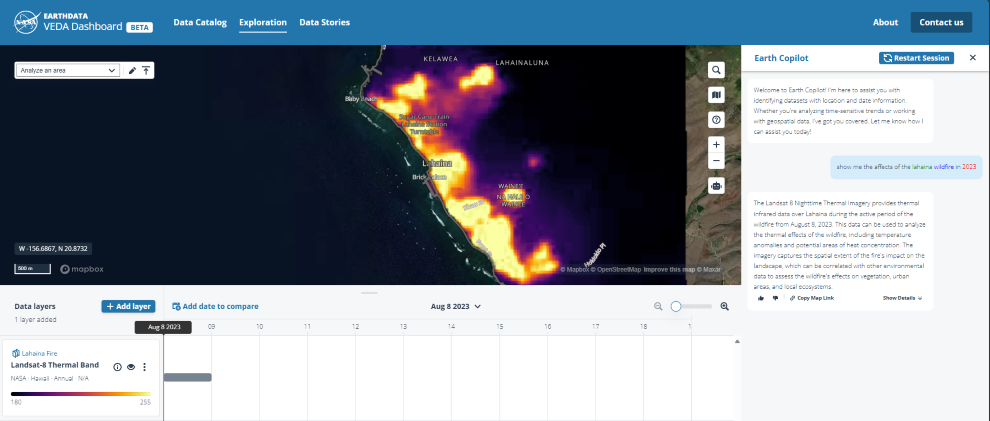
Every day, NASA’s satellites orbit Earth, capturing a wealth of information that helps us understand our planet. From monitoring wildfires to tracking climate change, this vast trove of Earth Science data has the potential to drive scientific discoveries, inform policy decisions and support industries like agriculture, urban planning and disaster response. But navigating the over 100 petabytes of collected data can be challenging, which is why NASA has collaborated with Microsoft to explore the use of a custom copilot using Azure OpenAI Service to develop NASA’s Earth Copilot, which could transform how people interact with Earth’s data. Geospatial data is complex, and often requires some level of technical expertise to navigate it. As a result, this data tends to be accessible only to a limited number of researchers and scientists. As NASA collects more data from new satellites, these complexities only grow and may further limit the potential pool of people able to draw insights and develop applications that could benefit society. Recognizing this challenge, NASA embarked on a mission to make its data more accessible and user-friendly. Through NASA’s Office of the Chief Science Data Officer, the agency seeks to democratize data access, breaking down technical barriers to empower a diverse range of audiences, from scientists and educators to policymakers and the general public. YouTube Video Click here to load media The challenge: Navigating the complexity of data NASA’s Earth Science Data Systems Program is responsible for collecting an incredible variety of data from spaceborne sensors and instruments. This data spans everything from atmospheric conditions to land cover changes, ocean temperatures and more. However, the sheer scale and complexity of this information can be overwhelming. For many, finding and extracting insights requires navigating technical interfaces, understanding data formats and mastering the intricacies of geospatial analysis — specialized skills that very few non-technical users possess. AI could streamline this process, reducing time to gain insights from Earth’s data to a matter of seconds. This issue isn’t just a matter of convenience; it has real-world implications. For example, scientists who need to analyze historical data on hurricanes to improve predictive models, or policymakers who want to study deforestation patterns to implement environmental regulations, may find themselves unable to easily access the data they need. This inaccessibility affects a broad array of sectors, including agriculture, urban planning and disaster response, where timely insights from spaceborne data could make a significant difference. Moreover, as new satellites with new instruments continue to launch and collect more data, NASA is constantly faced with the challenge of building new tools to manage and make sense of this growing repository. The agency explored emerging technologies that could not only streamline data discovery but also broaden accessibility, enabling more people to engage with the data and uncover new insights. The solution: AI-powered data access through Microsoft Azure To address these challenges, NASA IMPACT worked with Microsoft to develop an AI-driven customer copilot, called Earth Copilot, which could simplify data access and encourage a wider range of users to interact with its Earth Science data. Together, they built the proof of concept AI model that leverages Microsoft’s Azure cloud platform and advanced AI capabilities to transform how users can search, discover and analyze NASA’s geospatial data. The key to NASA’s Earth Copilot lies in the integration of cloud-based technologies like Azure OpenAI Service, which provides access to powerful AI models and natural language processing capabilities that enable developers to integrate intelligent, conversational AI into their applications. This approach allows NASA to integrate AI into its existing data analysis platform — VEDA. These technologies together make it easier for users to search, discover and analyze Earth Science data By combining these technologies, Earth Copilot enables users to interact with NASA’s data repository through plain language queries. Instead, they can simply ask questions such as “What was the impact of Hurricane Ian in Sanibel Island?” or “How did the COVID-19 pandemic affect air quality in the US?” AI will then retrieve relevant datasets, making the process seamless and intuitive. NASA’s EARTHDATA VEDA Dashboard. “Azure’s robust suite of services, including machine learning, data analytics and scalable cloud infrastructure, powers this AI prototype,” said Juan Carlos López, former NASA engineer and current Azure Specialist at Microsoft. “We’ve designed the system to handle complex queries and large datasets efficiently, ensuring that users can quickly find the information they need without getting bogged down by technical complexities. Our goal was to create a seamless, scalable solution that could evolve as NASA’s data, tools and applications grow.” Democratizing data for open science The collaboration between NASA IMPACT and Microsoft has resulted in a solution that democratizes access to spaceborne data, enabling a broader range of users to engage with NASA’s science data. This has significant benefits for the scientific community, as researchers can now spend less time on data retrieval and more on analysis and discovery. For example, climate scientists can quickly access historical data to study trends, while agricultural experts can gain insights into soil moisture levels to improve crop management. Educators and teachers can use real-world examples to engage students in Earth Science, fostering curiosity and encouraging the next generation of scientists and engineers. Policymakers can leverage the data to make informed decisions on critical issues like climate change, urban development and disaster preparedness, ensuring they have the most accurate information at their fingertips. “The vision behind this collaboration was to leverage AI and cloud technologies to bring Earth’s insights to communities that have been underserved, where access to data can lead to tangible improvements,” said Minh Nguyen, Cloud Solution Architect at Microsoft. “By enabling users to interact with the data through simple, plain language queries, we’re helping to democratize access to spaceborne information.” The development of this AI prototype aligns with NASA’s Open Science initiative, which aims to make scientific research more transparent, inclusive and collaborative. By removing barriers to data discovery, NASA and Microsoft are setting the stage for a new era of discovery, where insights are not confined to a

Uncategorized

Introducing CoreAI – Platform and Tools

Satya Nadella, Chairman and CEO, shared the below communication with Microsoft employees this morning. As we begin the new year, it’s clear that we’re entering the next innings of this AI platform shift. 2025 will be about model-forward applications that reshape all application categories. More so than any previous platform shift, every layer of the application stack will be impacted. It’s akin to GUI, internet servers, and cloud-native databases all being introduced into the app stack simultaneously. Thirty years of change is being compressed into three years! We will build agentic applications with memory, entitlements, and action space that will inherit powerful model capabilities. And we will adapt these capabilities for enhanced performance and safety across roles, business processes, and industry domains. Further, how we build, deploy, and maintain code for these AI applications is also fundamentally changing and becoming agentic. This is leading to a new AI-first app stack — one with new UI/UX patterns, runtimes to build with agents, orchestrate multiple agents, and a reimagined management and observability layer. In this world, Azure must become the infrastructure for AI, while we build our AI platform and developer tools — spanning Azure AI Foundry, GitHub, and VS Code — on top of it. In other words, our AI platform and tools will come together to create agents, and these agents will come together to change every SaaS application category, and building custom applications will be driven by software (i.e. “service as software”). The good news is that we have been working at this for more than two years and have learned a lot in terms of the systems, app platform, and tools required for the AI era. To more rapidly and boldly advance our roadmap across each of these layers, we are creating a new engineering organization: CoreAI – Platform and Tools. This new division will bring together Dev Div, AI Platform, and some key teams from the Office of the CTO (AI Supercomputer, AI Agentic Runtimes, and Engineering Thrive), with the mission to build the end-to-end Copilot & AI stack for both our first-party and third-party customers to build and run AI apps and agents. This group will also build out GitHub Copilot, thus having a tight feedback loop between the leading AI-first product and the AI platform to motivate the stack and its roadmap. Jay Parikh will lead this group as EVP of CoreAI – Platform and Tools, with Eric Boyd, Jason Taylor, Julia Liuson, Tim Bozarth, and their respective teams reporting to Jay. Jay will work closely with Scott, Rajesh, Charlie, Mustafa, and Kevin to optimize our entire tech stack for both performance and efficiency. Additionally, Jay and team will lead our progress and work around developer productivity and Engineering Thrive across the company. As our cloud infrastructure business continues to grow and scale to become Microsoft’s largest business, Scott will continue to lead Cloud + AI to ensure we’re delivering the quality, security, and innovation that our customers and partners count on for their most mission-critical applications, databases, and AI workloads. Ultimately, we must remember that our internal organizational boundaries are meaningless to both our customers and to our competitors. When we talk about operating as One Microsoft, we are effectively talking about how we are continually increasing our customer focus, raising the bar on our innovation, and driving accountability, so we can truly live up to our mission. Our success in this next phase will be determined by having the best AI platform, tools, and infrastructure. We have a lot of work to do and a tremendous opportunity ahead, and together, I’m looking forward to building what comes next. Satya The post Introducing CoreAI – Platform and Tools appeared first on The Official Microsoft Blog.

Uncategorized

Ignite 2024: Why nearly 70% of the Fortune 500 now use Microsoft 365 Copilot

Two things can be true at the same time. In the case of AI, it is absolutely true that the industry is moving incredibly fast and evolving quickly. It’s also true that hundreds of thousands of customers are using Microsoft AI technology today and, by making early bets on the platform, are seeing big benefits now and future-proofing their ability to benefit from the next big wave of AI improvements. Microsoft Ignite is our annual event that spotlights the updates and creations that enable customers, partners and developers to unleash the full potential of Microsoft’s technology and change the way we approach work. This year, we are announcing about 80 new products and features, including new capabilities in Microsoft 365 Copilot, additions to the Copilot + AI stack and new Copilot+ devices offerings. Underpinning each of these innovations is our commitment to security. Since launching our Secure Future Initiative (SFI) one year ago, we have made security the No. 1 job of every employee at Microsoft, dedicated 34,000 engineers to this focus and, at Ignite, we will announce innovations that are rooted in our SFI principles: secure by design, secure by default and secure operations. More than 200,000 people have registered to join us for this year’s Ignite, with more than 14,000 attendees at our in-person events in Chicago. Attendees can choose from more than 800 sessions, demos and expert-led labs from Microsoft and our partners. Most of the Ignite content will be available on demand for those who can’t attend the live event. Copilot momentum Microsoft 365 Copilot is your AI assistant for work, and we have seen the momentum grow as more organizations are moving to Copilot and deploying it to great success. All up, nearly 70% of the Fortune 500 now use Microsoft 365 Copilot. That echoes an industry trend: A recent IDC study showed that generative AI is on the rise, with 75% adoption among companies surveyed in 2024. In addition, for every $1 invested, companies are realizing a return of $3.70, and leaders are saying they are realizing as much as a $10 return, according to the study. The investments that Microsoft has made in Copilot are paying dividends for our customers. We recently highlighted some of the more than 200 customer stories of accelerated AI Transformation, with Copilot helping many of them spark innovation and transform their organization for the better. Several examples include: Intelligent power management company Eaton leveraged Microsoft 365 Copilot to help streamline and automate operations, improve data access, centralize knowledge and empower teams to focus on higher-value tasks. One immediate challenge addressed through Copilot focused on the manual, time-consuming documentation process in Eaton’s Finance operations. Copilot helped Eaton document over 9,000 standard operating procedures (SOPs), resulting in an 83% time savings for each SOP. Consulting firm McKinsey & Company is creating an agent to speed up the client onboarding process. The pilot showed lead time could be reduced by 90% and administrative work reduced by 30%. The agent automates complex processes, such as identifying the right expert capabilities and staffing teams and acts as a single place where colleagues can ask questions and request follow-ups. By streamlining tasks and reducing manual inputs, this agent could potentially save consultants many hours, allowing them to spend more time with clients. Boosting productivity with Microsoft 365 Copilot Microsoft is continuing to supercharge productivity with new capabilities in Microsoft 365 Copilot designed to help simplify the workday. Copilot Actions, now in private preview, enable anyone to automate everyday tasks with simple, fill-in-the-blank prompts, whether it’s getting a daily summary of meeting actions in Microsoft Teams, compiling weekly reports or getting an email upon return from vacation that summarizes missed meetings, chats and emails. Anyone can easily set up Actions right in their Microsoft 365 app, allowing users to focus on more impactful work, save time and boost productivity. New agents in Microsoft 365 are designed to help scale individual impact and transform business process. At Ignite we will introduce: Agents in SharePoint: These natural language AI assistants are grounded on relevant SharePoint sites, files and folders to make it easy to find answers from that content, and to make quicker decisions as a result. Now generally available, every SharePoint site will include an agent tailored to its content. Users can also create customized agents scoped to select SharePoint files, folders or sites with as little as one click. Interpreter: This agent in Teams helps users overcome language barriers by enabling real-time, speech-to-speech interpretation in meetings. Available in public preview in early 2025, meeting participants will also have the option to have the agent simulate their personal voice. The Employee Self-Service Agent: An agent available in private preview in Business Chat expedites answers for the most common policy-related questions and simplifies action-taking on key HR and IT-related tasks — like helping employees understand their benefits or request a new laptop. It can be customized in Copilot Studio to meet an organization’s unique needs. Other agents in public preview take real-time meeting notes in Teams and automate project management from start to finish in Planner. Copilot + AI Stack The Copilot stack empowers users to build more ambitious products by leveraging advanced technology at each layer of the stack. To create a unified experience where customers can design, customize and manage AI applications and agents, we are introducing Azure AI Foundry, which gives customers access to all existing Azure AI services and tooling, plus new capabilities like: Azure AI Foundry SDK, now available in preview, provides a unified toolchain for designing, customizing and managing AI apps and agents with enterprise-grade control and customization. With tools that help organizations responsibly scale their applications, Foundry also provides 25 prebuilt app templates and a simplified coding experience they can access from familiar tools like GitHub, Visual Studio and Copilot Studio. Azure AI Foundry portal (formerly Azure AI Studio), now available in preview, is a comprehensive visual user interface to help developers discover AI models, services and tools. With a new management center

Uncategorized

8080 Books, an imprint of Microsoft, launches, offering thought leadership titles spanning technology, business and society

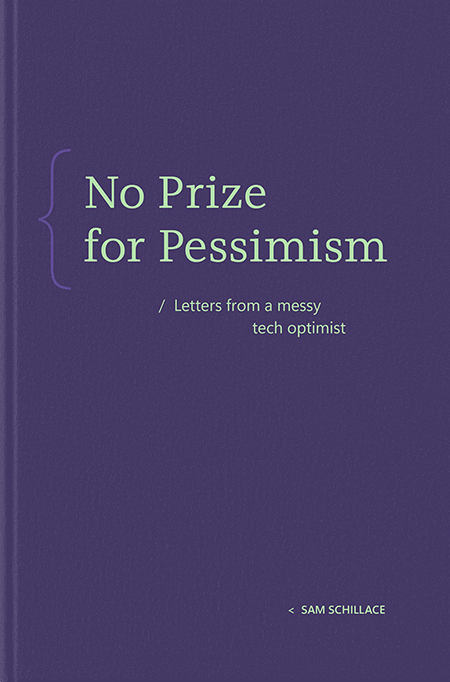
As fans of books, especially in their physical format, it is our great pleasure to launch 8080 Books, an imprint of Microsoft. Our first title, No Prize for Pessimism, is authored by Sam Schillace, deputy chief technology officer at Microsoft, and is available today. Our second title, Platform Mindset, by Marcus Fontoura, will be available later this year.   Computing has become an essential ingredient to almost every endeavor on our planet, and, as students of both Microsoft and technology, our goal with 8080 Books is to publish original research, ideas and insights at the intersection of science, technology and business, and, in doing so, to help advance discourse on this important landscape.    The name of our imprint takes its inspiration from the 8080 microprocessor — a foundation for the company’s earliest software breakthroughs. Not coincidentally, 8080 is also the last four digits of Microsoft’s corporate headquarters phone number.    With a combined tenure of, well, let’s just say a long time, we’re both acutely aware of the rich well of talent at Microsoft from which we can draw upon and publish under the 8080 Books imprint over time. However, our intention is that we will seek to use this not just as a platform for Microsoft authors but also to showcase minds and ideas from outside of the company.   While we are not currently accepting unsolicited manuscripts, our website does provide more details about our plans, such as evaluating out of print titles that we feel remain relevant to today’s leaders, and why we feel the time is right to launch this imprint.   We hope you enjoy our launch title, which is available here, and we look forward to hearing your feedback, questions and ideas as we embark on this new adventure.   For anyone in the Puget Sound area, we invite you to Schillace’s first reading and signing at Brick & Mortar Books, on Wednesday, Dec. 11 in Redmond, Washington. Check here for details. Space is limited.  The post 8080 Books, an imprint of Microsoft, launches, offering thought leadership titles spanning technology, business and society appeared first on The Official Microsoft Blog.

Uncategorized

How real-world businesses are transforming with AI — with more than 140 new stories

Updated March 10, 2025: The post contains more than 140 new customer stories, which appear in italics at the beginning of each section of customer lists. The post will be updated regularly with new stories. One of the highlights of my career has always been connecting with customers and partners across industries to learn how they are using technology to drive their businesses forward. In the past 30 years, we’ve seen four major platform shifts, from client server to internet and the web to mobile and cloud to now — the next major platform shift to AI.   As today’s platform shift to AI continues to gain momentum, Microsoft is working to understand just how organizations can drive lasting business value. We recently commissioned a study with IDC, The Business Opportunity of AI, to uncover new insights around business value and help guide organizations on their journey of AI transformation. The study found that for every $1 organizations invest in generative AI, they’re realizing an average of $3.70 in return — and uncovered insights about the future potential of AI to reshape business processes and drive change across industries. Check out the top 5 AI trends to watch from IDC and Microsoft Today, more than 85% of the Fortune 500 are using Microsoft AI solutions to shape their future. In working with organizations large and small, across every industry and geography, we’ve seen that most transformation initiatives are designed to achieve one of four business outcomes:   Enriching employee experiences: Using AI to streamline or automate repetitive, mundane tasks can allow your employees to dive into more complex, creative and ultimately more valuable work. Reinventing customer engagement: AI can create more personalized, tailored customer experiences, delighting your target audiences while lightening the load for employees. Reshaping business processes: Virtually any business process can be reimagined with AI, from marketing to supply chain operations to finance, and AI is even allowing organizations to go beyond process optimization and discover exciting new growth opportunities. Bending the curve on innovation: AI is revolutionizing innovation by speeding up creative processes and product development, reducing the time to market and allowing companies to differentiate in an often crowded field. In this blog, we’ve collected more than 400 of our favorite real-life examples of how organizations are embracing Microsoft’s proven AI capabilities to drive impact and shape today’s platform shift to AI. Today, we’ve added new stories of customers using our AI capabilities at the beginning of each section. We’ll regularly update this story with more. We hope you find an example or two that can inspire your own transformation journey. Enriching employee experiences Generative AI is truly transforming employee productivity and wellbeing. Our customers tell us that by automating repetitive, mundane tasks, employees are freed up to dive into more complex and creative work. This shift not only makes the work environment more stimulating but also boosts job satisfaction. It sparks innovation, provides actionable insights for better decision-making and supports personalized training and development opportunities, all contributing to a better work-life balance. Customers around the world have reported significant improvements in employee productivity with these AI solutions: New Stories: Aurigo used GitHub Copilot to enable their developers to focus on the logic and architecture of their code, allowing them to create functional prototypes more efficiently. Bennett, Coleman & Co. Ltd./The Times Group introduced Microsoft 365 Copilot across HR, sales, finance and merger and acquisition to automate routine tasks, streamline workflows and empower teams to work more efficiently. Birlasoft deployed Microsoft 365 Copilot and built a bot to handle 94% of policy-related queries and ten applications to enhance operational efficiency. Brandix adopted the Microsoft 365 Copilot suite to enhance productivity and streamline operations for executive staff. C3IT used Microsoft 365 Copilot when they developed Copilot PM Assist to help project managers prepare project documentation 30% faster and reduce the time to create project kick-off presentations by 60%. Cactus Communications leveraged Microsoft 365 Copilot to automate routine tasks and augment content generation under human supervision to achieve 15% to 20% efficiency. Embee adopted Microsoft Copilot Studio to develop tailored plug-ins to help redefine productivity and efficiency. Using GitHub Copilot for code validation and testing automation, their developers experienced a 30% productivity boost. HCLTech used Microsoft 365 Copilot and GitHub Copilot to develop TeamSight, a platform to help accelerate engineering, track progress and fine tune KPIs. Indegene leveraged Microsoft 365 Copilot to significantly reduce time, enhance overall efficiency and improve productivity in tasks like scientific content writing and coding. Infosys used GitHub Copilot to significantly accelerate the development of a feature or bug fix, and found the quality of code was far better. InMobi embraced Azure AI and Microsoft 365 Copilot to streamline employees’ business workflows. Integrating GitHub Copilot into engineering, they generated 50 to 60 million predictions per second with its 15-20 ML models. LambdaTest integrated GitHub Copilot into its workflow, experiencing a remarkable 30% reduction in development time. LTIMindtree introduced Copilot declarative agents to address challenges faced by senior leadership and presales/transition teams with RFP and RFIs. They also used GitHub Copilot to increase development speed and improve test coverage. Mphasis used Microsoft 365 Copilot across finance, HR, legal, marketing and IT to enhance productivity and ingenuity within the operational processes. Noventiq leveraged Microsoft 365 Copilot to improve operational efficiencies. Within four weeks of implementation, they saved 989 hours on routine tasks, boosting productivity that resulted in an estimated value of INR 989K. Nykaa used GitHub Copilot to accelerate development cycles. By automating repetitive tasks such as code completion, developers elevated productivity by 20%, leading to notable cost savings and expedited feature releases. Paytm used GitHub Copilot when they launched Code Armor, a solution used to improve the time taken to secure cloud accounts that represented an efficiency increase of over 95%, significantly boosting productivity too. PGP Glass introduced Microsoft 365 Copilot internally to help with repetitive tasks. The team estimated a 30 to 40 minutes per day increase in productivity, enabling employees to focus more on priorities and strategic tasks. Physics Wallah used RAG+Azure OpenAI Service architecture to create “Gyan Guru,” a hyper-personalized conversational study companion designed to cater to the distinctive needs of each student. SPAR used Microsoft 365 Copilot to

Uncategorized

Microsoft unveils Majorana 1

Satya Nadella, Chairman and CEO, shared the below communication on social media this morning. Click here to load media The post Microsoft unveils Majorana 1 appeared first on The Official Microsoft Blog.

Uncategorized

A new level unlocked

Today Microsoft released Muse, a first-of-its-kind generative AI model that we are applying to gaming. But it’s so much more than that. What we’re sharing today is a huge step forward for gameplay ideation. And what’s even more exciting is what this breakthrough represents in our journey of building and using generative AI, and what industries, developers and creators of all interests will be enabled to do next. The impressive abilities we first witnessed with ChatGPT and GPT-4 to learn human language are now being matched by AI’s abilities to learn the mechanics of how things work, in effect developing a practical understanding of interactions in the world. As a computer scientist, this ability to understand and model a 3D world is something I and many other great researchers have pursued for over 10 years and, personally, I was not sure that it could be made possible with such speed and quality. In the case of Muse, just from observing human gameplay, this model develops a deep understanding of the environment, including its dynamics and how it evolves over time in response to actions. This unlocks the ability to rapidly iterate, remix and create in video games so developers can eventually create immersive environments and unleash their full creativity. Beyond gaming, I’m excited by the potential of this capability to enable AI assistants that understand and help visualize things, from reconfiguring the kitchen in your home to redesigning a retail space to building a digital twin of a factory floor to test and explore different scenarios. All these things are just now becoming possible with AI. From the perspective of computer science research, it’s pretty amazing, and the future applications of this are likely to be transformative for creators. — At Microsoft, we have a long history of collaboration between research and engineering. Today, as we release Muse, we are also announcing Azure AI Foundry Labs, where the AI community can explore the latest from Microsoft Research. Azure AI Foundry Labs will help accelerate the transition from research to solutions, bringing new ideas to the broader community to help shape the future of AI. Learn more. The post A new level unlocked appeared first on The Official Microsoft Blog.

Uncategorized

The value of AI: How Microsoft’s customers and partners are creating differentiated AI solutions to reinvent how they do business today

Organizational leaders in every industry around the world are evaluating ways AI can unlock opportunities, drive pragmatic innovation and yield value across their business. At Microsoft, we are dedicated to helping our customers accelerate AI Transformation by empowering human ambition with Copilots and agents, developing differentiated AI solutions and building scalable cybersecurity foundations. At Microsoft Ignite we made over 100 announcements that bring the latest innovation directly to our customers and partners, and shared how Microsoft is the only technology leader to offer three distinct AI platforms for them to build AI solutions: Copilot is your UI for AI, with Copilot Studio enabling low-code creation of agents and extensibility to your data. Azure AI Foundry is the only AI app server for building real-world, world-class, AI-native applications. Microsoft Fabric is the AI data platform that provides one common way to reason over your data —no matter where it lives. All three of these platforms are open and work synchronously to enable the development of modern AI solutions; and each is surrounded by our world-class security offerings so leaders can move their AI-first strategies forward with confidence. As we look ahead to what we can achieve together, I remain inspired by the work we are doing today. Below are a handful of the many stories from the past quarter highlighting the differentiated AI solutions our customers and partners are driving to move business forward across industries and realize pragmatic value. Their success clearly illustrates that real results can be harnessed from AI today, and it is changing the way organizations do business. To power its industrial IoT and AI platform, ABB Group leveraged Microsoft Azure OpenAI Service to create Genix Copilot: a generative AI-powered analytics suite aimed at solving some of the most complex industrial problems. The solution helps customers analyze key functions in their operations —such as asset and process performance, energy optimization and emission monitoring — with real-time operational insights. As a result, customers are seeing up to 35% savings in operations and maintenance, and up to 20% improvement in energy and emission optimization. ABB also saw an 80% decrease in service calls with the self-service capabilities of Genix Copilot. Serving government healthcare agencies across the US, Acentra Health turned to Microsoft to help introduce the latest AI capabilities that maximize talent and cut costs in a secure, HIPAA-compliant manner. Using Azure OpenAI Service, the company developed MedScribe — an AI-powered tool reducing the time specially trained nursing staff spend on appeal determination letters. This innovation saved 11,000 nursing hours and nearly $800,000, reducing time spent on each appeal determination letter by about 50%. MedScribe also significantly enhanced operational efficiency, enabling nurses to process 20 to 30 letters daily with a 99% approval rate. To ease challenges for small farmers, Romanian agribusiness group Agricover revolutionized access to credit by developing MyAgricover. Built with help from partner Avaelgo, the scalable digital platform utilizes Microsoft Azure, Azure API Management and Microsoft Fabric to automate the loan process and enable faster approvals and disbursements. This has empowered small farmers to grow their businesses and receive faster access to financing by reducing loan approval time by 90 percent — from 10 working days to a maximum of 24 hours. Building on its status as a world-class airline with a strong Indian identity, Air India sought ways to enhance customer support while managing costs. By developing AI.g, one of the industry’s first generative AI virtual assistants built on Azure OpenAI Service, the airline upgraded the customer experience. Today, 97% of customer queries are handled with full automation, resulting in millions of dollars of support costs saved and improved customer satisfaction — further positioning the airline for continued growth. BMW Group aimed to enhance data delivery efficiency and improve vehicle development and prototyping cycles by implementing a Mobile Data Recorder (MDR) solution with Azure App Service, Azure AI and Azure Kubernetes Service (AKS). The solution achieved 10 times more efficient data delivery, significantly improved data accessibility and elevated overall development quality. The MDR monitors and records more than 10,000 signals twice per second in every vehicle of BMW’s fleet of 3,500 development cars and transmits data within seconds to a centralized cloud back end. Using Azure AI Foundry and Azure OpenAI Service, BMW Group created an MDR copilot fueled by GPT-4o. Engineers can now chat with the interface using natural language, and the MDR copilot converts the conversations into KQL queries, simplifying access to technical insights. Moving from on-premises tools to a cloud-based system with faster data management also helps engineers troubleshoot in real time. The vehicle data covered by the system has doubled, and data delivery and analysis happen 10 times faster. Coles Group modernized its logistics and administrative applications using Microsoft Azure Stack HCI to scale its edge AI capabilities and improve efficiency and customer experience across its 1,800 stores. By expanding its Azure Stack HCI footprint from two stores to over 500, Coles achieved a six-fold increase in the pace of application deployment, significantly enhancing operational efficiency and enabling rapid innovation without disrupting workloads. The retailer is also using Azure Machine Learning to train and develop edge AI models, speeding up data annotation time for training models by 50%. Multinational advertising and media company Dentsu wanted to speed time to insights for its team of data scientists and media analysts to support its media planning and budget optimization. Using Microsoft Azure AI Foundry and Azure OpenAI Service, Dentsu developers built a predictive analytics copilot that uses conversational chat and draws on deep expertise in media forecasting, budgeting and optimization. This AI-driven tool has reduced time to media insights for employees and clients by 90% and cut analysis costs. To overcome the limitations of its current systems, scale operations and automate processes across millions of workflows, Docusign created the Intelligent Agreement Management (IAM) platform on Azure. Using Azure AI, Azure Cosmos DB, Azure Logic Apps and AKS, the platform transforms agreement data into actionable insights to enhance productivity and accelerate contract review cycles. IAM also ensures better collaboration and unification across business systems to

Uncategorized

Microsoft and OpenAI evolve partnership to drive the next phase of AI

We are thrilled to continue our strategic partnership with OpenAI and to partner on Stargate. Today’s announcement is complementary to what our two companies have been working on together since 2019. The key elements of our partnership remain in place for the duration of our contract through 2030, with our access to OpenAI’s IP, our revenue sharing arrangements and our exclusivity on OpenAI’s APIs all continuing forward – specifically: Microsoft has rights to OpenAI IP (inclusive of model and infrastructure) for use within our products like Copilot. This means our customers have access to the best model for their needs. The OpenAI API is exclusive to Azure, runs on Azure and is also available through the Azure OpenAI Service. This agreement means customers benefit from having access to leading models on Microsoft platforms and direct from OpenAI. Microsoft and OpenAI have revenue sharing agreements that flow both ways, ensuring that both companies benefit from increased use of new and existing models. Microsoft remains a major investor in OpenAI, providing funding and capacity to support their advancements and, in turn, benefiting from their growth in valuation. In addition to this, OpenAI recently made a new, large Azure commitment that will continue to support all OpenAI products as well as training. This new agreement also includes changes to the exclusivity on new capacity, moving to a model where Microsoft has a right of first refusal (ROFR). To further support OpenAI, Microsoft has approved OpenAI’s ability to build additional capacity, primarily for research and training of models. We thank OpenAI for their continued partnership and look forward to what’s to come. The post Microsoft and OpenAI evolve partnership to drive the next phase of AI appeared first on The Official Microsoft Blog.

git-logo
tech blog

How to Install GitHub

GitHub is a platform for hosting and managing code using Git. To use GitHub, you need to install Git and optionally GitHub Desktop for an easier interface. 1. Install Git Git is required to work with GitHub repositories. Windows: Download Git from the official website: https://git-scm.com/ Run the installer and follow the setup instructions. Choose default options unless you need specific configurations. Open Command Prompt or Git Bash and type: sh git –version This should display the installed Git version. Mac: Open Terminal and type: sh git –version If Git is not installed, macOS will prompt you to install it. Alternatively, install Git via Homebrew: sh brew install git Linux (Ubuntu/Debian): Open Terminal and run: sh sudo apt update sudo apt install git Verify the installation with: sh git –version 2. Install GitHub Desktop (Optional) For users who prefer a graphical interface: Download GitHub Desktop from https://desktop.github.com/. Install it by following on-screen instructions. Sign in with your GitHub account. 3. Set Up GitHub Open a terminal or Git Bash. Configure Git with your name and email: sh git config –global user.name “Your Name” git config –global user.email “your-email@example.com” Authenticate with GitHub using SSH or HTTPS (recommended for private repositories). 4. Clone a Repository (Example) To download a repository: sh git clone https://github.com/username/repository.git 5. Create a Repository and Push Code Create a new repository on GitHub. In your local folder, initialize Git: sh git init Add files and commit changes: sh git add . git commit -m “Initial commit” Link to GitHub and push: sh git remote add origin https://github.com/username/repository.git git push -u origin main That’s it! You’ve installed GitHub and set up Git. 🚀

tech blog

SEO (Search Engine Optimization) – A Complete Guide

What is SEO? SEO, or Search Engine Optimization, is the process of optimizing a website to improve its ranking on search engines like Google, Bing, and Yahoo. The goal of SEO is to increase website visibility, drive more organic traffic, and improve user experience. When a user searches for something online, search engines analyze websites and rank them based on relevance, quality, and user experience. By applying SEO strategies, businesses and content creators can rank higher in search results and attract more visitors. Why is SEO Important? ✔ Increases Website Traffic – Higher rankings bring more visitors.✔ Boosts Brand Credibility – Websites on the first page of search results are seen as trustworthy.✔ Cost-Effective Marketing – Organic traffic reduces the need for paid ads.✔ Better User Experience – SEO enhances website speed, navigation, and mobile-friendliness.✔ Higher Conversion Rates – More visitors lead to more leads, sales, and engagement. Types of SEO SEO is divided into three main categories: 1. On-Page SEO On-page SEO involves optimizing elements within a website to improve search rankings. This includes: Keyword Optimization – Using relevant keywords in titles, headings, and content. Content Quality – Publishing high-value, unique, and informative content. Meta Tags & Descriptions – Writing compelling meta titles and descriptions. URL Structure – Creating clean, readable URLs (e.g., example.com/best-seo-tips). Internal Linking – Connecting different pages on the website for better navigation. 2. Off-Page SEO Off-page SEO includes external factors that impact a website’s authority and ranking. This includes: Backlinks – Getting high-quality links from other reputable websites. Social Media Signals – Engagement on platforms like Facebook, Twitter, and LinkedIn. Guest Blogging – Writing articles for other websites with links back to your site. Influencer Outreach – Partnering with influencers to promote content. 3. Technical SEO Technical SEO ensures that a website is optimized for search engine crawling and indexing. It includes: Website Speed Optimization – Faster loading times improve rankings. Mobile-Friendliness – Ensuring the website works well on mobile devices. Secure Website (HTTPS) – Using SSL certificates for security. XML Sitemaps – Helping search engines understand website structure. Fixing Broken Links – Removing errors and redirects. Best SEO Practices ✔ Research Keywords – Use tools like Google Keyword Planner to find popular search terms.✔ Create High-Quality Content – Write valuable, engaging, and original content.✔ Optimize Images – Use alt text and compress images for better loading speed.✔ Improve User Experience – Ensure easy navigation and fast page speed.✔ Regularly Update Content – Keep information fresh and relevant.✔ Earn Backlinks – Get quality links from trusted websites.✔ Use Schema Markup – Help search engines understand content better. SEO Tools to Use ✅ Google Search Console – Monitors website performance in Google Search.✅ Google Analytics – Tracks visitor behavior and traffic sources.✅ SEMrush & Ahrefs – Finds keywords, backlinks, and competitor data.✅ Yoast SEO – Optimizes WordPress websites for better rankings. Conclusion SEO is essential for businesses and content creators looking to increase visibility, attract organic traffic, and improve website performance. By implementing on-page, off-page, and technical SEO strategies, websites can achieve better rankings and long-term success.

business

Dropshipping: A Complete Guide

What is Dropshipping? Dropshipping is an e-commerce business model where an online store sells products without holding any inventory. Instead, the store owner purchases items from a third-party supplier (such as a manufacturer or wholesaler), who then ships the product directly to the customer. This means the seller never handles the products physically. Dropshipping is popular due to its low startup cost, flexibility, and minimal risk, making it an excellent option for entrepreneurs looking to start an online business. How Dropshipping Works Set Up an Online Store – The seller creates an e-commerce store using platforms like Shopify, WooCommerce, or BigCommerce. Find a Supplier – Products are sourced from suppliers on AliExpress, CJ Dropshipping, or SaleHoo. List Products for Sale – The seller adds the supplier’s products to their online store with a price markup. Customer Places an Order – A buyer purchases a product from the online store. Supplier Fulfills the Order – The seller forwards the order to the supplier, who ships it directly to the customer. Profit is Made – The seller earns the difference between the product’s wholesale and retail price. Benefits of Dropshipping ✔ Low Initial Investment – No need to buy inventory upfront.✔ Easy to Start – No warehousing or shipping required.✔ Flexible Location – Manage the business from anywhere.✔ Wide Product Selection – Sell various items without storage limitations.✔ Scalability – Easily add new products and suppliers. Challenges of Dropshipping ❌ Low Profit Margins – Due to high competition, pricing must be strategic.❌ Shipping Delays – Delivery times can vary, especially with overseas suppliers.❌ Quality Control Issues – The seller has no direct control over product quality.❌ Supplier Reliability – Unreliable suppliers can cause fulfillment problems.❌ High Competition – Many stores sell similar products, making branding essential. Best Niches for Dropshipping Tech Gadgets & Accessories Fashion & Apparel Beauty & Skincare Products Fitness & Health Gear Home & Kitchen Essentials Pet Supplies Top Platforms for Dropshipping ✅ Shopify – Best for beginners with easy setup and app integrations.✅ WooCommerce – A flexible option for WordPress users.✅ BigCommerce – Scalable for large online stores.✅ AliExpress Dropshipping – Provides a vast product selection for suppliers. How to Succeed in Dropshipping 🔹 Choose a Profitable Niche – Research trending products and customer demand.🔹 Find Reliable Suppliers – Work with trusted platforms like CJ Dropshipping or Oberlo.🔹 Optimize Your Website – Use SEO, attractive product descriptions, and fast-loading pages.🔹 Run Targeted Marketing Campaigns – Use Facebook Ads, Google Ads, and influencer marketing.🔹 Provide Excellent Customer Support – Ensure smooth communication and problem resolution. Conclusion Dropshipping is a cost-effective and scalable e-commerce model, ideal for beginners and experienced entrepreneurs. While it has challenges like low profit margins and supplier dependency, with the right strategies—such as selecting the right niche, optimizing marketing, and providing excellent customer service—it can become a profitable online business.

tech blog

How to Install WordPress on Hostinger (Step-by-Step Guide)

Installing WordPress on Hostinger is quick and easy, thanks to Hostinger’s one-click installer. Follow this step-by-step guide to set up your WordPress website effortlessly. Step 1: Log in to Hostinger Control Panel Go to Hostinger’s website and log in to your account. Navigate to the hPanel (Hostinger Control Panel). Step 2: Select Your Hosting Plan In the hPanel, go to “Websites” and click “Manage” next to your domain. If you haven’t purchased hosting yet, select a WordPress hosting plan and link it to your domain. Step 3: Install WordPress via Auto Installer Scroll down to the “Website” section and click on “Auto Installer.” Select WordPress from the list of available applications. Enter your website details, including: Administrator Email – Your login email for WordPress. Username & Password – Credentials to access the WordPress dashboard. Website Title – The name of your website. Language – Select your preferred language. Click “Install.” Step 4: Access Your WordPress Dashboard After installation, go to “Websites” → “Manage” in hPanel. Click “Edit Website”, and you will be redirected to the WordPress dashboard. Alternatively, access it directly via yourdomain.com/wp-admin and log in with your credentials. Step 5: Customize Your WordPress Website Choose a Theme: Go to Appearance → Themes and select a WordPress theme. Install Plugins: Add essential plugins like Yoast SEO, Elementor, and Contact Form 7. Create Pages: Set up pages like Home, About, and Contact. Set Up Permalinks: Go to Settings → Permalinks and choose “Post Name” for SEO-friendly URLs. Step 6: Secure & Optimize Your Website Enable SSL: In hPanel, go to SSL and activate the free SSL certificate. Set Up Backups: Enable automatic backups from Hostinger’s control panel. Optimize Performance: Install LiteSpeed Cache for faster loading times. Conclusion Installing WordPress on Hostinger is a simple process with their one-click installer. Once installed, customize your site with themes, plugins, and settings to create a fully functional website.

tech blog

Cloud Services: Definition, Types, and Benefits

What is Cloud Service? A cloud service refers to the delivery of computing resources, applications, and data storage over the internet. Instead of relying on local computers or on-premise servers, users can access and use cloud-based solutions from anywhere with an internet connection. Cloud services offer flexibility, scalability, and cost savings, making them essential for both individuals and businesses. Companies like Amazon Web Services (AWS), Microsoft Azure, and Google Cloud provide cloud-based solutions that help organizations store data, run applications, and enhance collaboration without needing expensive physical infrastructure. Types of Cloud Services Cloud services are classified into three main models: 1. Infrastructure as a Service (IaaS) Infrastructure as a Service (IaaS) provides virtualized computing resources over the internet, such as servers, storage, and networking. Businesses can rent these resources on demand instead of purchasing expensive hardware. Examples of IaaS: Amazon Web Services (AWS EC2) – Offers virtual computing power. Google Compute Engine (GCE) – Provides scalable cloud infrastructure. Microsoft Azure Virtual Machines – Supports cloud-based applications and workloads. Benefits of IaaS: ✔ Scalability: Resources can be increased or decreased as needed.✔ Cost Savings: Eliminates the need for purchasing and maintaining physical hardware.✔ Flexibility: Users can choose different operating systems and applications. 2. Platform as a Service (PaaS) Platform as a Service (PaaS) provides a complete development and deployment environment for software applications. It includes operating systems, development tools, databases, and cloud infrastructure, allowing developers to focus on coding rather than managing hardware and servers. Examples of PaaS: Google App Engine – A platform for developing and hosting applications. Microsoft Azure App Services – Allows businesses to build and deploy applications easily. Heroku – Provides cloud-based hosting for developers. Benefits of PaaS: ✔ Faster Development: Developers can focus on writing code without managing infrastructure.✔ Cost Efficiency: Reduces expenses related to hardware and software management.✔ Enhanced Collaboration: Teams can work together in real-time from different locations. 3. Software as a Service (SaaS) Software as a Service (SaaS) delivers applications over the internet, eliminating the need for users to install and maintain software on their local devices. SaaS applications are typically accessed via a web browser. Examples of SaaS: Google Drive & Google Workspace – Cloud-based file storage and collaboration tools. Microsoft Office 365 – Online productivity software for businesses. Dropbox – A cloud storage service for file sharing. Benefits of SaaS: ✔ Ease of Use: Applications are accessible from any device with an internet connection.✔ Automatic Updates: Software providers handle maintenance and updates.✔ Cost-Effective: Users pay for what they use, reducing upfront software costs. Types of Cloud Deployment Models Cloud services can be deployed in different ways based on user needs: Public Cloud – Hosted by third-party providers and available to multiple users (e.g., AWS, Google Cloud). Private Cloud – Dedicated cloud infrastructure used by a single organization for enhanced security. Hybrid Cloud – A combination of public and private clouds for greater flexibility and control. Multi-Cloud – Using multiple cloud providers to avoid vendor dependency and improve reliability. Key Benefits of Cloud Services ✔ Cost Savings – Reduces IT infrastructure costs by eliminating the need for expensive hardware.✔ Scalability – Resources can be expanded or reduced as needed.✔ Remote Accessibility – Cloud services can be accessed from anywhere with an internet connection.✔ Data Security – Cloud providers implement high-level security measures to protect data.✔ Automatic Updates – Software and security updates are managed by the provider.✔ Collaboration – Teams can work together in real-time on cloud-based applications. Conclusion Cloud services have transformed the way businesses and individuals use technology. Whether it’s IaaS for scalable computing infrastructure, PaaS for simplified application development, or SaaS for easy-to-use software, the cloud offers cost efficiency, flexibility, and innovation. Organizations can choose from public, private, hybrid, or multi-cloud deployments to meet their specific needs. By leveraging cloud computing, businesses can enhance productivity, reduce costs, and stay competitive in a rapidly evolving digital world.

Scroll to Top