INITIALIZING
tech blog

Give GitHub Copilot CLI real code intelligence with language servers

Ever watched GitHub Copilot CLI extract a JAR file to a temporary directory, grep through .class files, and piece together an API signature from raw bytecode? The agent is resourceful, but without a language server, that’s the best it can do. The Language Server Protocol (LSP) is the standard that powers go to definition, find references, and type resolution in editors like VS Code. It works just as well in the terminal. The LSP Setup skill automates the installation and configuration of LSP servers for Copilot CLI, so the agent gets precise, structured answers about your code instead of relying on text search heuristics. In this post, you’ll learn how the skill works under the hood, see the configuration format it generates, and get set up for any of the 14 languages it supports today. The problem: heuristic code understanding Without an LSP server, the agent in GitHub Copilot CLI reverse-engineers API information through text search and binary extraction. For a Java project, that might look like: # Find the dependency JAR find ~/.m2/repository -name “*httpclient*.jar” # Extract it to a temp directory mkdir /tmp/httpclient && cd /tmp/httpclient jar xf ~/.m2/repository/org/apache/httpcomponents/httpclient/4.5.14/httpclient-4.5.14.jar # Search extracted class files for a method grep -r “execute” –include=”*.class” . For Python, the agent might cat files inside site-packages. For TypeScript, it walks node_modules. These text-based approaches work for simple cases, but they’re doing pattern-matching over raw text rather than true semantic analysis, so they miss generics, overloads, and transitive types, and can’t see compiled bytecode at all. That’s exactly the gap a language server close. An LSP server solves this structurally. When the agent sends a textDocument/definition request for a symbol, the language server returns the exact source location, fully resolved type, and signature. What is an agent skill? Agent skill is a reusable instruction set that extends what an AI coding agent can do. Skills are defined in Markdown files with YAML frontmatter and follow a standard structure: trigger descriptions, step-by-step workflows, reference data, and behavioral constraints. The LSP Setup skill uses this structure to guide the agent through a multi-step installation process, detecting the operating system, choosing the right package manager, writing valid configuration, and verifying the result. How the LSP Setup skill works When triggered, the skill executes a seven-step workflow: 1. Language selection The agent uses ask_user with a set of choices to determine which language the user needs LSP support for. This drives all subsequent steps. 2. Operating system detection The agent runs uname -s (or checks $env:OS / %OS% on Windows) to determine the target platform. Install commands vary by operating system. For example, brew install jdtls on macOS versus downloading from eclipse.org on Linux. 3. LSP server lookup The skill includes a reference file (references/lsp-servers.md) with curated data for 14 languages: install commands per operating system, binary names, and ready-to-use config snippets. The agent reads this file and selects the matching entry. 4. Configuration scope The agent asks whether the config should be: User-level: ~/.copilot/lsp-config.json—applies to all repositories Repository-level: lsp.json at the repository root or .github/lsp.json—scoped to a single project Repository-level configuration takes precedence when both exist. 5. Installation The agent runs the appropriate install command. For example: # TypeScript on any OS npm install -g typescript typescript-language-server # Java on macOS brew install jdtls # Rust on any OS rustup component add rust-analyzer 6. Configuration The agent writes or merges an entry into the chosen config file. The format uses a lspServers object where each key is a server identifier: { “lspServers”: { “java”: { “command”: “jdtls”, “args”: [], “fileExtensions”: { “.java”: “java” } } } } Key rules the skill enforces: command must be on $PATH or an absolute path args typically includes “–stdio” for standard I/O transport (some servers like jdtls handle this internally) fileExtensions maps each extension (with leading dot) to a language identifier Existing entries in the config file are preserved — the agent merges, never overwrites 7. Verification The agent runs which <binary> (or where.exe on Windows) to confirm the server is accessible, then validates the config file is well-formed JSON. Supported languages The skill comes with a set of predefined language servers for several programming languages. If the coding agent faces one that it is not mapped out already, it will search for an appropriate server and walk you through manual configuration. What changes after setup Once an LSP server is configured, the CLI agent can: Resolve types across dependencies — no more grepping through JAR files or node_modules Jump to definitions in third-party libraries, even when source isn’t checked into the repository Find all references to a symbol across the project Read hover documentation for any function, class, or type This means the agent spends less time on tool calls and produces more accurate code on the first pass. For you, that’s less time waiting while the agent decompiles a JAR file or greps through node_modules to answer a question your IDE already knows, and fewer wrong turns built on a misread signature. The agent reasons about your code with the same structured understanding you get from go-to-definition in your editor, so you can hand it bigger, gnarlier tasks and trust the result. Get started Download the skill: visit the Awesome Copilot LSP Setup skill page and click the Download button to get a ZIP file. Extract the ZIP to ~/.copilot/skills/ by running: unzip lsp-setup.zip -d ~/.copilot/skills/ Restart GitHub Copilot CLI: if Copilot CLI is already running, type /exit first. Then relaunch copilot so it picks up the new skill. Ask the agent to set up a language server: for example, “set up LSP for Java” or “enable code intelligence for Python”. Verify: after the skill installs and configures the LSP server, restart Copilot CLI one more time (/exit, then relaunch), run /lsp to check the server status, and try go-to-definition on a symbol from one of your dependencies. The skill is part of the Awesome Copilot project. It’s open source, so contributions and feedback are welcome! The post

tech blog

GitHub availability report: May 2026

In March and April we shared updates on GitHub’s availability and infrastructure investments. As that work continues and we approach some major milestones, we wanted to start sharing more regular updates in our monthly availability reports.  So before we dive into incidents from May, here’s how we’re tracking with our ongoing work to make GitHub more reliable.   Our progress in making GitHub more resilient The short version: GitHub’s traffic is growing rapidly, driven in large part by AI-assisted and agentic development workflows, and we’ve been transforming our infrastructure to keep up with it. That means moving to Azure for elastic capacity, breaking our monolith apart into isolated services, and eliminating the shared failure points that have driven past incidents.  Here’s where we stand. We’re now serving 40% of monolith traffic from Azure (up from 8% in February), with Git traffic at 30% and repository replication at 99%. We’ve more than doubled our effective capacity in four months. At the same time, we’re completing the isolation of our primary database cluster: splitting users, authentication, and authorization into independent domains so that a problem in one can no longer cascade across the platform. Our new users service is fully cut over, and handling double the traffic at substantially lower database cost. Stateless authentication tokens are also rolling out, eliminating per-request database lookups that amplified pressure during traffic spikes.  We are making structural changes that permanently remove failure modes. We acknowledge that we have work to do, but we’re committed to getting it done and making GitHub reliable when and where you need it. The principle guiding our decision is simple: availability, then capacity, then features.  Thanks for your partnership as we keep building GitHub’s reliability and resilience.  In May, we experienced nine incidents that resulted in degraded performance across GitHub services. May 04 15:45 UTC (lasting 55 minutes) On May 4, 2026, between 15:34 and 16:40 UTC, github.com experienced a service disruption that produced elevated latency and an increased rate of request failures across a broad set of customer-facing services. Total customer impact lasted approximately one hour and six minutes.  The most significantly impacted service was pull requests, which was statused Red for the duration of peak impact. Issues, actions, webhooks, and Git operations experienced elevated latency and intermittent errors. A number of dependent services—including Codespaces, Pages, Packages, OAuth and GitHub Apps, Marketplace, and Copilot—also saw varying degrees of degraded performance due to shared data dependencies. At peak, approximately 1.3% of requests returned a 5xx response, averaging around 0.46% across the duration of the incident.  The disruption was triggered by a routine online schema migration running against a large, heavily-accessed database table. The migration had been progressing without issue for several hours, but as traffic ramped up toward the weekly peak, the combined load from the migration and normal production traffic saturated database connection capacity. This produced query contention on a primary database and cascading timeouts across services that depend on it.  The incident was detected within approximately three minutes of the first signs of impact through a combination of automated monitoring and on-call observation. Once the contributing migration was identified, it was paused, and dependent services recovered shortly thereafter. Time to mitigation was approximately 33 minutes, and full resolution followed approximately 30 minutes later  As follow-up, we are implementing several improvements to reduce the likelihood and blast radius of a similar event. Migrations against large, high-traffic tables will be more tightly aligned with low-traffic windows and will use dynamic throttling that adapts to live cluster load. We are adding automated circuit breakers that will pause in-flight migrations when latency or connection utilization on the underlying database crosses safe thresholds, and we are extending our monitoring so that migration-induced pressure (i.e., write rate, lock time, and connection saturation) triggers alerts before customer impact occurs. In parallel, we are reviewing connection-pool capacity to ensure adequate headroom is maintained while migrations are running.   May 05 13:37 UTC (lasting 3 hours and 49 minutes) May 06 07:19 UTC (lasting 2 hours and 25 minutes) On May 5 and May 6, GitHub Actions was degraded across two related incidents affecting hosted runners. The two events were connected: remediation work performed after the May 5 incident introduced the configuration issue that triggered the May 6 incident.  On May 5, 2026, from 13:22 to 17:05 UTC, GitHub Actions hosted runners in the East US region were degraded. Approximately 13.5% of jobs requesting a standard runner failed and ~16% of requested larger runners with private networking pinned to East US failed or were delayed by more than five minutes. Copilot code review requests were also impacted. Approximately 8,500 code review requests timed out during this window. Affected users saw an error comment on their pull requests and were able to retry by rerequesting a review. Most runner requests were picked up by other regions automatically, but a portion of requests still routing to East US were impacted.  This was triggered by a scale-up operation for hosted runner VMs in the East US region. This is a regular operation, but the VM create load hit an internal rate limit when VM creates pull images from storage. Existing backoff logic was not triggered because of the response code returned in this case. The rate limiting and VM creation failures were mitigated by reducing load to allow for recovery and allowing queued work to be processed. By 15:34 UTC, queued and failed job assignments were mostly mitigated, with less than 0.5% of runner assignments impacted between 15:34 and full recovery at 17:05.  On May 6, 2026, from 06:45 to 09:15 UTC, GitHub Actions Standard Ubuntu hosted runners were again degraded, and approximately 17.1% of jobs requesting a standard runner failed. The issue was caused by unexpected configuration data introduced during remediation work for the previous day’s incident, which blocked new allocations as daily load ramped up. We removed the problematic data at 08:51 UTC, allowing allocations to resume and runner pools to scale back up and recover.   We are improving our system’s throttling behavior when limits occur, improving our controls to more quickly mitigate similar situations in the future, and reviewing all limits end-to-end for similar operations. In addition, we are updating the filter logic for this allocation data to be resilient to abnormal data shapes and improving monitoring to alert when allocations are blocked, allowing the team to respond before customer impact starts.  May 06 11:21 UTC (lasting 38 minutes) On May 6, 2026, between 11:02 and 11:13 UTC,

tech blog

Making secret scanning more trustworthy: Reducing false positives at scale

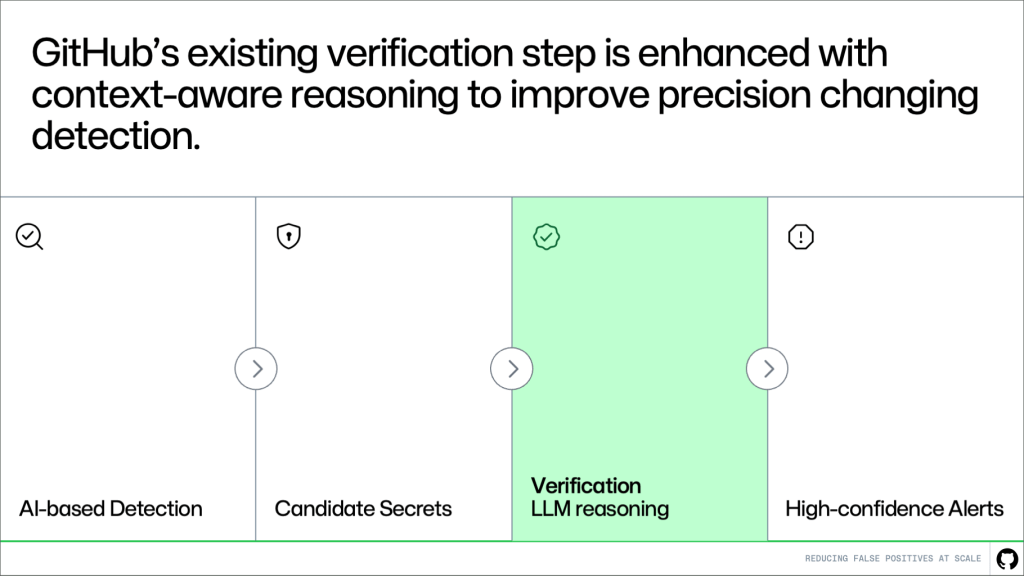
Secret scanning plays a critical role in protecting developers and organizations. It helps catch exposed credentials early and prevents small mistakes from turning into real incidents. At GitHub’s scale, even small inefficiencies create real friction. Too many false positives make alerts harder to trust. When alerts feel noisy, developers spend more time triaging and less time fixing real issues. Over time, this slows down remediation and reduces confidence in the system. To address this challenge, GitHub collaborated with Microsoft Security & AI’s Agents Offense team to bring more contextual reasoning into GitHub’s secret scanning verification. The collaboration applied the verification approach from Agentic Secret Finder, a broader detection and verification system developed to understand potential secrets in context, not just whether they match a secret-like pattern. This helped GitHub explore ways to reduce low-value alerts while preserving the coverage you expect from secret scanning. Secret scanning at GitHub today GitHub secret scanning combines pattern-based detection with AI-based detection to identify potential secrets. Pattern-based detection catches known secret formats, such as partner patterns for tokens and API keys. AI-powered generic secret detection expands coverage to unstructured secrets like passwords that don’t match a known provider pattern. GitHub already has industry-leading precision for provider-pattern secret detection at massive scale, processing billions of pushes and protecting tens of millions of developers across millions of repositories. As GitHub expanded into AI-powered secret detection, the next challenge was bringing the precision of AI-detected secrets closer to the same high standard as provider-pattern detections. This collaboration focused on combining GitHub’s large-scale detection pipeline with LLM-based contextual verification to improve alert quality and developer trust. Our approach: Make secret scanning alerts trustworthy Secret scanning is most useful when you can quickly tell which alerts need action. GitHub already has safeguards to reduce noise, but some secret-like values need more context to determine whether they represent a real exposure. To make those alerts easier to trust, we added more reasoning to the verification step. By looking at how a detected value appears in code, the system can better separate real exposures from values that only look sensitive. This helps you spend less time investigating low-value alerts and more time fixing the issues that matter. Where this fits in the pipeline This approach builds directly on the existing system. Detection continues to generate candidates, and the verification step evaluates them. More context-awareness makes this system better at distinguishing real secrets from noise. The result is higher precision without changing upstream detection logic or reducing coverage. How it works A key challenge in verification is deciding what context to provide. A small snippet of code is often not enough to determine whether something is a real secret. At the same time, passing entire files or repositories introduces too much noise and increases cost and latency. Instead of giving more context, we’re giving better context. Rather than send large amounts of code, we extract a small set of high-signal information that helps explain how the value is used. For example, we look for cases where a value is assigned to a variable and later passed into an API request, authentication header, database client, or cloud SDK call. Pattern matching can tell us that a value looks like a secret, but it can’t tell us whether the value is actually being used as one. The surrounding usage context helps the model distinguish real exposures from false alarms, such as random UUIDs or opaque strings, without reviewing the full file or repository. Focused context, not more data It’s natural to assume that improving accuracy requires analyzing more of the codebase. But the opposite is true. Most false positives can be resolved with focused, file-level context. What matters is not how much code the model sees, but whether it has the right signals. In many cases, you can determine whether a value is a real secret by looking at how it is used within a single file. Values that resemble placeholders, test data, or unused configuration can often be filtered out without deeper analysis. This keeps the system both effective and practical: high accuracy, low latency, and the ability to scale across large codebases. Results: reducing false positives in practice We evaluated this approach on hundreds of customer-confirmed false positive alerts. Our target was a 65% reduction. The result was 75.76%, exceeding that goal while maintaining strong detection performance. In practice, this means significantly less noise and a higher proportion of alerts that require action. False positive reduction results based on hundreds of customer-confirmed false positive alerts. This improvement shows up directly in the developer experience. With fewer irrelevant alerts, it becomes easier to trust what you see. Less time is spent triaging noise, and real issues can be prioritized and fixed faster. What’s next We’re continuing to evaluate this approach on larger datasets and live traffic, while improving how context is extracted and used for verification. Reducing false positives has been a consistent need at scale. This work focuses on improving signal quality where it matters most, making alerts easier to trust and act on. The goal is simple: fewer distractions, clearer signals, and faster action on real risks. Get started by running the risk assessment for your organization today, or learn more about secret scanning. The post Making secret scanning more trustworthy: Reducing false positives at scale appeared first on The GitHub Blog. ​ AI & ML, LLMs, Security, Secret Scanning The GitHub Blog

tech blog

How we made GitHub Copilot CLI more selective about delegation

In agentic systems, more delegation isn’t always better. Imagine asking Copilot CLI to make a simple change. Instead of handling it directly, it spins up a helper agent that searches the repository, waits on a result, and stalls. Work that should have taken one step now takes three. While some tasks genuinely benefit from a specialist subagent—like exploring an unfamiliar repository, checking an independent area of the code, or running a long command while the main agent keeps moving—delegation isn’t free. Every handoff adds coordination overhead, tool calls, and wait time. If an agent delegates too eagerly, the “help” can become friction.   We recently released an improvement to our agentic harness called smarter subagent delegation. This makes Copilot CLI more selective by helping the main agent:   Stay focused when it can move faster on its own. Delegate when a specialist creates real leverage. Parallelize work when tasks are truly independent. Smarter subagent delegation has now rolled out to 100% of Copilot CLI production traffic. If you want to get started today, simply update GitHub Copilot CLI by running the /update command in your terminal to version 1.0.42 or later.  In a production A/B test, this improvement reduced tool failures per session by 23%, including a 27% reduction in search tool failures and an 18% reduction in edit tool failures. It also improved total user wait time by 5% at P95 and 3% at P75, with no quality regression. Here, P95 captures wait time near the slowest 5% of sessions, while P75 reflects wait time toward the slower end of typical sessions. This means fewer unnecessary handoffs, fewer repeated searches, fewer failure-prone tool paths, and less waiting during long-running coding tasks.  In this post, we’ll walk through how we identified unnecessary delegation in Copilot CLI, what we changed to make delegation more selective, and how we validated those changes through offline evaluation and production A/B testing. We’ll also show why those changes led to fewer failures and less waiting—and what that looks like for developers using Copilot CLI day to day.  The problem: Delegation is powerful, but not free Subagents are one of the most important capabilities in an agentic CLI. They let Copilot break down complex work, run investigations in parallel, and keep the main agent focused on coordinating the final answer. For large codebases and multi-step engineering tasks, that can be the difference between a slow linear workflow and an efficient parallel one.  But delegation introduces its own failure modes:  Unnecessary handoffs for simple tasks that the main agent could complete faster on its own.  Overuse of exploration subagents when the handoff already contains enough context. Repeated or overlapping searches across the main agent and subagents.  Sequential delegation, where the main agent waits for a subagent instead of treating delegation as an opportunity for parallel work.  Failure-prone subagent paths, including stale file paths, moved files, incorrect relative paths, and workspace mismatches.   Figure 1. Example: tool call failure by subagents while main agent is idling.  Our goal: help developers use subagents when they create leverage, avoid them when they add overhead, and parallelize work when the task genuinely benefits from independent execution.  From problem signals to shipped improvement The way we identified the problem became the way we solved it. Instead of treating agent trajectory analysis, product changes, evaluation, and rollout as separate activities, we used them as one feedback loop: observe the agent behavior, isolate the orchestration bottleneck, make a targeted change, validate it offline, measure it online, and ship only once the end-to-end workflow improved.  Figure 2. The end-to-end improvement loop: analyze, change, validate, and ship. 1. Analyze: Let LLMs identify the delegation bottleneck Instead of manually reviewing agent sessions, we used LLMs to analyze full trajectories and identify where orchestration was helping versus where it was adding overhead. That analysis surfaced a consistent pattern: subagents were sometimes being invoked for tasks that were already narrow, obvious, or fully described in the handoff.  In those cases, the subagent could spend time re-searching the repository even though the main agent already had enough context to act directly. That clarified the improvement target: keep simple discovery-and-edit tasks in the main agent, and reserve subagents for work that is broader, cross-cutting, or naturally parallelizable.  2. Change: Refine the orchestration policy After identifying the bottleneck, we used LLMs to help translate that diagnosis into a more selective orchestration policy. Copilot CLI should handle focused work directly: find a file, read it, make a targeted change, and verify it. Delegation is more useful when the work requires independent context, broad exploration, or parallel execution. In practice, that means starting with the narrowest effective path, escalating when complexity or uncertainty creates value, and stepping back down when the task becomes focused again. Subagents should be treated as a parallelism tool, not a pause button. When Copilot launches a subagent, the main agent should continue making progress on independent work rather than simply waiting for the result. When a subagent is used, the handoff should also be specific: what the user asked, what is already known, what the subagent owns, and what kind of result the main agent needs back.  3. Validate: Test offline, confirm online, then ship Before broad rollout, we validated the change with automatically generated regression cases and existing benchmarks. This helped confirm that the new delegation guidance reduced avoidable overhead without breaking cases where subagents genuinely add value.  Finally, we moved through staff and public A/B testing, then analyzed production metrics across reliability, responsiveness, subagent workload, and quality. The gains did not come primarily from making individual LLM calls faster. Instead, it reduced orchestration overhead by avoiding unnecessary subagent paths and lowering subagent workload per user.  That end-to-end process let us move from problem signal to shipped improvement while keeping the user experience stable: fewer avoidable handoffs, fewer failure-prone tool paths, and no quality regression.  Outcomes After rolling smarter subagent delegation to production traffic, we saw measurable percentage improvements across reliability and responsiveness (Table 1):  Dimension Metric Delta Reliability  Tool failures

tech blog

GitHub Copilot CLI for Beginners: Overview of common slash commands

Welcome back to GitHub Copilot CLI for Beginners! In this series (available in video and blog format), we’ll give you everything you need to get started using GitHub Copilot CLI. So far in this series, we’ve covered how to get started and when to use interactive and non-interactive modes. In this edition, we’ll learn what slash commands are, why they matter, and how to use slash commands to control GitHub Copilot efficiently. You can complete tasks like switching models, checking token usage, and resuming past sessions right from your terminal. Let’s dive in! Understanding slash commands in GitHub Copilot CLI When working in Copilot CLI, one of the most powerful concepts to learn early on is slash commands. Slash commands are built-in controls that you can access directly from the command line. Acting as your control surface within Copilot CLI, slash commands allow you to: Guide Copilot’s behavior Inspect changes Manage context Move efficiently across sessions and projects Keep permissions tidy Slash commands can be thought of as your command center for interacting with Copilot CLI. To look at all of the options available, just type / in the command line for a scrollable list of all currently supported slash commands. Let’s take a look at some of the most popular ones. Choosing the right model Different models are optimized for different kinds of work. If you want to switch models, type /model into the command line. This will display a list of available models, along with key details like: Capabilities: Some are better for quick, lightweight tasks like refactoring, while others more efficiently handle deeper reasoning such as feature planning. Availability: The list may vary depending on your plan or organization’s settings. Cost: Numbers shown on the right of each model indicate cost multiplier, helping you choose the right balance between performance and usage in relation to your plan. Choosing the right model can significantly impact both speed and results. Managing context and token usage Copilot CLI operates within a context window, which determines how much information it can “remember” during a session. If you want to check your current usage, type /context to learn how many tokens you have left, along with system usage and available buffer. If you find that you’re running low on space, you can free up space by typing /compact in the command line. This summarizes your current conversation so you can continue without having to start a new session. Copilot CLI will do this automatically when you approach the limit, but you can also do this manually if you want to transition to a new task or clean up context mid-session. If you’d rather start fresh and completely reset your environment, you can use /clear to clear the session entirely. Working across sessions If you want to resume a previous session, you can type /resume. This will bring up a list of previous sessions you’ve had, including both local and remote sessions. Entering a previous session will show you your session history, and you can pick up right where you left off. Inspecting changes As you work with Copilot to make changes to your project, it’s important to keep track of what’s changed. If you want to see what the changes are, run /diff to see recent updates. This gives you a clear view of what modifications were made during your session, so you can validate changes before moving forward. Navigating projects and directories If you want to work across repositories or directories, you don’t have to exit Copilot. You can type /cwd to change your working directory to another repository. This allows you to scope Copilot’s work to a specific part of your project and helps you stay efficient while multitasking across codebases. Managing tool permissions In the past, you might have granted Copilot CLI permission to perform actions like editing files. Say you’re switching to a repository you want to be more careful in and want to reset those permissions: you can do so by running /reset-allowed-tools. Take this with you Using these slash commands gives you even better control over Copilot CLI—and the more familiar you become with them, the more deliberate your workflow becomes. Whether you’re switching models, managing context, or navigating across projects, using slash commands in CLI gives you the tools you need to stay in control. And if you haven’t already: open up your terminal, type /, and explore! There are many more slash commands to discover. Happy coding! Looking to try GitHub Copilot CLI? Read the docs and get started today. More resources to explore: GitHub Copilot CLI for Beginners video series GitHub Copilot CLI for Beginners: Getting started with GitHub Copilot CLI GitHub Copilot CLI for Beginners: Interactive v. non-interactive mode GitHub Copilot CLI 101: How to use GitHub Copilot from the command line Best practices for GitHub Copilot CLI The post GitHub Copilot CLI for Beginners: Overview of common slash commands appeared first on The GitHub Blog. ​ AI & ML, GitHub Copilot, GitHub Copilot CLI, GitHub Copilot CLI for Beginners The GitHub Blog

tech blog

Accelerating researchers and developers building multilingual AI with a new open dataset

Software may be written in programming languages, but human language is at the heart of developer collaboration. Developers explain how projects work in READMEs. They ask for help in issues. They review, debate, and improve code in pull requests. That collaboration often happens in English—but not always. As AI becomes a bigger part of how developers build software, multilingual developer content matters more than ever. Today, GitHub is publishing the GitHub Multilingual Repositories Dataset, a repository-level metadata dataset designed to help researchers and developers discover public GitHub repositories with evidence of non-English natural-language content. When building the dataset, we found that language distribution differs across READMEs, issues and pull requests: Korean is the most common non-English language in issue text, but only the fifth-most common in READMEs. Portuguese tops the non-English README list with more than 3 million repositories. The dataset is now available on GitHub under CC0-1.0. It follows through on a commitment we made in 2025, as part of Microsoft’s European Digital Commitments, to make multilingual data more accessible, including to open source AI developers. What’s in the dataset The GitHub Multilingual Repositories Dataset is intentionally not a dump of repository content. Instead, it is a metadata dataset that helps developers and researchers find repositories where multilingual collaboration may be happening. The dataset covers over 80 million classification rows across more than 40 million repositories. For each public repository, we provide: Language classifications of the README, the most-commented issue, and the most-commented pull request, with the first 150 characters of each used as the input sample. We exclude texts under 20 characters. Classifications for each text source, from fastText, gcld3, and lingua-py, each with a confidence score. The dataset only includes classifications with >0.5 confidence. Repository metadata: creation timestamp, disk usage, stars, forks, primary programming language, SPDX license, issue and pull request counts, and the snapshot date. We deliberately did not collapse the three classifiers into a single label. Different classifiers have different coverage and confidence calibration, especially for lower-resource languages. By exposing all three, we let you decide how strict you want to be. Want a high-precision Greek subset? Require all three classifiers to agree above some confidence threshold. Want broad recall for an exploratory study of Romance languages? One classifier may be enough. What you can build with it The dataset is designed for the kind of work that’s hard to do with general web text: Discover repositories likely to contain developer documentation or collaboration in specific languages. Study how non-English developer communities use issues, pull requests, and READMEs. Build evaluation sets for AI coding tools, doc generators, or review assistants that need to behave well across languages. Encourage decision-makers to expand language coverage for new developer tools and AI features using data-backed arguments on the rich multilingual diversity of developers. Measure representation of European and other underrepresented languages in open source. Some caveats Language identification is hard, especially in software repositories. Repository text is often short. It may include badges, templates, installation commands, code snippets, usernames, or mixed-language content. A 150-character sample may not represent the whole repository. Classifiers also vary in coverage and calibration, especially for lower-resource languages. That is why the dataset should not be treated as a ground-truth benchmark for language identification. Instead, it is designed as a transparent discovery tool. Users can inspect classifications, confidence scores, and sources, then choose the precision and recall tradeoffs that fit their own research or development workflow. The dataset also should not be used to infer sensitive attributes about repository owners, contributors, or communities. The signals are repository-level metadata, not person-level attributes. Why open multilingual data matters Today, many European languages remain underrepresented in the online text used to build and evaluate AI systems. That creates a risk that AI tools work well for some developers, languages, and communities, while leaving others behind. Open data can help close that gap. We built this dataset because developer content is different from general web text. READMEs, issues, and pull requests contain the language of software collaboration: installation instructions, bug reports, feature requests, review comments, and community norms. That context can help build AI systems that better understand how developers actually work. By making multilingual developer-content signals easier to find and analyze, this dataset gives researchers, open source developers, and model builders another tool for studying language representation in software development. It can help identify gaps, support better evaluation, and inform more inclusive AI tools for developers across Europe and beyond. It also reflects a broader principle: Building AI for developers should include the communities, languages, and workflows developers actually use. What’s next We’ll be discussing the dataset, and the broader importance of open data for multilingual AI, at the Open Innovation Dialogue Hub in Strasbourg on June 16. The event is co-organized by the Microsoft Open Innovation Center, the Council of Europe, and GitHub, and will bring together policymakers, researchers, cultural institutions, and open innovation leaders to discuss AI, linguistic diversity, cultural heritage, and open data. Multilingual AI needs multilingual developer communities. We hope this dataset helps more people study, support, and build for them. By releasing it under CC0-1.0 on GitHub, we’re inviting researchers, open source maintainers, and model builders to use it, critique it, extend it, and build evaluation sets and tools on top of it. If you do something interesting with it, we’d love to hear about it. The post Accelerating researchers and developers building multilingual AI with a new open dataset appeared first on The GitHub Blog. ​ AI & ML, LLMs The GitHub Blog

tech blog

What are git worktrees, and why should I use them?

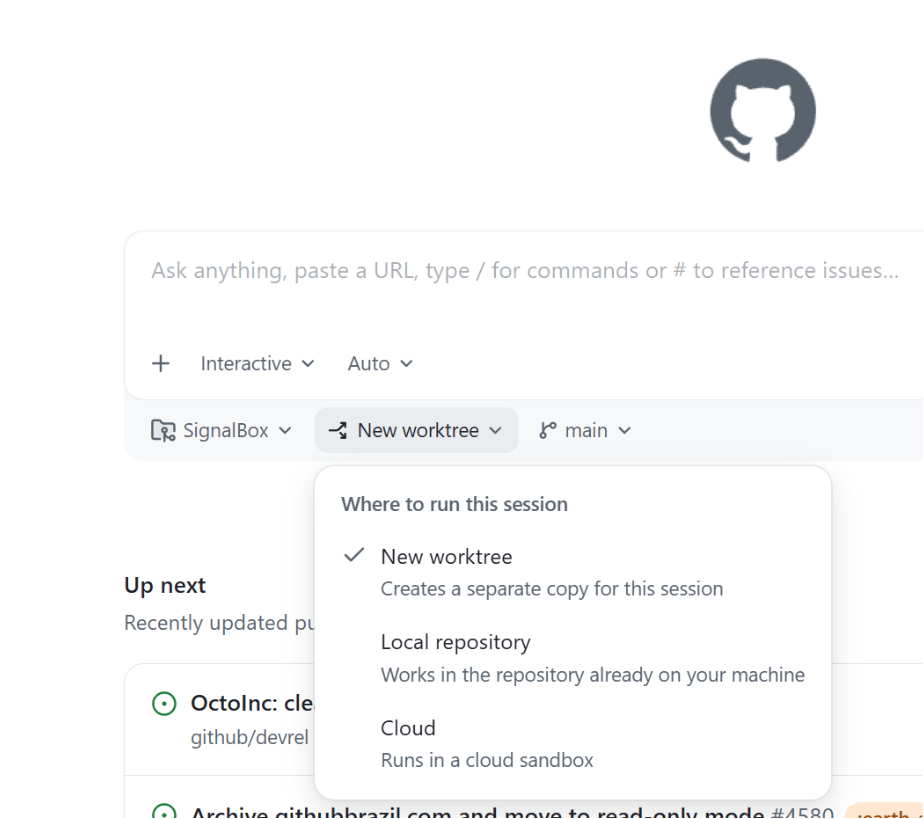
It seems like the latest hotness in git these days is the concept of worktrees. Which… is kind of funny because they’ve been around since 2015. But, nevertheless, they are cool, and you might be wondering why you’d use them, how they differ from branches, and why they are suddenly so popular. Let’s talk about it! Context switching with branches and stashing Let’s say you lived in a worktree-less world, and were working on a ticket, and suddenly an urgent bug came to you and you had to switch contexts. First, you might stash your work: git stash “wip feature login” Then you’d switch to your main branch and update: git checkout main git pull origin main Then make a bugfix branch: git checkout -b hotfix-bug Then you’d fix everything, commit, and push the branch: git add . git commit -m “fix broken submit button” git push origin hotfix-bug Then after merging a pull request, you might return back to your computer and pull main and remove the bug branch: git checkout main git pull origin main git branch -d hotfix-bug And then you could go back to the feature you were working on: git checkout feature-login git stash pop Phew. Where were we? The mental overhead of switching around, reloading files, reinstalling node_modules based on whatever changed, and so on, is a lot. The context switching burden is heavy. Now, this is a basic example, but sometimes developers would work around this kind of chaos with doing some more complicated git stash commands, or even multiple clones of the same repo (I’m guilty of that one). Until… worktrees! Context switching with worktrees With worktrees, you never leave your branch and you never stash, and your editor context for your original feature stays untouched. git worktree add ../hotfix-workspace -b hotfix-bug main This instantly creates a sibling folder called hotfix-workspace, and bases it on main, and checks out a new branch called hotfix-bug. Now you can open that folder in a new editor window (or cd into it) and fix the bug. Your original editor window stays exactly as you left it. cd ../hotfix-workspace # …fix fix fix… git add . git commit -m “fix broken submit button” git push origin hotfix-bug You merge the pull request online just like before, and once it’s merged, you can simply delete the temporary folder. cd ../main-project git worktree remove ../hotfix-workspace This is so much smoother! Worktrees can go beyond the git command line, too. For example, VS Code has full worktree support built in. You have options! And no matter where you work, worktrees give you zero risk of stash conflicts, there’s no editor disruption, and you can truly work in parallel. So… why now? For a really long time, worktrees were relatively unknown. Most developers had never heard of them, because either Git GUIs didn’t support them (or treated them as second-class citizens), or because they just usually followed the known pattern of feature branch, then work, then PR, then merge, then repeat. Now, our work as developers has changed. AI has made us work in parallel more than we ever have before in the history of software development. Developers run so many sessions in parallel, and “code review culture” is growing beyond “code writing culture.” Agents and humans can do more in parallel with worktrees. It’s the default mode for the GitHub Copilot app, and for many other modern tools. What’s the catch? Worktrees do solve a whole lot of issues, but there’s definitely some things to watch out for. Dependency bloat: each worktree folder requires its own copy of your project dependencies. If you’re running npm install or pip install across multiple of them, your computer might get very full, very quickly. Folder management: you have to delete the worktree folders, to avoid cluttering your parent directory over time. Apps like the GitHub Copilot app do often handle this for you, but it’s still something you might have to do yourself if you’re operating in the terminal yourself. Global .gitignore requirements: if you create worktree folders inside your main repo directory, you have to manually add them to .gitignore to not accidentally track them. You can make these worktrees outside of your main repo (and many apps do that by default), but it’s worth noting. One branch limits: Git prevents you from checking out the exact same branch in two different worktrees at the same time to prevent data corruption. How do I use worktrees in the GitHub Copilot app? Great question! What’s awesome is they “just work” out of the box. When you open the app, there’s a dropdown that asks you where you want to run your new session on the home screen. The default is a new worktree. Then, once you kick off a new session, you can click the session name at the top of the app, and you’ll see the (fun!) generated name of your worktree, as well as the path where it’s located, the project that worktree is for, and details about the changes that you’ve made. Easy peasy lemon squeezy! Should I use worktrees? I will give you the most senior developer answer I can: It depends! You might prefer working in one way or another. You might not do as much work in parallel and like the mental model of branches and stashing. You might only do worktrees from now on. You might want to do both! The world’s your oyster, and you can try them all in the GitHub Copilot app today. The post What are git worktrees, and why should I use them? appeared first on The GitHub Blog. ​ AI & ML, Git, GitHub Copilot, git worktrees, GitHub Copilot app The GitHub Blog

tech blog

Getting more from each token: How Copilot improves context handling and model routing

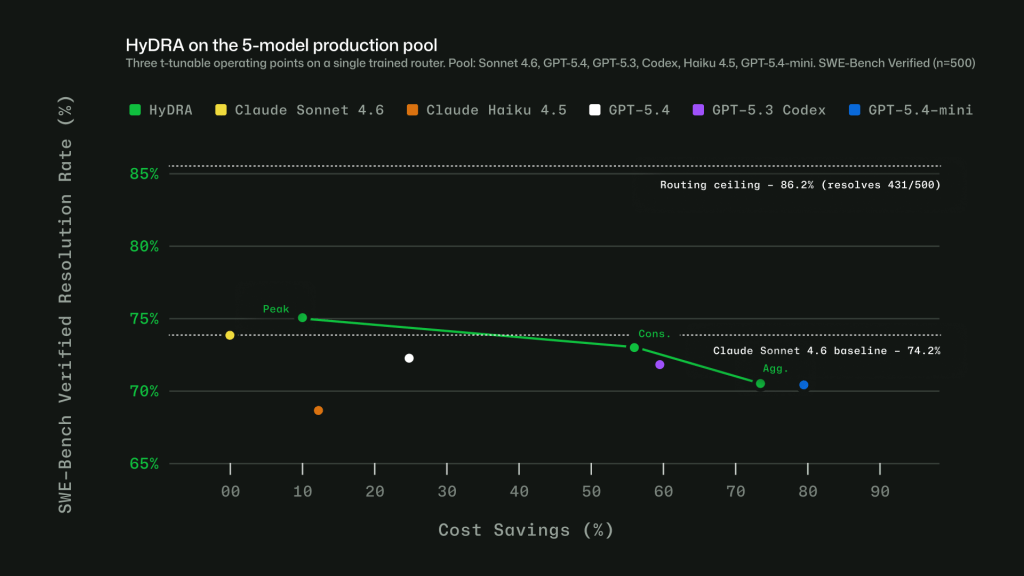
As Copilot takes on more agentic work, from planning and editing to debugging, reviewing, and calling tools across longer sessions, efficiency means more than using fewer tokens. It means being smarter about how you use them. Increasing efficiency starts with reducing what Copilot has to repeat from turn to turn, including context, tool definitions, and cached state. It continues with choosing the right model for the job. A quick explanation, a focused edit, and a complex multi-file change should not all be treated the same way. We are working on both: improving the Copilot harness so more of each session goes toward the task itself, and expanding Auto so Copilot can pick the model that fits the work without asking developers to make that choice every time. This post focuses on harness improvements in GitHub Copilot for VS Code and on ongoing work to expand Auto across Copilot surfaces. Increased prompt caching and deferred tools In longer GitHub Copilot sessions in VS Code, the harness prepares a lot of recurring information for the model: instructions, repository context, conversation history, available tools, and the current state of the task. Some of that context is needed. Some of it can be cached, deferred, or loaded only when it becomes relevant. Two improvements in GitHub Copilot for VS Code are doing most of the work here. Prompt caching helps Copilot reuse model state for repeated prompt prefixes instead of recomputing the same prefix on every request. Tool search lets the model load tool definitions on demand, instead of sending every full tool schema into context on every turn. That matters more as agents use more tools. A session may need access to MCP tools, terminal commands, file operations, workspace search, and product-specific actions. Loading every full tool definition up front adds fixed cost to each turn, even when only a small number of tools are relevant to the task. With tool search, Copilot can keep the available toolset broad while sending less unnecessary tool schema into the model. For a deeper technical look at the implementation, including prompt caching, cache-control breakpoints, provider-specific tool search, and how these changes work across long-running agentic sessions, read the VS Code technical deep dive. Where GitHub Copilot auto model selection fits in Auto answers a practical question: which model is the best fit for this task right now? After your first prompt, Copilot uses task intent and current model health to choose a model that best fits the task. Different kinds of work, like quick explanations, focused edits, or multi-file changes, do not all benefit from the same level of reasoning, so Auto makes that call without requiring you to tune model settings. In our evaluations, no single model consistently performed best across tasks. In many cases, a more efficient model reached the same outcome, while stronger models mattered most when the task required deeper reasoning. Auto learns where stronger reasoning improves the result. It routes up when the task demands it and stays more efficient when it does not. The goal is not to trade quality for cost, but to use the model that best fits the work. How Auto selects the right model Auto combines two signals: what model is healthy and available right now, and what kind of work Copilot is being asked to do. Real-time model health: a dynamic engine tracks model availability, utilization, speed, error rates, and cost. A model may be capable of handling a task, but that does not mean it is the best choice at that moment. Auto takes current system conditions into account so Copilot can route to a model that is both capable and ready to respond. Task-aware routing with HyDRA: a routing model that considers factors like reasoning depth, code complexity, debugging difficulty, and tool orchestration needs. HyDRA identifies models that can meet the quality bar for the task, then chooses the best fit among them. Figure 1: Three HyDRA operating points illustrate tunability: (Peak) exceeds Sonnet at 12.9% savings; (Agg.) balances quality for 72.5% savings. Figure 2: HyDRA (Cons.) ties OpenRouter Auto on resolution rate (70.8%) at 3.3x the savings. HyDRA (Agg.) outperforms both Azure Foundry operating modes. Taken together, these signals let Auto avoid a one-size-fits-all approach. The point is not to send every task to the biggest model, or every task to the cheapest one. It is to choose the model that fits the work. Making Auto work in practice Getting routing right in evaluations is only part of the problem. To make Auto useful in real workflows, we also had to account for how developers actually use Copilot: conversations get longer, context builds up, tasks shift, and developers work in many languages. Cache-aware routing. Switching models on every turn may sound flexible, but it can work against efficiency. When a conversation stays on the same model, the prompt prefix can be cached and reused across turns. Switching models mid-conversation breaks that cache, which can cost more than the routing change saves. Auto avoids that by routing at natural cache boundaries: on the first turn, when there is no cache to lose, and after compaction, when Copilot summarizes older turns and the prompt prefix resets. Between those points, the selected model stays in place so the cache can keep building. Routing across languages. Copilot serves developers around the world, so routing has to work in languages other than English. We trained the routing model on conversations across 16 language families, including CJK, European, and others. In evaluations, routing accuracy stayed within four points of the English baseline across language groups, with no statistically significant quality gap. Figure 3: Intelligent routing stays within 4 points of English baseline. Model evaluations across English, European, CJK, and other script families, based on a held out evaluation set sampled from production VS Code chat telemetry across 19 languages. Learning when escalation matters. Instead of labeling tasks as simply “easy” or “hard,” we trained the router to learn where models actually diverge. For each training query, responses

tech blog

Achieving success with AI

The two most important elements in any AI solution are Intelligence + Trust. I first made this statement in November at our Ignite conference and my conviction is strengthened by every conversation I have with customers. Through my travels, three consistent topics are being raised when considering the adoption of AI solutions: Will AI amplify the intelligence of my organization and the attributes that make my company unique within its industry to grow my business; or will it use my intelligence for its own benefit, learning from my most important business flows and leveraging my intellectual property? Can I trust that the outcomes are providing durable return on investment and that these solutions are running within the confines of my governance and security standards? How do I get the visibility, control, flexibility and business model innovation needed to manage the costs associated with AI and maximize value? I consistently advise customers that they need to build their own IQ on a platform of intelligence that is model-diverse, open and heterogeneous at every layer of the stack. Models are commoditizing. No company should be dependent upon any one model or any one model’s harness. Over the weekend, Satya warned of a world where every company across every sector is ceding value to a few models that eat everything they see. AI that is intended for growth should amplify the intelligence of an organization so that it compounds from within. Companies also need an observability platform that provides governance, management, security and Financial Operations (FinOps) to ensure the ROI with AI. This enables AI to be trusted within the environment over which it reasons and puts the business in control of the outcomes. Intelligence + Trust is embedded across Microsoft 365 Copilot, GitHub Copilot and Copilot Studio, where model diversity aligns cost and performance to each task. Microsoft IQ optimizes workflows, so context is routed efficiently and reduces unnecessary compute. Agent 365 is the control plane to observe, govern, manage and secure agents. We have built a system to manage AI spend as a core enterprise capability, not an afterthought. It is delivered across clouds and model providers without locking customers into a single approach. Managing costs at scale As agent usage scales, organizations need a clear set of levers to manage cost: Model diversity. Any given inferencing model, model harness or agentic loop on its own does not help build out an organization’s IQ in ways that compound its intelligence. Both Microsoft 365 Copilot and GitHub Copilot are model-diverse by design without locking customers into a single provider. Different models — like GPT-5.5 or Claude Opus 4.8 — serve distinct roles with different economics. Matching the right intelligence to each task optimizes performance and cost. Your IQ. Agents struggle with raw data. Significant compute is spent interpreting structure and context before useful work begins. The Microsoft IQ platform empowers your IQ by turning raw data into usable intelligence, continuously building a semantic understanding of how your organization operates across Microsoft 365 and line-of-business systems. It provides agents with the context they need upfront rather than requiring them to reconstruct it. The result is measurable: faster execution, higher accuracy and lower token usage. This is how intelligence compounds within your organization. Financial operations. FinOps became critical when companies moved to the cloud and requires even greater attention as AI shifts from fixed pricing to usage-driven models. With Foundry and Agent 365, we are providing tools to help our customers optimize their AI costs today. Frontier business models Business models are evolving as we use AI to drive business outcomes. The User Subscription License (USL) has become the foundation, providing a package of capabilities for a predictable per-user-per-month fee. Usage-based licensing has emerged for long-running, multi-tasking agents, where cost aligns directly to the work performed. Microsoft gives customers a unique combination of business model flexibility and integrated product experiences that is unmatched in the market. Microsoft 365 Copilot and GitHub Copilot use both models — a USL offering with not only value and capabilities, but flexible consumption on top. Today we’re announcing the general availability of Copilot Cowork worldwide, which requires the Microsoft 365 Copilot USL and is then usage-based. Our model-diverse strategy allows customers to purchase capacity with the flexibility to use the right model for the job based on model strengths, economics and the latest innovations. Microsoft Agent Factory provides a single consumption model spanning Microsoft 365 Copilot (including Cowork), GitHub Copilot and agents built in Fabric, Foundry and Copilot Studio. Our integrated product experiences put AI in the flow of work for both knowledge workers and software developers and manage capacity fluidly across the two. Historically these personas have been distinct, but increasingly the line between them is blurring. Coding is becoming a mainstream knowledge worker skill and chat and Cowork are becoming modalities important for software development. With Microsoft 365 and GitHub, we offer market-leading tools for both roles and make it easy to seamlessly manage capacity based on availability and need. Agent 365: The control plane As organizations adopt agents from Microsoft, another provider or build their own, a control plane is essential. Agent 365 gives IT and security leaders a single place to observe, govern, manage and secure agents across the organization. It builds on the Microsoft stack that enterprises trust: Entra for identity, Defender for threat protection, Purview for data governance and Intune for endpoint management. We are extending Agent 365 to include cost management, so organizations can monitor and manage agent spend alongside security and compliance. As the Frontier Firm operating model takes hold, leaders will manage human and agentic work as a single system, with visibility into both performance and cost. — The two most essential elements in any AI solution are Intelligence + Trust. At Microsoft, this conviction shapes how we design every layer of our AI platform. Microsoft IQ enables organizations to harness their own unique IQ, bringing context to data and embedding AI directly into the flow of work to deliver

tech blog

Building Quality Digital Solutions with ITMAITY

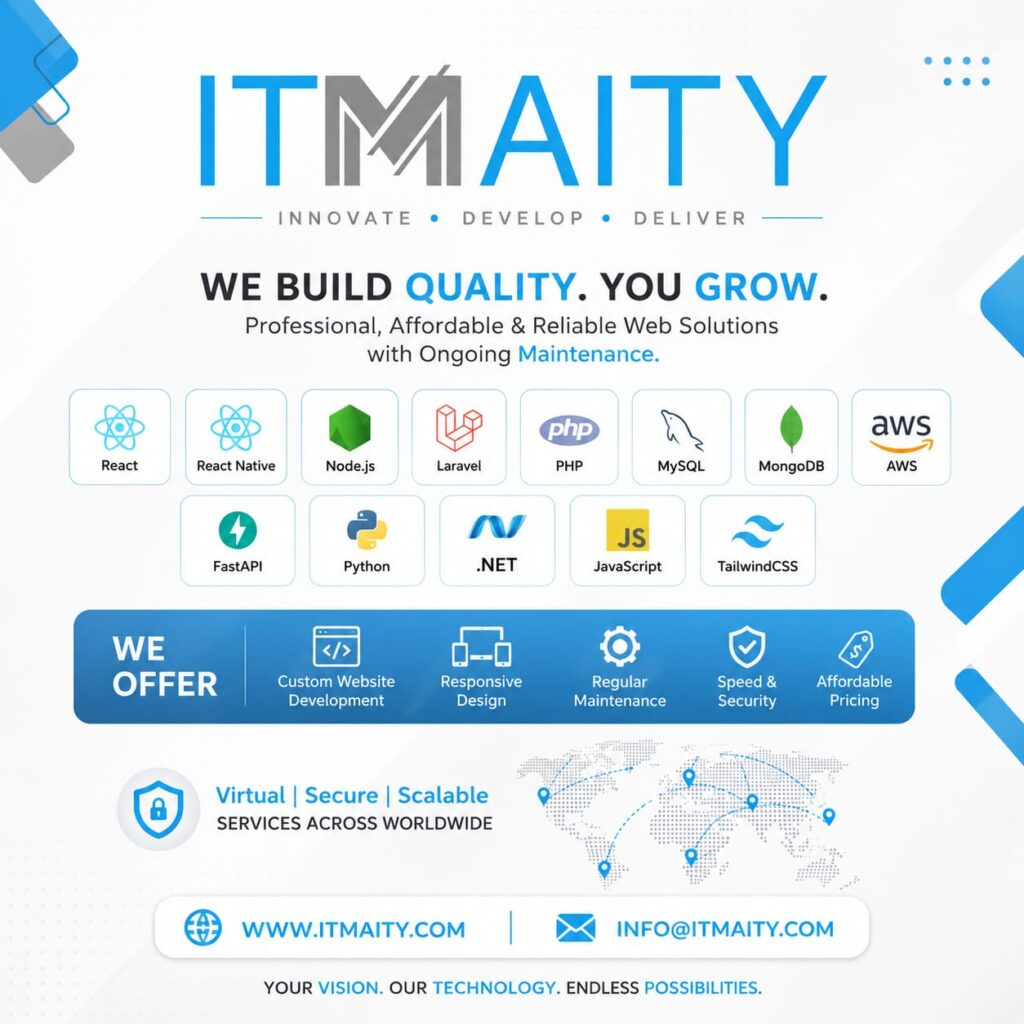
ITMAITY Web Development Services In today’s competitive digital landscape, having a professional, secure, and scalable online presence is essential for business growth. Whether you’re a startup, small business, or established enterprise, the right technology partner can help you transform ideas into powerful digital experiences. Why Choose ITMAITY? ITMAITY specializes in delivering high-quality web and application development solutions designed to help businesses grow faster and operate more efficiently. With a focus on innovation, reliability, and long-term support, ITMAITY provides end-to-end technology services tailored to your business needs. Our Expertise ITMAITY works with modern technologies and frameworks, including: Services We Offer Custom Website Development We create professional websites that are fast, secure, and tailored to your business objectives. Responsive Web Design Our websites are optimized for desktops, tablets, and mobile devices, ensuring a seamless user experience across all platforms. Ongoing Maintenance & Support Technology evolves constantly. We provide regular maintenance and updates to keep your website secure and performing at its best. Speed & Security Optimization From performance enhancements to advanced security measures, we ensure your digital assets remain protected and efficient. Affordable Development Solutions We offer cost-effective services without compromising on quality, helping businesses maximize their return on investment. Virtual, Secure & Scalable At ITMAITY, we believe technology should empower businesses to expand without limits. Our scalable solutions are designed to support growing organizations, ensuring smooth performance as your customer base and business requirements evolve. Benefits of Working with ITMAITY ✅ Professional Development Team✅ Modern Technology Stack✅ Reliable Technical Support✅ Scalable Business Solutions✅ Transparent Communication✅ Affordable Pricing Models✅ Long-Term Partnership Approach Let’s Build Something Great Together Whether you need a new website, a custom web application, cloud integration, or ongoing technical support, ITMAITY is ready to help you achieve your digital goals. Contact Us 📧 Email: info@itmaity.com📞 Phone: +91 87590 27112🌐 Website: www.itmaity.com Your Vision. Our Technology. Endless Possibilities.

tech blog

Managed SSL Service by ITMAITY: Secure Your Website with Expert SSL Management

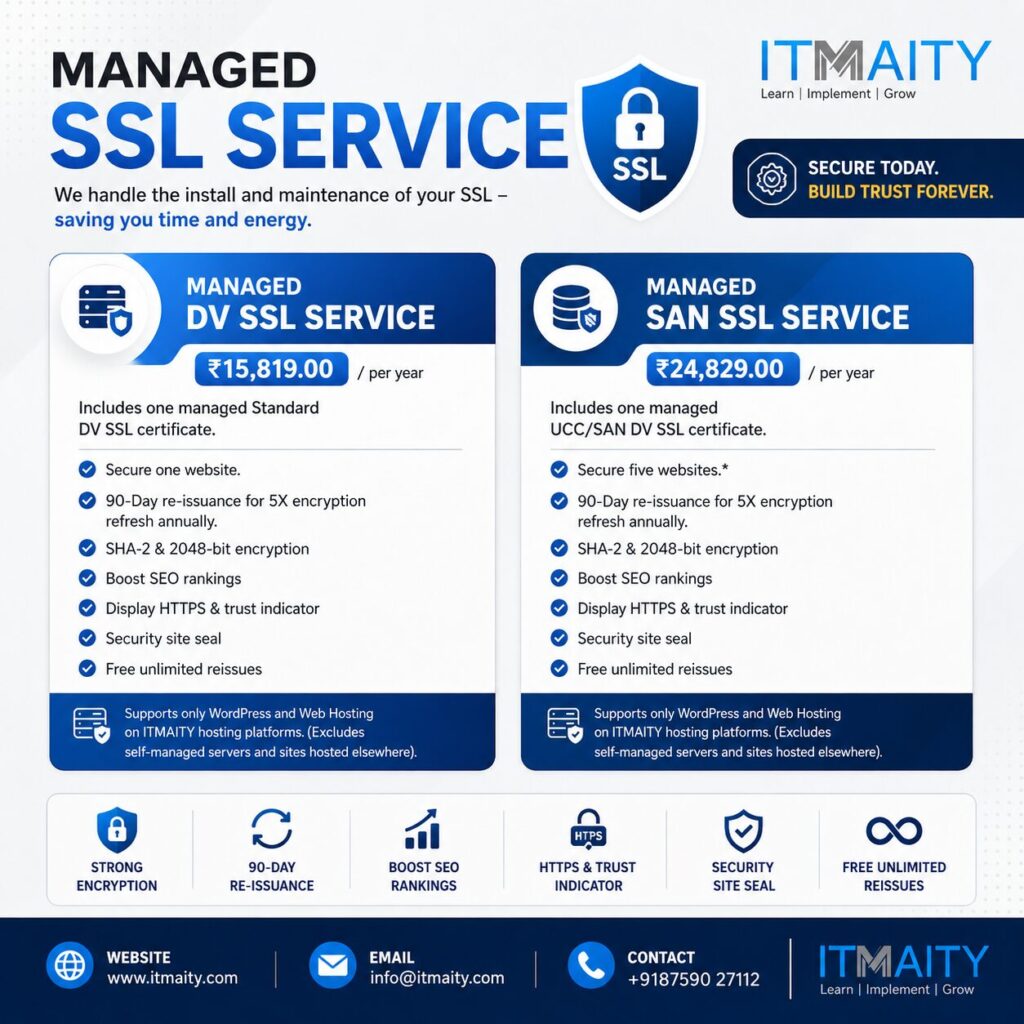
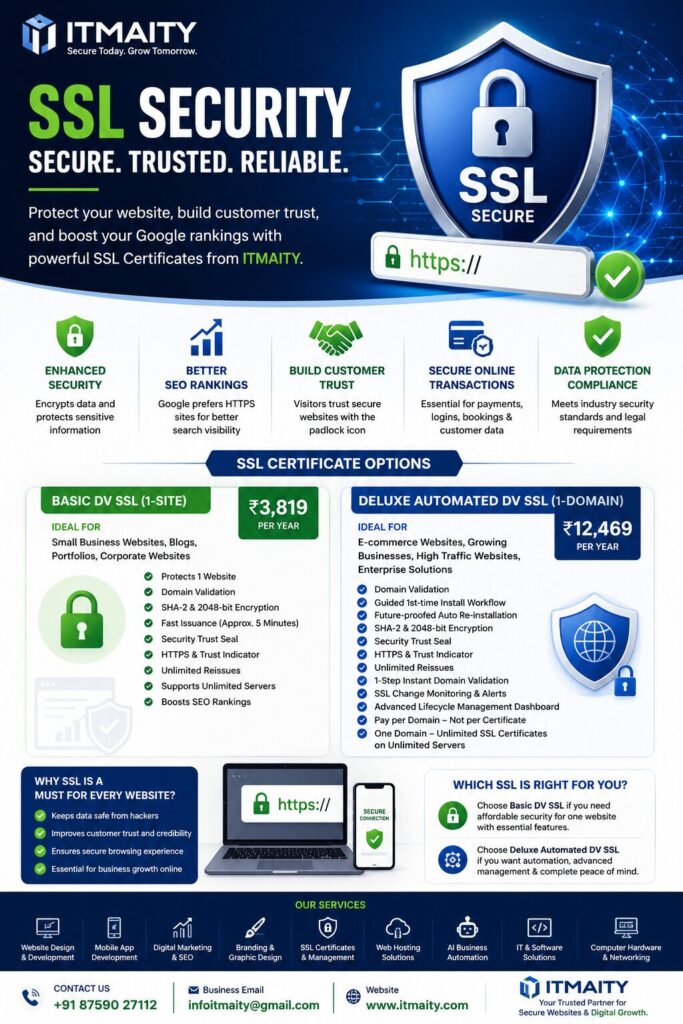
In today’s digital world, website security is no longer optional—it’s essential. Whether you’re running a business website, an e-commerce platform, or a professional portfolio, protecting user data and maintaining trust are critical for online success. At ITMAITY, we offer Managed SSL Services designed to keep your website secure while saving you time and technical effort. Our team handles SSL installation, maintenance, renewal management, and security monitoring so you can focus on growing your business. Why SSL Certificates Matter An SSL (Secure Sockets Layer) certificate encrypts the communication between your website and visitors, ensuring that sensitive information remains protected. SSL certificates also: Our Managed SSL Plans Managed DV SSL Service Price: ₹15,819 per year This plan includes a managed Standard DV (Domain Validation) SSL certificate with: Managed SAN SSL Service Price: ₹24,829 per year Ideal for businesses managing multiple websites. Features include: Benefits of Choosing ITMAITY Professional SSL Management Our experts take care of installation, renewal, configuration, and maintenance. Enhanced Security Protect your website with industry-standard encryption and security practices. Improved Search Rankings Search engines prioritize secure websites, helping improve visibility and credibility. Hassle-Free Renewals Never worry about certificate expiration or downtime due to SSL issues. Trusted Website Experience Display HTTPS and trust indicators that reassure visitors and customers. Who Can Benefit? Our Managed SSL Services are perfect for: Why Choose ITMAITY? At ITMAITY, we combine technical expertise with dedicated customer support to deliver reliable web security solutions. Our managed SSL services ensure your website remains protected, compliant, and trusted by visitors throughout the year. Contact ITMAITY Today 📧 Email: info@itmaity.com📞 Phone: +91 87590 27112🌐 Website: www.itmaity.com Secure your website today and build trust forever with ITMAITY Managed SSL Services.

tech blog

The New XPS 13: A Commitment Delivered

For students and young professionals who refuse to settle, meet the most accessible XPS ever built.   ​  ​For students and young professionals who refuse to settle, meet the most accessible XPS ever built. Laptops Blog | Dell

tech blog

Professional Digital Marketing Course by ITMAITY: Your Gateway to a Successful Digital Career

In today’s digital-first world, businesses rely heavily on online marketing to reach customers, build brands, and drive growth. As a result, skilled digital marketers are in high demand across industries. If you’re looking to build a rewarding career, grow your business, or start freelancing, ITMAITY’s Professional Digital Marketing Course is designed specifically for you. Why Choose ITMAITY? At ITMAITY, we believe in practical, industry-focused learning that prepares students for real-world challenges. Our training is delivered by experienced professionals who bring hands-on expertise and proven marketing strategies directly into the classroom. Whether you’re a student, entrepreneur, freelancer, or job seeker, this course provides the knowledge and skills needed to thrive in the digital marketing landscape. What You’ll Learn Our comprehensive curriculum covers the most in-demand digital marketing skills: Search Engine Optimization (SEO) Learn how to improve website rankings, increase organic traffic, and optimize content for search engines. Keyword Research Master the techniques used to identify profitable keywords that drive targeted traffic and conversions. Social Media Marketing Discover how to grow brands and engage audiences across platforms like Facebook, Instagram, LinkedIn, and YouTube. Graphics Design Create attractive visual content for social media campaigns, advertisements, and brand promotion. Basic Video Editing Learn essential video editing techniques to produce engaging content for digital platforms. Content Writing Develop compelling content that attracts, informs, and converts customers. Ads Management Understand how to create, manage, and optimize paid advertising campaigns for maximum ROI. AI Tools Training Get hands-on experience with 10+ powerful AI tools that enhance productivity, content creation, marketing automation, and business growth. Business Branding & Marketing Strategy Learn how successful brands build authority, attract customers, and scale their businesses through effective marketing strategies. Flexible Learning Structure ITMAITY offers personalized learning to ensure every student receives individual attention. Training Details This flexible format allows working professionals, students, and business owners to learn at their own pace while receiving expert guidance. Course Fees One-Time Payment ₹15,000/- Monthly Payment Option ₹6,000/- per month for 3 monthsTotal: ₹24,000/- Choose the payment option that best fits your budget and learning goals. Who Should Join? This course is ideal for: ✅ Students seeking career opportunities in digital marketing✅ Business Owners looking to grow their online presence✅ Freelancers wanting to expand their service offerings✅ Job Seekers aiming to acquire high-demand skills✅ Professionals planning a career transition into digital marketing Career Opportunities After Completion After completing the course, participants can pursue careers such as: Learn, Implement & Grow with ITMAITY Digital marketing is one of the fastest-growing career fields in the world. With practical training, personalized mentorship, and industry-relevant skills, ITMAITY empowers learners to achieve professional success and business growth. Contact ITMAITY 🌐 Website: www.itmaity.com📧 Email: info@itmaity.com📞 Contact: +91 8759027112 Take the first step toward a successful digital marketing career with ITMAITY today. Learn, Implement & Grow! 🚀

tech blog

ITMAITY – Building Quality Digital Solutions That Help Businesses Grow

In today’s fast-paced digital world, having a strong online presence is no longer optional—it’s essential. Businesses need websites and applications that are fast, secure, scalable, and designed to deliver exceptional user experiences. This is where ITMAITY steps in. Innovate. Develop. Deliver. At ITMAITY, our mission is simple: “We Build Quality. You Grow.” We provide professional, affordable, and reliable web development solutions that help businesses establish, strengthen, and expand their digital footprint. Whether you’re a startup looking for your first website or an established organization seeking advanced digital transformation, ITMAITY delivers customized solutions tailored to your goals. Our Technology Expertise We leverage modern technologies and industry best practices to build powerful digital products that perform. Frontend Technologies Backend Development Database Solutions Cloud & Infrastructure Our technology stack enables us to create high-performance applications that are scalable, secure, and future-ready. Services We Offer Custom Website Development Every business is unique, and your website should reflect that. We build custom websites designed to match your brand identity, business objectives, and customer expectations. Responsive Design With users accessing websites from multiple devices, responsive design is critical. Our websites provide seamless experiences across desktops, tablets, and smartphones. Regular Maintenance & Support Technology evolves continuously. ITMAITY offers ongoing maintenance and support to ensure your website remains secure, updated, and optimized. Speed & Security Optimization Website performance and security directly impact customer trust and search engine rankings. We implement industry-standard security measures and performance enhancements to keep your digital assets protected. Affordable Pricing We believe quality technology solutions should be accessible to businesses of all sizes. Our pricing models are designed to deliver maximum value without compromising quality. Why Choose ITMAITY? ✅ Professional Development Standards✅ Modern Technology Stack✅ Scalable Business Solutions✅ Reliable Ongoing Support✅ Secure Development Practices✅ Cost-Effective Services✅ Client-Centric Approach Virtual • Secure • Scalable ITMAITY serves clients worldwide, providing digital solutions that help businesses compete effectively in today’s connected marketplace. From website development to cloud-ready applications, we focus on creating technology that drives measurable business growth. Transform Your Digital Vision Into Reality Your vision deserves the right technology partner. At ITMAITY, we combine innovation, technical expertise, and customer-focused service to deliver solutions that create lasting impact. Your Vision. Our Technology. Endless Possibilities. Contact ITMAITY 📧 Email: info@itmaity.com🌐 Website: www.itmaity.com Partner with ITMAITY today and take the next step toward digital success.

tech blog

ITMAITY – Building Quality Digital Solutions That Help Businesses Grow

In today’s fast-paced digital world, having a strong online presence is no longer optional—it’s essential. Businesses need websites and applications that are fast, secure, scalable, and designed to deliver exceptional user experiences. This is where ITMAITY steps in. Innovate. Develop. Deliver. At ITMAITY, our mission is simple: “We Build Quality. You Grow.” We provide professional, affordable, and reliable web development solutions that help businesses establish, strengthen, and expand their digital footprint. Whether you’re a startup looking for your first website or an established organization seeking advanced digital transformation, ITMAITY delivers customized solutions tailored to your goals. Our Technology Expertise We leverage modern technologies and industry best practices to build powerful digital products that perform. Frontend Technologies Backend Development Database Solutions Cloud & Infrastructure Our technology stack enables us to create high-performance applications that are scalable, secure, and future-ready. Services We Offer Custom Website Development Every business is unique, and your website should reflect that. We build custom websites designed to match your brand identity, business objectives, and customer expectations. Responsive Design With users accessing websites from multiple devices, responsive design is critical. Our websites provide seamless experiences across desktops, tablets, and smartphones. Regular Maintenance & Support Technology evolves continuously. ITMAITY offers ongoing maintenance and support to ensure your website remains secure, updated, and optimized. Speed & Security Optimization Website performance and security directly impact customer trust and search engine rankings. We implement industry-standard security measures and performance enhancements to keep your digital assets protected. Affordable Pricing We believe quality technology solutions should be accessible to businesses of all sizes. Our pricing models are designed to deliver maximum value without compromising quality. Why Choose ITMAITY? ✅ Professional Development Standards✅ Modern Technology Stack✅ Scalable Business Solutions✅ Reliable Ongoing Support✅ Secure Development Practices✅ Cost-Effective Services✅ Client-Centric Approach Virtual • Secure • Scalable ITMAITY serves clients worldwide, providing digital solutions that help businesses compete effectively in today’s connected marketplace. From website development to cloud-ready applications, we focus on creating technology that drives measurable business growth. Transform Your Digital Vision Into Reality Your vision deserves the right technology partner. At ITMAITY, we combine innovation, technical expertise, and customer-focused service to deliver solutions that create lasting impact. Your Vision. Our Technology. Endless Possibilities. Contact ITMAITY 📧 Email: info@itmaity.com🌐 Website: www.itmaity.com Partner with ITMAITY today and take the next step toward digital success.

tech blog

Transforming Businesses with Smart Digital SolutionsTransforming Businesses with Smart Digital Solutions

ITMAITY is a fast-growing technology and digital solutions company delivering innovative, affordable, and professional IT services across India and worldwide. Based in West Bengal, ITMAITY is committed to helping businesses, startups, hospitals, educational institutes, and enterprises build a strong digital presence with modern technology and creative marketing solutions. With a dedicated team of developers, designers, marketers, and IT experts, ITMAITY offers end-to-end digital transformation services tailored to every business need. From professional website development and mobile applications to digital marketing, branding, AI automation, and IT infrastructure solutions — ITMAITY focuses on quality, performance, security, and customer satisfaction. Our Services 💻 Website Design & Development📱 Android & iOS Mobile App Development📈 Digital Marketing & SEO Services🎨 Branding, Graphics & Creative Design🎬 Professional Video Editing & Motion Graphics🤖 AI Automation & Smart Business Solutions🖥️ Computer Sales, Service & Networking📹 CCTV & Security Solutions☁️ Domain, Hosting, Cloud & Business Email Solutions🧾 Billing Software & POS Setup📊 Social Media Management & Ads Campaigns🛠️ Custom Software Development🌐 E-commerce & Business Management Solutions Why Choose ITMAITY? ✔ Professional & Affordable Solutions✔ Latest Technologies & Modern Designs✔ SEO Friendly & High Performance Platforms✔ PAN India & Global Service Support✔ Dedicated Technical Support Team✔ Business-Focused Growth Strategies✔ Creative & Corporate Branding Expertise ITMAITY believes technology should not only look professional but also generate real business growth. The company continuously works on innovative digital strategies to help clients improve their online visibility, customer engagement, and brand value. Whether you are a startup, local business, hospital, educational institute, or large enterprise — ITMAITY provides scalable and reliable digital solutions designed for long-term success. 🌐 Website: www.itmaity.com📧 Email: info@itmaity.com📞 Contact: +91 87590 27112 “Virtual Secure Services Across Worldwide.”

business

Master the Digital World with ITMAITY’s Professional Digital Marketing Course

In today’s digital-first economy, businesses and professionals need more than just basic marketing knowledge to succeed. ITMAITY proudly presents its Professional Digital Marketing Course, designed to help students, entrepreneurs, freelancers, job seekers, and business owners master modern digital marketing strategies and build successful careers in the digital landscape. Why Digital Marketing Matters More Than Ever The internet has transformed the way businesses connect with customers. Companies are actively seeking professionals who can drive online visibility, generate leads, manage social media platforms, and create impactful digital campaigns. By learning digital marketing, you can: What You’ll Learn at ITMAITY Our comprehensive course covers both fundamental and advanced digital marketing concepts, ensuring you gain practical, job-ready skills. SEO (Search Engine Optimization) Learn how to improve website rankings, increase organic traffic, and optimize content for search engines like Google. Keyword Research Understand how to identify profitable keywords and develop content strategies that attract targeted audiences. Social Media Marketing Master marketing techniques across platforms such as Facebook, Instagram, LinkedIn, and YouTube to build strong online communities. Content Writing Create engaging, SEO-friendly content that drives traffic, conversions, and customer engagement. Graphics Design Learn the basics of designing attractive marketing creatives, social media posts, and promotional materials. Video Editing Develop skills to create professional-quality videos for social media, advertising campaigns, and business promotions. Ads Management Gain hands-on experience with paid advertising campaigns and learn how to maximize return on investment (ROI). AI Tools Training Explore more than 10 powerful AI tools that can automate tasks, improve productivity, and enhance marketing performance. Practical Learning Approach At ITMAITY, we believe that practical experience is the key to mastering digital marketing. Our course includes: ✅ Live Projects✅ Hands-On Training✅ Real-World Case Studies✅ Industry-Relevant Assignments✅ Personalized Mentorship✅ Certificate of Completion Students gain practical exposure that helps them confidently apply their knowledge in real business environments. Flexible Learning Structure We understand that learners have different schedules and commitments. That’s why our training program offers a flexible and convenient learning format. Course Highlights Affordable Course Fees ITMAITY offers quality education at accessible pricing: One-Time Payment ₹15,000/- Monthly Payment Plan ₹6,000/- per month for 3 months This flexible pricing structure allows students to choose the option that best fits their budget and learning goals. Who Should Join This Course? This program is ideal for: Career Opportunities After Completion Upon completing the ITMAITY Digital Marketing Course, learners can pursue roles such as: Start Your Digital Success Journey Today The future belongs to digital professionals who can adapt, innovate, and leverage modern technologies to drive business growth. ITMAITY’s Professional Digital Marketing Course provides the knowledge, practical experience, and confidence needed to excel in today’s competitive digital world. Whether you want to grow your career, launch a business, or become a freelance marketing expert, ITMAITY is here to help you achieve your goals. Contact ITMAITY 📞 Phone: +91 87590 27112📧 Email: info@itmaity.com🌐 Website: www.itmaity.com Learn. Implement. Grow. Join ITMAITY and Master the Digital World Today! 🚀

tech blog

ITMAITY: Empowering Digital Creativity with AI-Powered Video & Image Generation

In today’s fast-paced digital world, businesses, content creators, marketers, and entrepreneurs need powerful tools to create engaging visual content quickly and efficiently. ITMAITY is revolutionizing the creative landscape by providing advanced AI-powered video and image generation solutions that help users transform ideas into stunning visual experiences. Create. Innovate. Elevate. At ITMAITY, we believe that creativity should have no limits. Our cutting-edge platform enables users to generate professional-quality videos and images using artificial intelligence, making content creation faster, smarter, and more accessible than ever before. Whether you’re a digital marketer, social media manager, business owner, educator, or content creator, ITMAITY provides the tools you need to bring your vision to life. Why Choose ITMAITY? 🚀 AI-Powered Content Creation Harness the power of advanced AI technology to create compelling videos and images without requiring extensive technical expertise. 🎥 Unlimited Video Generation Generate high-quality videos with ease using our powerful AI video creation tools, designed to support a wide range of creative and marketing needs. 🖼️ Unlimited Image Generation Create eye-catching visuals, graphics, and images to enhance your brand presence, marketing campaigns, and social media content. ✨ Text-to-Video & Image-to-Video Transform simple text prompts or static images into dynamic, engaging videos that capture audience attention and increase engagement. 🎨 Text-to-Image & Image-to-Image Generate unique images from text descriptions or enhance existing images using AI-powered image transformation technology. 👤 Character Consistency Maintain consistent characters and visual elements across multiple videos and projects, ensuring a professional and cohesive brand identity. 🌄 Advanced Scene Builder Design stunning scenes and visual environments effortlessly with intelligent scene-building capabilities. 🎬 First Frame to Last Frame Control Enjoy greater creative control throughout the video generation process, ensuring your content aligns perfectly with your vision. High-Quality Output for Professional Results ITMAITY delivers: Whether you’re creating promotional videos, social media content, product showcases, educational materials, or brand campaigns, ITMAITY helps you achieve exceptional results. Perfect for Businesses and Creators Our platform is ideal for: Transform Your Content Strategy Visual content has become essential for modern marketing success. With ITMAITY’s AI-powered solutions, businesses can significantly reduce production time, lower content creation costs, and scale their marketing efforts effectively. By combining innovation, automation, and creativity, ITMAITY empowers users to create impactful content that drives engagement, strengthens brand presence, and delivers measurable results. Get Started Today Ready to unlock unlimited creative possibilities? ITMAITY is your trusted partner for next-generation AI-powered video and image creation. 📞 Phone: +91 87590 27112📧 Email: info@itmaity.com🌐 Website: www.itmaity.com Create Without Limits. Inspire Without Boundaries. Choose ITMAITY.

tech blog

SSL Certificate: Why Every Business Website Needs One in 2026

In today’s digital world, website security is no longer optional—it’s essential. Whether you run an e-commerce store, a corporate website, a hospital, a restaurant, or a service-based business, protecting your customers’ information is critical. One of the most important security measures for any website is an SSL Certificate. At ITMAITY, we help businesses secure their websites with reliable SSL solutions that enhance security, improve customer trust, and boost search engine rankings. What is an SSL Certificate? An SSL (Secure Sockets Layer) Certificate encrypts the data exchanged between a website and its visitors. When SSL is installed, your website URL changes from: ❌ http://yourwebsite.com to ✅ https://yourwebsite.com The padlock icon displayed in the browser assures visitors that their personal information, login credentials, payment details, and business data are protected. Benefits of SSL Certificates 🔒 Enhanced Website Security SSL encrypts sensitive information, preventing hackers from intercepting data during transmission. 📈 Better SEO Rankings Google gives preference to HTTPS-enabled websites, helping improve search engine rankings and online visibility. 🤝 Increased Customer Trust Visitors are more likely to engage with websites displaying the secure padlock icon. 💳 Secure Online Transactions SSL is essential for websites handling payments, reservations, bookings, and customer information. 🛡️ Data Protection Compliance Many privacy and security standards require websites to implement SSL encryption. SSL Certificate Options Basic DV SSL (1-Site) Price: ₹3,819/year Suitable for: Features: ✔ Protects 1 Website✔ Domain Validation✔ SHA-2 & 2048-bit Encryption✔ Fast Issuance (Approx. 5 Minutes)✔ Security Trust Seal✔ HTTPS & Trust Indicator✔ Unlimited Reissues✔ Supports Unlimited Servers✔ SEO Benefits Deluxe Automated DV SSL (1-Domain) Price: ₹12,469/year Suitable for: Features: ✔ Domain Validation✔ Automated SSL Management✔ Automatic Reinstallation✔ Advanced SSL Monitoring✔ Instant Domain Validation✔ Security Trust Seal✔ Unlimited SSL Certificate Issuance✔ HTTPS & Trust Indicator✔ Advanced Lifecycle Dashboard✔ Supports Unlimited Servers Which SSL Certificate Should You Choose? Choose Basic DV SSL if: Choose Deluxe Automated DV SSL if: Why Choose ITMAITY? At ITMAITY, we provide complete website security solutions for businesses across India and worldwide. Our Services: 🌐 Website Design & Development📲 Mobile App Development📈 Digital Marketing & SEO🎨 Branding & Graphic Design🛡️ SSL Certificate Installation & Management☁️ Web Hosting Solutions🤖 AI Business Automation💻 IT & Software Solutions🖥️ Computer Hardware & Networking Our experienced team ensures your website remains secure, fast, and optimized for growth. Secure Your Website Today Don’t leave your business vulnerable to security threats. Protect your website, improve customer trust, and strengthen your online presence with a professional SSL certificate solution from ITMAITY. Contact ITMAITY 📱 Business Number: +91 87590 27112📧 Business Email: infoitmaity@gmail.com🌐 Website: www.itmaity.com ITMAITY – Your Trusted Partner for Website Security, Digital Growth & Business Technology Solutions. #SSL #WebsiteSecurity #HTTPS #CyberSecurity #DigitalMarketing #SEO #WebHosting #ITMAITY #BusinessGrowth #WebsiteDevelopment #SecureWebsite #TechnologySolutions #OnlineBusiness #DataProtection #IndiaBusiness #SSLCertificate #DigitalTransformation

tech blog

World Environment Day 2026: Technology and Sustainability Together for a Greener Future

Celebrating World Environment Day with ITMAITY Every year on World Environment Day, people, organizations, and businesses across the globe come together to raise awareness about environmental protection and sustainable development. At ITMAITY, we believe that technology and innovation can play a vital role in creating a cleaner, greener, and more sustainable future. As a leading IT solutions and digital transformation company, we are committed to helping businesses embrace digital technologies that reduce waste, improve efficiency, and contribute to environmental sustainability. Why World Environment Day Matters The environment is the foundation of our lives and businesses. Clean air, water, forests, and natural resources are essential for future generations. However, challenges such as pollution, deforestation, climate change, and excessive resource consumption continue to threaten our planet. World Environment Day reminds us that every individual and organization has a responsibility to make environmentally conscious choices and adopt sustainable practices. How Technology Supports Sustainability Digital transformation helps reduce environmental impact in numerous ways: ✅ Paperless business operations through digital documentation and billing systems ✅ Online marketing and communication that reduce printing waste ✅ Remote work and cloud-based solutions that minimize travel-related emissions ✅ Smart business automation that improves resource efficiency ✅ Digital record management that reduces physical storage requirements At ITMAITY, we empower businesses with technology solutions that support both growth and sustainability. ITMAITY’s Commitment to a Greener Future We encourage businesses to adopt modern digital solutions that help reduce environmental impact while improving productivity and profitability. Small Actions Create Big Impact This World Environment Day, let us all take a pledge to: 🌱 Reduce paper usage 🌱 Save electricity and energy 🌱 Promote digital solutions 🌱 Plant more trees 🌱 Reduce waste and recycle responsibly 🌱 Support environmentally conscious business practices Together, through innovation, responsibility, and sustainable technology, we can build a better future for generations to come. Happy World Environment Day! ITMAITY – Empowering Businesses Through Technology & Innovation 📞 Business Number: +91 87590 27112 📧 Email: infoitmaity@gmail.com 🌐 Website: www.itmaity.com “Technology for Business Growth, Innovation for a Sustainable Tomorrow.”

Scroll to Top