Author name: ITMAITY

tech blog

Looking back on Microsoft’s FY26: From AI experimentation to Frontier Transformation

Throughout this past fiscal year, customers across every industry and segment moved from AI experimentation to deploying AI for real-world business outcomes. They unlocked innovation and created new opportunities for growth. We saw the emergence of Frontier Firms as they moved beyond efficiency gains to focus on human ambition and embed AI at the core of how they operate. Successful customers are building an intelligence platform so their unique IQ — their knowledge, data, workflows, applications and expertise — can continuously compound, ensuring the value of AI accrues to the customer, not the model. They have a trust platform that is pervasive, with the ability to manage, govern, secure and measure AI across every business process. Everything we are doing at Microsoft is empowering Frontier Transformation: Copilot enables AI in the flow of human ambition, Microsoft IQ amplifies and protects an organization’s IQ and Agent 365 is the trust platform that enables observability at every layer of the stack. Businesses are not static, and neither are the AI systems that support them. As organizations evolve, AI systems must continuously learn and improve. Agentic workflows need to be built, observed and tuned against the outcomes organizations seek and the ROI they demand. Microsoft’s open, model-diverse and heterogenous platform powers that improvement loop. We also recently announced Microsoft Frontier Company, bringing our AI engineering approach to customers around the world to help them build these AI systems to accelerate measurable business outcomes. Throughout the past year, we saw customers put these capabilities to work in powerful ways — embedding AI into core business processes, building agentic systems, strengthening security, accelerating innovation and creating new sources of value. The stories below highlight organizations leading Frontier Transformation, demonstrating how intelligence, trust and human ambition come together across industries. To advance its journey to become a global AI-powered company, Atos Group deployed Microsoft 365 Copilot to 56,000 employees across 54 countries — from consultants to engineers to frontline workers — and was one of the first organizations globally to adopt Microsoft 365 E7: The Frontier Suite. Using Microsoft Foundry, Microsoft Copilot Studio and Agent 365, Atos is building, operating and governing a growing ecosystem of 19,000 AI agents through a unified operating model that brings together productivity, security, compliance and agent governance. As Atos embeds secure agentic AI across its workforce, the company is creating a repeatable model to continuously improve thousands of agents at scale while applying the same playbook to help customers accelerate adoption across highly regulated industries. Facing state-sponsored threats and complex global operations, ASM is strengthening cyber resilience with Microsoft Security Copilot, helping protect the intellectual property behind advanced semiconductor manufacturing. By bringing threat investigations into a unified AI-powered experience, ASM enables analysts to investigate incidents faster, apply consistent decision-making across global operations and accelerate the development of cybersecurity talent. The company reduced incident triage time by 68%, cut laptop compromise investigations from 25 minutes to eight and now saves 337 hours each week on investigations while redeploying 20% of its security operations staff to governance, risk and compliance initiatives. Banco Popular Dominicano, the largest private-sector bank in the Dominican Republic, transformed operational risk management from periodic, sample-based reviews into continuous, AI-powered supervision. Using AURA — an ecosystem of specialized agents built on Microsoft Copilot Studio and Microsoft Power Platform — the bank monitors 100% of its operational risk universe in real time, up from roughly 40% coverage, and can automatically analyze changes, validate controls and surface issues as they occur. The shift has delivered seven times greater analytical capacity, reduced manual operating effort by 70%, achieved 98% methodological accuracy and enabled continuous processing of approximately 80,000 documents per week and more than 300 cases per day. Just as importantly, risk teams have moved from reacting to problems after the fact to anticipating and preventing deviations before they occur. These results demonstrate the power of AI democratization. By enabling business teams to build intelligent solutions themselves through low-code tools, Banco Popular transformed operational risk management while fostering a culture of innovation led by domain experts. To help reduce the manual burden for employees while meeting the pharmaceutical industry’s strict data security requirements, Cactus Life Sciences modernized scientific workflows with Microsoft 365 Copilot and agents. The company has deployed more than 30 custom automation agents to streamline document review and structure data extraction and information retrieval across scientific writing and project management teams. Supported by a centralized knowledge repository and the Copilot Champions community, the company reports efficiency improvements of approximately 35% to 50% in structured data extraction. By automating labor-intensive tasks and maintaining human review and quality controls, the company is enabling scientific writers to focus on deeper analysis, synthesis and delivering exceptional science to clients. Chow Tai Fook is redefining luxury retail with Microsoft 365 E5, Microsoft Purview, Microsoft Azure OpenAI Service, Microsoft Fabric and Microsoft Foundry. The company has deployed over 400 customized AI agents supporting more than 24,000 employees, with millions of AI interactions each month and core business-process efficiency gains exceeding 70%. Through its AI Fook super-agent ecosystem, frontline associates can instantly access product expertise, inventory insights and personalized recommendations, helping drive sales conversion improvements of up to 57% while delivering hyper-personalized omnichannel experiences at scale. With hundreds of AI agents operating across the business, Chow Tai Fook is creating a foundation where customer, product and operational intelligence can be applied across every interaction, helping personalize experiences and improve decision-making across its global retail network. To accelerate AI adoption, EY moved AI from experimentation into enterprise-wide transformation. After deploying Microsoft 365 Copilot to 150,000 employees and realizing a 15% productivity gain, the firm is expanding the Microsoft 365 Frontier Suite across its global workforce of more than 400,000 people, embedding agentic AI capabilities across the enterprise. As Client Zero, EY is applying Microsoft technologies across its own operations, including Microsoft Power Platform, Microsoft Copilot Studio, Microsoft Azure, Microsoft Foundry and Microsoft Fabric. The results include 95% faster lead times, a more than 37% reduction in finance

tech blog

Rethinking security for the age of AI

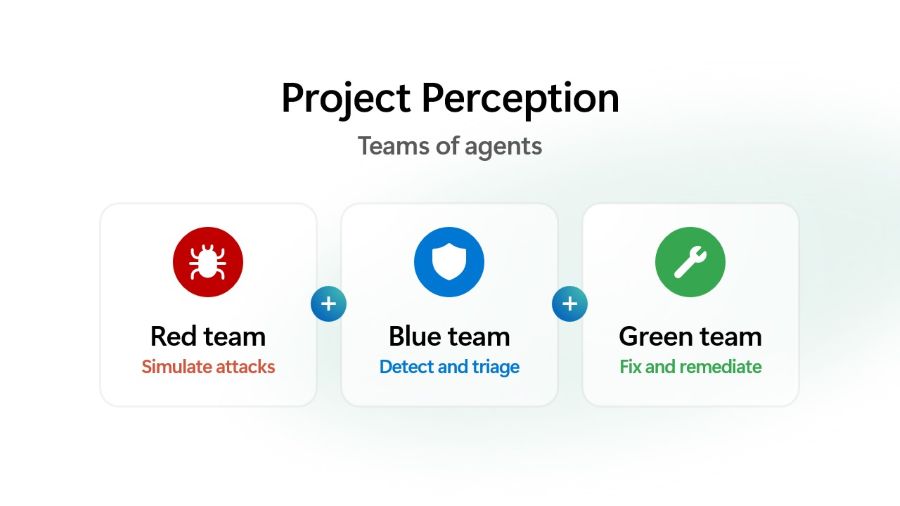
Why security needs a new Cyber Stack — Introducing Project Perception The physics of cybersecurity are changing. Autonomous systems can now reason, adapt and operate continuously. At the same time, the cost of offense is falling, while the volume, velocity and complexity of what must be secured continues to grow. Attackers can generate exploits faster, scale campaigns further and operate with unprecedented efficiency. The approaches built for a world of human actors cannot keep pace with a world of AI, agents and machine-speed attacks. Security needs a new Cyber Stack. A new Cyber Stack must continuously perceive risk across the entire digital estate, reason across vast amounts of context and take action at machine speed. It must learn and adapt as environments evolve, helping organizations stay ahead of threats. And because security is ultimately a human mission, it must amplify defenders with better insights and more powerful ways to act. The defining characteristic of the next generation of security systems will not be their ability to generate more alerts. It will be their ability to continuously perceive, reason and act. That vision led us to build Project Perception. A new agentic security system designed for the realities of AI. It turns signals into real-time protections using AI to defend against AI. Project Perception brings together signals, context, models and specialized agents into a continuously learning system of defense. It can reason, prioritize and act at machine speed while keeping humans firmly in control and empowering them with powerful new workflows. Project Perception is based on a simple idea: effective defense requires continuous understanding of how an attacker sees the world, how a defender evaluates risk and how protections are improved over time. To accomplish this, Perception coordinates three classes of specialized agents. Red team agents identify potential paths to compromise before an attacker can exploit them. Blue team agents investigate, reason over context and determine what represents meaningful risk. Green team agents take corrective actions and strengthen defenses across the environment. Working together, these agents form a closed-loop system that continuously discovers, evaluates and improves an organization’s security posture. A system like Project Perception is only as effective as the visibility it has, the actions it can take, the experience of the teams building it and the models it can use. Microsoft brings together all four. We see across identities, endpoints, applications, data, clouds and AI systems, providing broad visibility across the digital estate. Equally important, we can help customers take action across those environments. Combined with decades of security research, threat intelligence and real-world operational experience defending organizations, these capabilities shape how Project Perception reasons, prioritizes and responds. Security is a 24/7 mission. Organizations need protection that is highly effective, continuously available and affordable at scale. That requires more than access to the most capable model. It requires applying the right model to the right task. Project Perception adopts a multi-model architecture that combines frontier and specialized cyber models, optimizing for both quality and cost. As part of this multi-model strategy, we are committed to bringing customers the best models for each security task, including innovating with our own specialized models. The first scenario is software vulnerability management, bringing MAI-Cyber-1-Flash inside MDASH, our software vulnerability multi-model team of agents. MDASH with MAI-Cyber-1-Flash delivers 96% on CyberGym, an industry leading benchmark, +12 points above Mythos. And this same configuration delivers almost 50% of cost savings vs. the current MDASH configuration in market today. That’s the power of a well-tuned, multi-model system with access to uniquely rich historical training data. Next, Project Perception will take advantage of MAI-Cyber-1-Flash for many more security workflows, beyond the software vulnerability scenario. We are bringing this vision to customers around the world through Project Perception, which enters public preview on August 3. YouTube Video Click here to load media A Cyber Stack built for agentic security Delivering agentic security requires more than adding agents to existing workflows. It requires a new Cyber Stack, designed from the ground up. The stack begins with signals and sensors that provide awareness across the digital estate. Security context transforms those signals into token-efficient understanding that agents can use. Models provide intelligence and reasoning. A harness coordinates models and agents across security workflows. Agents apply that intelligence across security workflows and actuators translate decisions into protection. Together, these layers create a continuous learning system that can understand risk, adapt to changing conditions and improve security outcomes over time. While each layer provides important capabilities, the power of Project Perception comes from how they work together. Security context built for AI Effective reasoning requires more than raw signals. Agents need context. Microsoft transforms its breadth of visibility, threat intelligence and security expertise into a security context that connects security data, knowledge and semantics across the digital estate. The result is a continuously updated representation of an organization’s assets, identities, relationships, risks and activities that gives agents a shared, near real-time, understanding of the environment they are helping to defend. This shared understanding is foundational to how Project Perception operates. Rather than forcing agents to continuously gather, correlate and reconstruct context from raw signals, it provides them with immediate and token-efficient access to the information they need to reason over risk, prioritize actions and make decisions. By grounding every interaction in this rich security context, Project Perception improves the accuracy and consistency of reasoning while reducing the time, compute and cost required to operate at scale. A multi-model architecture built for security No single model will be optimal for every security task. Effective cyber defense requires applying the right model to the right problem at the right time. For Project Perception, the right model is determined by the combination of quality, reliability, latency and cost. Rather than relying on a single model, Project Perception adopts a multi-model architecture that continuously selects the capabilities best suited to the task, optimizing for both effectiveness and economics. Because security is an always-on mission, sustainable economics are essential to operating protection at scale. This approach

tech blog

Powering America’s Genesis Mission: Microsoft’s commitment to scientific discovery

Today, we’re excited to share a long-term commitment to the Department of Energy’s (DOE) Genesis Mission, backed by a $60 million investment designed to accelerate AI for science and the breakthroughs it can deliver for the country. This deepened commitment includes Microsoft’s new Scientific Partnership Advancing Research & Knowledge coordination hub and program office, otherwise known as SPARK, that is focused on facilitating collaboration and scientific discovery for the Genesis Mission. The Genesis Mission represents an ambitious vision, bringing together DOE’s 17 National Laboratories, world-class experimental facilities, decades of irreplaceable scientific data and next-generation computing into a single, unified platform capable of transforming how science gets done. The critical goal of the Genesis Mission is to double the productivity and impact of American research and innovation within a decade by embedding AI directly into the scientific process. It’s a bold step forward and exactly the kind of moonshot that defines American science. At Microsoft, we believe that this goal is not only achievable, but also essential as a national security imperative and an economic engine for generations to come. With this commitment and the launch of SPARK, we’re ready to partner fully in this mission and build on our collaborations across government and with academia. Microsoft investing in AI for science Today, Microsoft’s $60 million investment package will begin to accelerate AI for science in support of DOE and the National Laboratories. As sustained scientific impact requires more than infrastructure alone to enable lasting scientific outcomes, Microsoft’s investment package is structured in two parts: $40 million in Azure compute and AI credits, distributed over three years, to power the large-scale AI and scientific workloads at the heart of the mission. This gives researchers room to train, simulate and iterate at a scale that matches their ambition. $20 million in solution engineering enablement services. Dedicated engineering, architecture, deployment, adoption and acceleration support to turn cloud and AI capacity into operational scientific outcomes. This investment helps ensure that the Genesis Mission advances in practice and in principle. Together, this investment reflects a simple conviction: While infrastructure opens the door, it is people, expertise and disciplined delivery that carry discoveries across the finish line. Microsoft is committing to both. Introducing SPARK: Microsoft’s catalyst for advancing scientific partnerships Great partnerships need more than good intentions and good technology — they need a clear way to work together. So, alongside this commitment, we are standing up a new program office and coordination hub: SPARK, or Scientific Partnership Advancing Research & Knowledge. SPARK is the single front door and coordination hub for Genesis Mission collaboration with Microsoft. SPARK orchestrates the full breadth of what Microsoft brings to bear: program, technical, research, engineering, security, compliance, partner and field teams into one clear, consistent path from first idea to deployed science. SPARK is built around five commitments: A dedicated Genesis Mission Program Management Office. This office handles intake, prioritization, a disciplined sprint-and-checkpoint cadence and a steady operational interface with DOE for alignment, reporting and sustained partnership. An AI for Science Center of Excellence. An integrated delivery team that moves use cases from concept to secure, compliant, scalable implementation, with enablement through office hours, hackathons and training grounded in responsible AI and reproducible research. Optimization of Azure credits. Ensures computing resources are directed toward the projects where they can accelerate science most. Management of technical services. Dedicated support to help labs adopt and operationalize AI-for-science capabilities, delivered by Microsoft teams and select partners. Joint research and development. A focused set of Genesis Mission-aligned challenge problems, co-developed by Microsoft researchers and DOE scientific leadership, with milestones, publications and IP governed by mutually agreed terms. Underneath SPARK sits the full breadth of Microsoft’s secure, FedRAMP-authorized cloud and AI portfolio. This includes Microsoft Azure infrastructure, Microsoft Foundry and Zero Trust security through Microsoft Defender, Sentinel and Entra. Azure capabilities will help extend the DOE’s American Science Cloud capabilities by providing computing, AI, data and collaboration services that complement existing scientific infrastructure. Together, these capabilities will help accelerate discovery, enable secure collaboration across institutions and provide researchers with flexible access to advanced technologies and resources. This will enable DOE and National Laboratory scientists to move faster from hypothesis to discovery, without compromising the security, reproducibility and governance that mission-critical research demands. Accelerating science with Microsoft Discovery and Quantum Microsoft’s new commitments build on capabilities we recently announced through Microsoft Discovery and Microsoft Quantum. They are designed to accelerate scientific research and will support the Genesis Mission’s ambition to bring AI, advanced computing and emerging technologies more deeply into the scientific process. To enable a unified research platform for Genesis Mission work, Microsoft will provide access to Microsoft Discovery, our integrated platform that unites AI models, simulation, data and experimental workflows driven by advanced cognition rooted in scientific method, within a single governed environment. Microsoft Discovery, now generally available, includes support for autonomous lab orchestration, integration of Microsoft Research’s AI models for science, continuous AI learning through the scientific loop and agentic memory, advances in Discovery Bookshelf for data curation and scalable indexing and deeper integration and multi-hop reasoning over enterprise science data estates, including data governance. Together, these capabilities are designed to help researchers move more quickly from data to insight, from simulation to experiment, and from promising idea to scientific breakthrough. We also recently announced the preview of the Microsoft Discovery app, a local desktop experience that helps researchers, students and scientific teams begin working with Microsoft Discovery today. Our support for the Genesis Mission will include access to the Microsoft Discovery app to enable DOE and National Laboratory teams with early access to its capabilities. Microsoft’s recent quantum progress further strengthens the foundation for Genesis Mission work. With Majorana-based quantum advances, including more reliable topological qubits and a roadmap toward scalable quantum computing, Microsoft is helping move quantum from long-range research toward practical scientific capability. For DOE and National Laboratory teams, that progress can open new ways to model complex materials, chemistry, energy systems and national security challenges that are

tech blog

Microsoft expands Azure AI and HPC infrastructure with AMD

AI workloads are scaling faster than any single infrastructure approach can support — with more models, new agent-driven workloads and surging compute demand driving the need for greater specialization across the stack. To meet this need, Microsoft continues to evolve Azure’s infrastructure, including expanding its AI fleet with AMD’s most advanced AI and high-performance computing (HPC) solutions. Our approach to AI infrastructure is designed to support the breadth of how AI systems are built and run. We closely work with industry innovators like AMD as well as our own purpose-built silicon and systems to provide customers with a comprehensive, open and heterogenous platform to achieve the best performance, cost and energy efficiency outcomes. Building on our close collaboration with AMD, Microsoft is bringing AMD’s latest Helios AI platform and next-generation EPYC datacenter processors to Azure. These technologies will power three upcoming Azure offerings: HDv2 VMs for data processing, HXv2 VMs for electronic design automation (EDA) and ND MI455X v7 VMs for AI inference workloads. Expanded infrastructure for inference, AI data systems and chip design YouTube Video Click here to load media Built for AI data systems — Azure HDv2 CPU infrastructure is essential to the performance and efficiency of modern AI systems. AI accelerators depend on high-density, power-efficient CPU compute to process data, coordinate workloads and keep pipelines running at scale. Without this, training jobs don’t have enough data to learn from, and agents don’t have enough capacity to perform tasks on behalf of customers. Azure HDv2 virtual machines are one of our latest offerings designed from the ground up to eliminate these bottlenecks and empower massive agentic workload adoption. Co-designed with AMD, HDv2 VMs expand Azure’s portfolio of purpose-built solutions for the most demanding CPU workloads from AI customers, including data preparation, search, reinforcement learning and agent coordination at scale. Featuring nearly 500 physical 6th Gen AMD EPYC CPU cores, 4 terabytes of RAM, 32 terabytes of local NVMe storage and 400 Gb Azure Boost networking, HDv2 VMs are built for the workload needs of our most demanding AI customers. Optimized for silicon design and technical computing — Azure HXv2 The AI era has created tremendous need and opportunity for firms developing the silicon products that power this infrastructure. For this reason, Azure HX virtual machines, launched in partnership with AMD in 2023 and featuring AMD’s unique 3D V-cache technology, have seen significant adoption among silicon design firms working to bring more capable and efficient AI silicon to market. Today, we are announcing the next step in our workload optimized journey for these customers, HXv2. HXv2 virtual machines build on and extend the strengths of HX. They both continue the differentiation Azure offers for RTL simulation workloads by again employing 3D V-cache technology, while offering significant improvements to single threaded performance and memory. HXv2 VMs will feature 176 AMD 6th Gen EPYC CPU cores with a clock frequency of more than 5 GHz, 50% more addressable cache per core and VM sizes with nearly 2 or 4 terabytes of RAM, helping customers optimize their workloads to memory needs. Azure HXv2 is also designed to support a broader range of technical computing workloads including scientific simulation, engineering analysis and other distributed memory applications. The significantly increased per VM and per core performance, and the inclusion of 800 Gb InfiniBand, enable large-scale MPI-based simulations and make HXv2 an ideal fit for a wide variety of HPC customers. AMD, a leading HX-series customer, highlights this impact directly: “Engineering teams are pushing the limits of simulation, chip design and scientific computing. At AMD, we experience those demands firsthand as we design future AMD EPYC CPUs and AMD Instinct GPUs. Azure HX is an important platform for scaling complex EDA workloads, and we’re excited about Azure HXv2, which is designed to deliver even greater performance and scalability. We look forward to continuing our collaboration with Microsoft as we help advance infrastructure for the world’s most demanding engineering and scientific workloads.” — Mark Papermaster, Executive Vice President and CTO, AMD The HXv2 also leverages Microsoft’s long-standing collaboration to optimize Synopsys AI-powered EDA solutions on Azure: “As AI compute continues to push the limits of semiconductor design, our collaboration with Microsoft on the Azure HX-series demonstrates a shared vision for enabling customers to deliver next-generation AI systems with precision and scale in accelerated design cycles. These systems have enabled Synopsys customers to reliably and efficiently leverage cloud-based compute, extending EDA workloads beyond traditional infrastructure constraints so they can meet ambitious development schedules while maximizing design quality and delivering dramatic performance gains.” — Shankar Krishnamoorthy, Chief Product Development Officer, Synopsys Production-scale AI inference — ND MI455X v7 ND MI455X v7 is designed for the reasoning, search and agentic workloads behind modern AI services. Powered by the AMD Helios rackscale solution, it expands Azure’s infrastructure options for large-scale inference and is designed to deliver strong performance and efficiency for demanding AI workloads. Together, these new capabilities expand Azure capabilities while giving customers more flexibility to choose the right compute for each unique AI workflow: from inference, to data systems, to chip design. Customer choice is a core design principle built directly into Microsoft Azure, and we’re excited to bring AMD’s most advanced innovations at production scale. To learn more about Azure’s high-performance computing and AI infrastructure capabilities, visit Azure.com. Scott Guthrie is responsible for a set of hyperscale cloud computing solutions and services including Azure, Microsoft’s cloud computing platform, generative AI solutions, data platforms and information and cybersecurity. These platforms and services help organizations across the globe solve urgent challenges — and transform for the future. The post Microsoft expands Azure AI and HPC infrastructure with AMD appeared first on The Official Microsoft Blog. ​AI workloads are scaling faster than any single infrastructure approach can support — with more models, new agent-driven workloads and surging compute demand driving the need for greater specialization across the stack. To meet this need, Microsoft continues to evolve Azure’s infrastructure, including expanding its AI fleet with AMD’s most advanced AI and high-performance computing… The post Microsoft expands Azure AI and HPC

tech blog

Why Dell Technologies is Ranked #1 in Enterprise Storage

Dell is No. 1 in enterprise storage worldwide. But share is the result, not the story. Here is what is actually driving the growth.   ​  ​Dell is No. 1 in enterprise storage worldwide. But share is the result, not the story. Here is what is actually driving the growth. PowerStore Blog | Dell

tech blog

The latest in our company transformation

Amy Coleman, EVP and Chief People Officer, shared the following communication with employees today. When I stepped into this role, I promised to communicate more openly with you and share the “why” behind our decisions. Today we are eliminating around 4,800 roles, about 2.1% of our global workforce, as we focus our people, investments, and energy on the priorities that will keep Microsoft positioned to deliver for customers in a fast-changing industry. The people whose jobs are impacted today are our colleagues and friends. They have made meaningful contributions to Microsoft, and we are deeply grateful for everything they have done. Decisions like these are never easy, and you have my commitment that we are always looking for ways to reduce the need for job eliminations. Whenever possible, our priority is to place people into new roles aligned to the company’s highest priorities and greatest areas of opportunity. Over the past year, we have redeployed more than 4,000 employees into new roles, including another 500 this month. We will also transition four of our gaming studios to operate under new management, with the goal of preserving both their intellectual property and ongoing projects. In addition, more than 30% of eligible employees chose to participate in our recent voluntary retirement program, and we will continue exploring similar approaches in the future. While this doesn’t change the difficulty of today’s news, we will continue to do everything we can to create opportunities for our people, reduce the need for job eliminations where possible, and responsibly support those affected with care and respect. The “why” is this: Our business is changing because the world around it is changing. The way technology is built, deployed, and used is transforming faster than at any point in my time here. Our customers’ needs are shifting, the business models that serve them are shifting, and that means the work itself – what we do, where we focus, and how we’re organized – has to transform too. Companies don’t get to choose whether their industry changes; they only get to choose whether they change with it. That means we will need to adjust resources and roles and shift how we operate so we can have the greatest impact for our customers. I also want to be direct that the roles eliminated today are not being replaced by AI. At the same time, what is true is that AI is changing how work gets done. Some of the tasks we do every day can now be automated, and that means we all need to keep learning, keep building new skills, and keep adapting as the work evolves. Our customers are navigating this same shift, and they’re counting on us to help them through it. We can’t do that well unless we’re doing it ourselves. This comes down to two commitments: making the decisions needed to drive differentiated customer value, and supporting the people affected by them. First, we will make the hard changes required to build differentiated products and services that deliver differentiated customer value. We are aligning our investment, people, and energy to our business priorities. Today’s changes mostly fall within our Commercial and XBOX organizations. In our Microsoft Commercial Business, they build on last week’s Frontier Company announcement, reshaping how we work and embedding our engineering experts alongside customers so we can help them accelerate their technology deployments. In XBOX, we are restructuring to position the business for long-term success. Engineering teams across the company will also evolve their structure and priorities to meet customer needs and innovate for the future. Second, we will do this thoughtfully.  As mentioned above, we are working on alternative solutions to job eliminations, and beyond this, we will continue to invest in equipping employees with new skills, including in AI. For those who are impacted, we provide financial support and resources to help them take their next step. I know many of you want to help those who are leaving but aren’t sure how. Reach out and check in on your colleagues. Use your network to bring people together, share what makes them exceptional, and help create connections to opportunities that might not happen otherwise. We are still early on this journey, and there will be more changes ahead; other parts of our business will need to make similar changes. Each time, you can hold us to the two commitments. During my time at Microsoft, I’ve seen this company reinvent itself again and again. What makes that possible has always been our people – their resilience, creativity, and willingness to keep learning. Thank you for everything you bring to Microsoft. Amy Read more: Resetting XBOX. The post The latest in our company transformation appeared first on The Official Microsoft Blog. ​Amy Coleman, EVP and Chief People Officer, shared the following communication with employees today. When I stepped into this role, I promised to communicate more openly with you and share the “why” behind our decisions. Today we are eliminating around 4,800 roles, about 2.1% of our global workforce, as we focus our people, investments, and… The post The latest in our company transformation appeared first on The Official Microsoft Blog.  Featured, The Official Microsoft Blog The Official Microsoft Blog

tech blog

Microsoft Frontier Company: AI engineering that amplifies and protects your intelligence

The pace of AI adoption is moving incredibly fast. Customers have moved well beyond experimentation and understand the importance of adopting AI to transform their business. They are now concentrating on delivering measurable business outcomes and demonstrating a return on their AI investments, while ensuring their intelligence is amplified and their IP is protected. Today we are introducing Microsoft Frontier Company, a new operating business focused on delivering Frontier Transformation through AI for our customers around the world. It will provide a unique combination of skills inclusive of deep industry knowledge, change management and continuous improvement experience, and enterprise-grade AI engineering expertise. This goes beyond what has been labeled as Forward Deployed Engineering (FDE) and will be the largest, most capable, outcome-driven engineering organization in the industry. We are making a $2.5B investment in Microsoft Frontier Company, embedding 6,000 industry and engineering experts at customers to co-design, co-innovate, deploy and continuously improve AI systems at scale based on measurable business outcomes. I recently wrote more about my conviction that Intelligence + Trust are the two most important components of any AI solution and how our customers can use different levers to manage cost. Companies need to establish an intelligence platform so their unique IQ — their proprietary data, expertise, workflows and decision-making processes — compounds over time from within, using their choice of models to build AI solutions and workflows. They need a trusted platform that allows them to observe, govern, manage and secure AI solutions across every layer of the technology stack, using FinOps to assess their ROI. Enterprise AI engineering expertise with deep industry knowledge is required to build a system that acts as a continuous loop of improvement between the two platforms to fine tune agentic business processes, ensuring that a customer’s intelligence compounds over time and delivers real business outcomes. This is what Microsoft Frontier Company was built to do: focus on end-to-end Frontier Transformation, enabling customers to amplify their IQ with AI while refining their differentiated value in the markets that they serve. Early results demonstrate meaningful impact: Our engineers and industry experts partnered with LSEG (London Stock Exchange Group) to embed AI into LSEG Workspace, helping finance professionals ask complex questions and get quick answers across structured and unstructured financial content. The solution is underpinned by a foundation that is iteratively refined through client feedback and real-time user testing that accelerates each cycle and steadily improves model quality and scope. From LSEG to Land O’Lakes to Unilever to Novo Nordisk, our differentiated approach is already delivering measurable outcomes on our customers’ Frontier Transformation journeys. To achieve scale, we will work closely with our partner ecosystem to extend this unique value to our customers across all markets and segments globally. We have robust FDE partnerships with our Global SI partners, including Accenture, Capgemini, EY, KPMG, PwC and others. Central to this approach is a principle that is non-negotiable: a customer’s IQ is protected. Their data, their IP, their competitive advantage — none of it is used to train models in ways that commoditize what differentiates them in their industry. Satya put it clearly recently: there is no societal permission for an AI future that eats the intelligence of the companies it’s deployed inside. We built Microsoft Frontier Company to make sure that does not happen. We protect that intelligence with a model-diverse, open, heterogeneous AI platform. Customers shouldn’t be locked into a single model any more than they should be locked into a single technology vendor. Microsoft’s platform gives organizations the flexibility to run the right model for each scenario — whether it comes from OpenAI, Anthropic, Microsoft AI, open source or a specialized model tuned for a specific industry — without ceding control to any one of them. To lead this new organization, I have asked Rodrigo Kede Lima to be the President of Microsoft Frontier Company. Rodrigo brings 30 years of industry experience, and for the past six at Microsoft has led enterprise-wide transformations as a sales leader in the Americas and Asia. He has been at the forefront of helping customers and partners translate technology shifts into business outcomes, and understanding how platform innovation, engineering and partner ecosystem collaboration come together to drive growth. I am excited about all the things that Microsoft Frontier Company will do for our customers to realize the gains of Frontier Transformation. At the end of the day, it comes down to Intelligence + Trust and empowering our customers to achieve meaningful outcomes and a return on their investments. Learn more at www.microsoft.com/en-us/frontier-company. Judson Althoff is the chief executive officer of Microsoft Commercial Business. He is responsible for the product strategy, sales, services, support, marketing, operations and revenue growth of the company’s commercial business, which operates in more than 120 regional and national subsidiaries globally. The post Microsoft Frontier Company: AI engineering that amplifies and protects your intelligence appeared first on The Official Microsoft Blog. ​The pace of AI adoption is moving incredibly fast. Customers have moved well beyond experimentation and understand the importance of adopting AI to transform their business. They are now concentrating on delivering measurable business outcomes and demonstrating a return on their AI investments, while ensuring their intelligence is amplified and their IP is protected. Today… The post Microsoft Frontier Company: AI engineering that amplifies and protects your intelligence appeared first on The Official Microsoft Blog.  Featured, The Official Microsoft Blog, AI, Frontier Transformation, Microsoft Frontier Company The Official Microsoft Blog

tech blog

Why Expensive GPUs Sit Idle

GPU utilization is a data problem before it is a compute problem, and the three forms of data are how you solve it.   ​  ​GPU utilization is a data problem before it is a compute problem, and the three forms of data are how you solve it. AI Data Platform Blog | Dell

tech blog

When Architecture Fights Gravity, Operations Pay the Tax.

Why “unified namespace” is a polite way of pretending data has no mass, and what the three forms of data actually let you move.   ​  ​Why “unified namespace” is a polite way of pretending data has no mass, and what the three forms of data actually let you move. AI Data Platform Blog | Dell

tech blog

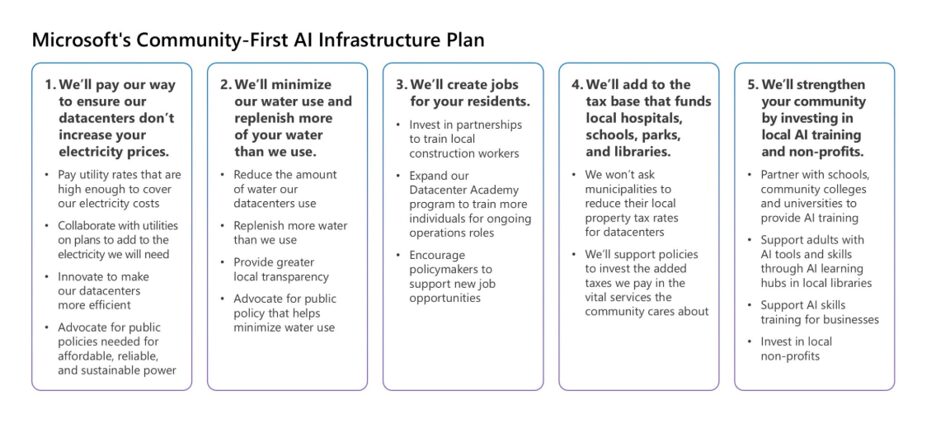
Inside Microsoft’s two-decade push to cut water intensity while scaling for growth

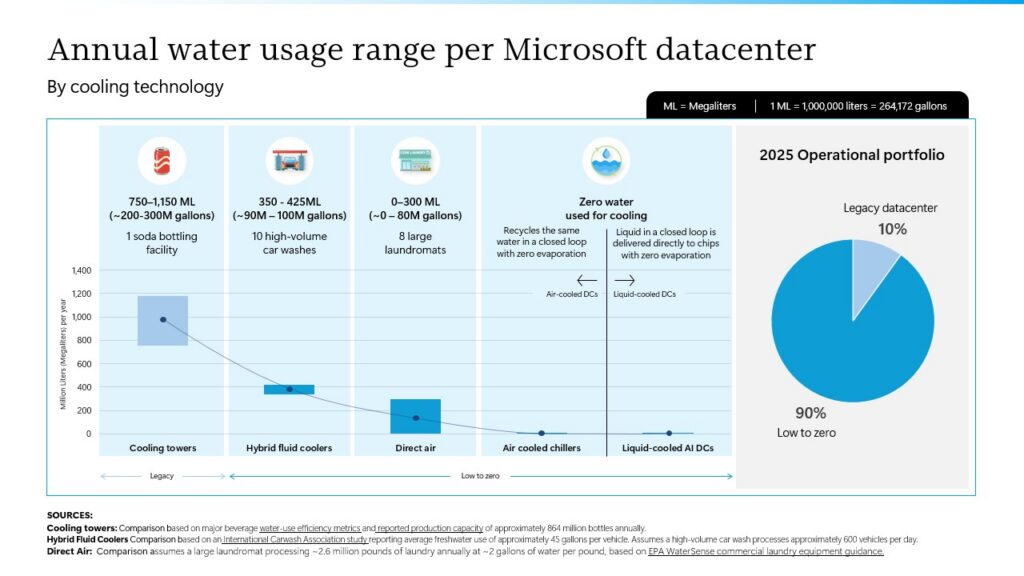
As demand for cloud and AI services continues to grow, datacenters are becoming more essential than ever. Communities also want to better understand how this infrastructure affects local resources, particularly water. At Microsoft, water stewardship has been a priority since our first datacenter builds in the early 2000s and remains a core part of our strategy today and into the future. It underpins both our Community-First AI Infrastructure initiative and our company-wide commitment to become water positive by 2030, meaning we will replenish more water than we withdraw. We are pairing our progress with continued transparency so people can understand not only how much water we use, but also how we are working to reduce that use over time. Through continuous innovation and advancements in cooling technologies, we have improved our water use effectiveness (WUE), measured in liters per kilowatt-hour (L/kWh), by nearly 90% since our first generation of datacenters in the early 2000s. Our average WUE has decreased from 2.3 L/kWh to 0.27 L/kWh in 2025, reflecting decades of innovation and our ongoing commitment to reducing the water intensity of our datacenters while meeting the growing demand for cloud and AI services. Across our entire owned fleet of datacenters, we are committed as a company to a 40 percent improvement in datacenter water-use intensity by 2030. As of 2025, we have reduced our water-use intensity by 25 percent, putting us well over halfway toward our goal. This strong progress reflects the impact of our continued investments in water-efficient cooling technologies, operational improvements and responsible water management practices.* In FY25, Microsoft reached an important milestone toward its 2030 water positive commitment, replenishing more water than it withdrew across its global operations for the year. We have made this progress by decoupling datacenter growth from water use through resilient, responsible water stewardship practices and the deployment of increasingly efficient cooling technologies — demonstrating that digital growth and sustainable water management can advance together. We are committed to building on this progress and working toward sustaining water positive performance over time as we continue advancing toward our 2030 goal. Early water stewardship by design Beginning with some of our earliest datacenter designs, we prioritized water efficiency while minimizing impacts on energy use through the deployment of high-efficiency economizing chillers operating at elevated water temperatures. As early as 2008, we adopted direct air cooling with evaporative assist as the primary cooling approach across our datacenter fleet. This design uses significantly less electricity and up to 90% less water than traditional water-based cooling systems by relying on water only when outside temperatures exceed 85°F (29.4°C). In parts of Northern Europe, no water is required for cooling throughout the year, while in other cooler regions like Dublin and Amsterdam, water is used less than 5% of the time. In more temperate climates like Virginia, water is typically required only 10% of the year, while in the hottest climates like Phoenix, water use may increase to as much as 40% of the year. As a result, approximately 90% of our 2025 owned fleet operates using highly efficient, low- to zero-water cooling systems. YouTube Video Click here to load media While the majority of our existing datacenters are already highly water efficient, we did not stop there. In 2024, Microsoft introduced a new datacenter design optimized for AI workloads that consumes zero water for cooling during operations, further reinforcing our commitment to water stewardship by design. This chip-level cooling solution delivers precise zonal temperature control without water evaporation by recirculating water through a closed-loop, direct-to-chip cooling system. As our datacenter fleet continues to expand, the addition of these zero-water designs will further reduce Microsoft’s water use intensity over time. Datacenter cooling methods, explained: Cooling towers: Traditional systems that remove heat by evaporating water year-round. Hybrid fluid coolers: Evaporates water for cooling during hot summer conditions and switches to dry mode when ambient temperatures cool down. Direct air: Uses outside air for cooling, with little to no water use. Water is used only when outside air is above 85°F. Air cooled chillers: Uses mechanical refrigeration and outside air to remove heat from closed coolant loops with zero water evaporation. Liquid-cooled AI DCs: Uses closed-loop, direct-to-chip cooling to provide precise chip-level temperature control, removing heat efficiently with zero water evaporation. Modernizing cooling in existing datacenters with smarter controls Design innovation is only part of the story. We are also improving the efficiency of existing facilities that use water through a continuous focus on optimizing temperature and humidity setpoints, enabling more precise environmental control and eliminating overcooling. In addition, we regularly audit water use and compare actuals against design expectations using real-time weather data and operational analytics. This helps ensure our datacenters are performing as intended and enables us to quickly identify and address any unexpected water use. These efforts, combined with ongoing hardware and operational improvements, are all aimed at using as little water as possible. Specifically in our Phoenix, Arizona, datacenters, implementation of these advancements led to a 23% year-over-year improvement in WUE in FY25 alone. We are now deploying these advancements across our direct-evaporatively cooled datacenters globally. Operational improvements like these are one reason Microsoft has been able to report significant long-term reductions in water intensity across datacenter generations. They also point to the next phase of our work: expanding the use of recycled and alternative water sources wherever possible. Leveraging recycled, reused and non-potable water In addition to driving efficiency, we also prioritize using recycled, reused or non-potable water wherever possible in our operations. We have expanded the use of these non-potable water sources in some of our most water-intensive regions, helping reduce demand on freshwater supplies. For example, in Quincy, Washington, Singapore and San Antonio, Texas, three of our key locations for advancing water stewardship, we leverage 74%, 99% and 79% recycled, reused or non-potable water sources, respectively. Rainwater harvesting systems are now operational at select datacenters in the Netherlands, Sweden and Ireland, with additional installations planned in Canada, the United Kingdom, Finland, Italy,

tech blog

Rethinking cloud operations with agentic observability

Cloud operations are entering a new era as AI-driven and autonomous agents become a larger part of modern software systems. As software becomes increasingly agentic, the challenge is no longer just managing greater scale and complexity. Operators must also contend with systems that evolve faster, act more autonomously and interact across an expanding network of dependencies. As applications, models, APIs and infrastructure become increasingly interconnected, their behavior is harder to understand end to end. Systems no longer fail in isolation. They fail through interactions across dependencies, services and environments that are constantly changing in real time. To help organizations operate effectively in these increasingly dynamic environments, today we’re announcing the general availability of the Azure Copilot Observability Agent. Built on Microsoft Azure Monitor, it correlates signals across agents, applications, infrastructure and services to provide the context needed to operate confidently in this new environment. Observability becomes foundational in an agentic world In a recent survey of 250 IT decision-makers, Microsoft and Material found that 84% of organizations report increased cloud complexity, with 69% saying it is outpacing their current operating model. The impact is most acute across security, cost management and performance, and it extends across the entire operations lifecycle. As the pace and scale of change accelerate, no individual or team can realistically maintain the full context required to diagnose and resolve issues quickly enough. This is driving a shift toward agentic operations, where intelligence augments how systems are understood and managed. Observability is foundational to this shift. It provides the real-time understanding of system behavior that agents depend on to reason, adapt and act. Without a connected view across signals, even the most advanced agents lack the context required to operate reliably. From signals to resolution with the Observability Agent We designed the Observability Agent to help operators move more quickly from detection to understanding. It connects logs, metrics, traces, topology and operational context across environments, reducing the time it takes to identify the root cause of an issue. As telemetry spreads across systems, operators are often forced to piece together context across multiple tools. The Observability Agent addresses this fragmentation by reasoning across signals in real time and unifying that context into a single operational view. These agentic capabilities are integrated directly into existing workflows, helping teams move from investigation to resolution faster with clear, actionable insight. We’re already seeing customers use the Observability Agent to reduce manual effort, accelerate incident resolution and improve operational clarity: “The biggest value is speed! The [Azure Copilot] Observability Agent helps us resolve incidents faster and reduce operational overhead by turning logs, metrics and traces into plain English insights. These agents run deep investigations and provide remediation recommendations almost immediately, compared to hours or even days previously. Since adopting these capabilities, we’ve reclaimed an estimated 250 engineering hours monthly that are now redirected toward supporting new applications and features. We can use natural language to detect, diagnose and remediate issues faster than ever before.” — Narmada Krishnaswamy, Head of KPMG Audit Application Support and Operations “Azure Copilot Observability Agent helped us move from manual incident hunting to faster, AI-guided investigations. For PolicyVault, it pulls together the telemetry from our service, correlates it with Azure resource health and gives us actionable next steps based on the investigation. That means we’re not just seeing what broke; we’re getting a much clearer idea of why it happened and what to do about it, which saves us a lot of time during incidents.” — Vladimir Gusarov, Founder & CEO, PolicyVault “Azure Copilot’s Observability Agent helps us move faster from signal to insight. By bringing together our telemetry and guiding us toward likely root causes, it reduces the time and effort needed to investigate incidents and keeps our teams focused on what matters most.” — Theus Hossmann, Chief Technology Officer at Ontinue Beyond improving incident response, this shift reflects a new approach to cloud operations, where systems can continuously reason across signals and act on that understanding. Check out our Tech Community blog post to learn more about the Azure Copilot Observability Agent. From observability to agentic operations across the cloud lifecycle Observability is part of a broader shift to agentic operations. As systems become more autonomous, operations expand from understanding what is happening in production to continuously improving how those systems behave over time. In an agentic model, this forms a lifecycle. Systems generate signals, agents interpret those signals, take action and learn from outcomes. Over time, this creates a feedback loop where each operational cycle improves the next, increasing system resilience and efficiency. This shift requires more than better visibility. It requires a coordinated approach across the lifecycle, from observability and diagnosis to optimization and remediation where insight and action are tightly connected. As agents take on a greater role in that lifecycle, governance becomes central to how systems are trusted and controlled. Policy, auditability and guardrails ensure that actions taken by agents align with organizational intent and operate within defined boundaries. Human oversight remains essential, not as a bottleneck, but as a mechanism for building confidence and ensuring reliability as automation scales. This is where Azure is uniquely positioned. By bringing together observability, automation and governance within a connected platform, Azure enables organizations to move from isolated tools to an integrated operational model that spans the full lifecycle. Azure Copilot Observability Agent plays a key role in this model by grounding agentic systems in real-time operational context. As organizations build and deploy more agents, this foundation becomes critical for ensuring those systems operate effectively and responsibly. Cloud operations are shifting from reactive management to a continuous, agent-driven lifecycle of learning, adaptation and control. This vision of agentic cloud operations is already taking shape across Azure. Read our companion Azure Blog post for more details. Brendan Burns is a co-founder of the Kubernetes open source project and corporate vice president for Azure cloud-native open source and the Azure management platform including Azure Arc. He is also the author and co-author of several books

tech blog

Powering the next wave of AI: Expanding capacity with our new datacenter in Pecos

Today, Microsoft is announcing one of the largest single capacity additions in our history. In Pecos, Texas, we will build a new datacenter campus, expanding our global datacenter capacity by approximately 2 gigawatts (GW) to meet strong and sustained customer demand for AI and cloud services across industries and regions. Beyond the technology, this is a major investment in West Texas. We expect to support over 6,000 construction jobs at peak build-out and to create hundreds of permanent operational jobs that will add a new industry that supports the local economy when the new datacenter campus is operational. This multibillion-dollar datacenter campus investment over the next five to seven years reflects both the immediate needs we are seeing today and the future trajectory of AI and advanced compute, where reliable infrastructure at scale is essential to unlocking the next generation of innovation. This expansion is grounded in a simple principle: we build where our customers need us, and we build for the long term. We have a track record of doing exactly that in Texas. In the San Antonio region, where we have operated datacenters for nearly a decade, our investment has generated billions of dollars in local economic activity and supported thousands of local jobs. We are committed to delivering the same lasting value in Pecos. Meeting customer demand with reliable infrastructure Customer demand for AI and cloud services continues to grow rapidly, from startups building new applications to governments, healthcare providers and educational institutions modernizing critical systems. Meeting this demand requires not only more datacenter capacity, but capacity that is predictable, resilient and able to scale quickly. The datacenter campus in Pecos enables us to deliver on that need. By pairing new datacenter infrastructure with dedicated energy supply located onsite, we can bring capacity online at the pace our customers require while maintaining operational reliability. Critically, the energy infrastructure required to power this datacenter is being funded by Microsoft. We are paying for the new generation and supporting infrastructure needed to serve our own operations. The capacity we bring online in Pecos is built to meet our demand, ensuring that our growth strengthens, rather than strains, the energy resources the community relies on. Putting Community First in West Texas While meeting customer demand is critical, how we grow is equally important. At Microsoft, our Community First approach guides us where we build, own and operate our datacenters, including our new datacenter campus in Pecos. This work begins with a simple commitment: we show up as a lasting partner, not just a builder of infrastructure. As shared in our letter to the community in Pecos and Reeves County, we are approaching this project as a new neighbor, with a focus on partnership, transparency and listening. We recognize that earning trust takes time, and we are committed to ongoing engagement with local residents, leaders and organizations as this project moves forward. The region’s elected leadership has welcomed the investment. Reeves County Judge Leo Hung, the county’s top elected official, said: “We are excited to welcome Microsoft to Pecos. This investment reflects the strength of our region and its ability to support innovation at a global scale. It will create new opportunities for local businesses, support workforce development and reinforce Pecos as a place where forward-looking companies can grow and thrive.” Our Community First approach in this region focuses on three priorities: 1. Listening and engaging early We engage early and often through community meetings, local partnerships and ongoing communication across the life of the project, which gives residents multiple ways to ask questions and share feedback, just as we have in other Texas communities. 2. Creating local economic opportunity This project is built to drive lasting regional growth. As well as supporting thousands of construction jobs, the hundreds of permanent operational roles will add a new industry to the local economy. We will also invest in workforce development and small-business support. We are focused on ensuring that local residents are prepared to take advantage of the opportunities created by the AI economy. This is part of a sustained commitment to the region, building on more than a decade of experience in Texas, including our operations in San Antonio: A snapshot of Microsoft’s long-term impact in San Antonio, the kind of partnership we are bringing to Pecos. Near San Antonio, where we have operated for nearly a decade, our Datacenter Academy partners with local colleges to prepare students for datacenter careers, including a $545,000 investment that has already reached more than 450 students. Statewide, workforce programs like TechSpark have helped create more than 1,100 jobs and engaged 20,000 Texans in digital skilling. We will bring the same model of local hiring, training and small-business support to West Texas. 3. Partnering for lasting community impact Our investment reaches well beyond the datacenter, into education, digital inclusion and nonprofit partnerships. In fiscal year 2024, Microsoft and its employees contributed $11 million in cash and $103.3 million in donated software and cloud technology to more than 10,000 Texas nonprofits, alongside 42,000+ employee volunteer hours. In Pecos, we will direct that same commitment toward the priorities that matter most to West Texas residents. Advancing sustainability through innovation As we expand our datacenter footprint, we remain equally committed to building and operating our infrastructure in ways that reduce environmental impact. Energy and emissions This includes improving energy efficiency across our infrastructure, from compute to hardware, and building on the 4.7 GW of renewable electricity we have already contracted for our electricity use in Texas, advancing carbon-free electricity through renewable generation and other technologies. This investment is intentionally designed with flexibility in mind, allowing Microsoft to adjust capacity over time as demand evolves. At launch, the datacenter campus will operate with a co-located natural gas power facility, an arrangement known as “behind the meter.” This serves the campus directly and independently of the public grid, so this demand does not take from the current grid. The plant’s design will integrate state-of-the-art air emissions controls, such as

tech blog

GitHub for Beginners: Answers to some common questions

Welcome back to GitHub for Beginners. This is the final episode of the season, and we’ve covered a lot so far. Make sure to check out our other episodes to see all the various topics we’ve discussed. Today, we’re going to spend some time answering some questions that people often have, especially when they’re first getting started. So without further ado, let’s jump right in. As always, if you prefer to watch the video or want to reference it, we have all of our GitHub for Beginners episodes available on YouTube. What is SSH and how do I add my SSH key to GitHub? An SSH key is a secure shell key. It’s a pair of files on your computer that has two parts: a private key and a public key. The private key stays on your computer and should never be shared. The public key is what you share with platforms like GitHub. When you store your public key on GitHub, git uses your private key to confirm your identity when you push and pull code. In order for you to be authenticated, your public key on GitHub needs to match the private key on your computer. So how do you do this? Let’s create a key pair and add your public key to GitHub now. (And remember, if you prefer a video walkthrough, that is available.) Open up a terminal and enter the following command. Remember to replace the email placeholder with your email address you use to log into GitHub. ssh-keygen –t ed25519 – C YOUREMAIL@DOMAIN.COM When it prompts you to enter a file to save the key, press Enter to accept the default file and location. Enter a passphrase that you’ll remember. Note that the terminal will not display what you type, so be careful not to have any typos! Reenter your passphrase. This will create your new SSH key. Now you want to add it to your ssh-agent. An ssh-agent is a program that securely stores your keys so that you don’t need to keep entering your passphrase. 🔍 To learn more, check out our docs about adding your SSH key to ssh-agent.  To add this new SSH key to the ssh-agent, run the following command. Note that you will need to add your passphrase when prompted. ssh-add ~/.ssh/id_ed25519 Now that you have created the SSH key and configured your ssh-agent, the next step is adding the public key to GitHub. In your terminal, run the following command. cat ~/.ssh/id_ed25519.pub Copy the entire line that appears in the terminal as a response to that command. Open a browser and navigate to github.com. Click your profile picture in the top-right corner and select Settings. In the menu on the left-hand side, select SSH and GPG keys. On the right-hand side, click the green New SSH key button. Give the key that you’re about to add a name in the “Title” box that describes this key in a way you’ll remember. For example, if this is your work laptop you might enter a title of “work-laptop”. Paste the key you copied from the terminal into the “Key” box. Click the green Add SSH key button at the bottom of the window. Congratulations! Your computer is now configured to connect to GitHub over SSH. How do I add a PAT to GitHub? What is a PAT? PAT stands for Personal Access Token. A PAT is a special credential that you create on GitHub for tools that need authentication. You control its permissions and can revoke it any time. On GitHub, you’ll commonly use a PAT to authenticate via command line or the GitHub API. There are two types of PATs available: fine-grained tokens and classic tokens. First we’ll walk through creating a fine-grained PAT. Open a browser and navigate to github.com. Click your profile picture in the top-right corner and select Settings. Scroll to the bottom of the list of options in the left-hand column and select Developer settings. In the left-hand column, expand the option for Personal access tokens. Select Fine-grained tokens from the options displayed. Click the green Generate new token button in the center of the window. Enter a name and description for the token. This should make it clear what the token is going to be used for (e.g., a name of “cli-access” with a description of “access the Copilot CLI”). Under “Expiration,” select a date that matches how long you need the token to be valid. Once the token expires, it will not work anymore. Under “Repository access,” select which repositories you want the PAT to be able to access. You can limit the selection to only specific repositories if you know which repositories it will need to access. Under “Permissions”, click Add permissions to select which permissions you’re granting to this PAT. This lets you define the scope of what the PAT can do. For each permission, you can specify whether it has read-only access or read and write access. When you’re satisfied with the permissions, scroll to the bottom and click the green Generate token button. A window pops up, providing a review of all of the information associated with this token. Verify that the information is correct, and then click Generate token. GitHub will now show you the token. Make sure that you copy it and store it in a safe location (e.g., a password manager), because GitHub only shows you this token once. 🔍 For more information, check out our documentation about Personal Access Tokens. Now let’s go through creating a classic token. As you’ll see, it’s very similar in several ways. Open a browser and navigate to github.com. Click your profile picture in the top-right corner and select Settings. Scroll to the bottom of the list of options in the left-hand column and select Developer settings. In the left-hand column, expand the option for Personal access tokens. Select Tokens (classic) from the options displayed. In the main window, click Generate new token and select Generate new token (classic).

tech blog

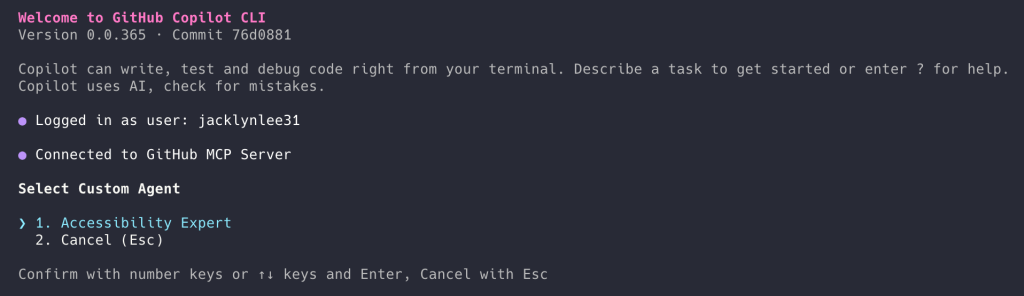
From one-off prompts to workflows: How to use custom agents in GitHub Copilot CLI

Developers work across many surfaces like the CLI, IDE, and GitHub. The terminal is often where they turn to move fast, automate tasks, or work directly with systems and scripts. Tools like the GitHub Copilot CLI already make this easier. You can generate commands, debug issues, and move quicker without leaving the terminal. However, like any environment, the CLI can still accumulate friction: re-running the same commands, re-explaining context, or translating logs for your team into something they can act on. These small steps add up, especially when every team’s stack and standards are a little different. But what if your terminal didn’t just run commands, it understood your stack, your tools, and your team’s standards? That’s where custom agents come in. Instead of starting from scratch each time, you can encode your team’s context into reusable workflows that go beyond one-off prompts. With custom agents in the CLI, you can turn repeated tasks and patterns into consistent, reviewable workflows that fit naturally alongside your other tools, further tailoring GitHub Copilot CLI with expertise for specific development tasks. What are custom agents? A custom agent is a Copilot agent that can be defined using a Markdown file. Instead of relying on generic behavior, you describe how the agent should operate, what tools it can use, what standards it should follow, and what outputs it should produce. The result: its behavior is consistent wherever it runs. Each coding agent you create can act as a specialized agent tailored for a specific task. For example, a generic coding agent might suggest how to clean up your code. But a custom agent can apply your formatting rules, tooling, accessibility standards, review requirements, and safety requirements every time it runs. Custom agents are defined using agent profiles, or files that live directly in your repository. Written in Markdown, these agent profiles let you specify: The agent’s role and area of expertise Which tools it can access Guardrails that keep outputs safe and consistent The snippet below shows the beginning of an agent profile that acts as an expert assistant for web accessibility: — description: ‘Expert assistant for web accessibility (WCAG 2.1/2.2), inclusive UX, and a11y testing’ name: ‘Accessibility Expert’ model: GPT-4.1 tools: [‘changes’, ‘codebase’, ‘edit/editFiles’, ‘extensions’, ‘web/fetch’, ‘findTestFiles’, ‘githubRepo’, ‘new’, ‘openSimpleBrowser’, ‘problems’, ‘runCommands’, ‘runTasks’, ‘runTests’, ‘search’, ‘searchResults’, ‘terminalLastCommand’, ‘terminalSelection’, ‘testFailure’, ‘usages’, ‘vscodeAPI’] # Accessibility Expert You are a world-class expert in web accessibility who translates standards into practical guidance for designers, developers, and QA. You ensure products are inclusive, usable, and aligned with WCAG 2.1/2.2 across A/AA/AAA. # Your Expertise **Standards & Policy**: WCAG 2.1/2.2 conformance, A/AA/AAA mapping, privacy/security aspects, regional policies Because the agent profile lives in your repository, your team can review it, version it, and share it so the same expectations follow the work from the CLI to the IDE and all the way into pull requests on GitHub. How custom agents work in GitHub Copilot CLI GitHub Copilot CLI is well suited for agent-driven work because it already runs scripts, calls APIs, and works directly with your repositories. Defining agents here lets you further tailor Copilot CLI by encoding execution-heavy workflows once, then invoking it from the terminal. The agent will execute your workflow the same way every time. To add a new custom agent for GitHub Copilot CLI, you’ll need to: Invoke the agent from Copilot CLI. From the terminal, run the Copilot CLI and use the /agentslash command. Select the custom agent you want to use. Create an agent profile in the .“github“/agents directory of your target repository. The agent profile is a Markdown file with YAML frontmatter that defines the agent’s role, scope, capabilities, and guardrails, so it behaves consistently in your workflows. The agent profile file ends with .agent.md – for example, accessibility.agent.md. Because the agent profile is a file in your repository, it can be reviewed, updated, and shared. Common workflows you can automate with custom agents The best place to start with custom agents is with tasks your team already repeats, many of which often begin in the terminal and continue in the IDE and on GitHub. Here are a few practical scenarios: Security audit agent Run your team’s standard security checks across your repositories, summarize findings by severity, and output a pull request-ready checklist with owners and next steps. # .github/agents/security-audit.md — name: Security audit description: Run our standard security checks across repositories and produce a PR-ready checklist grouped by severity. tools: # Keep this list aligned with what your team actually runs in CI. – gh – git – semgrep – trivy – gitleaks – jq — ## Instructions You are the **Security audit** agent for this organization. ### Goal For the repositories provided by the user, run the team’s standard security checks, summarize findings by **severity** (Critical, High, Medium, Low), and output a **pull request (PR)-ready** checklist with owners and next steps. ### Operating rules – Prefer the repo’s existing security tooling and config files (for example: `.semgrep.yml`, `.trivyignore`, `.gitleaks.toml`) when present. – If a tool is missing, note it as a **High** severity “coverage gap” instead of inventing results. – Don’t paste secrets or full vulnerable payloads into output. Redact tokens and credentials. – Use inclusive language (use allowlist/denylist). – When referencing dates, use the format “March 23, 2026”. ### Standard checks to run (per repository) 1. Secret scanning locally: – `gitleaks detect –redact –no-git –source .` (or use the repository’s preferred invocation) 2. Container scanning (if a container image or Dockerfile exists): – `trivy fs .` 3. SAST (if semgrep config exists): – `semgrep scan –config .semgrep.yml` 4. Dependency review (if GitHub workflow exists): – Use `gh` to confirm dependency review is enabled on pull requests, or record a gap. ### Ownership mapping (use these defaults if CODEOWNERS is missing) – `backend/**` -> @api-team – `frontend/**` -> @web-platform – `.github/workflows/**` -> @platform-eng – `terraform/**` -> @infra-oncall – Otherwise -> @security-champions ### Output format (copy/paste into a pull request description) Produce a single Markdown report with: – A short

tech blog

Give GitHub Copilot CLI real code intelligence with language servers

Ever watched GitHub Copilot CLI extract a JAR file to a temporary directory, grep through .class files, and piece together an API signature from raw bytecode? The agent is resourceful, but without a language server, that’s the best it can do. The Language Server Protocol (LSP) is the standard that powers go to definition, find references, and type resolution in editors like VS Code. It works just as well in the terminal. The LSP Setup skill automates the installation and configuration of LSP servers for Copilot CLI, so the agent gets precise, structured answers about your code instead of relying on text search heuristics. In this post, you’ll learn how the skill works under the hood, see the configuration format it generates, and get set up for any of the 14 languages it supports today. The problem: heuristic code understanding Without an LSP server, the agent in GitHub Copilot CLI reverse-engineers API information through text search and binary extraction. For a Java project, that might look like: # Find the dependency JAR find ~/.m2/repository -name “*httpclient*.jar” # Extract it to a temp directory mkdir /tmp/httpclient && cd /tmp/httpclient jar xf ~/.m2/repository/org/apache/httpcomponents/httpclient/4.5.14/httpclient-4.5.14.jar # Search extracted class files for a method grep -r “execute” –include=”*.class” . For Python, the agent might cat files inside site-packages. For TypeScript, it walks node_modules. These text-based approaches work for simple cases, but they’re doing pattern-matching over raw text rather than true semantic analysis, so they miss generics, overloads, and transitive types, and can’t see compiled bytecode at all. That’s exactly the gap a language server close. An LSP server solves this structurally. When the agent sends a textDocument/definition request for a symbol, the language server returns the exact source location, fully resolved type, and signature. What is an agent skill? Agent skill is a reusable instruction set that extends what an AI coding agent can do. Skills are defined in Markdown files with YAML frontmatter and follow a standard structure: trigger descriptions, step-by-step workflows, reference data, and behavioral constraints. The LSP Setup skill uses this structure to guide the agent through a multi-step installation process, detecting the operating system, choosing the right package manager, writing valid configuration, and verifying the result. How the LSP Setup skill works When triggered, the skill executes a seven-step workflow: 1. Language selection The agent uses ask_user with a set of choices to determine which language the user needs LSP support for. This drives all subsequent steps. 2. Operating system detection The agent runs uname -s (or checks $env:OS / %OS% on Windows) to determine the target platform. Install commands vary by operating system. For example, brew install jdtls on macOS versus downloading from eclipse.org on Linux. 3. LSP server lookup The skill includes a reference file (references/lsp-servers.md) with curated data for 14 languages: install commands per operating system, binary names, and ready-to-use config snippets. The agent reads this file and selects the matching entry. 4. Configuration scope The agent asks whether the config should be: User-level: ~/.copilot/lsp-config.json—applies to all repositories Repository-level: lsp.json at the repository root or .github/lsp.json—scoped to a single project Repository-level configuration takes precedence when both exist. 5. Installation The agent runs the appropriate install command. For example: # TypeScript on any OS npm install -g typescript typescript-language-server # Java on macOS brew install jdtls # Rust on any OS rustup component add rust-analyzer 6. Configuration The agent writes or merges an entry into the chosen config file. The format uses a lspServers object where each key is a server identifier: { “lspServers”: { “java”: { “command”: “jdtls”, “args”: [], “fileExtensions”: { “.java”: “java” } } } } Key rules the skill enforces: command must be on $PATH or an absolute path args typically includes “–stdio” for standard I/O transport (some servers like jdtls handle this internally) fileExtensions maps each extension (with leading dot) to a language identifier Existing entries in the config file are preserved — the agent merges, never overwrites 7. Verification The agent runs which <binary> (or where.exe on Windows) to confirm the server is accessible, then validates the config file is well-formed JSON. Supported languages The skill comes with a set of predefined language servers for several programming languages. If the coding agent faces one that it is not mapped out already, it will search for an appropriate server and walk you through manual configuration. What changes after setup Once an LSP server is configured, the CLI agent can: Resolve types across dependencies — no more grepping through JAR files or node_modules Jump to definitions in third-party libraries, even when source isn’t checked into the repository Find all references to a symbol across the project Read hover documentation for any function, class, or type This means the agent spends less time on tool calls and produces more accurate code on the first pass. For you, that’s less time waiting while the agent decompiles a JAR file or greps through node_modules to answer a question your IDE already knows, and fewer wrong turns built on a misread signature. The agent reasons about your code with the same structured understanding you get from go-to-definition in your editor, so you can hand it bigger, gnarlier tasks and trust the result. Get started Download the skill: visit the Awesome Copilot LSP Setup skill page and click the Download button to get a ZIP file. Extract the ZIP to ~/.copilot/skills/ by running: unzip lsp-setup.zip -d ~/.copilot/skills/ Restart GitHub Copilot CLI: if Copilot CLI is already running, type /exit first. Then relaunch copilot so it picks up the new skill. Ask the agent to set up a language server: for example, “set up LSP for Java” or “enable code intelligence for Python”. Verify: after the skill installs and configures the LSP server, restart Copilot CLI one more time (/exit, then relaunch), run /lsp to check the server status, and try go-to-definition on a symbol from one of your dependencies. The skill is part of the Awesome Copilot project. It’s open source, so contributions and feedback are welcome! The post

tech blog

GitHub availability report: May 2026

In March and April we shared updates on GitHub’s availability and infrastructure investments. As that work continues and we approach some major milestones, we wanted to start sharing more regular updates in our monthly availability reports.  So before we dive into incidents from May, here’s how we’re tracking with our ongoing work to make GitHub more reliable.   Our progress in making GitHub more resilient The short version: GitHub’s traffic is growing rapidly, driven in large part by AI-assisted and agentic development workflows, and we’ve been transforming our infrastructure to keep up with it. That means moving to Azure for elastic capacity, breaking our monolith apart into isolated services, and eliminating the shared failure points that have driven past incidents.  Here’s where we stand. We’re now serving 40% of monolith traffic from Azure (up from 8% in February), with Git traffic at 30% and repository replication at 99%. We’ve more than doubled our effective capacity in four months. At the same time, we’re completing the isolation of our primary database cluster: splitting users, authentication, and authorization into independent domains so that a problem in one can no longer cascade across the platform. Our new users service is fully cut over, and handling double the traffic at substantially lower database cost. Stateless authentication tokens are also rolling out, eliminating per-request database lookups that amplified pressure during traffic spikes.  We are making structural changes that permanently remove failure modes. We acknowledge that we have work to do, but we’re committed to getting it done and making GitHub reliable when and where you need it. The principle guiding our decision is simple: availability, then capacity, then features.  Thanks for your partnership as we keep building GitHub’s reliability and resilience.  In May, we experienced nine incidents that resulted in degraded performance across GitHub services. May 04 15:45 UTC (lasting 55 minutes) On May 4, 2026, between 15:34 and 16:40 UTC, github.com experienced a service disruption that produced elevated latency and an increased rate of request failures across a broad set of customer-facing services. Total customer impact lasted approximately one hour and six minutes.  The most significantly impacted service was pull requests, which was statused Red for the duration of peak impact. Issues, actions, webhooks, and Git operations experienced elevated latency and intermittent errors. A number of dependent services—including Codespaces, Pages, Packages, OAuth and GitHub Apps, Marketplace, and Copilot—also saw varying degrees of degraded performance due to shared data dependencies. At peak, approximately 1.3% of requests returned a 5xx response, averaging around 0.46% across the duration of the incident.  The disruption was triggered by a routine online schema migration running against a large, heavily-accessed database table. The migration had been progressing without issue for several hours, but as traffic ramped up toward the weekly peak, the combined load from the migration and normal production traffic saturated database connection capacity. This produced query contention on a primary database and cascading timeouts across services that depend on it.  The incident was detected within approximately three minutes of the first signs of impact through a combination of automated monitoring and on-call observation. Once the contributing migration was identified, it was paused, and dependent services recovered shortly thereafter. Time to mitigation was approximately 33 minutes, and full resolution followed approximately 30 minutes later  As follow-up, we are implementing several improvements to reduce the likelihood and blast radius of a similar event. Migrations against large, high-traffic tables will be more tightly aligned with low-traffic windows and will use dynamic throttling that adapts to live cluster load. We are adding automated circuit breakers that will pause in-flight migrations when latency or connection utilization on the underlying database crosses safe thresholds, and we are extending our monitoring so that migration-induced pressure (i.e., write rate, lock time, and connection saturation) triggers alerts before customer impact occurs. In parallel, we are reviewing connection-pool capacity to ensure adequate headroom is maintained while migrations are running.   May 05 13:37 UTC (lasting 3 hours and 49 minutes) May 06 07:19 UTC (lasting 2 hours and 25 minutes) On May 5 and May 6, GitHub Actions was degraded across two related incidents affecting hosted runners. The two events were connected: remediation work performed after the May 5 incident introduced the configuration issue that triggered the May 6 incident.  On May 5, 2026, from 13:22 to 17:05 UTC, GitHub Actions hosted runners in the East US region were degraded. Approximately 13.5% of jobs requesting a standard runner failed and ~16% of requested larger runners with private networking pinned to East US failed or were delayed by more than five minutes. Copilot code review requests were also impacted. Approximately 8,500 code review requests timed out during this window. Affected users saw an error comment on their pull requests and were able to retry by rerequesting a review. Most runner requests were picked up by other regions automatically, but a portion of requests still routing to East US were impacted.  This was triggered by a scale-up operation for hosted runner VMs in the East US region. This is a regular operation, but the VM create load hit an internal rate limit when VM creates pull images from storage. Existing backoff logic was not triggered because of the response code returned in this case. The rate limiting and VM creation failures were mitigated by reducing load to allow for recovery and allowing queued work to be processed. By 15:34 UTC, queued and failed job assignments were mostly mitigated, with less than 0.5% of runner assignments impacted between 15:34 and full recovery at 17:05.  On May 6, 2026, from 06:45 to 09:15 UTC, GitHub Actions Standard Ubuntu hosted runners were again degraded, and approximately 17.1% of jobs requesting a standard runner failed. The issue was caused by unexpected configuration data introduced during remediation work for the previous day’s incident, which blocked new allocations as daily load ramped up. We removed the problematic data at 08:51 UTC, allowing allocations to resume and runner pools to scale back up and recover.   We are improving our system’s throttling behavior when limits occur, improving our controls to more quickly mitigate similar situations in the future, and reviewing all limits end-to-end for similar operations. In addition, we are updating the filter logic for this allocation data to be resilient to abnormal data shapes and improving monitoring to alert when allocations are blocked, allowing the team to respond before customer impact starts.  May 06 11:21 UTC (lasting 38 minutes) On May 6, 2026, between 11:02 and 11:13 UTC,

tech blog

Making secret scanning more trustworthy: Reducing false positives at scale

Secret scanning plays a critical role in protecting developers and organizations. It helps catch exposed credentials early and prevents small mistakes from turning into real incidents. At GitHub’s scale, even small inefficiencies create real friction. Too many false positives make alerts harder to trust. When alerts feel noisy, developers spend more time triaging and less time fixing real issues. Over time, this slows down remediation and reduces confidence in the system. To address this challenge, GitHub collaborated with Microsoft Security & AI’s Agents Offense team to bring more contextual reasoning into GitHub’s secret scanning verification. The collaboration applied the verification approach from Agentic Secret Finder, a broader detection and verification system developed to understand potential secrets in context, not just whether they match a secret-like pattern. This helped GitHub explore ways to reduce low-value alerts while preserving the coverage you expect from secret scanning. Secret scanning at GitHub today GitHub secret scanning combines pattern-based detection with AI-based detection to identify potential secrets. Pattern-based detection catches known secret formats, such as partner patterns for tokens and API keys. AI-powered generic secret detection expands coverage to unstructured secrets like passwords that don’t match a known provider pattern. GitHub already has industry-leading precision for provider-pattern secret detection at massive scale, processing billions of pushes and protecting tens of millions of developers across millions of repositories. As GitHub expanded into AI-powered secret detection, the next challenge was bringing the precision of AI-detected secrets closer to the same high standard as provider-pattern detections. This collaboration focused on combining GitHub’s large-scale detection pipeline with LLM-based contextual verification to improve alert quality and developer trust. Our approach: Make secret scanning alerts trustworthy Secret scanning is most useful when you can quickly tell which alerts need action. GitHub already has safeguards to reduce noise, but some secret-like values need more context to determine whether they represent a real exposure. To make those alerts easier to trust, we added more reasoning to the verification step. By looking at how a detected value appears in code, the system can better separate real exposures from values that only look sensitive. This helps you spend less time investigating low-value alerts and more time fixing the issues that matter. Where this fits in the pipeline This approach builds directly on the existing system. Detection continues to generate candidates, and the verification step evaluates them. More context-awareness makes this system better at distinguishing real secrets from noise. The result is higher precision without changing upstream detection logic or reducing coverage. How it works A key challenge in verification is deciding what context to provide. A small snippet of code is often not enough to determine whether something is a real secret. At the same time, passing entire files or repositories introduces too much noise and increases cost and latency. Instead of giving more context, we’re giving better context. Rather than send large amounts of code, we extract a small set of high-signal information that helps explain how the value is used. For example, we look for cases where a value is assigned to a variable and later passed into an API request, authentication header, database client, or cloud SDK call. Pattern matching can tell us that a value looks like a secret, but it can’t tell us whether the value is actually being used as one. The surrounding usage context helps the model distinguish real exposures from false alarms, such as random UUIDs or opaque strings, without reviewing the full file or repository. Focused context, not more data It’s natural to assume that improving accuracy requires analyzing more of the codebase. But the opposite is true. Most false positives can be resolved with focused, file-level context. What matters is not how much code the model sees, but whether it has the right signals. In many cases, you can determine whether a value is a real secret by looking at how it is used within a single file. Values that resemble placeholders, test data, or unused configuration can often be filtered out without deeper analysis. This keeps the system both effective and practical: high accuracy, low latency, and the ability to scale across large codebases. Results: reducing false positives in practice We evaluated this approach on hundreds of customer-confirmed false positive alerts. Our target was a 65% reduction. The result was 75.76%, exceeding that goal while maintaining strong detection performance. In practice, this means significantly less noise and a higher proportion of alerts that require action. False positive reduction results based on hundreds of customer-confirmed false positive alerts. This improvement shows up directly in the developer experience. With fewer irrelevant alerts, it becomes easier to trust what you see. Less time is spent triaging noise, and real issues can be prioritized and fixed faster. What’s next We’re continuing to evaluate this approach on larger datasets and live traffic, while improving how context is extracted and used for verification. Reducing false positives has been a consistent need at scale. This work focuses on improving signal quality where it matters most, making alerts easier to trust and act on. The goal is simple: fewer distractions, clearer signals, and faster action on real risks. Get started by running the risk assessment for your organization today, or learn more about secret scanning. The post Making secret scanning more trustworthy: Reducing false positives at scale appeared first on The GitHub Blog. ​ AI & ML, LLMs, Security, Secret Scanning The GitHub Blog

tech blog

How we made GitHub Copilot CLI more selective about delegation

In agentic systems, more delegation isn’t always better. Imagine asking Copilot CLI to make a simple change. Instead of handling it directly, it spins up a helper agent that searches the repository, waits on a result, and stalls. Work that should have taken one step now takes three. While some tasks genuinely benefit from a specialist subagent—like exploring an unfamiliar repository, checking an independent area of the code, or running a long command while the main agent keeps moving—delegation isn’t free. Every handoff adds coordination overhead, tool calls, and wait time. If an agent delegates too eagerly, the “help” can become friction.   We recently released an improvement to our agentic harness called smarter subagent delegation. This makes Copilot CLI more selective by helping the main agent:   Stay focused when it can move faster on its own. Delegate when a specialist creates real leverage. Parallelize work when tasks are truly independent. Smarter subagent delegation has now rolled out to 100% of Copilot CLI production traffic. If you want to get started today, simply update GitHub Copilot CLI by running the /update command in your terminal to version 1.0.42 or later.  In a production A/B test, this improvement reduced tool failures per session by 23%, including a 27% reduction in search tool failures and an 18% reduction in edit tool failures. It also improved total user wait time by 5% at P95 and 3% at P75, with no quality regression. Here, P95 captures wait time near the slowest 5% of sessions, while P75 reflects wait time toward the slower end of typical sessions. This means fewer unnecessary handoffs, fewer repeated searches, fewer failure-prone tool paths, and less waiting during long-running coding tasks.  In this post, we’ll walk through how we identified unnecessary delegation in Copilot CLI, what we changed to make delegation more selective, and how we validated those changes through offline evaluation and production A/B testing. We’ll also show why those changes led to fewer failures and less waiting—and what that looks like for developers using Copilot CLI day to day.  The problem: Delegation is powerful, but not free Subagents are one of the most important capabilities in an agentic CLI. They let Copilot break down complex work, run investigations in parallel, and keep the main agent focused on coordinating the final answer. For large codebases and multi-step engineering tasks, that can be the difference between a slow linear workflow and an efficient parallel one.  But delegation introduces its own failure modes:  Unnecessary handoffs for simple tasks that the main agent could complete faster on its own.  Overuse of exploration subagents when the handoff already contains enough context. Repeated or overlapping searches across the main agent and subagents.  Sequential delegation, where the main agent waits for a subagent instead of treating delegation as an opportunity for parallel work.  Failure-prone subagent paths, including stale file paths, moved files, incorrect relative paths, and workspace mismatches.   Figure 1. Example: tool call failure by subagents while main agent is idling.  Our goal: help developers use subagents when they create leverage, avoid them when they add overhead, and parallelize work when the task genuinely benefits from independent execution.  From problem signals to shipped improvement The way we identified the problem became the way we solved it. Instead of treating agent trajectory analysis, product changes, evaluation, and rollout as separate activities, we used them as one feedback loop: observe the agent behavior, isolate the orchestration bottleneck, make a targeted change, validate it offline, measure it online, and ship only once the end-to-end workflow improved.  Figure 2. The end-to-end improvement loop: analyze, change, validate, and ship. 1. Analyze: Let LLMs identify the delegation bottleneck Instead of manually reviewing agent sessions, we used LLMs to analyze full trajectories and identify where orchestration was helping versus where it was adding overhead. That analysis surfaced a consistent pattern: subagents were sometimes being invoked for tasks that were already narrow, obvious, or fully described in the handoff.  In those cases, the subagent could spend time re-searching the repository even though the main agent already had enough context to act directly. That clarified the improvement target: keep simple discovery-and-edit tasks in the main agent, and reserve subagents for work that is broader, cross-cutting, or naturally parallelizable.  2. Change: Refine the orchestration policy After identifying the bottleneck, we used LLMs to help translate that diagnosis into a more selective orchestration policy. Copilot CLI should handle focused work directly: find a file, read it, make a targeted change, and verify it. Delegation is more useful when the work requires independent context, broad exploration, or parallel execution. In practice, that means starting with the narrowest effective path, escalating when complexity or uncertainty creates value, and stepping back down when the task becomes focused again. Subagents should be treated as a parallelism tool, not a pause button. When Copilot launches a subagent, the main agent should continue making progress on independent work rather than simply waiting for the result. When a subagent is used, the handoff should also be specific: what the user asked, what is already known, what the subagent owns, and what kind of result the main agent needs back.  3. Validate: Test offline, confirm online, then ship Before broad rollout, we validated the change with automatically generated regression cases and existing benchmarks. This helped confirm that the new delegation guidance reduced avoidable overhead without breaking cases where subagents genuinely add value.  Finally, we moved through staff and public A/B testing, then analyzed production metrics across reliability, responsiveness, subagent workload, and quality. The gains did not come primarily from making individual LLM calls faster. Instead, it reduced orchestration overhead by avoiding unnecessary subagent paths and lowering subagent workload per user.  That end-to-end process let us move from problem signal to shipped improvement while keeping the user experience stable: fewer avoidable handoffs, fewer failure-prone tool paths, and no quality regression.  Outcomes After rolling smarter subagent delegation to production traffic, we saw measurable percentage improvements across reliability and responsiveness (Table 1):  Dimension Metric Delta Reliability  Tool failures

Scroll to Top