Author name: ITMAITY

tech blog

GitHub Copilot CLI for Beginners: Overview of common slash commands

Welcome back to GitHub Copilot CLI for Beginners! In this series (available in video and blog format), we’ll give you everything you need to get started using GitHub Copilot CLI. So far in this series, we’ve covered how to get started and when to use interactive and non-interactive modes. In this edition, we’ll learn what slash commands are, why they matter, and how to use slash commands to control GitHub Copilot efficiently. You can complete tasks like switching models, checking token usage, and resuming past sessions right from your terminal. Let’s dive in! Understanding slash commands in GitHub Copilot CLI When working in Copilot CLI, one of the most powerful concepts to learn early on is slash commands. Slash commands are built-in controls that you can access directly from the command line. Acting as your control surface within Copilot CLI, slash commands allow you to: Guide Copilot’s behavior Inspect changes Manage context Move efficiently across sessions and projects Keep permissions tidy Slash commands can be thought of as your command center for interacting with Copilot CLI. To look at all of the options available, just type / in the command line for a scrollable list of all currently supported slash commands. Let’s take a look at some of the most popular ones. Choosing the right model Different models are optimized for different kinds of work. If you want to switch models, type /model into the command line. This will display a list of available models, along with key details like: Capabilities: Some are better for quick, lightweight tasks like refactoring, while others more efficiently handle deeper reasoning such as feature planning. Availability: The list may vary depending on your plan or organization’s settings. Cost: Numbers shown on the right of each model indicate cost multiplier, helping you choose the right balance between performance and usage in relation to your plan. Choosing the right model can significantly impact both speed and results. Managing context and token usage Copilot CLI operates within a context window, which determines how much information it can “remember” during a session. If you want to check your current usage, type /context to learn how many tokens you have left, along with system usage and available buffer. If you find that you’re running low on space, you can free up space by typing /compact in the command line. This summarizes your current conversation so you can continue without having to start a new session. Copilot CLI will do this automatically when you approach the limit, but you can also do this manually if you want to transition to a new task or clean up context mid-session. If you’d rather start fresh and completely reset your environment, you can use /clear to clear the session entirely. Working across sessions If you want to resume a previous session, you can type /resume. This will bring up a list of previous sessions you’ve had, including both local and remote sessions. Entering a previous session will show you your session history, and you can pick up right where you left off. Inspecting changes As you work with Copilot to make changes to your project, it’s important to keep track of what’s changed. If you want to see what the changes are, run /diff to see recent updates. This gives you a clear view of what modifications were made during your session, so you can validate changes before moving forward. Navigating projects and directories If you want to work across repositories or directories, you don’t have to exit Copilot. You can type /cwd to change your working directory to another repository. This allows you to scope Copilot’s work to a specific part of your project and helps you stay efficient while multitasking across codebases. Managing tool permissions In the past, you might have granted Copilot CLI permission to perform actions like editing files. Say you’re switching to a repository you want to be more careful in and want to reset those permissions: you can do so by running /reset-allowed-tools. Take this with you Using these slash commands gives you even better control over Copilot CLI—and the more familiar you become with them, the more deliberate your workflow becomes. Whether you’re switching models, managing context, or navigating across projects, using slash commands in CLI gives you the tools you need to stay in control. And if you haven’t already: open up your terminal, type /, and explore! There are many more slash commands to discover. Happy coding! Looking to try GitHub Copilot CLI? Read the docs and get started today. More resources to explore: GitHub Copilot CLI for Beginners video series GitHub Copilot CLI for Beginners: Getting started with GitHub Copilot CLI GitHub Copilot CLI for Beginners: Interactive v. non-interactive mode GitHub Copilot CLI 101: How to use GitHub Copilot from the command line Best practices for GitHub Copilot CLI The post GitHub Copilot CLI for Beginners: Overview of common slash commands appeared first on The GitHub Blog. ​ AI & ML, GitHub Copilot, GitHub Copilot CLI, GitHub Copilot CLI for Beginners The GitHub Blog

tech blog

Accelerating researchers and developers building multilingual AI with a new open dataset

Software may be written in programming languages, but human language is at the heart of developer collaboration. Developers explain how projects work in READMEs. They ask for help in issues. They review, debate, and improve code in pull requests. That collaboration often happens in English—but not always. As AI becomes a bigger part of how developers build software, multilingual developer content matters more than ever. Today, GitHub is publishing the GitHub Multilingual Repositories Dataset, a repository-level metadata dataset designed to help researchers and developers discover public GitHub repositories with evidence of non-English natural-language content. When building the dataset, we found that language distribution differs across READMEs, issues and pull requests: Korean is the most common non-English language in issue text, but only the fifth-most common in READMEs. Portuguese tops the non-English README list with more than 3 million repositories. The dataset is now available on GitHub under CC0-1.0. It follows through on a commitment we made in 2025, as part of Microsoft’s European Digital Commitments, to make multilingual data more accessible, including to open source AI developers. What’s in the dataset The GitHub Multilingual Repositories Dataset is intentionally not a dump of repository content. Instead, it is a metadata dataset that helps developers and researchers find repositories where multilingual collaboration may be happening. The dataset covers over 80 million classification rows across more than 40 million repositories. For each public repository, we provide: Language classifications of the README, the most-commented issue, and the most-commented pull request, with the first 150 characters of each used as the input sample. We exclude texts under 20 characters. Classifications for each text source, from fastText, gcld3, and lingua-py, each with a confidence score. The dataset only includes classifications with >0.5 confidence. Repository metadata: creation timestamp, disk usage, stars, forks, primary programming language, SPDX license, issue and pull request counts, and the snapshot date. We deliberately did not collapse the three classifiers into a single label. Different classifiers have different coverage and confidence calibration, especially for lower-resource languages. By exposing all three, we let you decide how strict you want to be. Want a high-precision Greek subset? Require all three classifiers to agree above some confidence threshold. Want broad recall for an exploratory study of Romance languages? One classifier may be enough. What you can build with it The dataset is designed for the kind of work that’s hard to do with general web text: Discover repositories likely to contain developer documentation or collaboration in specific languages. Study how non-English developer communities use issues, pull requests, and READMEs. Build evaluation sets for AI coding tools, doc generators, or review assistants that need to behave well across languages. Encourage decision-makers to expand language coverage for new developer tools and AI features using data-backed arguments on the rich multilingual diversity of developers. Measure representation of European and other underrepresented languages in open source. Some caveats Language identification is hard, especially in software repositories. Repository text is often short. It may include badges, templates, installation commands, code snippets, usernames, or mixed-language content. A 150-character sample may not represent the whole repository. Classifiers also vary in coverage and calibration, especially for lower-resource languages. That is why the dataset should not be treated as a ground-truth benchmark for language identification. Instead, it is designed as a transparent discovery tool. Users can inspect classifications, confidence scores, and sources, then choose the precision and recall tradeoffs that fit their own research or development workflow. The dataset also should not be used to infer sensitive attributes about repository owners, contributors, or communities. The signals are repository-level metadata, not person-level attributes. Why open multilingual data matters Today, many European languages remain underrepresented in the online text used to build and evaluate AI systems. That creates a risk that AI tools work well for some developers, languages, and communities, while leaving others behind. Open data can help close that gap. We built this dataset because developer content is different from general web text. READMEs, issues, and pull requests contain the language of software collaboration: installation instructions, bug reports, feature requests, review comments, and community norms. That context can help build AI systems that better understand how developers actually work. By making multilingual developer-content signals easier to find and analyze, this dataset gives researchers, open source developers, and model builders another tool for studying language representation in software development. It can help identify gaps, support better evaluation, and inform more inclusive AI tools for developers across Europe and beyond. It also reflects a broader principle: Building AI for developers should include the communities, languages, and workflows developers actually use. What’s next We’ll be discussing the dataset, and the broader importance of open data for multilingual AI, at the Open Innovation Dialogue Hub in Strasbourg on June 16. The event is co-organized by the Microsoft Open Innovation Center, the Council of Europe, and GitHub, and will bring together policymakers, researchers, cultural institutions, and open innovation leaders to discuss AI, linguistic diversity, cultural heritage, and open data. Multilingual AI needs multilingual developer communities. We hope this dataset helps more people study, support, and build for them. By releasing it under CC0-1.0 on GitHub, we’re inviting researchers, open source maintainers, and model builders to use it, critique it, extend it, and build evaluation sets and tools on top of it. If you do something interesting with it, we’d love to hear about it. The post Accelerating researchers and developers building multilingual AI with a new open dataset appeared first on The GitHub Blog. ​ AI & ML, LLMs The GitHub Blog

tech blog

What are git worktrees, and why should I use them?

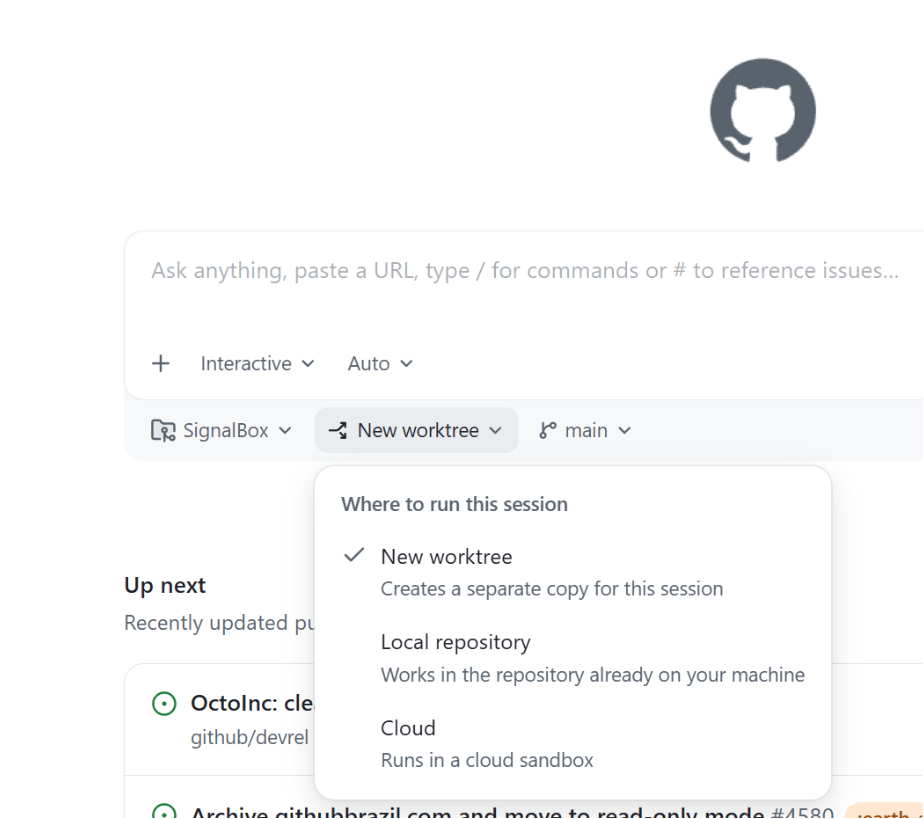
It seems like the latest hotness in git these days is the concept of worktrees. Which… is kind of funny because they’ve been around since 2015. But, nevertheless, they are cool, and you might be wondering why you’d use them, how they differ from branches, and why they are suddenly so popular. Let’s talk about it! Context switching with branches and stashing Let’s say you lived in a worktree-less world, and were working on a ticket, and suddenly an urgent bug came to you and you had to switch contexts. First, you might stash your work: git stash “wip feature login” Then you’d switch to your main branch and update: git checkout main git pull origin main Then make a bugfix branch: git checkout -b hotfix-bug Then you’d fix everything, commit, and push the branch: git add . git commit -m “fix broken submit button” git push origin hotfix-bug Then after merging a pull request, you might return back to your computer and pull main and remove the bug branch: git checkout main git pull origin main git branch -d hotfix-bug And then you could go back to the feature you were working on: git checkout feature-login git stash pop Phew. Where were we? The mental overhead of switching around, reloading files, reinstalling node_modules based on whatever changed, and so on, is a lot. The context switching burden is heavy. Now, this is a basic example, but sometimes developers would work around this kind of chaos with doing some more complicated git stash commands, or even multiple clones of the same repo (I’m guilty of that one). Until… worktrees! Context switching with worktrees With worktrees, you never leave your branch and you never stash, and your editor context for your original feature stays untouched. git worktree add ../hotfix-workspace -b hotfix-bug main This instantly creates a sibling folder called hotfix-workspace, and bases it on main, and checks out a new branch called hotfix-bug. Now you can open that folder in a new editor window (or cd into it) and fix the bug. Your original editor window stays exactly as you left it. cd ../hotfix-workspace # …fix fix fix… git add . git commit -m “fix broken submit button” git push origin hotfix-bug You merge the pull request online just like before, and once it’s merged, you can simply delete the temporary folder. cd ../main-project git worktree remove ../hotfix-workspace This is so much smoother! Worktrees can go beyond the git command line, too. For example, VS Code has full worktree support built in. You have options! And no matter where you work, worktrees give you zero risk of stash conflicts, there’s no editor disruption, and you can truly work in parallel. So… why now? For a really long time, worktrees were relatively unknown. Most developers had never heard of them, because either Git GUIs didn’t support them (or treated them as second-class citizens), or because they just usually followed the known pattern of feature branch, then work, then PR, then merge, then repeat. Now, our work as developers has changed. AI has made us work in parallel more than we ever have before in the history of software development. Developers run so many sessions in parallel, and “code review culture” is growing beyond “code writing culture.” Agents and humans can do more in parallel with worktrees. It’s the default mode for the GitHub Copilot app, and for many other modern tools. What’s the catch? Worktrees do solve a whole lot of issues, but there’s definitely some things to watch out for. Dependency bloat: each worktree folder requires its own copy of your project dependencies. If you’re running npm install or pip install across multiple of them, your computer might get very full, very quickly. Folder management: you have to delete the worktree folders, to avoid cluttering your parent directory over time. Apps like the GitHub Copilot app do often handle this for you, but it’s still something you might have to do yourself if you’re operating in the terminal yourself. Global .gitignore requirements: if you create worktree folders inside your main repo directory, you have to manually add them to .gitignore to not accidentally track them. You can make these worktrees outside of your main repo (and many apps do that by default), but it’s worth noting. One branch limits: Git prevents you from checking out the exact same branch in two different worktrees at the same time to prevent data corruption. How do I use worktrees in the GitHub Copilot app? Great question! What’s awesome is they “just work” out of the box. When you open the app, there’s a dropdown that asks you where you want to run your new session on the home screen. The default is a new worktree. Then, once you kick off a new session, you can click the session name at the top of the app, and you’ll see the (fun!) generated name of your worktree, as well as the path where it’s located, the project that worktree is for, and details about the changes that you’ve made. Easy peasy lemon squeezy! Should I use worktrees? I will give you the most senior developer answer I can: It depends! You might prefer working in one way or another. You might not do as much work in parallel and like the mental model of branches and stashing. You might only do worktrees from now on. You might want to do both! The world’s your oyster, and you can try them all in the GitHub Copilot app today. The post What are git worktrees, and why should I use them? appeared first on The GitHub Blog. ​ AI & ML, Git, GitHub Copilot, git worktrees, GitHub Copilot app The GitHub Blog

tech blog

Getting more from each token: How Copilot improves context handling and model routing

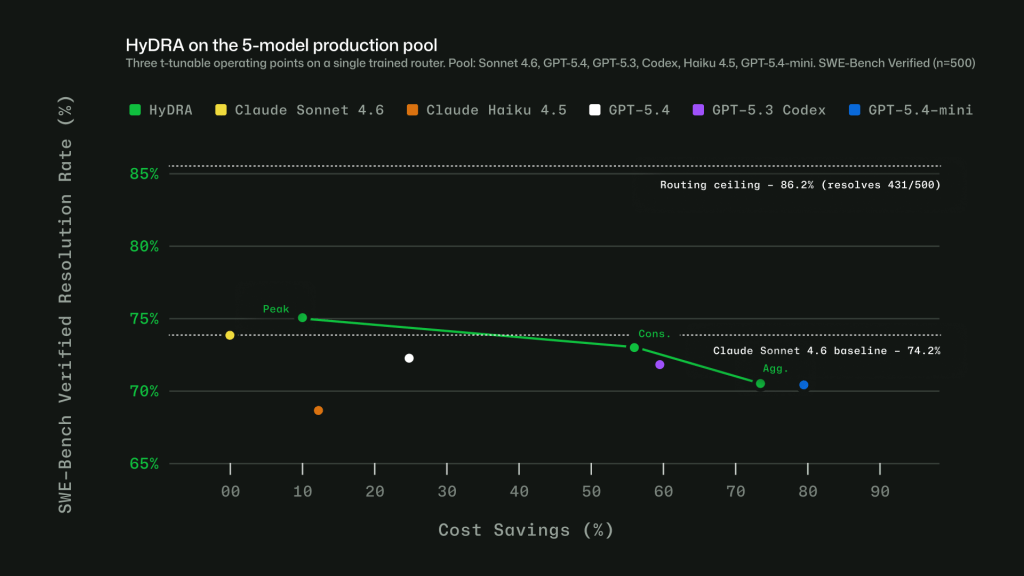
As Copilot takes on more agentic work, from planning and editing to debugging, reviewing, and calling tools across longer sessions, efficiency means more than using fewer tokens. It means being smarter about how you use them. Increasing efficiency starts with reducing what Copilot has to repeat from turn to turn, including context, tool definitions, and cached state. It continues with choosing the right model for the job. A quick explanation, a focused edit, and a complex multi-file change should not all be treated the same way. We are working on both: improving the Copilot harness so more of each session goes toward the task itself, and expanding Auto so Copilot can pick the model that fits the work without asking developers to make that choice every time. This post focuses on harness improvements in GitHub Copilot for VS Code and on ongoing work to expand Auto across Copilot surfaces. Increased prompt caching and deferred tools In longer GitHub Copilot sessions in VS Code, the harness prepares a lot of recurring information for the model: instructions, repository context, conversation history, available tools, and the current state of the task. Some of that context is needed. Some of it can be cached, deferred, or loaded only when it becomes relevant. Two improvements in GitHub Copilot for VS Code are doing most of the work here. Prompt caching helps Copilot reuse model state for repeated prompt prefixes instead of recomputing the same prefix on every request. Tool search lets the model load tool definitions on demand, instead of sending every full tool schema into context on every turn. That matters more as agents use more tools. A session may need access to MCP tools, terminal commands, file operations, workspace search, and product-specific actions. Loading every full tool definition up front adds fixed cost to each turn, even when only a small number of tools are relevant to the task. With tool search, Copilot can keep the available toolset broad while sending less unnecessary tool schema into the model. For a deeper technical look at the implementation, including prompt caching, cache-control breakpoints, provider-specific tool search, and how these changes work across long-running agentic sessions, read the VS Code technical deep dive. Where GitHub Copilot auto model selection fits in Auto answers a practical question: which model is the best fit for this task right now? After your first prompt, Copilot uses task intent and current model health to choose a model that best fits the task. Different kinds of work, like quick explanations, focused edits, or multi-file changes, do not all benefit from the same level of reasoning, so Auto makes that call without requiring you to tune model settings. In our evaluations, no single model consistently performed best across tasks. In many cases, a more efficient model reached the same outcome, while stronger models mattered most when the task required deeper reasoning. Auto learns where stronger reasoning improves the result. It routes up when the task demands it and stays more efficient when it does not. The goal is not to trade quality for cost, but to use the model that best fits the work. How Auto selects the right model Auto combines two signals: what model is healthy and available right now, and what kind of work Copilot is being asked to do. Real-time model health: a dynamic engine tracks model availability, utilization, speed, error rates, and cost. A model may be capable of handling a task, but that does not mean it is the best choice at that moment. Auto takes current system conditions into account so Copilot can route to a model that is both capable and ready to respond. Task-aware routing with HyDRA: a routing model that considers factors like reasoning depth, code complexity, debugging difficulty, and tool orchestration needs. HyDRA identifies models that can meet the quality bar for the task, then chooses the best fit among them. Figure 1: Three HyDRA operating points illustrate tunability: (Peak) exceeds Sonnet at 12.9% savings; (Agg.) balances quality for 72.5% savings. Figure 2: HyDRA (Cons.) ties OpenRouter Auto on resolution rate (70.8%) at 3.3x the savings. HyDRA (Agg.) outperforms both Azure Foundry operating modes. Taken together, these signals let Auto avoid a one-size-fits-all approach. The point is not to send every task to the biggest model, or every task to the cheapest one. It is to choose the model that fits the work. Making Auto work in practice Getting routing right in evaluations is only part of the problem. To make Auto useful in real workflows, we also had to account for how developers actually use Copilot: conversations get longer, context builds up, tasks shift, and developers work in many languages. Cache-aware routing. Switching models on every turn may sound flexible, but it can work against efficiency. When a conversation stays on the same model, the prompt prefix can be cached and reused across turns. Switching models mid-conversation breaks that cache, which can cost more than the routing change saves. Auto avoids that by routing at natural cache boundaries: on the first turn, when there is no cache to lose, and after compaction, when Copilot summarizes older turns and the prompt prefix resets. Between those points, the selected model stays in place so the cache can keep building. Routing across languages. Copilot serves developers around the world, so routing has to work in languages other than English. We trained the routing model on conversations across 16 language families, including CJK, European, and others. In evaluations, routing accuracy stayed within four points of the English baseline across language groups, with no statistically significant quality gap. Figure 3: Intelligent routing stays within 4 points of English baseline. Model evaluations across English, European, CJK, and other script families, based on a held out evaluation set sampled from production VS Code chat telemetry across 19 languages. Learning when escalation matters. Instead of labeling tasks as simply “easy” or “hard,” we trained the router to learn where models actually diverge. For each training query, responses

tech blog

Achieving success with AI

The two most important elements in any AI solution are Intelligence + Trust. I first made this statement in November at our Ignite conference and my conviction is strengthened by every conversation I have with customers. Through my travels, three consistent topics are being raised when considering the adoption of AI solutions: Will AI amplify the intelligence of my organization and the attributes that make my company unique within its industry to grow my business; or will it use my intelligence for its own benefit, learning from my most important business flows and leveraging my intellectual property? Can I trust that the outcomes are providing durable return on investment and that these solutions are running within the confines of my governance and security standards? How do I get the visibility, control, flexibility and business model innovation needed to manage the costs associated with AI and maximize value? I consistently advise customers that they need to build their own IQ on a platform of intelligence that is model-diverse, open and heterogeneous at every layer of the stack. Models are commoditizing. No company should be dependent upon any one model or any one model’s harness. Over the weekend, Satya warned of a world where every company across every sector is ceding value to a few models that eat everything they see. AI that is intended for growth should amplify the intelligence of an organization so that it compounds from within. Companies also need an observability platform that provides governance, management, security and Financial Operations (FinOps) to ensure the ROI with AI. This enables AI to be trusted within the environment over which it reasons and puts the business in control of the outcomes. Intelligence + Trust is embedded across Microsoft 365 Copilot, GitHub Copilot and Copilot Studio, where model diversity aligns cost and performance to each task. Microsoft IQ optimizes workflows, so context is routed efficiently and reduces unnecessary compute. Agent 365 is the control plane to observe, govern, manage and secure agents. We have built a system to manage AI spend as a core enterprise capability, not an afterthought. It is delivered across clouds and model providers without locking customers into a single approach. Managing costs at scale As agent usage scales, organizations need a clear set of levers to manage cost: Model diversity. Any given inferencing model, model harness or agentic loop on its own does not help build out an organization’s IQ in ways that compound its intelligence. Both Microsoft 365 Copilot and GitHub Copilot are model-diverse by design without locking customers into a single provider. Different models — like GPT-5.5 or Claude Opus 4.8 — serve distinct roles with different economics. Matching the right intelligence to each task optimizes performance and cost. Your IQ. Agents struggle with raw data. Significant compute is spent interpreting structure and context before useful work begins. The Microsoft IQ platform empowers your IQ by turning raw data into usable intelligence, continuously building a semantic understanding of how your organization operates across Microsoft 365 and line-of-business systems. It provides agents with the context they need upfront rather than requiring them to reconstruct it. The result is measurable: faster execution, higher accuracy and lower token usage. This is how intelligence compounds within your organization. Financial operations. FinOps became critical when companies moved to the cloud and requires even greater attention as AI shifts from fixed pricing to usage-driven models. With Foundry and Agent 365, we are providing tools to help our customers optimize their AI costs today. Frontier business models Business models are evolving as we use AI to drive business outcomes. The User Subscription License (USL) has become the foundation, providing a package of capabilities for a predictable per-user-per-month fee. Usage-based licensing has emerged for long-running, multi-tasking agents, where cost aligns directly to the work performed. Microsoft gives customers a unique combination of business model flexibility and integrated product experiences that is unmatched in the market. Microsoft 365 Copilot and GitHub Copilot use both models — a USL offering with not only value and capabilities, but flexible consumption on top. Today we’re announcing the general availability of Copilot Cowork worldwide, which requires the Microsoft 365 Copilot USL and is then usage-based. Our model-diverse strategy allows customers to purchase capacity with the flexibility to use the right model for the job based on model strengths, economics and the latest innovations. Microsoft Agent Factory provides a single consumption model spanning Microsoft 365 Copilot (including Cowork), GitHub Copilot and agents built in Fabric, Foundry and Copilot Studio. Our integrated product experiences put AI in the flow of work for both knowledge workers and software developers and manage capacity fluidly across the two. Historically these personas have been distinct, but increasingly the line between them is blurring. Coding is becoming a mainstream knowledge worker skill and chat and Cowork are becoming modalities important for software development. With Microsoft 365 and GitHub, we offer market-leading tools for both roles and make it easy to seamlessly manage capacity based on availability and need. Agent 365: The control plane As organizations adopt agents from Microsoft, another provider or build their own, a control plane is essential. Agent 365 gives IT and security leaders a single place to observe, govern, manage and secure agents across the organization. It builds on the Microsoft stack that enterprises trust: Entra for identity, Defender for threat protection, Purview for data governance and Intune for endpoint management. We are extending Agent 365 to include cost management, so organizations can monitor and manage agent spend alongside security and compliance. As the Frontier Firm operating model takes hold, leaders will manage human and agentic work as a single system, with visibility into both performance and cost. — The two most essential elements in any AI solution are Intelligence + Trust. At Microsoft, this conviction shapes how we design every layer of our AI platform. Microsoft IQ enables organizations to harness their own unique IQ, bringing context to data and embedding AI directly into the flow of work to deliver

tech blog

The New XPS 13: A Commitment Delivered

For students and young professionals who refuse to settle, meet the most accessible XPS ever built.   ​  ​For students and young professionals who refuse to settle, meet the most accessible XPS ever built. Laptops Blog | Dell

tech blog

Microsoft Build 2026: Be yourself at work

Platforms shift when developers build. We explore, choose tools, dream, create. This platform shift comes with more information than ever, ready at your fingertips. This shift, it’s about building fast AND THEN: it’s about building, operating, optimizing and observing. Securing your infrastructure, applications and agents in a seamless way that doesn’t slow you down from the moment you open your laptop to the moment you ship to production. But there’s a duality in being a developer – you’re a tinkerer, choosing your own tools and models, and you’re an enterprise builder, shipping systems that demand governance, security and trust from day one. Developers don’t need another way to just build and run an agent or app. They need trust. They need native context and knowledge. Most of all, they need choice to access the right model for the right problem. This duality is where Microsoft thrives. We ask: what does it mean to be a modern developer today? And at Microsoft Build, we shared how we empower developers to build in this era of ubiquitous intelligence with the controls and security you expect at scale – on a platform that’s model diverse, open and heterogeneous at every layer of the stack. Bringing together what you know with what the world knows natively. There’s a lot of news today, but there are three themes to anchor on. First, intelligence that’s truly yours. With the Microsoft Agent Platform powered by your context and intelligence from Microsoft IQ, you can build your agent in GitHub, deploy it to Microsoft Foundry and optimize it automatically with models best suited for the job. Ground it in your intelligence and the world’s knowledge, then access it via Microsoft Teams, M365 or anywhere your team works. Designed to reduce the need to make tradeoffs between context and governance, security and speed, or models and tools. Second, the full stack built your way. You should be able to build the way you want to build, with the tools, models and workflows you choose, and make it real. This expands beyond the agent platform to across the stack. Silicon to OS to developer tools to cloud – and that starts with Windows. Not Windows for “Windows developers.” Windows for developers, period. We’re bringing a new developer configuration that gives you more flexibility, a frictionless intelligent shell and terminal experience, local sandboxing for agents, new Windows Subsystem for Linux capabilities and powerful options to do it on your local machine. Third is what comes next, where agentic systems move from code to human progress, amplifying what scientists and researchers can achieve. New frontiers in science and computing that start with the same developer platform underneath. Together, developers get a multi-model ecosystem, from your laptop to the cloud, so you can build the frontier without giving up the control and craft that truly makes the work yours. And as always, it starts with the developer. Let’s dive in. Agents that know you, your business, and the world As models become more capable and more available, the differentiator for any organization is no longer access to intelligence, but ownership. How does your expertise, data and way of working become a system that continuously learns and drives better outcomes? The goal is an ecosystem that gives companies their own agency, not one that funnels value back to a consultant or the model maker. Your agents should reflect how you think and operate, from your business logic and institutional knowledge, down to your workflows. That starts with context. Microsoft IQ, generally available today across GitHub Copilot, Microsoft Foundry and Copilot Studio, is a new context layer that grounds agents in both world knowledge and enterprise knowledge. Work IQ is the workplace intelligence layer for agents, capturing how work actually happens across Microsoft 365, organizational systems and external sources: people, emails, documents, meetings and how they connect. The Work IQ APIs, generally available on June 16, provide programmatic access to this intelligence layer and give agents the context they need to work effectively in your organization. Fabric IQ provides a shared semantic foundation over structured business data. Foundry IQ ties it together and enables retrieval planning across both enterprise knowledge and the live web. New to the family is Web IQ, announced today: the fastest real-world grounding you can give your agents. An AI-first web search stack that’s model-agnostic and MCP-native, returning relevant passages at nearly 2.5x the speed of the next best alternative. We’re also looking at how this context applies to new form factors, specifically always-on autonomous agents. Microsoft Scout is a new personal agent for work that we are bringing to Frontier customers today. Built on OpenClaw and WorkIQ, Microsoft Scout understands how you work, uses the tools you already live in, like Teams and Outlook, and proactively handles things like meeting prep, scheduling conflicts and routine tasks without asking. We’re excited to share more soon as we expand what Microsoft Scout can do and roll it out more broadly. On the model layer, the Microsoft AI Superintelligence Team released a family of seven new in-house models, starting with MAI-Thinking-1 – Microsoft AI’s first reasoning model. Trained from scratch with zero distillation on enterprise grade, clean and commercially licensed data you can build on with confidence. It’s a mid-sized, 35 billion active parameter model with a 256K context window built for high efficiency and performance, but importantly, at a low-token cost. On a blind test, independent raters prefer it to Sonnet 4.6 [1], and it matches Opus 4.6 on coding abilities on SWE Bench Pro [2]. MAI-Thinking-1 was designed to be good at complex multi-step instructions, long-context reasoning and code generation, and it’s open now on Foundry in private preview. But that isn’t the only new model. MAI-Image-2.5 and its flash variant are Microsoft’s first models to serve both text-to-image (#3 on the Arena AI leaderboard) and enabling image-to-image workloads (#2 on the Arena AI leaderboard, surpassing Nano Banana 2). These are especially useful in creative workflows, when you want some

tech blog

AI alone won’t change your business. The system running it will.

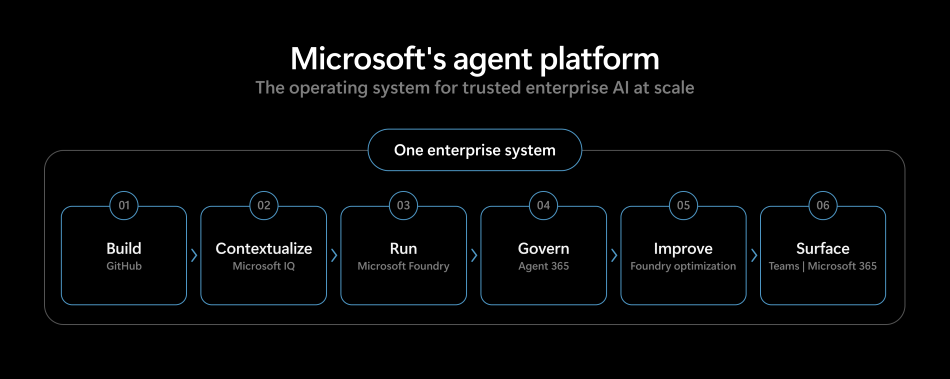
AI has arrived in the enterprise, and the shift is happening all at once. Every function, every role, every workflow is being reshaped. At the same time, a new class of organizations is emerging, one that will look fundamentally different from the companies that defined the last era of business. The winners won’t be those with the most demos, but those that turn AI into a governed, continuously improving system for running real work. This isn’t just about chatbots, either. Those experiences are useful, but they don’t transform how large organizations operate. The real opportunity is teams of agents executing long running work across functions like software delivery, support, finance, HR, and operations — with the identity, context, policy, and human oversight required to trust them in production. To make this possible, enterprises need more than access to a powerful AI model or scalable compute. What determines success is the system around the AI: how agents are built and deployed by engineering teams, how they’re contextualized in the enterprise, how they’re governed and observed in production, and how they improve safely over time. Without that system, AI remains fragmented, fragile, and difficult to trust at scale. We’re taking a fundamentally different approach. We are building a comprehensive agent platform: one that supports many models, is open, and gives you choice and flexibility at every layer of the stack. And we are purposefully designing it with developers at the center. Today, the next pieces of that platform are clicking into place. Building a system for the agentic enterprise To succeed in this new era, an agent platform must meet a higher bar. It must run real production workloads, map real organizational complexity, and manage real business responsibility. We’re building around three key principles: First, it must be a single, integrated system, with support for a wide range of models. Enterprises can’t afford to assemble their agent strategy one piece at a time. Disconnected tools stitched together after the fact can slow teams down and introduce unnecessary risk. Building, contextualizing, running, governing, and improving agents should happen within one coherent system. That’s why we’re bringing together Azure, GitHub, Microsoft IQ, Fabric, Foundry, Windows, Microsoft Security, and Microsoft 365 to operate as a single system you can use to deploy agents at enterprise scale. Enterprises also need the flexibility to choose the right model for the task, balancing quality, speed, and cost — including Microsoft models, partner models, and open models. Second, it must be secured and governed by design. Governance is easy to claim and much harder to deliver. Making it real means starting with a single stack that spans development through production, built on the identity, access, compliance, and security foundations enterprises already trust. By extending Entra, Purview, Defender, Agent 365, and the broader Microsoft Security stack, governance becomes native to the system rather than bolted on later, supporting the ambitions of an AI first enterprise without compromising control. Third, it must improve continuously. Enterprise AI systems can’t be static. Agent behavior, outcomes, and human feedback must flow back into the system, so it can improve safely over time under human oversight. As the system runs, models, workflows, and agents become more capable and more specific to an enterprise’s unique business processes. The result is a system that compounds in value the longer it’s in use. These properties are becoming must-haves, and enterprises that align their AI ambitions with these three principles will pull ahead in quarters, not years. So how does a system like this actually take shape inside a real enterprise? It starts where work begins, with how agents are built. Let’s walk through what that looks like on the platform we’ve built.   1. Build in GitHub GitHub is where your developers already work. It’s where your dependencies live, where your application and code context is kept, where you collaborate with the open source community you depend on, and where you drive innovation. Building agents anywhere else means leaving all that behind. Agents should be built the same way production software is built. You write code with GitHub Copilot to move faster. You bring together the assets that matter most: codebases, work items, agent skills, and tools. And because agents aren’t just code, you bring your evals and observability assets alongside them, all versioned the way any production system should be. Agents must follow a lifecycle: source, test, deploy, observe, and improve. GitHub sets up that lifecycle and provides the necessary controls from day one. The result is a workflow designed for building agents with the right guardrails from the start. And you can do all this in one place, in a new app built for this system. 2. Contextualize with Microsoft IQ Code is only part of an agent. To be useful, an agent also has to understand your business: your customers, your products, your contracts, your processes. Without enterprise context and intelligence you can trust, even the most capable model is guessing. Enterprises require a wide variety of models and the ability to match the right model to the right job, but model choice alone is not enough. Microsoft IQ grounds agents in enterprise context by connecting to your business data wherever it lives, across Microsoft 365, your core business systems (such as customer and revenue data), and other systems your enterprise already relies on, like knowledge bases and your website. With Web IQ, the latest addition to the IQ platform, agents can also incorporate relevant information from the web when appropriate. Contextualizing agents in enterprise data isn’t just about access. Pointing AI at raw information is inefficient and brittle. Microsoft IQ organizes, secures, and surfaces the right information in forms agents can actually use, so they can reach accurate insight without drowning in noise or hallucinating answers. Once agents are grounded in the right context, enterprises can go further. With Frontier Tuning, you don’t just call AI models. You improve how they behave using your data and real-world workflows. That includes Microsoft’s seven new

tech blog

Kolkata Based IT Services & Website, App, Software Solutions by ITMAITY

Kolkata Based IT Services & Website, App, Software Solutions by ITMAITY: Looking for reliable IT services in Kolkata? ITMAITY offers website development, mobile app development, custom software solutions, digital transformation, and IT consulting services for businesses of all sizes. Kolkata Based IT Services & Website, App, Software Solutions by ITMAITY In today’s digital-first business environment, having a strong online presence and efficient technology infrastructure is essential for sustainable growth. Businesses across industries are investing in websites, mobile applications, custom software, and digital solutions to improve customer engagement, streamline operations, and stay competitive. ITMAITY is a Kolkata-based IT services company dedicated to helping organizations leverage technology for success. From website development and mobile app creation to enterprise software solutions and IT consulting, ITMAITY provides comprehensive technology services tailored to meet the unique requirements of startups, SMEs, and large enterprises. Why Businesses Need Professional IT Services Technology has become the backbone of modern business operations. Whether you run a retail store, healthcare facility, educational institution, manufacturing unit, or service-based company, digital solutions can significantly improve efficiency and profitability. Professional IT services help businesses: ITMAITY focuses on delivering innovative and cost-effective technology solutions that align with business goals. Website Development Services in Kolkata A website is often the first interaction customers have with your business. A professionally designed website creates credibility, improves user engagement, and drives conversions. https://share.google/Fu2waPiQSjHRkAGYl

tech blog

From AI pilots to enterprise impact: Why execution is the new differentiator

As the pace of change accelerates, organizations are moving quickly from AI experimentation to enterprise-scale transformation. Leaders are prioritizing measurable outcomes, faster time to value and repeatability across the business. But many are encountering the same reality: the challenge is no longer deciding whether to invest in AI — it’s scaling adoption and delivering consistent, enterprise-wide impact. Over the past year, one thing has become clear. Organizations aren’t asking if AI matters. They’re asking how to make it real — how to embed it into the way work gets done and ensure it drives meaningful results. That’s where many are getting stuck. Because the barrier is no longer experimentation. It’s execution. Intelligence and trust as the foundation At Microsoft, we believe successful AI Transformation depends on two foundational elements: intelligence and trust. Organizations need to harness their own work intelligence — the data, workflows and expertise that make their business unique — and apply it through AI in ways that are flexible, secure and governed. That requires a platform that supports model diversity and continuous innovation, without compromising enterprise-grade security, compliance and reliability. Just as importantly, AI must be embedded into the flow of work — how people collaborate, make decisions and operate day to day. For that to scale, systems must be transparent, secure and accountable. This is where real enterprise value is created — and where many organizations need a clearer path forward. Achieving impact at scale requires more than deploying new tools. It requires a trusted foundation — integrating data, security, privacy and governance — and a new model for delivering AI into the business. That’s why Microsoft and EY are deepening our alliance — to help organizations move faster from AI ambition to measurable business outcomes. From pilots to production There is no shortage of AI pilots in today’s market. But pilots don’t transform businesses. What organizations need now is the ability to scale AI across the enterprise, integrate it into core workflows and deliver sustained, repeatable impact. EY brings that experience. As one of the first global organizations to deploy Microsoft 365 Copilot at scale, EY began with an initial rollout to 150,000 of its people, quickly demonstrating what’s possible when AI is embedded into everyday work. The results were significant and measurable: A 15% productivity gain, reinvested into client delivery and continuous learning 94% monthly adoption and 85% weekly usage 63% of enabled employees using Copilot three or more days per week 81% of employees reporting time savings, with 84% redirecting that time to higher-value work and 73% improving quality of output The impact goes beyond individual productivity into agentic AI in core business operations: Finance operations modernized with intelligent agents, driving 95% faster lead times and more than 37% reduction in operational costs A multi-agent AI framework was deployed across 130,000 Assurance professionals and 160,000 audit engagements Tax workflows were transformed through document automation, reducing manual effort by up to 90% With these results, EY is now expanding Copilot through Microsoft 365 E7 to more than 400,000 of its people worldwide, moving from early success to true enterprise scale. This is what enterprise-scale transformation looks like — not isolated wins, but sustained impact across the organization. It’s also why EY serves as Customer Zero — applying Microsoft AI technologies internally to prove what works before bringing those solutions to clients. Investing in what actually drives outcomes Building on this foundation, Microsoft and EY are jointly investing more than $1 billion in a new initiative designed to help organizations move from isolated AI use cases to enterprise-scale transformation. This effort brings together Microsoft’s AI platforms, including Azure, Microsoft 365 Copilot, Foundry, Fabric and security — and EY’s deep industry capabilities and transformation leadership. But what differentiates this initiative isn’t just what we bring. It’s how we deliver it. At its core is a shared focus on helping organizations become Frontier Firms — where AI is embedded across the enterprise, not layered on top. In a Frontier Firm, data, workflows and decision-making are connected end to end. AI becomes part of how work happens, and human expertise is amplified by intelligent systems. Reaching this level requires more than investment. It requires execution. A new model for execution at scale This is where our approach is fundamentally different. Microsoft and EY are cooperating as an integrated transformation engine — co-developing, co-engineering and co-delivering solutions aligned to real business priorities. A key part of this model is Microsoft’s Forward Deployed Engineers (FDEs), who work side by side with EY transformation teams directly within customer environments. Together, these teams: Co-create solutions grounded in business needs Accelerate deployment across complex systems Stay engaged from initial use case through full-scale adoption This integrated model closes the gap between strategy and execution. It reduces friction across the technology stack and creates a direct path from pilot to production — at enterprise scale. It also ensures that intelligence and trust advance together, embedding AI across data, applications and infrastructure in ways that can be governed, secured and continuously optimized. Importantly, it establishes a repeatable blueprint — one that organizations can use to scale AI adoption across functions, industries and geographies. Why this matters now Organizations are under pressure to move faster — to go beyond experimentation and deliver AI across the enterprise. What they need is not just technology, but a clear path to execution — grounded in both intelligence and trust. AI is not simply about doing work faster. It’s about enabling people and organizations to do more — focusing on insight, creativity and higher-value decision-making. Our work with EY demonstrates what’s possible when AI is deployed with purpose at scale. Together, we are bringing those learnings to customers around the world — helping them accelerate transformation, unlock efficiencies and create new opportunities for growth. Microsoft and EY are committed to helping organizations turn AI ambition into enterprise impact. Learn more in the official announcement. The post From AI pilots to enterprise impact: Why execution is the new differentiator appeared

tech blog

How Frontier Firms are rebuilding the operating model for the age of AI

Spend time with any software engineering team right now and you’ll see something worth paying attention to. Over the last few years, the way software gets built has moved through four distinct patterns of human-agent collaboration — and the same patterns are beginning to show up across other functions of the firm. Author: You’re producing the work, calling on AI to help as needed — a line of code, a sentence, a chart. Editor: You set the intent and AI creates the first draft for you to edit and approve. Director: You create a spec and hand off entire tasks for AI to execute in the background. Orchestrator: You design a system where multiple agents run in parallel across a workflow, flagging exceptions and escalations to you. Every business leader knows the world is changing, but far fewer have a clear picture of what to do about it. These four patterns are the place to start. The real work ahead for leaders is redesigning their firm’s operating model around the collaboration patterns. As agent use increases, human involvement doesn’t disappear — it changes shape. What declines is the amount of tactical, step-by-step execution work humans do themselves. And what rises is the need for humans to set direction, define standards and evaluate outcomes. Ultimately, the goal is not to move every task and business process to the fourth pattern. Instead, it’s up to leaders to help their organizations develop clarity around matching workstreams to the right collaboration pattern. That’s the shape of the Frontier Firm: defined by how deliberately leaders design work across functions, matching the level of human involvement to the outcome. What the data shows Our 2026 Work Trend Index research reinforces this shift across roles and industries. We analyzed trillions of anonymized Microsoft 365 productivity signals and surveyed 20,000 workers using AI across 10 countries. We also spoke with leading experts in AI, work and organizational psychology to help us unpack the insights from the data and understand where all this is going. The conclusion is consistent: the constraint is no longer what people can do, it is how work is structured around them. AI lifts individual potential. A privacy-preserving analysis of more than 100,000 chats in Microsoft 365 Copilot shows that 49% of all conversations support cognitive work — helping workers analyze information, solve problems, evaluate and think creatively. This shift is already visible in output, with 58% of AI users saying they’re producing work they couldn’t have a year ago, rising to 80% among Frontier Professionals, the most advanced AI users in our research. Additionally, when AI users were asked which human skills are most important as AI takes on more work, they said two topped the list: quality control of AI output (50%) and critical thinking — that is, analyzing information objectively and making a reasoned judgment (46%). The Transformation Paradox. We are seeing a pressure point emerge within the organization where the pull to perform collides with the push to transform. 65% of AI users surveyed fear falling behind if they don’t use AI to adapt quickly, yet 45% say it feels safer to focus on current goals than to redesign work with AI. And only 13% of workers say they’re rewarded for reinvention of work with AI even if results aren’t met. The same forces accelerating AI adoption are holding it back. Every organization is a learning system. Our results show that organizational factors like culture, manager support and talent practices account for more than 2X the AI impact of individual factors like mindset and behavior (67% vs. 32%). Specifically, the findings underscore the importance of an AI-ready environment: a culture that treats AI as a strategic advantage and encourages experimentation, managers who model and incentivize AI use and talent practices that build skills and create space to apply them. The real question isn’t whether people have the right skills, it’s whether the organization is built to unlock them. The firms that build a new operating model today won’t just move faster in the short term. They’ll build something more durable, setting themselves up to create value in ways that we can’t yet conceive of: an organization that learns faster than its competitors, compounds its own intelligence and gets harder to catch with every cycle. For deeper analysis, see the 2026 Work Trend Index Report. Enabling the Frontier Firm with Copilot Cowork — now mobile, extensible and enterprise-ready None of an organization’s system scales without infrastructure that brings people and agents into the same flow of work with connected data and the ability to manage and govern it all. Microsoft 365 Copilot is built for exactly that. Today, we’re expanding Copilot Cowork with new capabilities for Frontier customers to help organizations move from isolated AI tasks to coordinated, multistep work. Cowork enables people to define outcomes and delegate work across apps, business systems and data, with execution that stays directed and controlled throughout. This update introduces Copilot Cowork Mobile for iOS and Android, along with a growing plugin ecosystem for Cowork, bringing more of an organization’s tools and data into these experiences. This includes native plugins across Microsoft services like Dynamics 365 and Fabric, and partner integrations available in the coming weeks like LSEG (London Stock Exchange Group), Miro, monday.com, S&P Global Energy and more. Organizations can also build custom plugins to turn their own workflows and expertise into reusable, scalable processes. Additionally, a first wave of federated Copilot connectors in Researcher and Microsoft 365 Copilot Chat is generally available today from partners like HubSpot, LSEG (London Stock Exchange Group), Moody’s, Notion and more. Together, these updates extend Copilot Cowork from a task-based assistant into an extensible platform that helps orchestrate work across Microsoft and third-party systems. With management and governance through Microsoft Agent 365, organizations can deploy and scale agents across core business functions like sales, service and operations. For more on these product innovations: Microsoft 365 blog. AI is no longer an experiment. It is an execution challenge. Employees

tech blog

Unlocking human ambition to drive business growth with AI

As our customers progress toward becoming Frontier Firms, they are using AI not only to optimize how work gets done, but to reinvent their business on the promise of growth. Organizations can now unlock creativity, accelerate innovation and democratize intelligence by bringing Copilots and agents directly into the tools people love and use every day. As adoption continues to scale, business value is no longer measured solely by time saved or productivity gained, but in how effectively organizations translate their unique IQ into decisions that drive measurable impact across core business processes. The two most important elements in any AI solution are Intelligence + Trust. At Microsoft, we are focused on providing a platform for both through Microsoft IQ and Agent 365, respectively, so customers can harness the power of AI, have it amplify their unique differentiation and do so in a model diverse, open and heterogeneous manner. Microsoft IQ brings context to your data and provides faster, more accurate, more trusted experiences across modalities of chat, artifact creation and augmentation, and agent development; all while safeguarding your assets and protecting your intellectual property. Agent 365 provides observability, governance and security across all the agents you build — whether on Microsoft’s platform or third-party environments — so you can trust the outcomes you achieve with AI and ensure ROI for the same. With intelligence embedded into daily work, organizations are activating human ambition — engaging customers more effectively, reshaping business processes and accelerating innovation without adding operational complexity — turning gains into competitive advantage. Trust makes this durable, allowing organizations to scale securely with AI. The shift to becoming Frontier can be seen in our recent partnerships, with BMW Group selecting Microsoft for its large-scale deployment of Microsoft 365 Copilot across its global workforce and Accenture rolling out Copilot to more than 740,000 employees. Frontier Transformation — built on a foundation of Intelligence + Trust — is how organizations are enabling AI for growth; moving from aspiration to outcome with confidence, driving measurable business gains and maintaining the rigor required to operate AI responsibly. Across industries, our customers and partners are putting AI to work to reveal new sources of innovation and business value. I am pleased to highlight additional stories from this past quarter. With millions of customer queries overwhelming its support channels, Air India was facing rising costs, slower response times and growing frustration for customers and employees. Within six months, internal development teams built an agentic AI solution using Azure OpenAI and in Foundry models. AI.g handles 40,000 customer queries daily and since launching has saved the company millions of dollars. The agent has resolved more than 13 million conversations with a 97% success rate, allowing employees to focus on contributing at a higher level — solving complex cases that require nuanced human judgement and problem-solving skills. Air India is the first airline worldwide to deploy generative AI for customer service at scale. As the second largest school district in Florida, Broward County Public Schools serve approximately 235,000 students across 235 schools and 25,000 employees. Although the district had extensive data, it lacked the real-time insights required to support its students — while simultaneously facing a $90-million budget shortfall. Rather than slowing innovation, the district used financial pressure as a catalyst to modernize systems and rethink how work was done. By deploying Microsoft 365 Copilot, educators and staff reclaimed six to seven hours weekly — time redirected to students for direct interaction, coaching and feedback. The district also equipped students with Microsoft 365 Copilot Chat and Copilot Studio to provide faster access to learning resources and foster more equitable learning — providing support for students with disabilities, English language learners and those needing additional academic assistance. The district’s adoption of Copilot — the largest K-12 deployment globally — is also expected to generate $40 to $50 million in savings over five years. Cemex is one of the world’s largest building materials companies, operating more than 50 cement plants and over 1,000 ready mix plants across four continents. To accelerate execution at scale, Cemex built LUCA Bot — an AI agent built in Microsoft Foundry with Azure OpenAI — giving approximately 100 senior business leaders visibility into company-wide performance across more than 120 KPIs. The self-service tool processes 400 to 500 queries per month with high accuracy, delivering real-time, conversational insights across global sales, plant operations and financial performance. By compressing decision cycles from days to seconds, the company shifted from reactive to real-time decision-making — allowing leaders to recognize demand signals faster, improve operational efficiency and drive business outcomes across its multi-billion-dollar enterprise. Cybersecurity startup ContraForce is democratizing enterprise-grade protection for managed service providers by operationalizing Microsoft’s security — Microsoft Sentinel, Defender XDR, Entra ID and Azure OpenAI in Foundry models — into a turnkey, AI-driven platform. Built for environments where traditional tools were too complex and costly for most providers to operate efficiently, the solution automates more than 90% of incident response, reducing cost per incident and enabling 24/7 protection. Providers can onboard more customers, deliver higher-quality security services and scale operations without adding headcount — transforming security delivery into a growth engine. Analysts can manage significantly more volume with incidents resolving in minutes and teams freed to focus on more strategic advisory work. As global professional services firm KPMG expanded its Digital Gateway platform to support secure, global engagement with clients and professionals, its data environment grew increasingly fragmented and complex — spanning multiple tools and systems that slowed collaboration and increased operational effort. The company established Microsoft Fabric as its strategic data platform; unifying its data engineering, storage, analytics, reporting and global security policies into a single, trusted environment and pacing adoption as it matured in enterprise governance. Client data onboarding times were 87% faster — from sixteen hours to two — and operational IT efforts were reduced by 25%. With a governed, real-time data foundation, KPMG is accelerating insights; enabling faster, more confident decisions and freeing teams to provide consistent, high-quality client value

tech blog

The next phase of the Microsoft-OpenAI partnership

Amended Agreement Provides Long-Term Clarity The rapid pace of innovation requires us to continue to evolve our partnership to benefit our customers and both companies. Today, we are announcing an amended agreement to simplify our partnership and the way we work together, grounded in flexibility, certainty and a focus on delivering the benefits of AI broadly. The greater predictability in the amended agreement strengthens our joint ability to build and operate AI platforms at scale while providing both companies the flexibility to pursue new opportunities. The agreement spells out:    Microsoft remains OpenAI’s primary cloud partner, and OpenAI products will ship first on Azure, unless Microsoft cannot and chooses not to support the necessary capabilities. OpenAI can now serve all its products to customers across any cloud provider.  Microsoft will continue to have a license to OpenAI IP for models and products through 2032. Microsoft’s license will now be non-exclusive.   Microsoft will no longer pay a revenue share to OpenAI.  Revenue share payments from OpenAI to Microsoft continue through 2030, independent of OpenAI’s technology progress, at the same percentage but subject to a total cap.   Microsoft continues to participate directly in OpenAI’s growth as a major shareholder.   While this amendment simplifies the partnership, the work we’re doing together remains ambitious. From scaling gigawatts of new datacenter capacity, to collaborating on next-generation silicon, to applying AI to advance cybersecurity, and more, we’re excited to keep partnering to advance and scale AI for people and organizations around the world. The post The next phase of the Microsoft-OpenAI partnership appeared first on The Official Microsoft Blog. ​Amended Agreement Provides Long-Term Clarity The rapid pace of innovation requires us to continue to evolve our partnership to benefit our customers and both companies. Today, we are announcing an amended agreement to simplify our partnership and the way we work together, grounded in flexibility, certainty and a focus on delivering the benefits of AI broadly. The greater predictability in the… The post The next phase of the Microsoft-OpenAI partnership appeared first on The Official Microsoft Blog.  Featured, The Official Microsoft Blog, AI The Official Microsoft Blog

tech blog

Microsoft Sovereign Private Cloud scales to thousands of nodes with Azure Local

Today, I am pleased to announce that Azure Local now scales to support deployments of up to thousands of servers within a single sovereign environment, allowing organizations to run much larger workloads locally across large-footprint datacenters, industrial environments and edge locations while maintaining control within their sovereign boundary. Organizations operating national infrastructure, regulated workloads or mission-critical services are navigating a fundamental shift in how cloud infrastructure must be deployed and managed. As digital sovereignty postures evolve and regulatory requirements tighten across regions, infrastructure strategies are increasingly shaped by the need to maintain jurisdictional control over data, operations and dependencies. At the same time, AI and data-intensive applications are moving closer to where data is generated, requiring infrastructure that can scale to support larger deployment footprints while maintaining operational control, compliance and data residency requirements within sovereign environments. Azure Local is the foundation for Microsoft’s Sovereign Private Cloud, allowing organizations to run cloud-consistent infrastructure on hardware they own and operate within their sovereign boundary. It supports deployments across connected, intermittently connected or fully disconnected environments. With Azure Local disconnected operations, customers retain the ability to apply policy enforcement, role-based access control, auditing and compliance configuration locally, allowing them control over how infrastructure is configured, secured and updated regardless of public cloud connectivity. Scaling Sovereign Private Cloud Sovereign Private Cloud deployments must scale to support not only larger workloads, but also the operational requirements of national infrastructure and regulated industries. Azure Local allows organizations to grow deployments from hundreds up to thousands of servers within a single sovereign boundary, allowing infrastructure to expand alongside demand without requiring architectural redesign. As deployment footprints grow, resiliency becomes essential to maintaining continuous operations for mission critical services. Expanded fault domains and infrastructure pools help prevent hardware failures from resulting in service outages, ensuring critical workloads remain operational across environments with varying levels of cloud connectivity. At these larger scale points, organizations can run data-intensive AI inference and analytics workloads entirely within their own environment. With support for high-performance graphics processing unit (GPU) infrastructure, sensitive models and operational data remain within customer-controlled infrastructure, while access management, auditing and compliance controls are maintained within the sovereign deployment. Built for challenging workloads  Increased deployment scale unlocks new workload placement opportunities, from large sovereign private cloud deployments to distributed AI workloads, allowing organizations to run more data intensive and latency sensitive applications entirely within their sovereign boundary. AT&T, one of the world’s largest telecommunications operators, is deploying Azure Local to run mission-critical infrastructure on hardware they own in their environment. The goal: full operational control while running at the scale the business demands. “Azure Local provides the infrastructure foundation we need to run critical operations at scale, while ensuring control and governance across our environment. The consistency of the Azure operating model, delivered on our own infrastructure, is key as we continue to modernize while delivering reliable services to our customers.” — Sherry McCaughan, Vice President – Mobility Core Services, AT&T Kadaster, the Netherlands’ official land registry and mapping agency, is running Azure Local to keep sovereign control over some of the country’s most sensitive public data. “As a government agency responsible for some of the Netherlands’ most sensitive data, we need infrastructure that gives us full control over where our data lives and how it’s governed. Azure Local has been a consistent foundation for that — and as our workloads grow in scale and complexity, the platform has grown with us.” — Maarten van der Tol, General Manager, Kadaster FiberCop, Italy’s most advanced and extensive digital network operator is deploying Azure Local across its edge locations to bring sovereign cloud and AI services to organizations throughout the country. Fabio Veronese, Chief Information & Technology Officer commented: “FiberCop is better positioned than any other player on the Italian market to drive innovation and deliver cloud as well as AI services at national scale. Azure Local supports our mission to drive Italy’s digital future and brings Microsoft’s cloud capabilities to edge workloads across the country while keeping data sovereignty and compliance where they matter most.” The infrastructure behind Sovereign Private Cloud Azure Local is available today with validated compute and enterprise storage platforms from partners including DataON, Dell Technologies, Everpure, Hitachi Vantara, HPE, Lenovo and NetApp, allowing organizations to integrate existing Storage Area Networks (SAN) and preserve prior investments while allowing compute and storage resources to scale independently within their sovereign environment. At the silicon level, Intel®  Xeon® 6 processors provide the compute foundation for the platform. Built for the density and performance demands of modern enterprise workloads, Xeon 6 also brings built-in AI acceleration with Intel® AMX, meaning organizations running inference or generative AI workloads within their sovereign environment do not need to introduce separate, specialized infrastructure to do so. Together, Azure Local, validated compute and enterprise storage platforms, accelerated computing platforms and underlying silicon can provide a datacenter-scale stack that supports sovereign infrastructure deployments while helping ensure data, models and execution remain within customer-controlled environments. Sovereign infrastructure built for your requirements Azure Local was built to meet customers where their requirements are whether that means strict data residency, disconnected operations, regulated workloads or AI running close to where data is generated. As these requirements evolve across regulated industries and governments worldwide, Sovereign Private Cloud deployments can expand from a single node at the edge to large enterprise-scale datacenter environments, running on hardware organizations own and operate, with consistent lifecycle management through Azure. Resources: Learn more about Azure Local Explore Microsoft’s Sovereign Cloud Read the Tech Community blog Visit the Azure Local solution catalog Douglas Phillips leads global engineering efforts for Microsoft’s specialized, sovereign and private clouds. He is responsible for Microsoft’s global strategy, products and operations that bring Microsoft’s industry-leading solutions, including Azure, our adaptive cloud portfolio and Microsoft 365 collaboration suite, to customers with additional sovereignty, security, edge and compliance requirements. The post Microsoft Sovereign Private Cloud scales to thousands of nodes with Azure Local appeared first on The Official Microsoft Blog. ​Today, I am pleased to announce that Azure Local now scales to support deployments of up

tech blog

Accelerating Frontier Transformation with Microsoft partners

AI has moved quickly from experimentation to production. Customers want measurable business outcomes, along with security, governance and responsible AI built in from day one. Microsoft partners are a meaningful differentiator to deliver these objectives. They turn ideas into deployable solutions by prioritizing the highest value use cases, building the right data and security foundations and establishing adoption and measurement capabilities so customers can run AI reliably in production. Frontier Transformation is where AI becomes a repeatable, governed capability embedded into the flow of work, business processes and customer engagement. Customers are quickly moving from targeted pilots to operating AI at scale with a foundation built upon identity, data protection, compliance, monitoring and change management. As organizations expand from custom agents to agent-led processes, unified governance is essential so leaders can manage risk, track performance and scale with confidence. Two essentials: Intelligence and Trust Frontier Transformation depends on two essential elements: intelligence and trust. Customers want solutions grounded in their unique work intelligence, including their data, business context and operational realities. They also expect trust by design, with AI artifacts observable, managed and secured across the technology stack so they can deploy responsibly and scale with confidence. A success framework for Frontier Transformation Microsoft has developed a powerful framework for success as partners enable AI transformation for customers across all segments, industries and geographies: Enriching employee experiences: enabling businesses to empower employees with world-class tools and capabilities to activate a thriving, productive workforce Reinventing customer engagement: applying AI and agentic solutions to break through with customers, accelerate revenue growth, become more efficient at customer acquisition and deliver more personalized solutions Reshaping business processes: redesigning workflows across the business, enhanced by AI and agentic capability Bending the curve on innovation: AI acceleration is a powerful catalyst for business transformation and for addressing society’s biggest challenges — curing disease, addressing climate change and famine and other meaningful advancements The “what” matters, and so does the “how.” Organizations that scale successfully put AI where people already work, enable innovation close to the business challenge and build observability at every layer so leaders can measure quality, govern risk and manage AI like a production system. More than 90% of the Fortune 500 use Microsoft 365 Copilot, reflecting how quickly AI is becoming part of everyday work.(1) IDC predicts 1.3 billion agents in circulation by 2028(2) and 80% of the Fortune 500 are already using Microsoft agents, led by operationally complex industries like manufacturing, financial services and retail.(3) As customers move from piloting AI to agents embedded in their flow of work, governance and security need to scale with them. Microsoft’s approach is straightforward: Copilot drives action in the flow of work, agents orchestrate workflows across systems and Microsoft Agent 365 provides a unified control plane designed to govern and secure agents at scale, with the same tools businesses use for employee administration, such as Microsoft admin center, Defender, Entra and Purview. Partners are creating impact right now in three areas. First, agentic workflows that remove operational friction and orchestrate end-to-end work across operations, finance, supply chain and service. Second, Customer Zero maturity. Partners who adopt Copilot and agents internally build credibility and move faster because they have meaningful, real-world experiences that they translate into their go-to-market plans. Third, security as the foundation. There is no AI at scale without secure identity, protected data and strong governance. Microsoft 365 E7 and Agent 365: The Frontier Suite In March, Microsoft introduced Wave 3 of Microsoft 365 Copilot and announced Microsoft 365 E7: The Frontier Suite, with general availability of Microsoft 365 E7 and Microsoft Agent 365 on May 1, 2026. Microsoft 365 E7 brings together Microsoft 365 E5 for secure productivity, Entra Suite for identity and access control, Microsoft 365 Copilot for AI in the flow of work and Agent 365 as the control plane to govern and scale agents. It is grounded in shared intelligence from Work IQ, the layer that brings together signals from the Microsoft 365 environment, including content, context and activity, so AI can operate with the right business grounding and policy awareness. Microsoft Agent 365 provides a unified control plane for agents, enabling IT, security and business teams to observe, govern and secure agents across the organization. This applies to any agents an organization uses, whether they are built on Microsoft AI platforms, delivered by ecosystem partners or introduced through other technology stacks. It also applies the same security and compliance capabilities teams already rely on, including Microsoft Defender, Microsoft Entra and Microsoft Purview. Some customer scenarios require custom agents. Microsoft Agent Factory is designed to accelerate the move from experimentation to execution. The Microsoft Agent Factory Pre-purchase Plan (P3) adds licensing flexibility across Copilot Studio, Microsoft Foundry, Fabric and GitHub, with tiered discounts intended to support broader adoption rather than isolated pilots. It also enables inclusion of tailored, role-based skilling at no additional cost to the customer, reducing adoption friction and increasing delivered value. The opportunity for partners is end-to-end, and this is where the partner’s strategy really matters. Shifting from transaction-first to outcome-first, partners who iterate quickly, establish clear guardrails and build an operating rhythm for adoption move customers from interest to impact. Over time, every organization will employ people who can direct and govern agents as part of daily work. Partners can make that capability real through packaged offers, change management and managed operations. Publishing those packaged offers in the Microsoft Marketplace adds a scalable route to market, improving discoverability and enabling a more repeatable buy-and-deploy motion as customers expand agent usage. Partner success: What governed scale looks like in practice “AI is at the forefront of everything we do. Through our ‘learn, use, create’ methodology and our AI Academy, we really support partners with learning paths.” — Nicole Clark, Global Alliance Manager, Arrow Electronics Partners are embracing Frontier Transformation by modernizing foundations, driving adoption, designing security into delivery and building agents that automate repeatable work and orchestrate business processes. Cognizant treated legacy automation as a platform

tech blog

The Reality of Enterprise AI Engineering

Dive into the reality of enterprise AI with Sagar Kewalramani: RAG, multi-agent systems, GPU optimization & building AI that scales.   ​  ​Dive into the reality of enterprise AI with Sagar Kewalramani: RAG, multi-agent systems, GPU optimization & building AI that scales. Artificial Intelligence Blog | Dell

tech blog

The Human Side of AI Platforms: Lessons From the Field With Sagar Kewalramani

Go behind the scenes with Distinguished Engineer and Field CTO Sagar Kewalramani. See how platform engineering turns AI potential into dependable outcomes for customers.   ​  ​Go behind the scenes with Distinguished Engineer and Field CTO Sagar Kewalramani. See how platform engineering turns AI potential into dependable outcomes for customers. Generative AI Blog | Dell

tech blog

Open to Work: How to Get Ahead in the Age of AI

Today is the day. Open to Work: How to Get Ahead in the Age of AI is officially available! At a time when technology dominates the headlines, the conversation I see most often on LinkedIn is deeply human: what does AI mean for my job and my career? And that makes sense. Careers once felt more predictable. Titles defined what you did. Progress looked like a ladder. That model has been evolving for years, but AI is accelerating the shift. The most important truth about this moment is that the outcome isn’t written yet. The new world of work is being assembled right now, task by task, policy by policy, business by business. It will reflect the choices of the people who show up to build it. That’s why Aneesh Raman and I wrote this book. Open to Work is a practical guide informed by what we see across the global labor market and insight into the tools millions of people use every day. It’s for every person asking what comes next for their job, their career, their company or their community. With help from experts and everyday LinkedIn members, it shows you how to engage with AI before you have to, how to adapt by focusing on what you can control and how to become irreplaceable by leaning into what makes you uniquely you. And those ideas don’t just apply to individuals, they guide how we as Microsoft and LinkedIn are building for this moment. At the intersection of how work gets done and how careers get built, our shared goal is to connect people to opportunity and turn the tools they use every day into a canvas for human and AI collaboration at scale. Done right, that’s how AI expands opportunity and helps people build confidence and momentum in their careers. We’ve always believed technology should serve people. AI should help humans. Not the other way around. That doesn’t happen by accident. It happens when we all decide to make it true. If you want to go deeper on Open to Work, listen to my conversation with Microsoft President and Vice Chair Brad Smith on his Tools and Weapons podcast. Open to Work is available now at linkedin.com/opentowork. Ryan Roslansky is the CEO of LinkedIn and Executive Vice President of Microsoft Office, where he leads engineering for products like Word, Excel, PowerPoint and Copilot. Through these roles, Ryan is shaping where work goes next to unleash greater economic opportunity for the global workforce. The post Open to Work: How to Get Ahead in the Age of AI appeared first on The Official Microsoft Blog. ​Today is the day. Open to Work: How to Get Ahead in the Age of AI is officially available! At a time when technology dominates the headlines, the conversation I see most often on LinkedIn is deeply human: what does AI mean for my job and my career? And that makes sense. Careers once felt… The post Open to Work: How to Get Ahead in the Age of AI appeared first on The Official Microsoft Blog.  Featured, The Official Microsoft Blog, AI, LinkedIn, Work Trend Index The Official Microsoft Blog

Scroll to Top