tech blog

Cyber-Resilient AI: Building a Secure Foundation with Dell

Discover how Dell’s AI Factory and PowerProtect solutions empower secure AI innovation with a robust cyber-resilient foundation.   ​  ​Discover how Dell’s AI Factory and PowerProtect solutions empower secure AI innovation with a robust cyber-resilient foundation. Cyber Recovery Blog | Dell

tech blog

Auf Wiedersehen, GitHub ♥️

Over a decade ago, my family and I made the leap to move from Germany to the United States after the sale of my startup to Microsoft. In the years since, I’ve had the privilege of working with many exceptional human beings, including Hubbers, Microsofties, customers, partners, our GitHub Stars, open-source maintainers, and developers around the world who’ve helped us shape GitHub. From building mobile developer tools, to running the acquisition of GitHub alongside Nat Friedman, to becoming GitHub’s CEO and guiding us into the age of Copilot and AI, it has been the ride of a lifetime. Still, after all this time, my startup roots have begun tugging on me and I’ve decided to leave GitHub to become a founder again. GitHub and its leadership team will continue its mission as part of Microsoft’s CoreAI organization, with more details shared soon. I’ll be staying through the end of 2025 to help guide the transition and am leaving with a deep sense of pride in everything we’ve built as a remote-first organization spread around the world. With more than 1B repos and forks, and over 150 million developers, GitHub has never been stronger than it is today. We have seen more open-source projects with more contributions every year. AI projects have doubled in the last year alone. And our presence in companies of any size is unmatched in the market. The GitHub platform has continued to lead with incredible momentum. We massively improved accessibility and availability, brought GitHub to the EU, Australia, and back to the US for FedRAMP certification, and fixed a ton of small and not-so-small papercuts. GitHub Advanced Security transformed the industry toward “found means fixed” with the power of AI, reducing mean time to remediation by 60% and enabling teams to fix vulnerabilities 3x faster. GitHub Actions has firmly matured into the world’s leading CI solution, now powering 3 billion minutes per month — up 64% year-over-year — fueled by many key ships and stability improvements. And of course, together, we launched and scaled Copilot from a simple, but magical autocompletion tool to conversational coding with Copilot Chat & Voice, to reviewing and fixing code, to full-stack app creation with GitHub Spark. Today, GitHub Copilot is the leader of the most successful and thriving market in the age of AI, with over 20 million users and counting. We did this by innovating ahead of the curve and showing grit and determination when challenged by the disruptors in our space. In just the last year, GitHub Copilot became the first multi-model solution at Microsoft, in partnership with Anthropic, Google, and OpenAI. We enabled Copilot Free for millions and introduced the synchronous agent mode in VS Code as well as the asynchronous coding agent native to GitHub.  Because of your relentless work, GitHub Copilot has introduced the greatest change to software development since the advent of the personal computer. While I’m certainly proud of our hard-earned business growth, technology built for its own sake means nothing but vanity unless it serves a greater purpose. We only succeed when the world succeeds, too. By launching this new age of developer AI, we’ve made it possible for anyone — no matter what language they speak at home or how fluent they are in programming — to take their spark of creativity and transform it into something real. I am more convinced than ever that the world will soon see one billion developers enabled by billions of AI agents, each imprinting human ingenuity into a new gold rush of software. When that day comes, we’ll know where the path began: with GitHub.  Thank you, Hubbers. Being your colleague and your leader has been a great honor and I will cherish our many beautiful moments. Together, we’ve bent the arc of technology for the better. So long, and thanks for all the fish, Thomas The post Auf Wiedersehen, GitHub ♥️ appeared first on The GitHub Blog. ​ Company news, News & insights The GitHub Blog

tech blog

Securing the supply chain at scale: Starting with 71 important open source projects

When the Log4j zero day broke in December 2021, everyone learned the same lesson: One under-resourced library can send shockwaves through the entire software supply chain. Today the average cloud workload includes over 500 dependencies, many of them tended by unpaid volunteers. The need to support and secure this ecosystem has never been more urgent. In response, GitHub launched the GitHub Secure Open Source Fund in November 2024, which provides maintainers with financial support to participate in a three-week program that delivers security education, mentorship, tooling, certification, community of security-minded maintainers,  and more. By linking this funding to programmatic security outcomes, our goal is to increase security impact, reduce risk, and help secure the software supply chain at scale. Already, we’re seeing measurable impact from proactive work. Our first two sessions brought together 125 maintainers from 71 important and fast growing open source projects  Early outcomes include:  Remediated over 1,100 vulnerabilities detected by CodeQL, reducing their risk surfaces. Participants issued more than 50 new Common Vulnerabilities and Exposures (CVEs), informing and protecting their downstream dependents. Prevented 92 new secrets from being leaked and 176 leaked secrets were detected and resolved  Empowered maintainers for long-term success, with 100% saying they left with actionable next steps for the following year’s roadmap.  Accelerated adoption of security best practices, with 80% of projects enabling three or more GitHub-based security features. Prepared projects for the future of development, as 63% said they have a better understanding of AI and MCP security. Maintainers found novel ways to partner with and use AI to accelerate learnings and implement solutions, with many consulting GitHub Copilot to conduct vulnerability scans and security audits, define and implement fuzzing strategies, and more.  These results show direct security impact immediately from the sessions, and the momentum is just beginning. Maintainers have embraced a culture of security, built out security backlogs, and are actively sharing insights with the maintainers in the community, and with their direct project contributors and consumers. As a result, the entire ecosystem benefits — and the security impact will continue to grow. And we’re not done. Session 3 starts in September 2025, and we want to bring more maintainers that work deeper in the dependency tree and those that manage critical dependencies by themselves. To see the immediate impact following Sessions 1 and 2, let’s look at what changed inside the categories of code that power almost everything you build. How the GitHub Secure Open Source Fund works Each session is a three-week sprint and engagement for a total of 12 months. The three-week sprint is designed and curated by the GitHub Security Lab, and delivered by security experts from GitHub and our partners. The training is structured into different focus areas per week. These include:  Foundations of open source security Threat modeling and secure coding Vulnerability management and AI security Throughout this program, each project receives $10,000 USD via GitHub Sponsors (which breaks down to $6,000 USD during the sprint and $2,000 USD at 6- and 12-month security check-ins). Projects are also invited to a new security focused community, and office hours with the GitHub Security Lab, that they can take advantage of during the full 12 months. They also receive security resources to immediately implement in their project and Azure credits for cloud infrastructure. Learn more > AI and ML frameworks / edge-LLM tooling 🤖 Ollama • AutoGPT/Gravitasml • scikit-learn • OpenCV • CodeCarbon •  Zeus • Cognee • CAMEL-AI •  Ruby-OpenAI These projects are the bedrock of the current AI work with LLMs, agents, orchestration layers, and model toolchains. Together they rack up tens of millions of installs and git clone commands each month, and they’re baked into cloud notebooks like Jupyter, Google Collab, AWS SageMaker, and Microsoft Azure ML. A prompt-injection flaw or poisoned weight file here could spill into thousands of downstream apps overnight, and the teams who rely on them often won’t even know which component failed. Why it matters 🤔 Think of an LLM agent that deploys new micro-services automatically; if its dependency graph gets hijacked, the attacker gains instant “remote DevOps” powers. Hardening these projects helps to protect everyone further up the stack. Project spotlight: Ollama  This project makes running large language models locally possible. Ollama is the easiest way to chat and build with open models. They used this opportunity to threat-model every moving part of their system – from their use of GitHub Actions, DNS security, model distribution, how the models are executed in Ollama’s engine, auto-update checker, and more — then they pruned unused dependencies.  The GitHub Secure Open Source Program is a safe space to ask leading experts security questions, and learn how other high-impact projects address similar challenges. Project spotlight: GravitasML by AutoGPT GravitasML is an MIT licensed XML parser for LLMs, built by the team that launched AutoGPT to be simple and secure by design. Fresh out of the sprint, the AutoGPT team wired CodeQL into every pull request across the AutoGPT Platform and GravitasML, and built a lightweight “security agent” that nudges contributors to tighten controls as they code. This helped turn passive checks into continuous coaching. The maintainers overhauled their security policy, stood up a formal incident-response workflow, and mapped out 28 follow-up tasks (from fuzzing their XML parser to completing the OSS Scorecard) to build a durable roadmap for safer LLM agents at large. The AI-agent ecosystem is safer — and will keep getting safer — because of the Secure Open Source Fund. Front-end and full-stack frameworks / UI libraries 📚 Next.js • Nuxt • Svelte • NativeScript • Bootstrap • shadcn/ui • Path-to-RegExp • WebdriverIO These frameworks ship the pixels users touch and often bundle their own server-side routing. Their install bases number in the millions, and improving their security posture closes off potential XSS, template-injection, and supply-chain hop points. The Bootstrap project alone powers nearly 17.5% of the world’s websites, and Next.js drives the frontends for Notion and Adobe, among many others. Why it matters 🤔 A single vulnerable


tech blog

Why we open sourced our MCP server, and what it means for you

Imagine you’re coding in VS Code with Copilot agent mode. You ask it: “What’s the status of PR #72?” But instead of fetching the details from GitHub, the model hallucinates an answer based on outdated context or guessed semantics. It sounds convincing, but it’s just wrong. Models, after all, are only as good as the context given to them. If large language models (LLMs) don’t have the ability to connect to other apps and tools, they’re not as useful as they can be. This is the core problem that Model Context Protocol (MCP) was built to solve. MCP is an open protocol that standardizes how LLM apps connect to and work with your external tools and data sources. It is similar to the Language Server Protocol (LSP) in that both follow client-server architecture, they simplify interaction between systems, and they provide standardized communication patterns. In essence, MCP is the LSP of LLMs. And now, GitHub has open-sourced its own MCP server. It acts as a source-of-truth interface between GitHub and any LLM, reducing hallucinations and unlocking new automation workflows. We cover this (and more!) in our latest episode of the GitHub Podcast! Listen below 👇 Trying to catch up quickly on MCP? We put together a guide on everything you need to know (but were too embarrassed to ask) about MCP.  Get the guide > MCP architecture MCP is based on a client-server architecture where an MCP host  — an AI app like Copilot Chat — maintains a dedicated 1:1 connection with MCP servers. Some key concepts to understand: MCP host: an LLM app that wants to access data via MCP (eg. VS Code, Copilot Chat) MCP clients: maintain a 1:1 connection with MCP servers, inside the host app MCP servers: lightweight programs that expose specific capabilities through MCP  GitHub’s MCP Server The GitHub MCP Server connects AI tools directly to GitHub’s platform. Instead of performing REST or GraphQL API calls, you point your MCP-compatible client or agent to the server, and request exactly what you need. For example, you could ask it to: List all open issues in a repository Show pull requests waiting for review Fetch metadata about a repo or file Create or comment on issues The magic is that you can now use natural language to make requests that are automagically converted into structured, semantically meaningful API calls. You’re no longer creating custom  API endpoints or parsing markdown descriptions. Ask for what you need in natural language to fetch real-time data from GitHub. And because the server speaks MCP, it can work with any compatible host. Copilot Workspace, VS Code plugins, LLM-based products, custom chat UIs, and homegrown agents can all request context or trigger actions using the same standardized interface. How it works The architecture is conceptually simple, but powerful: Server: GitHub’s MCP Server is a standalone service that listens for structured MCP requests. Client: A connector between the host and server. It knows how to translate user intent into valid MCP requests. Host: The AI front-end (like an IDE assistant or chat UI) that surfaces the conversation and sends structured prompts downstream. When a user asks a question, the host translates the question into a semantic request, the client packages it as an MCP request, and the server fetches the real data from GitHub and returns it as structured JSON. This creates a clean separation between the language model, the UX, and the data or tools it can access. Each layer is modular, testable, and swappable. How to get started using the GitHub Remote MCP Server The best part: You can start using GitHub’s MCP server today! Here’s what you need: MCP Host: VS Code or any other LLM application that supports MCP MCP Client: Copilot agent, LLM chat UI, or custom client that speaks MCP GitHub MCP Server: Available from the official GitHub MCP Server repo To install the GitHub MCP Server in VS Code follow these steps: Add the server configuration by copying this code snippet: { “servers”: { “github”: { “type”: “http”, “url”: “https://api.githubcopilot.com/mcp/” } } } Create the configuration file: In your project root, create a directory named /vscode Inside that directory, create a file named mcp.json Paste the above code into the file Complete setup: Click the start button that appears Complete the OAuth flow when prompted You’re now ready to use the GitHub MCP server in VS Code! Start automating with the GitHub MCP now Watch this video where I installed the GitHub MCP Server and automagically created five issues with natural language! Real-world use cases Early adopters have used MCP servers to create useful tools. Markdown automation: One team used the MCP server to turn dozens of GitHub Issues into Markdown content files for a community microsite. The issues had been collected as part of a campaign. Previously, converting them into site-ready content required tedious and manual reformatting. With MCP, the team created a script that fetched all labeled issues, cleaned and formatted the text, and committed the files automatically. It turned the process into a quick, repeatable job. Weekly team digests: Another team built a lightweight bot that scans specific GitHub repos and compiles a weekly digest. It pulls recent pull requests, issues, and merged changes, and summarizes them in Markdown. The report is posted to Slack every Monday morning, keeping distributed teams aligned without needing a meeting. Because it uses MCP, the bot isn’t tied to hard-coded GitHub queries; the same code could run against any MCP-compliant server. Conversational project assistants: A small open source team built a chat-based interface where contributors could ask natural-language questions like “What issues are waiting on review?” or “What changed in the last release?” The agent uses MCP to translate those questions into structured GitHub queries, fetch real-time data, and return conversational summaries.  Personal LLM dashboards: One developer connected their own GitHub account to an MCP-aware agent running on a local dashboard. The assistant provides proactive prompts each morning: pull requests they need to review, stale issues in

tech blog

Dell AI Data Platform Gets a Boost with NVIDIA and Elastic

Dell AI Data Platform, now with NVIDIA & Elastic, accelerates AI workflows, boosts creativity and scales enterprise innovation seamlessly.   ​  ​Dell AI Data Platform, now with NVIDIA & Elastic, accelerates AI workflows, boosts creativity and scales enterprise innovation seamlessly. AI Solutions Blog | Dell

tech blog

Collaboration Just Works Better with AI PCs

AI PCs are revolutionizing collaboration by supporting AI features in tools like Microsoft Teams, Windows Studio Effects and Zoom.   ​  ​AI PCs are revolutionizing collaboration by supporting AI features in tools like Microsoft Teams, Windows Studio Effects and Zoom. AI Solutions Blog | Dell

tech blog

Automate your project with GitHub Models in Actions

GitHub Models brings AI into your GitHub Actions workflows, helping you automate triage, summarize, and more — right where your project lives.  Let’s explore three ways to integrate and automate the use of GitHub Models in GitHub Actions workflows, from the most straightforward to the most powerful. But first: Add the right permissions Before you can use GitHub Models in your Actions workflows, you need to grant your workflow access to AI models. Without the correct permissions, any step that tries to call an AI model will fail. Giving permissions to use GitHub Models is one line in your permissions block: permissions: contents: read issues: write models: read These permissions will give your workflow the ability to read repository content; to read, create, or update issues and comments; and, most importantly for this tutorial, to enable access to GitHub Models.  Security tip Before we get to the examples, be aware of the potential for prompt injection attacks and how to mitigate the risk. It’s best practice to give GitHub Actions workflows the minimum permissions that are required to perform the actions. For example, if you only need to read issue content, don’t set the issues permissions to write. This minimizes the chance of a malicious actor opening an issue and instructing a model to do something you don’t want.  Example one: Request more information in bug reports  This example will show you how to use the AI inference action and how to use AI to create branching logic. You can find the full workflow in this repo. One of the most time-consuming and menial parts of our work as developers is triaging new issues that often contain too little information to reproduce.  Instead of having to spend time assessing and responding to these issues, you can use the AI inference action lets you call leading AI models to analyze or generate text as part of your workflow. The workflow below, for example, will automatically check if new bug reports have enough information to be actionable, and respond if they’re not. To set up the workflow, create a new file in your repository’s .github/workflows directory called bug-reproduction-instructions.yml (create the directory if it doesn’t exist). It will trigger whenever a new issue is opened and then fetch the issue’s title and body for future steps.  name: Bug Report Reproduction Check on: issues: types: [opened] permissions: contents: read issues: write models: read jobs: reproduction-steps-check: runs-on: ubuntu-latest steps: – name: Fetch Issue id: issue uses: actions/github-script@v7 with: script: | const issue = await github.rest.issues.get({ owner: context.repo.owner, repo: context.repo.repo, issue_number: context.issue.number }) core.setOutput(‘title’, issue.data.title) core.setOutput(‘body’, issue.data.body) Now that your workflow has the necessary context, create a new step. This step should only execute if the issue is tagged with a bug label. This step will use the AI inference action, configured with a system prompt that outlines the characteristics of effective reproduction instructions, and provide the value from the issue. – name: Analyze Issue For Reproduction if: contains(join(github.event.issue.labels.*.name, ‘,’), ‘bug’) id: analyze-issue uses: actions/ai-inference@v1 with: model: mistral-ai/ministral-3b system-prompt: | Given a bug report title and text for an application, return ‘pass’ if there is enough information to reliably reproduce the issue, meaning the report clearly describes the steps to reproduce the problem, specifies the expected and actual behavior, and includes environment details such as browser and operating system; if any of these elements are missing or unclear, return a brief description of what is missing in a friendly response to the author instead of ‘pass’. Consider the following title and body: prompt: | Title: ${{ steps.issue.outputs.title }} Body: ${{ steps.issue.outputs.body }} This step will either return a pass if there is enough information provided (more on why we’re doing this in a moment), or return a response detailing what is missing.  You can use over 40 AI models available in the GitHub Models catalog. Just swap out the model value with the identifier on each model’s page.  Next, add one final step, which will post the comment only if the value returned was not pass.  – name: Comment On Issue if: contains(join(github.event.issue.labels.*.name, ‘,’), ‘bug’) && steps.analyze-issue.outputs.response != ‘pass’ uses: actions/github-script@v7 env: AI_RESPONSE: steps.analyze-issue.outputs.response with: script: | await github.rest.issues.createComment({ owner: context.repo.owner, repo: context.repo.repo, issue_number: context.issue.number, body: process.env.AI_RESPONSE }) By prompting the AI model to return a fixed string if certain criteria are met (in this case, a good bug report was filed with enough reproduction information), we can create AI-powered conditional logic in our workflows. Example two: Creating release notes from merged pull requests This example will show you how to use the gh CLI with the gh-models extension. You can find the full workflow in this repo. Generating thorough release notes with new versions of a project can take time, between collating what’s changed and finding a succinct way to explain it to users. But you can actually trigger GitHub Actions workflow steps  when pull requests are merged and use the GitHub CLI to gather information and take action, including calling models. The workflow below, for example, will summarize merged pull requests and add them to a release notes issue — showing how you can save time and energy with each pull request. To set up this workflow, create a new label called release, and create one issue with this label called Publish next release changelog. Then, create a new file in your repository’s .github/workflows directory called release-notes.yml. It will trigger whenever a new pull request is closed, and its single job conditionally will run only if its merged status is true.  name: Add to Changelog on: pull_request: types: – closed permissions: pull-requests: read issues: write contents: read models: read jobs: add_to_changelog: if: github.event.pull_request.merged == true runs-on: ubuntu-latest steps: – name: Checkout repository uses: actions/checkout@v4 Install the gh-models extension with a new step, providing your workflow’s token which now has permissions to use GitHub Models: – name: Install gh-models extension run: gh extension install https://github.com/github/gh-models env: GH_TOKEN: ${{ secrets.GITHUB_TOKEN }} The rest of the steps will take place in one step: – name: Summarize

tech blog

Junior developers aren’t obsolete: Here’s how to thrive in the age of AI

Editor’s note: This piece was originally published in our LinkedIn newsletter, Branching Out_. Sign up now for more career-focused content >  Everyone’s talking about it: AI is changing how we work. And nowhere is that more true than in the field of software engineering. If you’re just getting started as a developer, you might be wondering: is AI ruining my chances of getting a junior-level role? After all, a 2023 study by ServiceNow and Pearson projects that nearly 26% of tasks performed by [current] junior application developers will be augmented or fully automated by 2027.  In a word: No. Quite the contrary. New learners are well positioned to thrive as junior developers because they’re coming into the workforce already savvy with AI tools, which is just what companies need to adapt to the changing ways software is being developed. Our CEO Thomas Domke says: We’re entering an era where interns and junior developers are showing up already fluent in the best tools for AI code-gen on the market. Why? They vibe with AI. They build with it. Fresh talent ➡ better ideas ➡ the best tools. :robot_face: Thanks @GergelyOrosz for the story on how we’re… https://t.co/Sj6KAbq7dz — Thomas Dohmke (@ashtom) May 27, 2025 Hear more from Thomas on The Pragmatic Engineer podcast >  So what does that mean for you? According to Miles Berry, professor of computing education at the University of Roehampton, today’s learners must develop the skills to work with AI rather than worry about being replaced by it. As a junior developer, you need to think critically about the code your AI tool gives you, stay curious when things feel unfamiliar, and collaborate with AI itself in addition to senior team members.  As Berry puts it: “Creativity and curiosity are at the heart of what sets us apart from machines.”  With that in mind, here are five ways to stand out as a junior developer in the AI era: 1. Use AI to learn faster, not just code faster  Most developers use GitHub Copilot for autocomplete. But if you’re just starting out, you can turn it into something more powerful: a coding coach. Get Copilot to tutor you You can set personal instructions so Copilot guides you through concepts instead of handing you full solutions. Here’s how:  In VS Code, open the Command Palette and run: > Chat: New Instructions File Then paste this into the new file: — applyTo: “**” — I am learning to code. You are to act as a tutor; assume I am a beginning coder. Teach me concepts and best practices, but don’t provide full solutions. Help me understand the approach, and always add: “Always check the correctness of AI-generated responses.” This will apply your tutoring instructions to any file you work on. You can manage or update your instructions anytime from the Chat > Instructions view. Ask Copilot questions Open Copilot Chat in VS Code and treat it like your personal coach. Ask it to explain unfamiliar concepts, walk through debugging steps, or break down tricky syntax. You can also prompt it to compare different approaches (“Should I use a for loop or map here?”), explain error messages, or help you write test cases to validate your logic. Every prompt is a learning opportunity and the more specific your question, the better Copilot can guide you. Practice problem solving without autocomplete  When you’re learning to code, it can be tempting to rely on autocomplete suggestions. But turning off inline completions — at least temporarily — can help strengthen your problem-solving and critical thinking skills. You’ll still have access to Copilot Chat, so you can ask questions and get help without seeing full solutions too early. Just keep in mind: This approach slows things down by design. It’s ideal when you’re learning new concepts, not when you’re under time pressure to build or ship something. To disable Copilot code completion for a project (while keeping chat on), create a folder called .vscode in the root of your project, and add a file named settings.json with this content: { “github.copilot.enable”: { “*”: false } } This setting disables completions in your current workspace, giving you space to think through solutions before asking Copilot for help. Read our full guide on how to use Copilot as a tutor > 2. Build public projects that showcase your skills (and your AI savvy) In today’s AI-powered world, highlighting your AI skills can help you stand out to employers. Your side projects are your portfolio and GitHub gives you the tools to sharpen your skills, collaborate, and showcase your work. Here’s how to get started: In VS Code, open Copilot Chat and type: /new Copilot can scaffold a new project inside your editor to help you get started. Once it’s scaffolded, ask Copilot: “Add the MIT license to this project and publish it as a public project on GitHub.” Open a command line in VS Code and send the following prompt to manually push: git init && git add . && git commit -m “Initial commit” && git push Or create a new repo using the GitHub web interface and upload your files. From there, you can: Track progress with issues, commits, and project boards. Document your journey and milestones in the README. Iterate and improve with feedback and AI assistance. Read our full guide on prompting Copilot to create and publish new projects and start building your public portfolio >  3. Level up your developer toolkit with core GitHub workflows Yes, AI is changing the game, but strong fundamentals still win it. If you’re aiming to level up from student to junior dev, these core workflows are your launchpad: Automate with GitHub Actions. Automating builds and deployments is a best practice for all developers. Use GitHub Actions to build, test, and deploy your projects automatically. Contribute to open source. Join the global developer community by contributing to open source. It’s one of the best ways to learn new skills, grow your resume, and build real-world experience.

tech blog

How to use GitHub Copilot to level up your code reviews and pull requests

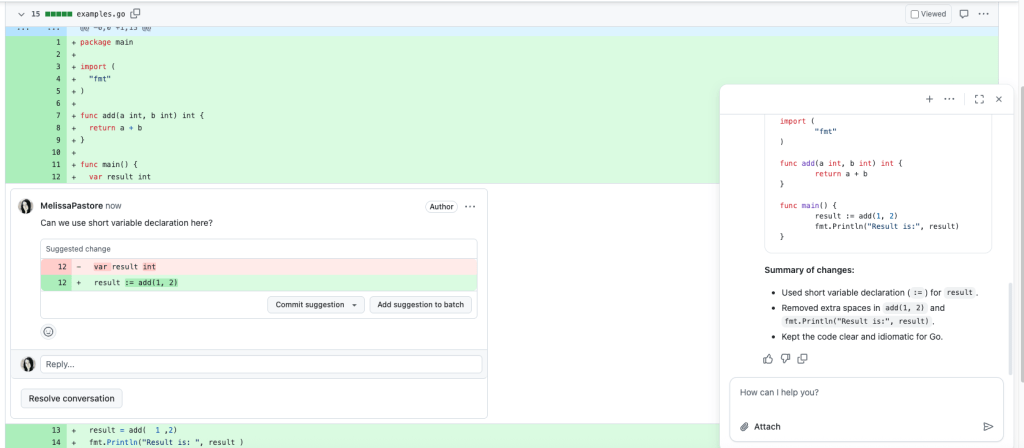
Since I joined GitHub as a software engineer on the billing team almost three years ago, I’ve had a front row seat to the evolution of AI coding tools including Github Copilot. What started out as code completions has evolved into so much more including agentic workflows and refactoring suggestions. When I first started using Copilot, I was mainly using it in VSCode. As Copilot has grown and expanded, I’ve extended my use cases beyond my code editor and into all parts of my day-to-day work, including pull requests, code reviews, and more.   GitHub Copilot is now available in all parts of the software development life cycle and one place where it can be extremely useful is when you’re creating pull requests and doing code reviews. During my time at GitHub, I’ve discovered some practical ways Copilot can make a difference during the pull request and code review processes. Here are a few things I’ve started doing that have made my workflow smoother and more efficient. Using Copilot suggestions when reviewing code Often, when I’m reviewing a teammate’s pull request, I’ll have an idea for how their code could be improved, or I’ll want to confirm the code is following best practices. However, I don’t always have time to write the suggested refactored code myself. In these cases, I’ll usually click the Copilot icon next to the file I’m reviewing and ask Copilot to suggest a specific improvement about the lines of code I’m currently reviewing. Then I’ll add that suggestion in my review comment along with some explanation of why I think the suggestion would improve the code.   Recently while reviewing a teammate’s code, I noticed some repetitive code in a Ruby file. I clicked the Copilot icon next to the relevant code and prompted it with: > “Can you refactor this Ruby on Rails code to reduce repetition?” Copilot’s suggestion matched what I would have written and saved me several minutes, which allowed me to focus on higher-level feedback. Since I frequently switch context and review code in different languages like Ruby, TypeScript and Go, sometimes I’ll need a reminder on best practices for each language. I recently used this prompt to help me review some Go code: > “Is this code addition following Go best practices for variable assignment? If not, can you suggest improvements?” Copilot quickly generated a suggestion that I reviewed and used as part of my code review comment. It saved me time and made my feedback more actionable. Formatting tables and data for pull requests I like to add images, screen recordings, and occasionally spreadsheets to my pull request descriptions to add context to help reviewers understand my changes. Adding this type of information in Markdown can be tedious! In these cases, I ask Copilot to do the formatting for me.  Recently, I was working on some improvements to help decrease the load time of a React page, and I wanted to show the improvements that my changes were making. I had been keeping a spreadsheet detailing the the page load times before and after my changes, and I wanted to include it in my pull request description, so I gave Copilot this prompt: Format this data into a GitHub flavored markdown table that I can paste into a GitHub pull request description: Load Time Before (in seconds) Load Time After Updates (in seconds) 1.3 1.2 1.2 1.1 1.1 0.885 1.3 1.3 1.2 0.918 Average 1.22 1.0806 And Copilot gave this response:  Here’s your data formatted as a GitHub-flavored markdown table, ready to paste into a pull request description: Markdown | Test Run | Load Time Before (seconds) | Load Time After Updates (seconds) | |———-|—————————|———————————–| | 1 | 1.3 | 1.2 | | 2 | 1.2 | 1.1 | | 3 | 1.1 | 0.885 | | 4 | 1.3 | 1.3 | | 5 | 1.2 | 0.918 | | **Average** | **1.22** | **1.0806** Let me know if you’d like any adjustments! This simple trick has made it much easier for me to clearly share data in my pull request descriptions and comments. Letting Copilot help write pull request summaries I often use Copilot to help me write pull request summaries. We’ve all been there: you finally open your pull request after fixing a bug or introducing a new feature and the last hurdle is writing the pull request description. Copilot can help kickstart this process for you by using the Copilot icon in the pull request description editor bar. Even if I end up editing the text, having a starting point makes it less daunting. Using Copilot for code reviews and understanding unfamiliar code Copilot is very good at reviewing and explaining code and two ways I leverage this in my day-to-day work are requesting initial code reviews from Copilot and asking questions about unfamiliar code.  Before I mark a pull request as ready for review, I’ll use Copilot to do a quick pass over my changes by requesting a code review from Copilot. It often catches things I might have missed or suggests a better way to write something. And don’t forget to add some notes in the custom instructions in your repository on what you want Copilot to focus on when reviewing pull requests. If I’m reviewing someone else’s code and I don’t understand a change, I’ll ask Copilot to explain it. This helps me get context quickly, especially when I’m less familiar with that part of the codebase. This better understanding of the code allows me to provide more thoughtful and thorough code reviews for my teammates and ensures that I fully understand the potential impact of any pull request that I’m approving.  Copilot’s impact on code reviews and pull requests  While Copilot isn’t a replacement for thoughtful, engaged code reviews, it has become an indispensable tool in my daily workflow as a software engineer. From generating smart suggestions and code refactors, to quick Markdown formatting and drafting pull request summaries, Copilot helps streamline the

tech blog

OpenAI’s GPT-OSS Models + Dell AI Factory: Unlocking Enterprise AI on Your Terms

Dell and Hugging Face are revolutionizing AI deployment with the Dell Enterprise Hub. From pre-validated models to seamless application integration, this partnership simplifies AI adoption for enterprises. Explore how cutting-edge tools like the Application Catalog and optimized containers empower businesses to scale AI effortlessly.   ​  ​Dell and Hugging Face are revolutionizing AI deployment with the Dell Enterprise Hub. From pre-validated models to seamless application integration, this partnership simplifies AI adoption for enterprises. Explore how cutting-edge tools like the Application Catalog and optimized containers empower businesses to scale AI effortlessly. AI Solutions Blog | Dell

tech blog

Ditch the Legacy Thinking – This Isn’t Your Typical PC Refresh Cycle

Customers are asking me: “Should I buy a new AI PC now or wait for AI technology to evolve?” My answer is always the same. Buy now. And I’ll tell you why.   ​  ​Customers are asking me: “Should I buy a new AI PC now or wait for AI technology to evolve?” My answer is always the same. Buy now. And I’ll tell you why. AI Solutions Blog | Dell

tech blog

GitHub Availability Report: June 2025

In June, we experienced three incidents that resulted in degraded performance across GitHub services. June 5 17:47 UTC (lasting 1 hour and 33 minutes) On June 5, 2025, between 17:47 UTC and 19:20 UTC, the Actions service was degraded, leading to run start delays and intermittent job failures. During this period, 47.2% of runs had delayed starts of 14 minutes on average, and 21.0% of runs failed. The impact extended beyond Actions itself; 60% of Copilot Coding Agent sessions were cancelled, and all Pages sites using branch-based builds failed to deploy (though Pages serving remained unaffected). The issue was caused by a spike in load between internal Actions services exposing a misconfiguration that caused throttling of requests in the critical path of run starts. We mitigated the incident by correcting the service configuration to prevent throttling and have updated our deployment process to ensure the correct configuration is preserved moving forward. June 12 17:55 UTC (lasting 3 hours and 12 minutes) On June 12, 2025, between 17:55 UTC and 21:07 UTC, the GitHub Copilot service was degraded and experienced unavailability for Gemini models and reduced availability for Claude models. Users experienced significantly elevated error rates for chat completions, slow response times, timeouts, and chat functionality interruptions across VS Code, JetBrains IDEs, and GitHub Copilot Chat. This was due to an outage affecting one of our model providers. We mitigated the incident by temporarily disabling the affected provider endpoints to reduce user impact. We are working to update our incident response playbooks for infrastructure provider outages and improve our monitoring and alerting systems to reduce our time to detection and mitigation of issues like this one in the future. June 17 19:32 UTC (lasting 31 minutes) On June 17, 2025, between 19:32 UTC and 20:03 UTC, an internal routing policy deployment to a subset of network devices caused reachability issues for certain network address blocks within our datacenters. Authenticated users of the github.com UI experienced 3-4% error rates for the duration of the incident. Authenticated callers of the API experienced 40% error rates. Unauthenticated requests to the UI and API experienced nearly 100% error rates. Actions experienced 2.5% of runs being delayed for an average of 8 minutes and 3% of runs failing. Large File Storage (LFS) requests experienced 1% errors. At 19:54 UTC, the deployment was rolled back, and network availability for the affected systems was restored. At 20:03 UTC, we fully restored normal operations. To prevent similar issues, we are expanding our validation process for routing policy changes. Please follow our status page for real-time updates on status changes and post-incident recaps. To learn more about what we’re working on, check out the GitHub Engineering Blog. The post GitHub Availability Report: June 2025 appeared first on The GitHub Blog. ​ Company news, News & insights, GitHub Availability Report The GitHub Blog

tech blog

We need a European Sovereign Tech Fund

Open source software is open digital infrastructure that our economies and societies rely on. Nevertheless, open source maintenance continues to be underfunded, especially when compared to physical infrastructure like roads or bridges. So we ask: how can the public sector better support open source maintenance?  As part of our efforts to support developers, GitHub’s developer policy team has commissioned a study from Open Forum Europe, Fraunhofer ISI and the European University Institute that explores how one of the open source world’s most successful government programs, the German Sovereign Tech Agency, can be scaled up to the European Union level. That study was published today. Here’s what it says and what you can do to help make the EU Sovereign Tech Fund (EU-STF) a reality. The maintenance challenge There is a profound mismatch between the importance of open source maintenance and the public attention it receives. The demand-side value of open source software to the global economy is estimated at $8.8 trillion, and the European Commission’s own research shows that OSS contributes a minimum of €65-95 billion to the EU economy annually. Basic open source technologies, such as libraries, programming languages, or software development tools, are used in all sectors of the economy, society, and public administrations. Open source is everywhere Open source is valuable Open source is underfinanced 96% of all code bases contain OSS $8.8T demand-side value to global economy 1/3 of OSS maintainers are unpaid 77% of a given code base is OSS €65-95M minimum contribution to annual EU GDP 1/3 are the only maintainer of their OSS project The flip side of everybody benefiting from this open digital infrastructure is that too few feel responsible for paying the tab. The Sovereign Tech Agency’s survey of over 500 OSS maintainers showed that a third of them are not paid at all for their maintenance work, but would like to be. Another third earns some income from OSS maintenance, but is not able to make a living off this work. Perhaps even more alarmingly, a third of respondents are solo maintainers, and almost three quarters of surveyed projects are maintained by three people or fewer. As prominent security incidents such as the xz backdoor or the Log4Shell vulnerability have shown in recent years, it can mean serious risks for the OSS community’s health and the security of our global software ecosystem if too much is put on the shoulders of small, overworked, and underappreciated teams. At GitHub, we are helping address this open source sustainability challenge through GitHub Sponsors, the GitHub Secure Open Source Fund, free security tooling for maintainers, and other initiatives. Yet we recognize that there is a significant gap between the immense public value of open source software and the funding that is available to maintain it, a gap that this research is seeking to address. Designing an impactful fund Building on the success story of the German Sovereign Tech Agency, which has invested over €23 million in 60 OSS projects in its first two years of operation (2022-2024), the EU-STF should have five main areas of activity: Identifying the EU’s most critical open source dependencies, Investments in maintenance, Investments in security, Investments in improvement, Strengthening the open source ecosystem. The study proposes two alternative institutional setups for the EU-STF: either the creation of a centralized EU institution (the moonshot model), or a consortium of EU member states that provide the initial funding and apply for additional resources from the EU budget (the pragmatic model). In both cases, to make the fund a success, the minimum contribution from the upcoming EU multiannual budget should be no less than €350 million. This would not be enough to meet the open source maintenance need, but it could form the basis for leveraging industry and national government co-financing that would make a lasting impact. Equipped with the learnings from the German Sovereign Tech Agency and other government open source programs, such as the US Open Technology Fund or the EU’s Next Generation Internet initiative, the study identified seven design criteria that the EU-STF must meet: Pooled financing. To address the maintenance funding gap, industry, national governments and the EU should all be able to put money into the same pot. It is not in the interest of overworked open source maintainers to have to research and apply to dozens of separate funds, all with slightly different funding criteria. That’s why GitHub’s Secure Open Source Fund pools funding from many industry partners into one coherent program. The EU-STF should follow the same logic and be capable of collecting contributions from industry, national governments and the EU budget alike. Low bureaucracy. If you’re one of those aforementioned unpaid solo maintainers, the last thing you need is to sink several days of work into a complicated application process with an uncertain outcome that many EU funding programs are unfortunately known for. The EU-STF should combine a lightweight application process along with its own research to identify and proactively contact critical OSS infrastructure projects. Funding recipients should have limited reporting requirements to make sure that they can spend their time on improving the health of their OSS projects, not jumping through administrative hoops. Political independence. Public funding programs often follow technological trends, such as blockchain, quantum computing or AI. Open source maintenance often gets overlooked, because it is neither a new development nor limited to a particular economic sector: it is foundational to all of them. An EU-STF has to be politically independent enough to shield it from frequent pivots to new, politically salient topics, and instead keep it focused on the mission of securing and maintaining our public software infrastructure. Flexible funding. There is no one-size-fits-all model for open source maintenance. Many maintainers are hired by companies to work on OSS as part of their day jobs. Others maintain projects in their free time. Some critical OSS projects are governed by a foundation or other nonprofit, yet others are made up of a loose collective of individuals scattered across the globe.

tech blog

Debugging UI with AI: GitHub Copilot agent mode meets MCP servers

If you’ve ever dusted off an old project and thought, “How did I leave things in such a mess?”, you’re in good company. On my latest Rubber Duck Thursdays stream, I dove back into my OctoArcade Next.js app, only to rediscover a host of UI gremlins. So, we experimented with something that felt like magic: letting GitHub Copilot agent mode, paired with Playwright MCP server, identify and fix UI bugs. Along the way, I learned (again) how crucial it is to provide AI tools like Copilot with clear, detailed requirements.  Let’s walk through how I used these agentic tools to debug, test, and (mostly) solve some tricky layout issues, while covering practical tips for anyone looking to leverage Copilot’s agent workflows in real-world projects. 💡 Useful Links Use agent mode in VS Code Use MCP servers in VS Code Playwright MCP The setup: Revisiting OctoArcade (and its bugs) I started by firing up OctoArcade, my collection of GitHub-themed mini-games built with Next.js and TypeScript. Within minutes, I realized I had been introducing a new game to the app, but hadn’t quite gotten around to fixing some bugs. Here’s what we accomplished in one stream session: Problem: Navigation header overlapping game content across all games Solution: Copilot agent mode and Playwright MCP server identified the issue through visual inspection, and implemented a global header fix Bonus: Fixed some additional UI issues (unintended gaps between the game canvas and footer) discovered during testing Result: Hands-off debugging that solved problems I’d stepped away from, and had previously spent some cycles on fixing Let me walk you through how this worked and what you can learn for your own debugging workflows. Making sure Copilot custom instructions are set up With my environment set up in VS Code Insiders, I checked that my Copilot custom instruction files (.github/copilot-instructions.md, *.instructions.md files) were up to date. This is usually my first step before using any agentic features, as these instructions provide important context on my expectations, coding styles, and working practices — influencing how Copilot responds and interacts with my codebase. In my last blog post, we spent time exploring recommended practices when setting up Copilot custom instructions. We also covered how the copilot-setup-steps.yml sets up a developer environment when using Copilot coding agent. Take a look at that blog post on using GitHub Copilot coding agents to refactor and automate developer workflows to learn more. 💡 Did you know? Learn more about instruction files: Adding repository custom instructions for GitHub Copilot (with instructions for different editors) Adding custom instructions to your repository is my go-to reference, as I personally find the structure of the file very helpful github/awesome-copilot has a collection of community contributed instructions, reusable prompts, chat modes and more Always keep your Copilot custom instructions current (including descriptions of your repository structure, common steps like building and testing, and any expectations before making commits). Copilot agents depend on this context to deliver relevant changes. When I think my instructions file is out of date, I typically prompt Copilot in agent mode with a prompt along the lines of: Based on the #codebase, please can you update the custom instructions file for accuracy? Please make sure to keep the structure (i.e. headings etc.) as-is. Thanks! In some of my instruction files, I’ve even instructed Copilot to keep key documentation (README, .github/copilot-instructions.md, etc.) up to date when it makes significant changes (like refactoring files or adding new features). Agentic debugging: UI troubleshooting with Playwright MCP Playwright MCP server is a powerful tool for end-to-end testing and UI automation. Since it’s an MCP server, you can access it through your favorite AI tools that support the Model Context Protocol, like Copilot agent mode and Copilot coding agent! In agent mode, Copilot can use Playwright’s structured tools to: Load web pages Simulate user actions (clicks, navigation) Inspect rendered layouts without needing vision models This means you can ask Copilot to “see” what a human would, spot layout issues, and even propose CSS or component fixes. To get started with Playwright, it’s as easy as adding the below to your MCP configuration: {   “mcpServers”: {     “playwright”: {       “command”: “npx”,       “args”: [“@playwright/mcp@latest”]     }   } } Once you have started the MCP server, you should see that Copilot now has access to a suite of new tools for browser interaction like: browser_snapshot – Capture accessibility snapshots of pages browser_navigate – Navigate to URLs browser_click, browser_type, browser_hover – Interact with elements browser_resize – Test different viewport sizes browser_take_screenshot – Visual documentation And many more: You can find the full list in the tools section of Playwright MCP server’s README With access to a new set of tools to solve the UI challenges, it was time to point Copilot at the problem. Meaning, I now had the task of clearly defining the requirements in my initial prompt…easier said than done. The debugging journey: Real-time fixes and lessons learned 1. Describe the problem and let agent mode work I noticed that, in several pages, the main content was tucked behind the navigation bar. This was particularly noticeable on any pages that rendered games. On some pages (like OctoPong), I saw inconsistent spacing between game elements and the footer. To get Copilot agent mode started, I aimed to be as explicit as possible in my prompts: I have spotted that there is a bit of a UI error. It seems like the main content of any page “starts” behind the navigation bar. This is more evident on the games like octosnap, octopong and octobrickbreaker. Can you take a look at the site using Playwright (you’ll need to spin up an instance of the server), take a look at the pages, and then investigate? Thanks! It loaded up the pages to configure each game, but didn’t try loading the games themselves (so missed some context). I followed up in a separate prompt: Sorry, I wanted you to take a look when a game is actually loaded too. Can you play the game Octopong and Octosnap –

Scroll to Top