tech blog

How to use GitHub Copilot on github.com: A power user’s guide

You’ve been using GitHub Copilot in your IDE for autocomplete and code suggestions. But here’s what I discovered recently: there’s a whole other side of Copilot that lives on github.com, and it’s designed for different problems entirely. While your IDE handles the day-to-day coding, GitHub Copilot on github.com helps you tackle project management, team coordination, and rapid prototyping. I can file issues from screenshots, assign AI agents to fix bugs, and spin up working demos without opening VS Code. Check it out in the video below 👇 No extensions to install, no setup required. Just go to github.com/copilot and start working. This becomes your AI-powered command center, and here’s how you can use it strategically: File issues from screenshots Got a bug report with a screenshot? Don’t write it manually, let Copilot do it. Here’s how: Take a screenshot of the bug (e.g., a misaligned icon or layout problem) Drag it into the Copilot chat on github.com/copilot.  Add a prompt like: Create a new issue using the ‘bug’ label. Use this screenshot and describe the overlapping arrow icon. Apply the UI issue template from this repo. Copilot reads the image, generates a clear title and description, applies the right labels, and uses your repository’s issue templates. It’s faster than manual transcription and often catches details I might miss. 📦 Quick actions at github.com/copilot Beyond screenshots, here’s what else you can do from your project hub: Chat with Copilot across your GitHub repositories Create and manage issues and pull requests Launch GitHub Spark to prototype code snippets or components Assign Copilot agents to work autonomously Switch between multiple AI models (even mid-conversation) 💡 Pro tip: Copilot can infer issue context from your screenshot and your prompt, no need to spell everything out. Let Agents handle routine work Once your issue is created, you can assign it to the Copilot coding agent to start working on a solution. To assign an agent: In the chat thread, tell Copilot: Assign yourself to this issue and draft a fix. The agent will analyze your codebase, identify the root cause, and submit a draft pull request with the fix. You can monitor progress in the task pane and review the pull request when ready. This works well for routine bugs, documentation updates, and dependency upgrades. For more complex features, I still prefer hands-on development in the IDE. 💡 Pro tip: Agents can work across issues, run workflows, and follow up, just like a teammate. Use Spark to prototype live When I need to test how a component behaves or validate a design idea, I use GitHub Spark to: Rapidly scaffold working code  Preview and interact with the output Share the work via a link with collaborators Example prompt: Create a feature comparison table for an API pricing page. Show Free, Pro, and Enterprise tiers with checkmarks for features. Within minutes, I get working code with a live preview. I can edit directly in Spark, GitHub Codespaces, or VS Code, see changes immediately, and publish and share the prototype with teammates. 💡 Pro tip: Use Spark to quickly practice with unfamiliar syntax by running and editing snippets in real time. Choose the best model for the task You can get access to multiple AI models and switch between models on github.com. In my experience: Model Best for GPT-4.1 General coding and reasoning Claude Sonnet 4 Structured writing, refactors, context-heavy tasks Opus 4 Creativity, edge cases, alternative perspectives To switch models: In a thread, click the model name. Select a different model and reload the response. Compare answers and choose the best one for your use case. 💡 Pro tip: Use model comparison to reduce hallucinations and sharpen your output. In my experience, GPT-4.1 works well for general coding, Claude 4 for complex refactoring, and Opus 4 when I need creative approaches. But your mileage may vary; the real value is having options when one model’s response doesn’t quite fit. Navigate conversation branches GitHub Copilot groups multiple responses under each message you send, especially when you switch models. It’s not threading in the Slack sense, but it acts like it — each group works like a separate “branch” of your conversation, completely isolated from the others. Here are a few use practical use cases: Compare different refactoring approaches by switching models for the same question. Test multiple architectural patterns by reviewing several AI-generated answers. Explore alternative explanations side-by-side without mixing contexts. 💡 Pro tip: Think of each message as a base commit in Git. Model switching creates alternative responses grouped under that message, letting you review different approaches without starting over. Combine web and IDE strategically  Copilot is most powerful when you use both github.com and your IDE together, leveraging each for what they do best. Task Use github.com when you need… Use IDE when you need… Project coordination Cross-repository visibility Single codebase focus Issue management Creating and assigning issues Implementing solution Agent work Async automation via coding agent Real-time collaboration via agent mode Prototyping Quick demos and sharing In-depth debugging Example workflow: I’ll start a project discussion on github.com, prototype the solution in Spark, create issues for the team, then switch to VS Code for implementation. Build your AI-native dev workflow Here’s what a full day might look like: Land at github.com/copilot. Check assigned pull requests and issues. Use chat to summarize project status and recent team activity. Assign an agent to a newly created issue. Prototype a new idea in Spark. Use thread conversations and switch models mid-thread. Push final changes via pull request. The key insight is that github.com Copilot handles the coordination and exploration work, while your IDE handles the detailed implementation. Used together, they can cover the full development workflow. Ready to try it? Copilot on github.com turns your browser into your personal development mission control. It’s time to stop thinking of Copilot as just autocomplete and start using it as your workflow orchestrator. Head to github.com/copilot and start building now > The post How to use GitHub Copilot on github.com:

tech blog

How we accelerated Secret Protection engineering with Copilot

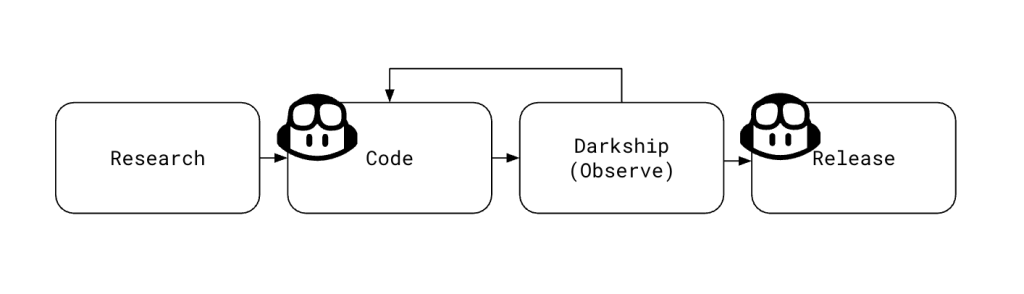
Accidentally committing secrets to source code is a mistake every developer dreads — and one that’s surprisingly easy to make. GitHub Secret Protection was built for moments like these, helping teams catch exposed credentials before they cause harm. Secret Protection works by creating alerts for sensitive credentials found in code, and it offers several features to help mitigate leaks even further. Push protection helps stop leaks before they happen by blocking any commits that contain sensitive data and ensuring that credentials do not make it into a code base. Validity checks help users triage alerts by indicating which secrets are active and need immediate attention. The partner program allows for providers to be notified of leaks in public repositories for certain token types. When these types are detected, providers can take immediate action on the exposed secret (e.g. immediate revocation, application of a quarantine policy, notification). Copilot secret scanning allows for detecting generic secrets, things like passwords or connection strings that may not be associated with a specific provider. Custom patterns let you define expressions for detecting secrets that are specific to your project or organization. Aaron and I have worked extensively on validity checks during our time at GitHub. It’s become a core part of our product, and many users rely on it day-to-day as part of their triage and remediation workflows. Secret Protection calculates the validity of a leaked credential by testing it against an unobtrusive API endpoint associated with the token’s provider.  We released this feature in 2023, and we started by adding validity checks support for the most common token types we saw leaked in code (e.g., AWS keys, GCP credentials, Slack tokens). Secret Protection got to a point where it was validating roughly 80% of newly created alerts. While the less common token types remained (and continue to remain) important, our team shifted focus to make sure we delivered the greatest value for our customers. Towards the end of 2024 and into 2025 we gradually saw the advent of agentic AI, and soon coding agents started to gain mainstream popularity. Our team got together earlier this year and had a thought: Could we successfully use coding agents to help cover this gap? Augmenting a repeatable workflow To identify opportunities for automation, we first took a close look at our existing process for adding validation support for new token types. This framework-driven workflow included the following steps for each token type: We researched the provider to determine a good endpoint for validating the token in question. We wrote code — a validator — to implement this change. We darkshipped the validator, thus allowing us to update our implementation with errors we saw. We fully shipped the validator by removing the darkship configuration. The coding and release parts (second and fourth steps) of this process were the obvious first choices for automation. The first step above involves finding a suitable endpoint to validate a new token type. We typically use  /me (or equivalent) endpoints if they exist. Sometimes they do exist, but they’re buried in documentation and not easy to find. We experimented with handing off this research to Copilot, but it sometimes struggled. It could not reliably find the same least-intrusive endpoint an engineer would choose. We also discovered that creating and testing live tokens, and interpreting nuanced API changes, remained tasks best handled by experienced engineers. Copilot did an excellent job of making code changes. The output of the human-driven research task was fed into a manually dispatched GitHub workflow that created a detailed issue we could assign to the coding agent. The issue served as a comprehensive prompt that included background on the project, links to API documentation, and various examples to look at. We learned that the coding agent sometimes struggled with following links, so we added an extra field for any additional notes.  After assigning an issue to Copilot, the coding agent automatically generated a pull request, instantly turning our research and planning into actionable, feedback-ready code. We treated code generated by the agent just like code written by our team: it went through automated testing, a human review process, and was eventually deployed by engineers. GitHub provided a streamlined process for requesting changes from the agent — just add comments to a pull request. The agent is not perfect, and it did make some mistakes. For example, we expected that Copilot would follow documentation links in a prompt and reference the information there as it implemented its change, but in practice we found that it sometimes missed details or didn’t follow documentation as intended. Our framework included the ability to darkship a validator. That is, we observed the results of our new code without writing validity inferences to the database. It wasn’t uncommon for our engineers to encounter some amount of drift in API documentation and actual behavior. This stage allowed us to safely fix any errors. When we were ready to fully release a change, we asked Copilot to make a small configuration change to take the new validator out of darkship mode. The result Prior to our AI experimentation, progress was steady but slow. We were validating 32 partner token types. It took us several months to get here as engineers balanced onboarding new checks with day-to-day feature development. With Copilot, we onboarded almost 90 new types in just a few weeks as our engineering interns, @inshalak and @matthew-tzong, directed Copilot through this process. Coding agents are a viable option for accelerating framework-driven repeatable workflows with automation. In our case, Copilot was literally a force multiplier. Being able to parallelize the output of N research tasks over N agents was huge. Copilot delivers speed and scale, but it’s no replacement for human engineering judgment. Always review, test, and verify the code it produces. We were successful by grafting Copilot into very specific parts of this framework. Takeaways and tips Our experiment using Copilot coding agent made a measurable impact: we dramatically accelerated our coverage of token types, parallelized

tech blog

How GitHub Models can help open source maintainers focus on what matters

Open source runs on passion and persistence. Maintainers are the volunteers who show up to triage issues, review contributions, manage duplicates, and do the quiet work that keeps projects going. Most don’t plan on becoming community managers. But they built something useful, shared it, and stayed when people started depending on it. That’s how creators become stewards. But as your project grows, your time to build shrinks. Instead, you’re writing the same “this looks like a duplicate of #1234” comment, asking for missing reproduction steps, and manually labeling issues. It’s necessary work. But it’s not what sparked your love for the project or open source. That’s why we built GitHub Models: to help you automate the repetitive parts of project management using AI, right where your code lives and in your workflows, so you can focus on what brought you here in the first place.  What maintainers told us We surveyed over 500 maintainers of leading open source projects about their AI needs. Here’s what they reported: 60% want help with issue triage — labeling, categorizing, and managing the flow 30% need duplicate detection — finding and linking similar issues automatically 10% want spam protection — filtering out low quality contributions 5% need slop detection — identifying low quality pull requests that add noise Folks surveyed indicated that they wanted AI to serve as a second pair of eyes and to not intervene unless asked. They also said triaging issues, finding similar issues, helping write minimal reproductions were top of mind. Clustering issues based on topic or feature was also possibly the most important concern to some. How GitHub Models + GitHub Actions = Continuous maintainer support We’re calling this pattern Continuous AI using automated AI workflows to enhance collaboration, just like CI/CD transformed testing and deployment. With GitHub Models and GitHub Actions, you can start applying it today.  Here’s how Continuous AI can help maintainers (you!) manage their projects The following examples are designed for you to easily copy and paste into your project. Make sure GitHub Models is enabled for your repository or organization, and then just copy the YAML into your repo’s .github/workflows directory. Customize these code blocks as needed for your project. Add permissions: models: read to your workflow YAML, and your action will be able to call models using the built-in GITHUB_TOKEN. No special setup or external keys are required for most projects.  Automatic issue deduplication Problem: You wake up to three new issues, two of them are describing the same bug. You copy and paste links, close duplicates, and move on… until it happens again tomorrow. Solution: Implement GitHub Models and a workflow to automatically check if a new issue is similar to existing ones and post a comment with links. name: Detect duplicate issues on: issues: types: [opened, reopened] permissions: models: read issues: write concurrency: group: ${{ github.workflow }}-${{ github.event.issue.number }} cancel-in-progress: true jobs: continuous-triage-dedup: if: ${{ github.event.issue.user.type != ‘Bot’ }} runs-on: ubuntu-latest steps: – uses: pelikhan/action-genai-issue-dedup@v0 with: github_token: ${{ secrets.GITHUB_TOKEN }} # Optional tuning: # labels: “auto” # compare within matching labels, or “bug,api” # count: “20” # how many recent issues to check # since: “90d” # look back window, supports d/w/m This keeps your issues organized, reduces triage work, and helps contributors find answers faster. You can adjust labels, count, and since to fine tune what it compares against. Issue completeness Problem: A bug report lands in your repo with no version number, no reproduction steps, and no expected versus actual behavior. You need that information before you can help. Solution: Automatically detect incomplete issues and ask for the missing details. name: Issue Completeness Check on: issues: types: [opened] permissions: issues: write models: read jobs: check-completeness: runs-on: ubuntu-latest steps: – name: Check issue completeness uses: actions/ai-inference@v1 id: ai with: prompt: | Analyze this GitHub issue for completeness. If missing reproduction steps, version info, or expected/actual behavior, respond with a friendly request for the missing info. If complete, say so. Title: ${{ github.event.issue.title }} Body: ${{ github.event.issue.body }} system-prompt: You are a helpful assistant that helps analyze GitHub issues for completeness. model: openai/gpt-4o-mini temperature: 0.2 – name: Comment on issue if: steps.ai.outputs.response != ” uses: actions/github-script@v7 with: script: | github.rest.issues.createComment({ owner: context.repo.owner, repo: context.repo.repo, issue_number: ${{ github.event.issue.number }}, body: `${{ steps.ai.outputs.response }}` }) The bot could respond: “Hi! Thanks for reporting this. To help us investigate, could you please provide: 1) Your Node.js version, 2) Steps to reproduce the issue, 3) What you expected to happen versus what actually happened?”Or you can take it a step further and ensure the issue is following your contributing guidelines, like ben-balter/ai-community-moderator (MIT License). Spam and “slop” detection Problem: You check notifications and find multiple spam pull requests or low effort “fix typo” issues. Solution: Use AI to flag suspicious or low quality contributions as they come in. name: Contribution Quality Check on: pull_request: types: [opened] issues: types: [opened] permissions: pull-requests: write issues: write models: read jobs: quality-check: runs-on: ubuntu-latest steps: – name: Detect spam or low-quality content uses: actions/ai-inference@v1 id: ai with: prompt: | Is this GitHub ${{ github.event_name == ‘issues’ && ‘issue’ || ‘pull request’ }} spam, AI-generated slop, or low quality? Title: ${{ github.event.issue.title || github.event.pull_request.title }} Body: ${{ github.event.issue.body || github.event.pull_request.body }} Respond with one of: spam, ai-generated, needs-review, or ok system-prompt: You detect spam and low-quality contributions. Be conservative – only flag obvious spam or AI slop. model: openai/gpt-4o-mini temperature: 0.1 – name: Apply label if needed if: steps.ai.outputs.response != ‘ok’ uses: actions/github-script@v7 with: script: | const label = `${{ steps.ai.outputs.response }}`; const number = ${{ github.event.issue.number || github.event.pull_request.number }}; if (label && label !== ‘ok’) { await github.rest.issues.addLabels({ owner: context.repo.owner, repo: context.repo.repo, issue_number: number, labels: [label] }); } This workflow auto-screens new issues and new pull requests for spam/slop/low-quality, and auto labels them based on an LLM’s judgment. Tip: If the repo doesn’t already have spam or needs-review labels, addLabels will create them with default styling. If you want custom colors or descriptions, pre-create them. You can also

tech blog

How Norby’s AI Robot Personalizes Language Learning

Norby’s AI companion helps people navigate the challenge of learning new languages, with support from Dell and NVIDIA.   ​  ​Norby’s AI companion helps people navigate the challenge of learning new languages, with support from Dell and NVIDIA. AI Solutions Blog | Dell

tech blog

Transforming Telecom with Agentic AI

The reality is clear: AI is poised to be a pivotal force in accelerating the transformation journeys of CSPs.   ​  ​The reality is clear: AI is poised to be a pivotal force in accelerating the transformation journeys of CSPs. Telecommunications Blog | Dell

tech blog

Grok 2.5 and Dell AI Factory Power AI Revolution

Experience scalable, secure AI powered by Grok 2.5 and Dell’s cutting-edge infrastructure. Simplify adoption with pre-validated models and seamless integration.   ​  ​Experience scalable, secure AI powered by Grok 2.5 and Dell’s cutting-edge infrastructure. Simplify adoption with pre-validated models and seamless integration. Innovation Blog | Dell

tech blog

AI with Your Data, Your Way

Dell and Cohere streamline enterprise AI model platform adoption for control and security.   ​  ​Dell and Cohere streamline enterprise AI model platform adoption for control and security. AI Solutions Blog | Dell

tech blog

Modern PC Refresh Made Easy

Technology changes fast – Equipping teams with modern PCs is essential for driving innovation, productivity and growth.   ​  ​Technology changes fast – Equipping teams with modern PCs is essential for driving innovation, productivity and growth. Thought Leadership Blog | Dell

tech blog

The Secret to AI Success? A Smarter Data Platform

Accelerate AI with the Dell AI Data Platform—open, modular, and powered by PowerScale for today’s fastest workloads.   ​  ​Accelerate AI with the Dell AI Data Platform—open, modular, and powered by PowerScale for today’s fastest workloads. PowerScale Blog | Dell

tech blog

Empowering Innovation through Cyber Resilience

Dell equips organizations to fortify data, adapt to evolving threats, and innovate confidently in a dynamic digital world.   ​  ​Dell equips organizations to fortify data, adapt to evolving threats, and innovate confidently in a dynamic digital world. Cyber Resilience Blog | Dell

tech blog

LoRA: Optimizing Text-to-Image Generation for Creative Teams

Did you know that blog posts with images and infographics receive 94% more views than those without? In creative industries, whether it’s marketing, design, or content production, the demand for customized visuals is higher than ever.   ​  ​Did you know that blog posts with images and infographics receive 94% more views than those without? In creative industries, whether it’s marketing, design, or content production, the demand for customized visuals is higher than ever. Dell Pro Max Blog | Dell

tech blog

AI ROI Can Be Huge On Premises

Deploying AI on premises with the Dell AI Factory with NVIDIA could yield a four-year ROI of 1,225% and nearly $26 million in cost savings.   ​  ​Deploying AI on premises with the Dell AI Factory with NVIDIA could yield a four-year ROI of 1,225% and nearly $26 million in cost savings. AI Solutions Blog | Dell

tech blog

Secure AI PCs, Meet Secure On-Device AI Apps

Mitigate risk in your GenAI journey – from development to deployment. Secure Dell AI PCs + Dell Pro AI Studio can help.   ​  ​Mitigate risk in your GenAI journey – from development to deployment. Secure Dell AI PCs + Dell Pro AI Studio can help. Endpoint Security Blog | Dell

tech blog

Power AI Innovation: All-Flash ObjectScale XF960 with 4.1

See how Dell ObjectScale 4.1 and the XF960 all-flash appliance deliver industry-leading, extreme performance for AI workloads.   ​  ​See how Dell ObjectScale 4.1 and the XF960 all-flash appliance deliver industry-leading, extreme performance for AI workloads. ObjectScale Blog | Dell

tech blog

From AI/ML to Agentic AI at the Edge

We’ve seen AI evolve for CSPs, from foundational AI/ML to Generative AI and Agentic AI, driving real-world benefits and ROI.   ​  ​We’ve seen AI evolve for CSPs, from foundational AI/ML to Generative AI and Agentic AI, driving real-world benefits and ROI. Telecommunications Blog | Dell

tech blog

Dell PowerScale and NVIDIA: Tackling the AI Data Challenge

From Trusted Storage to GPU-ready Innovation – PowerScale delivers uncompromising performance, unbound intelligence and unmatched safeguards.   ​  ​From Trusted Storage to GPU-ready Innovation – PowerScale delivers uncompromising performance, unbound intelligence and unmatched safeguards. Artificial Intelligence Blog | Dell

Scroll to Top