tech blog

How to thrive as a junior engineer: Tips and insights

Starting an engineering career can be both exciting and overwhelming—I know, I’ve been there. Life comes at you fast; bugs get reported, features get requested, meetings get scheduled. You have to navigate uncertainty, learn fast, and grow from mistakes—which happen, and that’s ok! Below I’ll share lessons from my journey—from beginning my career at a startup to then growing from junior to mid-level engineer at GitHub in just 2.5 years—to hopefully help early-in-career engineers succeed in any company. How you can help yourself grow as a junior engineer Growth as a junior engineer comes down to actively seeking out learning opportunities and taking responsibility for your progress. Here are a few strategies that helped me progress quickly, from asking the right questions to making my work visible and building connections with my team. Embrace the learning curve Asking questions is a strength, not a weakness. What really brought me forward was embracing every learning opportunity. I soaked up knowledge like a sponge. I exposed what I didn’t know daily, which helped me fill the gaps fast. It’s tempting to prove yourself by figuring everything out alone, but asking questions isn’t ignorance—it’s curiosity and initiative. Before asking for help on a problem, I also set a one-hour limit, which gave me time to try to find answers independently, while avoiding getting stuck in an endless loop of frustration. That said, knowing what to ask can be really helpful. While asking questions should be a regular habit, having a few key questions in your back pocket is a great way to get started and guide those early conversations. Here are a few questions I think every junior engineer could benefit from asking their mentors or teammates:  Are there any common mistakes you see juniors make and how can I avoid them? How do you approach debugging when things aren’t working as expected? How do we prioritize tasks when everything feels urgent? Are there any habits or practices that have helped you level up in your career? And a question to ask yourself:  Am I taking the time to learn from my mistakes and finding ways to do better next time? Make growth and progress visible “Proof or it didn’t happen” is a common phrase and it’s true: Showcasing your work and progress is essential. Find ways to share what you’re learning, whether it’s writing about challenges you’ve overcome, contributing to documentation, or suggesting improvements to established processes through your fresh perspective.  Before I started working at GitHub, I was at a small startup. In a team of six to eight engineers, it was impossible for achievements to go unnoticed. But in a larger company, it doesn’t always work the same way. Doing great work is still vital, but with so many projects, meetings, and moving parts, it can be easy to get overlooked in the hustle and bustle.  It took me some time to get the hang of this, but eventually I developed a knack for it. If I got stuck on some undocumented functionality, I made sure to update the docs and let the team know. Or, if I was tackling a tricky bug that required a lot of cross-team collaboration, I’d summarize everything we discovered so that it would be easier for others to pick up later. Close a gnarly bug that was passed around for centuries? Adjust the team’s project board to make it more efficient? I post about it in Slack and highlight its impact. Communicate your way to success Good teamwork isn’t just about solving complex problems—it’s about bringing the team along for the ride. It’s not just about getting things done: It’s about getting them done together.  Keep your communication clear, simple, and make sure progress, blockers, and decisions are easy to track.  Found a hack for a tricky problem? Write a team post about it! Led a cross-team discussion to create clarity on a vague problem? Create an entry in the decision log! Your team, stakeholders, and the future you will be grateful. Build a network Networking is more than making small talk at events, it’s about building strong, authentic relationships with your coworkers.  Lean on senior engineers for guidance: they’ve been there, done that. Dive into internal communities, contribute and learn from them, set up cross-team coffee chats and volunteer to pair. And don’t just take, help others shine too. Share your knowledge, support your teammates and you’ll be known as the go-to person who makes the team stronger.  This doesn’t only help your teammates, but also boosts your visibility. This can show up in peer reviews and play a big role when it’s time for promotions. Focus on depth before breadth In the beginning, I thought I had to master the entire software delivery process: write a Rails backend, build a React frontend, and somehow wing the AWS part. Spoiler alert: that didn’t happen.  I quickly realized that trying to juggle all of that led to a lot of half-understood concepts and not much real progress. Instead, I focused on the skills I needed right away, building depth before branching out. With so many technologies and moving parts, it’s easy to nibble at everything without real progress. That doesn’t mean stifling curiosity—you need it in this industry—but sometimes, you have to put your blinkers on and tackle what’s in front of you first. Fight imposter syndrome Who hasn’t had that sneaky thought, “What if they find out I don’t know as much as they think I do?” Imposter syndrome can quietly undermine your confidence, making you hesitate to collaborate, speak up, or advocate for yourself. Over time, it can hold you back from promotions and make you less effective as a collaborator.  Be aware when it starts to sneak in, and take steps to address it early. Ask mentors and peers for perspective, track your wins (you’ll be surprised how many add up), and remind yourself that growth comes from embracing the journey, not from being perfect. How teams can help early-in-profession


tech blog

Unlocking the Edge: The Latest Innovations from Dell NativeEdge

Redefine edge operations with the most advanced and cost-effective solution for virtualized workloads at the edge and in remote branch offices.   ​  ​Redefine edge operations with the most advanced and cost-effective solution for virtualized workloads at the edge and in remote branch offices. Edge AI Blog | Dell

tech blog

Dell Pro AI Studio: Redefining AI Development and Deployment

Transform AI with Dell Pro AI Studio. Discover on-device AI delivering top performance, security and cost savings. Learn more today.   ​  ​Transform AI with Dell Pro AI Studio. Discover on-device AI delivering top performance, security and cost savings. Learn more today. AI Accelerators Blog | Dell

tech blog

GitHub Copilot: Meet the new coding agent

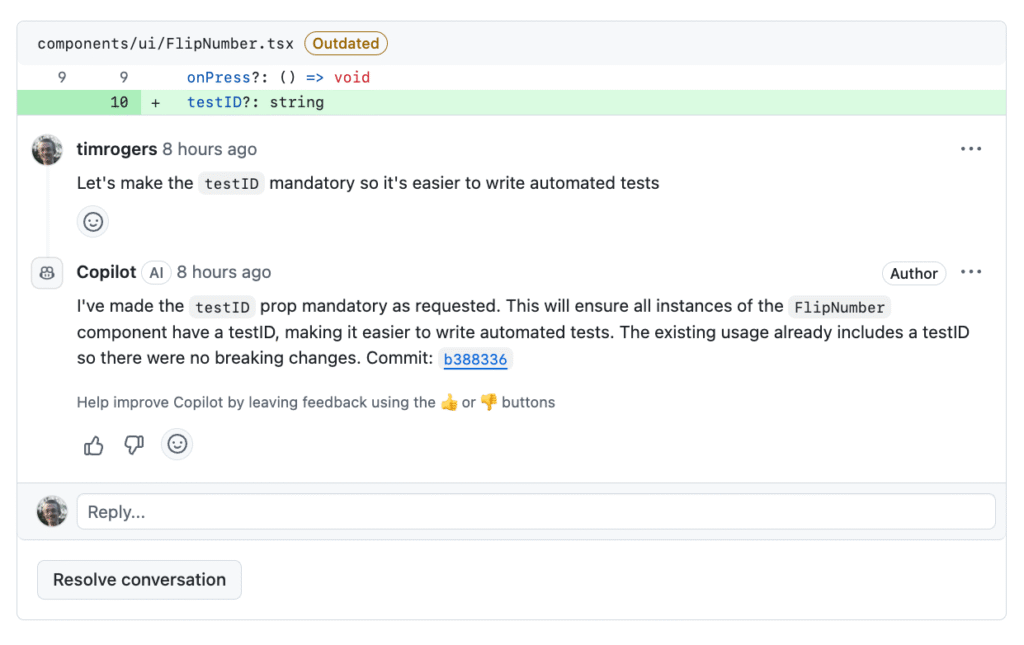
We are excited to introduce a new coding agent for GitHub Copilot. Embedded directly into GitHub, the agent starts its work when you assign a GitHub issue to Copilot or prompt it in VS Code. The agent spins up a secure and fully customizable development environment powered by GitHub Actions.  As the agent works, it pushes commits to a draft pull request, and you can track it every step of the way through the agent session logs. Having Copilot on your team doesn’t mean weakening your security posture – existing policies like branch protections still apply in exactly the way you’d expect. Plus, the agent’s pull requests require human approval before any CI/CD workflows are run, creating an extra protection control for the build and deployment environment.  Using state-of-the-art models, the agent excels at low-to-medium complexity tasks in well-tested codebases, from adding features and fixing bugs to extending tests, refactoring code, and improving documentation. You can hand off the time-consuming, but boring tasks to Copilot that will use pull requests, CI/CD, and all of your existing tooling while you focus on the interesting work. A detailed look To run the new coding agent, assign one or more GitHub issues to Copilot. It’s as easy as that. You can do this on github.com, in GitHub Mobile, or through the GitHub CLI, just as you would assign the same issue to one of your team members or yourself. You can also ask Copilot to open a pull request from Copilot Chat on GitHub or right in VS Code like this: > @github Open a pull request to refactor this query generator into its own class Once an issue is assigned to it, the agent adds an 👀 emoji reaction and starts its work in the background. It boots a virtual machine, clones the repository, configures the environment, and analyzes the codebase with advanced retrieval augmented generation (RAG) powered by GitHub code search. As the agent works, it regularly pushes its changes to a draft pull request as git commits and updates the pull request’s description. Along the way, you’ll see the agent’s reasoning and validation steps in the session logs, making it easy to trace decisions and spot issues.  With the power of Model Context Protocol (MCP), you can give the coding agent access to data and capabilities from outside of GitHub. MCP servers can be configured in the repository’s settings. And, of course, all your GitHub data can be pulled in from the official GitHub MCP Server. And the agent isn’t limited to just text – thanks to the power of vision models, it can see images included in GitHub issues you assign to it, so you can share screenshots of a bug or mockups of what your new feature should look like. Once Copilot is done, it’ll tag you for review and you can leave comments asking for it to make changes. It will pick those comments up automatically and propose code changes. The agent also incorporates context from related issue or PR discussions and follows any custom repository instructions, allowing it to understand both the intent behind the task and the coding standards of the project.  The Copilot coding agent is opening up doors for human developers to have their own agent-driven team, all working in parallel to amplify their work. We’re now able to assign tasks that would typically detract from deeper, more complex work—allowing developers to focus on high-value coding tasks. James Zabinski, DevEx Lead at EY Integrated, configurable, and secure All SWE agents need a compute environment to do their work. For agent mode in VS Code, it’s the CPU of your PC or Mac, or a remote development container like GitHub Codespaces. When we started the work on Project Padawan, there was only one answer to which cloud compute we should use: GitHub Actions. Introduced in 2018, Actions is the largest CI/CD ecosystem in the world with more than 25,000 actions in the GitHub Marketplace. Every weekday, GitHub-hosted and self-hosted runners execute more than 40 million daily jobs. Open source projects, startups, and large enterprises all rely on GitHub Actions to run their build, test, and deploy workloads. Our coding agent is designed from the ground up to keep your project secure and ensures that its work gets a review before it goes to production. The following policies are applied by default: The agent can only push to branches it created, keeping your default branch and the ones your team created safe and secure The developer who asks the agent to open a pull request cannot be the one to approve it – so any “required reviews” rule you have set up in your repository will be honored  The agent’s internet access is tightly limited to a trusted list of destinations that you can customize GitHub Actions workflows won’t run without your approval, giving you the chance to spot-check the agent’s code Existing repository rulesets and organization policies are considered as well. The GitHub Copilot coding agent fits into our existing workflow and converts specifications to production code in minutes. This increases our velocity and enables our team to channel their energy toward higher-level creative work. Alex Devkar, Senior Vice President, Engineering and Analytics, Carvana Get started today The new coding agent is available to all Copilot Enterprise and Copilot Pro+ customers. All you need to get started is enabling the agent in the repositories where you want to use it, and if you’re a Copilot Enterprise user, an administrator will need to turn on the policy too. Additionally, you can now activate agent mode in more IDEs, including Xcode, Eclipse, Jetbrains, and Visual Studio. Beginning June 4, 2025, Copilot coding agent will use one premium request per model request the agent makes.  Whether it’s code completions, next edit suggestions, chat, agent mode, or now coding agent, GitHub Copilot has always had one mission: To keep you in the magical flow state. To do the things you don’t want to do, so you have

tech blog

Redefining AI Connectivity with Dell’s Optimized Infrastructure

Discover how Dell’s optimized infrastructure revolutionizes AI connectivity, driving agility, scalability and unparalleled productivity.   ​  ​Discover how Dell’s optimized infrastructure revolutionizes AI connectivity, driving agility, scalability and unparalleled productivity. AI Solutions Blog | Dell

tech blog

Now Shipping: Dell AI Platform with Intel

Introducing Dell AI Platform with Intel, powered by Intel Gaudi 3 AI accelerators, the latest addition to the Dell AI Factory.   ​  ​Introducing Dell AI Platform with Intel, powered by Intel Gaudi 3 AI accelerators, the latest addition to the Dell AI Factory. AI Solutions Blog | Dell

tech blog

The Road to an AI Revolution

Michael Dell takes a trip into a ‘golden hour of progress’.   ​  ​Michael Dell takes a trip into a ‘golden hour of progress’. Artificial Intelligence Blog | Dell

tech blog

Microsoft Build 2025: The age of AI agents and building the open agentic web

TL;DR? Hear the news as an AI-generated audio overview made using Microsoft 365 Copilot. You can read the transcript here.   https://msblogs.thesourcemediaassets.com/2025/05/Build2025_OMB_AI-generated_AudioOverview_Final.mp3 We’ve entered the era of AI agents. Thanks to groundbreaking advancements in reasoning and memory, AI models are now more capable and efficient, and we’re seeing how AI systems can help us all solve problems in new ways. For example, 15 million developers are already using GitHub Copilot, and features like agent mode and code review are streamlining the way they code, check, deploy and troubleshoot. Hundreds of thousands of customers are using Microsoft 365 Copilot to help research, brainstorm and develop solutions, and more than 230,000 organizations — including 90% of the Fortune 500 — have already used Copilot Studio to build AI agents and automations. Companies like Fujitsu and NTT DATA are using Azure AI Foundry to build and manage AI apps and agents that help prioritize sales leads, speed proposal creation and surface client insights. Stanford Health Care is using Microsoft’s healthcare agent orchestrator to build and test AI agents that can help alleviate the administrative burden and speed up the workflow for tumor board preparation. Developers are at the center of it all. For 50 years Microsoft has been empowering developers with tools and platforms to turn their ideas into reality, accelerating innovation at every stage. From AI-driven automation to seamless cloud integration and more, it’s exciting to see how developers are fueling the next generation of digital transformation. So, what’s next? We envision a world in which agents operate across individual, organizational, team and end-to-end business contexts. This emerging vision of the internet is an open agentic web, where AI agents make decisions and perform tasks on behalf of users or organizations. At Microsoft Build we’re showing the steps we’re taking to make this vision a reality through our platforms, products and infrastructure. We’re putting new models and coding agents in the hands of developers, introducing enterprise-grade agents, making our platforms like Azure AI Foundry, GitHub and Windows the best places to build, embracing open protocols and accelerating scientific discovery with AI, all so that developers and organizations can go invent the next big thing. Here’s a glimpse at just a few of the announcements today: Reimagining the software development lifecycle with AI AI is fundamentally shifting how code is written, deployed and maintained. Developers are using AI to stay in the flow of their environment longer and to shift their focus to more strategic tasks. And as the software development lifecycle is being transformed, we’re providing new features across platforms including GitHub, Azure AI Foundry and Windows that enable developers to work faster, think bigger and build at scale. GitHub Copilot coding agent and new updates to GitHub Models: GitHub Copilot is evolving from an in-editor assistant to an agentic AI partner with a first-of-its-kind asynchronous coding agent integrated into the GitHub platform. We’re adding prompt management, lightweight evaluations and enterprise controls to GitHub Models so teams can experiment with best-in-class models, without leaving GitHub. Microsoft is also open-sourcing GitHub Copilot Chat in VS Code. The AI-powered capabilities from GitHub Copilot extensions will now be part of the same open-source repository that drives the world’s most popular development tool. As the home of over 150 million developers, this reinforces our commitment to open, collaborative, AI-powered software development. Learn more about GitHub Copilot updates. Introducing Windows AI Foundry: For developers, Windows remains one of the most open and widely used platforms available, with scale, flexibility and growing opportunity. Windows AI Foundry offers a unified and reliable platform supporting the AI developer lifecycle across training and inference. With simple model APIs for vision and language tasks, developers can manage and run open source LLMs via Foundry Local or bring a proprietary model to convert, fine-tune and deploy across client and cloud. Windows AI Foundry is available to get started today. To learn more visit our Windows Developer Blog. Azure AI Foundry Models and new tools for model evaluation: Azure AI Foundry is a unified platform for developers to design, customize and manage AI applications and agents. With Azure AI Foundry Models, we’re bringing Grok 3 and Grok 3 mini models from xAI to our ecosystem, hosted and billed directly by Microsoft. Developers can now choose from more than 1,900 partner-hosted and Microsoft-hosted AI models, while managing secure data integration, model customization and enterprise-grade governance. We’re also introducing new tools like the Model Leaderboard, which ranks the top-performing AI models across different categories and tasks, and the Model Router, designed to select an optimal model for a specific query or task in real-time. Read more about Azure AI Foundry Models. Making AI agents more capable and secure AI agents are not only changing how developers build, but how individuals, teams and companies get work done. At Build, we’re unveiling new pre-built agents, custom agent building blocks, multi-agent capabilities and new models to help developers and organizations build and deploy agents securely to help increase productivity in meaningful ways. With the general availability of Azure AI Foundry Agent Service, Microsoft is bringing new capabilities to empower professional developers to orchestrate multiple specialized agents to handle complex tasks, including bringing Semantic Kernel and AutoGen into a single, developer-focused SDK and Agent-to-Agent (A2A) and Model Context Protocol (MCP) support. To help developers build trust and confidence in their AI agents, we’re announcing new features in Azure AI Foundry Observability for built-in observability into metrics for performance, quality, cost and safety, all incorporated alongside detailed tracing in a streamlined dashboard. Learn more about how to deploy enterprise-grade AI agents in Azure AI Foundry Service. Discover, protect and govern in Azure AI Foundry: With Microsoft Entra Agent ID, now in preview, agents that developers create in Microsoft Copilot Studio or Azure AI Foundry are automatically assigned unique identities in an Entra directory, helping enterprises securely manage agents right from the start and avoid “agent sprawl” that could lead to blind spots. Apps and agents built with Foundry further benefit from Purview data security and compliance controls. Foundry also offers enhanced

tech blog

Vibe coding: Your roadmap to becoming an AI developer

Editor’s note: This piece was originally published in our LinkedIn newsletter, Branching Out_. Sign up now for more career-focused content >  Pop quiz: What do healthcare, self-driving cars, and your next job all have in common?  If you guessed AI, you were right. And with 80% of developers expected to need at least a fundamental AI skill set by 2027, there’s never been a better time to dive into this field. This blog will walk you through what you need to know, learn, and build to jump into the world of AI—using the tools and resources you already use on GitHub.  Let’s dive in. 1. Learn essential programming languages and frameworks 💬 Mastering the right programming languages and tools is foundational for anyone looking to excel in AI and machine learning development. Here’s a breakdown of the core programming languages to zero in on: Python: Known for its simplicity and extensive library support, Python is the cornerstone of AI and machine learning. Its versatility makes it the preferred language for everything from data preprocessing to deploying AI models. (Fun fact: Python overtook JavaScript as the number one programming language in 2024!) Java: With its scalability and cross-platform capabilities, Java is popular for enterprise-level applications and large-scale AI systems. C++: As one of the fastest programming languages, C++ is often used in performance-critical applications like gaming AI, real-time simulations, and robotics. Beyond programming, these frameworks give you the tools to design, train, and deploy intelligent systems across real-world applications: TensorFlow: Developed by Google, TensorFlow is a comprehensive framework that simplifies the process of building, training, and deploying AI models. Keras: Built on top of TensorFlow, Keras is user-friendly and enables quick prototyping. PyTorch: Favored by researchers for its flexibility, PyTorch provides dynamic computation graphs and intuitive debugging tools. Scikit-learn: Ideal for traditional machine learning algorithms, Scikit-learn offers efficient tools for data analysis and modeling. Spoiler alert: Did you know you can learn programming languages and AI frameworks right on GitHub? Resources like GitHub Learning Lab, The Algorithms, TensorFlow Tutorials, and PyTorch Examples provide hands-on opportunities to build your skills. Plus, tools like GitHub Copilot provide real-time coding assistance that can help you navigate new languages and frameworks easily while you get up to speed.  2. Master machine learning 🤖 Machine learning (ML) is the driving force behind modern AI, enabling systems to learn from data and improve their performance over time. It bridges the gap between raw data and actionable insights, making ML expertise a must-have if you’re looking for a job in tech. Here are some key subfields to explore: Deep learning: A subset of ML, deep learning uses multi-layered neural networks to analyze complex patterns in large datasets. While neural networks are used across ML, deep learning focuses on deeper architectures and powers advancements like speech recognition, autonomous vehicles, and generative AI models. Natural language processing (NLP): NLP enables machines to understand, interpret, and respond to human language. Applications include chatbots, sentiment analysis, and language translation tools like Google Translate. Computer vision: This field focuses on enabling machines to process and interpret visual information from the world, such as recognizing objects, analyzing images, and even driving cars. Luckily, you can explore ML right on GitHub. Start with open source repositories like Awesome Machine Learning for curated tools and tutorials, Keras for deep learning projects, NLTK for natural language processing, and OpenCV for computer vision. Additionally, try real-world challenges by searching for Kaggle competition solutions on GitHub or contribute to open source AI projects tagged with “good first issue” to gain hands-on experience.  3. Build a GitHub portfolio to showcase your skills 💼 A strong GitHub portfolio highlights your skills and AI projects, setting you apart in the developer community. Here’s how to optimize yours: Organize your repositories: Use clear names, detailed README files, and instructions for others to replicate your work. Feature your best work: Showcase projects in areas like NLP or computer vision, and use tags to improve discoverability. Create a profile README: Introduce yourself with a professional README that includes your interests, skills, and standout projects. Use GitHub Pages: Build a personal site to host your projects, case studies, or interactive demos. Contribute to open source: Highlight your open source contributions to show your collaboration and technical expertise. For detailed guidance, check out the guides on Building Your Stunning GitHub Portfolio and How to Create a GitHub Portfolio. 4. Get certified in GitHub Copilot 🏅 Earning a certification in GitHub Copilot showcases your expertise in leveraging AI-powered tools to enhance development workflows. It’s a valuable credential that demonstrates your skills to employers, collaborators, and the broader developer community. Here’s how to get started: Understand GitHub Copilot: GitHub Copilot is an AI agent designed to help you write code faster and more efficiently. Familiarize yourself with its features, such as real-time code suggestions, agent mode in Visual Studio Code, model context protocol (MCP), and generating boilerplate code across multiple programming languages. Explore certification options: GitHub offers certification programs through its certification portal. These programs validate your ability to use GitHub tools effectively, including GitHub Copilot. They also cover key topics like AI-powered development, workflow automation, and integration with CI/CD pipelines. Prepare for the exam: Certification exams typically include theoretical and practical components. Prepare by exploring GitHub Copilot’s official documentation, completing hands-on exercises, and working on real-world projects where you utilize GitHub Copilot to solve coding challenges. Earn the badge: Once you complete the exam successfully, you’ll receive a digital badge that you can showcase on LinkedIn, your GitHub profile, or your personal portfolio. This certification will enhance your resume and signal to employers that you’re equipped with cutting-edge AI development tools. Check out this LinkedIn guide for tips on becoming a certified code champion with GitHub Copilot.  Source Ready to begin? The AI revolution is calling, and it needs developers like you! There’s no better time to dive in and get started, as new models and capabilities are launching every day. For example, GitHub Copilot now offers

Scroll to Top